
607 - Bass guitar effects pedal ZOOM - Free user manual and instructions
Find the device manual for free 607 ZOOM in PDF.


| Product type | Multi-effects pedal for bass guitar |
| Brand | ZOOM |
| Model | 607 |
| Dimensions (L x D x H) | 233 mm x 159 mm x 54 mm |
| Weight | 600 g (without batteries) |
| Power supply | 9 V DC, 300 mA AC adapter (center negative, ZOOM AD-0006) or 4 IEC R6 (AA) batteries |
| Battery life | Approximately 24 hours with alkaline batteries, approximately 7 hours with manganese batteries |
| Built-in effects | 35 effects, up to 9 simultaneous |
| Effect modules | Up to 8 modules simultaneously (WAH, COMP/LIMIT, DRIVE, EQ, ZNR/AMP, MOD/PITCH, DLY/REV) |
| Number of patches | 42 patches (7 banks x 6 patches) |
| Input connector | Standard mono phone jack (rated input sensitivity -20 dBm, input impedance 470 kΩ) |
| Output connector | Standard stereo phone jack (max output level +5 dBm, load impedance 10 kΩ or more) |
| Sampling frequency | 31.25 kHz |
| A/D and D/A converter | 20 bits, 64x oversampling |
| Display | 2-digit 7-segment LED, pedal assign LED, DRIVE LED |
| Expression pedal | Built-in, assignable to different parameters (WAH, DRIVE, MOD/PITCH, DLY/REV, VOLUME) |
| Tuner | Built-in automatic chromatic tuner, adjustable reference (A3 = 435 to 445 Hz) |
| Noise reduction | Built-in ZNR (Zoom Noise Reduction) |
| Amp simulator | Built-in (types BOX, COMBO, STACK) |
| Cleaning | Soft, dry cloth, slightly dampened if necessary. Do not use abrasive products or solvents. |
| Safety instructions | Use only the specified AC adapter. Do not expose to extreme temperatures, humidity, dust, or shocks. Do not open the case. |
Frequently Asked Questions - 607 ZOOM
User questions about 607 ZOOM
0 question about this device. Answer the ones you know or ask your own.
Ask a new question about this device
Download the instructions for your Bass guitar effects pedal in PDF format for free! Find your manual 607 - ZOOM and take your electronic device back in hand. On this page are published all the documents necessary for the use of your device. 607 by ZOOM.
USER MANUAL 607 ZOOM
Thank you for selecting the ZOOM 607 (hereafter simply called the "607").
Please take the time to read this manual carefully so as to get the most out of the unit and to ensure optimum performance and reliability.
Retain this manual, the warranty card and all other documentation for future reference.
Contents
SAFETY PRECAUTIONS 2
Features 3
Basic Terms 4
Operating the Unit on Battery Power 5
Controls and Functions / Connections 6
Selecting Patches for Play 8
Using the Expression Pedal 10
Using the Tuner Function 12
Making/Changing DRIVE Module Settings 14
Editing a Patch 16
Storing/Copying Patches 18
Changing the "Patch Call" Method 20
Restoring the Factory Defaults 22
Adjusting the Expression Pedal 23
Effect Sequence 24
Effect Parameters 25
Specifications 38
Usage Precautions 39
Troubleshooting 39
Patch List
SAFETY PRECAUTIONS
In this manual, symbols are used to highlight warnings and cautions for you to read so that accidents can be prevented. The meanings of these symbols are as follows:

Warning
This symbol indicates explanations about extremely dangerous matters. If users ignore this symbol and handle the device the wrong way, serious injury or death could result.

Caution
This symbol indicates explanations about dangerous matters. If users ignore this symbol and handle the device the wrong way, bodily injury and damage to the equipment could result.
Please observe the following safety tips and precautions to ensure hazard-free use of the 607.
About power

- Since power consumption of this unit is fairly high, we recommend the use of an AC adapter whenever possible. When powering the unit from a battery, use only an alkaline type.
AC adapter operation
- Be sure to use only an AC adapter which supplies 9V DC, 300mA and is equipped with a "center minus" plug (Zoom AD-0006). The use of an adapter other than the specified type may damage the unit and pose a safety hazard.
- Connect the AC adapter only to an AC outlet that supplies the rated voltage required by the adapter.
- When disconnecting the AC adapter from the AC outlet, always grasp the adapter itself and do not pull at the cable.
- If the unit is not to be used for a long time, disconnect the AC adapter from the outlet.
Battery operation
- Use four IEC R6 (size AA) 1.5 V batteries (alkaline/manganese).
- The 607 cannot be used for recharging. Pay close attention to the labelling of the battery to make sure you choose the correct type.
- If the 607 is not to be used for an extended period of time, remove the battery from the unit.
- If battery leakage has occurred, wipe the battery compartment and the battery terminals carefully to remove all remnants of battery fluid.
While using the unit, the battery compartment cover should be closed.
Environment

Avoid using your 607 in environments where it will be exposed to:
- Extreme temperature
High humidity or moisture - Excessive dust or sand
- Excessive vibration or shock
Handling

- The 607 is a precision instrument. Except for the foot switches, do not push other parts with your feet or subject them to strong force.
Take care that no foreign objects (coins or pins etc.) or liquids can enter the unit.
- Be sure to turn the power to all equipment off before making connections.
- Before moving the unit, turn the power off, and disconnect all cables and the AC adapter.
Alterations

Never open the case of the 607 or attempt to modify the product in any way since this can result in damage to the unit.
Features
The 607 is a sophisticated multi-effect processor for bass guitar with the following great features.
Outstanding performance
The 607 provides a palette of 35 built-in high-quality effects, including a wide variation of distortion settings and flexible modulation effects. Up to nine effects can be used simultaneously. In terms of performance and features, the 607 far surpasses everything in its class.
Built-in expression pedal
The integrated pedal makes it easy to adjust effect depth or volume during play. Use it to adjust gain, get a gutsy pitch bend, or perform many other advanced functions.
- Smooth operation feel
The intuitive operation of the unit is derived from the highly popular ZOOM 506 II. Dedicated selectors for the most important distortion effects make the 607 a snap to use. Controlling distortion type and intensity during a performance is smooth and easy.
Built-in auto-chromatic tuner
The integrated auto-chromatic tuning function is tailored to the needs of the bass guitarist and can be used on stage.
- Dual power supply enables operation anywhere
The dual power supply allows the unit to be powered either from an AC adapter or from four IEC R6 (size AA) batteries. Continuous operation time on batteries is 7 hours with manganese batteries and 24 hours with alkaline batteries.
Basic Terms
This section explains some important terms that you will find in this manual.
■ Effect module
As shown in the illustration below, the effect sound of the 607 is created by routing the signal through a series of different effects. Each of these effects is called an effect module.

In addition to effect modules such as DRIVE (distortion), MOD/PITCH (modulation), or DLY/REV (delay and reverb), you can also use the ZNR (Zoom Noise Reduction) and amp simulator simultaneously. Parameters such as effect intensity can be adjusted for each module, and modules can be switched on and off as needed.
■ Effect type
Each effect module of the 607 contains a variety of effects in the same general family. These are called effect types, and you can select one of these at a time. For example, the MOD/PITCH module comprises the effect types chorus, flanger, pitch shifter, etc.
■ Effect parameter
Each effect module has various parameters that control how the effect operates. By adjusting the parameters for each module, you have a considerable amount of control over the final sound.
Patch
In the 607, effects are stored and called up in patches. A patch contains information about module on/off settings, selected effect types, and effect parameter settings. The 607 can store 42 patches in its internal memory.
Bank
A combination of 6 patches is called a bank. The 607 has a total of 7 banks which are labelled A through G. The patches in each bank are numbered 1 through 6. To select a patch, you specify the bank and the
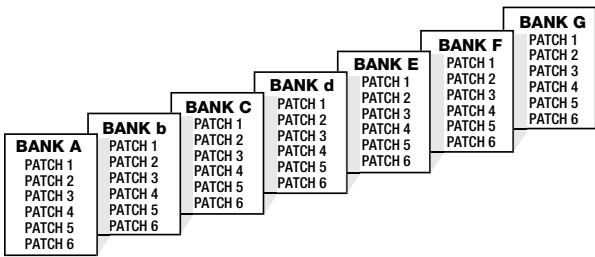
patch number. A1 selects patch 1 in bank A, and F4 selects patch 4 in bank F.
Play mode/edit mode
These terms refer to the operation state of the 607. The mode is selected with the PLAY/EDIT selector. In play mode, you can select the effects for playing, and in edit mode, you can change the effect settings.
Operating the Unit on Battery Power
- Turn the unit over, push the latch of the battery compartment cover, and lift the cover up.
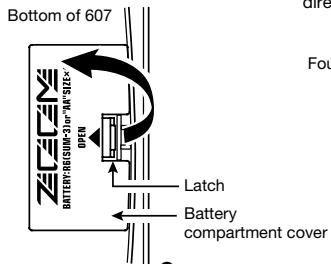
- Insert four fresh IEC R6 (size AA) batteries into the battery compartment. All four batteries must face in the same direction.
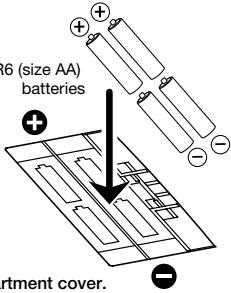

- Close the battery compartment cover.
Make sure that the latch snaps shut.
- When a dot (. ) flashes on the display, the batteries are almost exhausted. Replace them as soon as possible.
- When not using the 607, you should disconnect the cable plugged into the INPUT jack, to prevent draining the batteries.
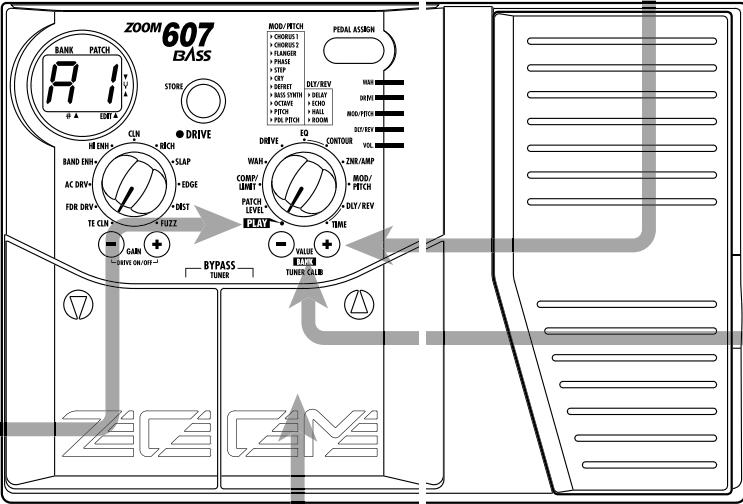
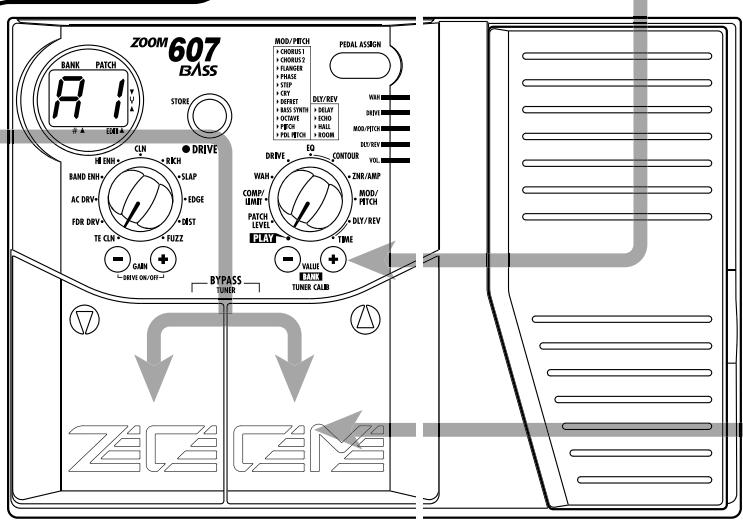
Top Panel
Display
Shows various information necessary for operation of the 607, such as patch number, parameter settings, etc.
DRIVE LED
Indicates the on/off status of the DRIVE module.
DRIVE selector
Selects the distortion (effect type) used in the DRIVE module.
GAIN [+] /[-] keys
Adjust the DRIVE module distortion intensity and gain.
[▼] / [▲] foot switches
These switches let you select patches, operate the tuner function, etc.
Rear Panel
INPUT jack
Connect the bass guitar to this jack. When the 607 is operated on battery power, the jack also serves as on/off switch. Plugging a cable into the jack turns the unit on.
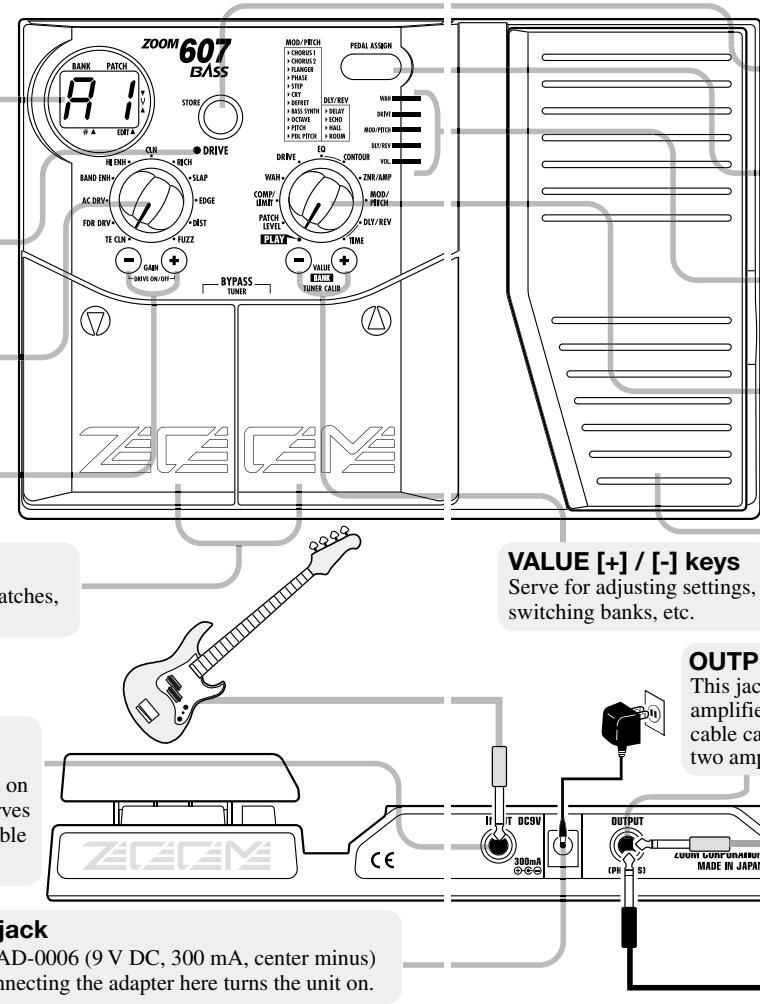
STORE key
Serves for storing an edited patch or copying an existing patch to another location.
PEDAL ASSIGN key
Selects the module to be controlled by the expression pedal.
PEDAL ASSIGN LEDs
Indicate which module is being controlled by the expression pedal.
PLAY/EDIT selector
Switches between play mode and edit mode and also serves to select the module for editing.
Expression pedal
Serves to adjust the intensity or level of a specific module in real time. The pedal also incorporates an on/off switch for modules.
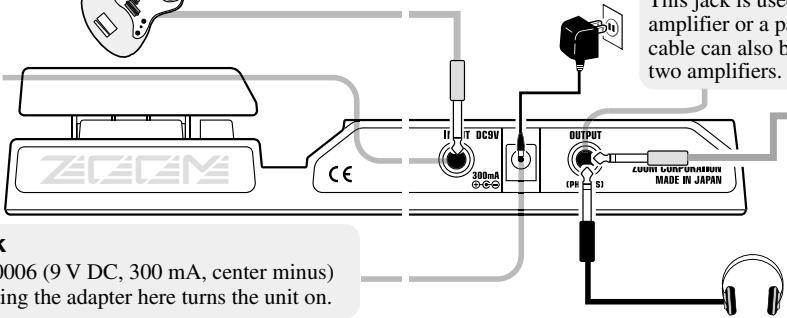
OUTPUT jack
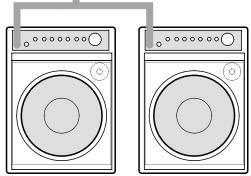
This jack is used for convection to a bass guitar amplifier or a pair of stereo headphones. A Y-splitter cable can also be used in this jack to connect the 607 to two amplifiers.
DC 9V (AC adapter) jack
The dedicated AC adapter AD-0006 (9 V DC, 300 mA, center minus) can be connected here. Connecting the adapter here turns the unit on.
Selecting Patches for Play
To try out the 607, we recommend that you simply play your instrument while switching patches. This will let you quickly see what the 607 can do.
Power-on
- When using the 607 on batteries, plug a shielded cable with mono phone plug into the INPUT jack of the 607.
- When using the 607 with the AC adapter, plug the adapter into the outlet and plug the cable from the adapter into the DC 9V jack on the 607.
- Turn power to the bass amplifier on, and adjust the volume to a suitable level.
Set 607 to play mode
- When the [PLAY/EDIT] selector is set to a different position, set it to "PLAY". The currently selected bank and patch number are shown on the display.
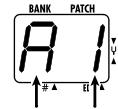
Bank Patch number

Immediately after turning on power to the 607, the unit will be in play mode even if the [PLAY/EDIT] selector is set to a different position.
4 To directly switch the bank
- You can use the VALUE [+] /[-] keys to directly switch among the banks A - G.
To adjust the master volume
- Keep both VALUE [+] / [-] keys depressed for more than 1 second.
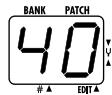
- While the master volume setting is shown, pressing the VALUE [+] / [-] key changes the setting.
The setting range is 0 - 50. When the unit is turned off and on again, the setting will be reset to 40.

When using headphones, the master volume setting can be used to adjust the listening volume.
Switch patches
To switch patches in play mode, use the [] / [] foot switches.
The 607 has a built-in expression pedal which can be used to control a selected effect parameter or the volume level with your foot.
Select the module to be controlled by the pedal
- Press the PEDAL ASSIGN key until the LED corresponding to the desired module is lit.
The LED indicators show which module is currently assigned to the pedal.
The following modules can be selected.
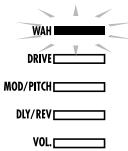
WAH
Effect parameter or WAH module
DRIVE
Effect parameter of DRIVE module
MOD/PITCH
Effect parameter of MOD/PITCH (modulation/pitch) module
DLY/REV
Effect parameter of DLY/REV
(delay/reverb) module
VOL.
Overall patch volume
All PEDAL ASSIGN LEDs out
Expression pedal is inactive.

The actual effect of operating the expression pedal will depend on which effect parameter is selected for the respective module.

- If you select a module that is set to OFF in the current patch, the module becomes ON when the pedal is assigned to it. If you later assign the pedal to another module, the previous module becomes OFF again.
- In the bypass mode (effects temporarily switched off), the pedal is automatically assigned to VOL.
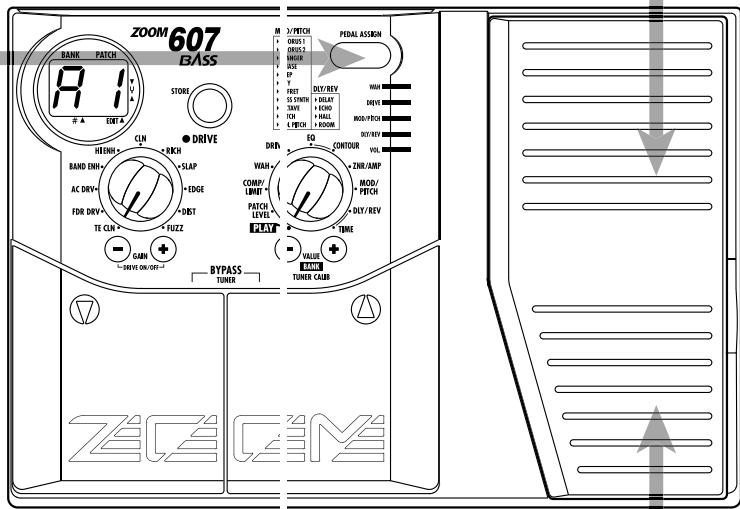
Operate the pedal
- Rock the pedal back and forth while playing your instrument.
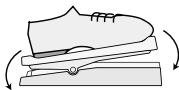
Rock back and forth
The effect of operating the pedal will differ, depending on which module was selected in step 1 Try moving the pedal to hear the actual sound change.
To switch the module on and off
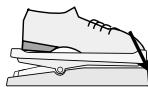
- Push the pedal fully down.
The currently lit PEDAL ASSIGN LED starts to flash, and the corresponding module is turned off. To return to the on setting, push the pedal down once more.
Push fully down

- Assignment of modules to the pedal and module on/off status can be stored as part of a patch ( p.18) .
- The pedal sensitivity can be adjusted ( p.23) .

When VOL. is assigned, the pedal does not perform on/off switching.
Using the Tuner Function
The 607 incorporates an auto-chromatic tuner for guitars. To use the tuner function, the built-in effects must be bypassed (temporarily turned off) or muted (original sound and effect sound turned off).

The tuner function is not available if the PLAY/EDIT selector is set to a position other than PLAY.
Switch to bypass or mute
- Press both [] / [] foot switches together.
Pressing and immediately releasing the switches sets the unit to the bypass condition. Pressing and holding the switches for at least 1 second sets the unit to the mute condition.

Bypass
Mute
Tune the guitar
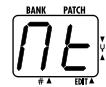
- Play the open string you want to tune, and watch the display.
The left side of the display shows the note which is closest to the current pitch.
Adjusting the reference pitch of the tuner
The default reference pitch of the tuner (the setting which is established when the unit is turned on) is center A = 440Hz . You can fine-tune this reference pitch if desired.
- Press one of the VALUE [+] /[-] keys.
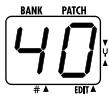
The current reference pitch is shown for about 2 seconds. The default setting is "40" (center A = 440 Hz).
- Use the VALUE [+] / [-] keys to adjust the setting.
The setting range is 35 - 45 (center A = 435 to 445Hz ).

When power to the unit is turned off and on again, the setting reverts to the default of "40" (center A = 440 Hz).
4 Return to play mode
- Press one of the [] / [] foot switches.
A = D^# =
A#F E E
B = F
C F
C^# = _·G =
D = G#=
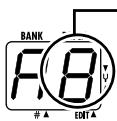
Pitch is high
Pitch is correct
Pitch is low
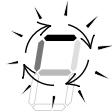

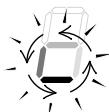
Indication turns faster the more the pitch is off.
The right side of the display shows a symbol that indicates by how much the tuning is off.
- Tune the other strings in the same way.
Making/Changing DRIVE Module Settings
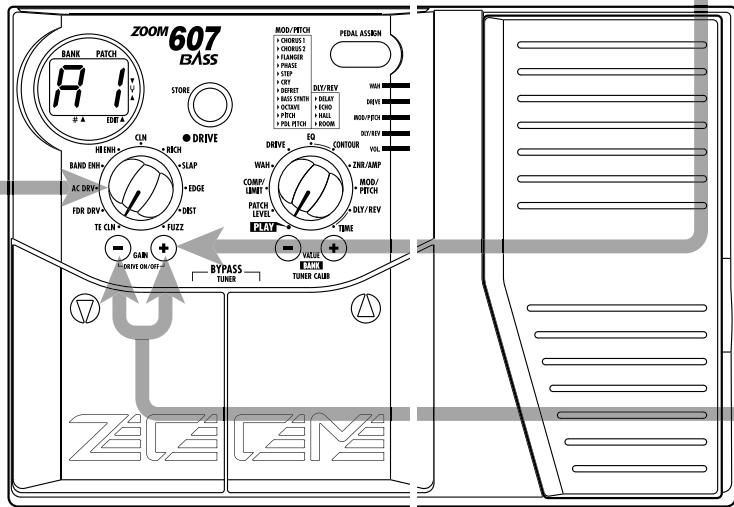
The DRIVE module comprises various distortion types and gain settings, which can be adjusted with the dedicated selector and keys at any time.

The following operation can be carried out in play mode or edit mode.
Select the DRIVE module distortion type
- Use the DRIVE selector to select the desired distortion type (effect type).
The selected effect type name is shown for about 2 seconds on the display. For a detailed list of effect types, see the section "Effect Parameters" at the end of this manual.
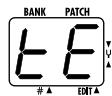

By setting the PLAY/EDIT selector to the DRIVE position, you can check the current effect type.

When the DRIVE LED is out, the DRIVE module is off. If you switch to a different effect type in this condition, the module is automatically turned on.

Adjust the DRIVE module gain
- Press one of the GAIN [+] / [-] keys.
Depending on which effect type is currently selected, distortion depth or signal gain changes. The GAIN parameter value is shown for about 2 seconds on the display.
3
To switch the DRIVE module on or off
- Press the GAIN [+] /[-] keys together.
When the DRIVE module is switched off, the DRIVE LED at the top right of the DRIVE selector goes out.

The change made in this way is only temporary. When you select a different patch, the setting will revert to the original condition. If you want to keep the change, store the patch, as described on page 18.
Editing means changing the various effect parameter settings of a patch. Use an existing patch as a starting point and adjust the parameters to create your own original sound.
Select the effect parameter
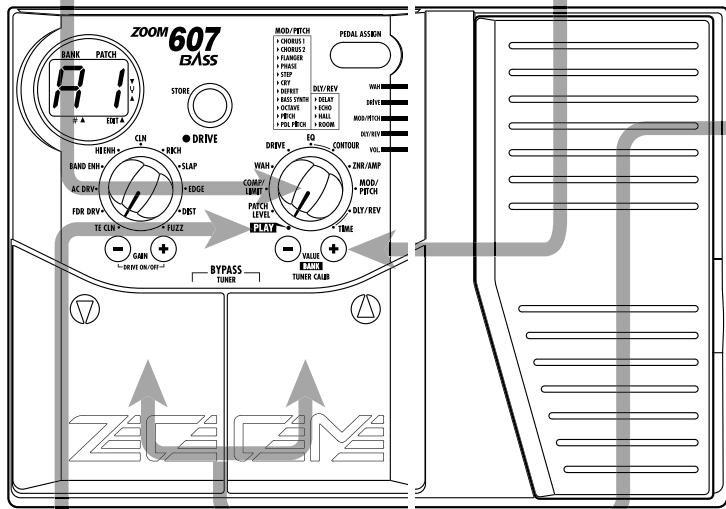
- Use the PLAY/EDIT selector to select the module and parameter you want to edit.
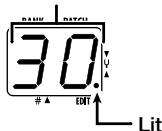
The 607 switches to the edit mode and the value of the currently selected effect parameter appears on the display. When the 607
is in edit mode, a dot is shown in the bottom right corner of the display.
Parameter value
For information on effect modules and parameters, see the section "Effect Parameters" at the end of this manual.

The DRIVE module can also be directly edited by using the DRIVE selector and GAIN [+] /[-] keys ( p.14).
Adjust the parameter setting value
Use the VALUE [+] /[-] keys.
The keys operate as follows.
- Keeping one key depressed: Value changes continuously.
- Hold down one key while pressing the other key: Value increases rapidly.
- Pressing both keys simultaneously: Switch to next effect type in same module.
3 Changing the module on/off setting
- Press both [] / [] foot switches together.
This switches the effect module that was selected with the PLAY/EDIT selector on or off.

When the PLAY/EDIT selector is set to "CONTOUR" or "TIME", pressing the [ ] / [] foot switches together has no effect.
4 Terminate the edit mode
- Set the PLAY/EDIT selector to "PLAY". The unit reverts to the play mode.

The editing changes made in this way are only temporary. When you return to the play mode and select a different patch, the settings will revert to the original condition. If you want to keep the change, store the settings before switching the patch ( p.18).
Storing/Copying Patches
An edited patch can be stored at any desired location in the internal memory of the unit. It is also possible to copy an existing patch and store it at another location.
Press the STORE key in play mode or edit mode.
The bank and patch number on the display are flashing.
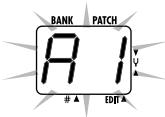
Use the [▼]/[▲] for switches to select the target loca in which to
![ZOOM 607 - Use the [▼]/[▲] for switches to select the target loca in which to - 1](/content/2025/01/152255/images/4558b46de8b9fdc902edd46197b285059589374246078e56516c2d8ef27cb403.jpg)
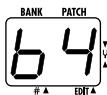
![ZOOM 607 - Use the [▼]/[▲] for switches to select the target loca in which to - 2](/content/2025/01/152255/images/0423b00c3d3be03e14f825c1d2edaadaad48038addf2d8b765b91c7eeba63352.jpg)
When storing or copying a patch, it is not possible to use the VALUE [+]/[-] keys to switch only the bank number.
Press the STORE key once more.
When the store/copy process is completed, the unit reverts to the original mode, with the target patch being selected.

When the store/copy process is executed, the previous content of the store target is overwritten and cannot be restored if it was a user-created patch. You should therefore take care when selecting a target patch. However, the factory default settings of an individual patch or all preset patches can be restored, as described on page 22.
4 To cancel the store/copy process
- Press the VALUE [+] /[-] key instead of the STORE key. The store process is aborted and the unit reverts to the previous mode.

The store process is also canceled when [PLAY/EDIT] selector is operated instead of the VALUE [+] /[-] key.
Changing the "Patch Call" Method
In normal operation, the sound of the 607 will change immediately if a patch is selected in play mode. This may be undesirable if a patch from a distant memory location is called and the sound of other unwanted patches in between is heard. If desired, you can change the "Patch call"
method from direct selection to the pre-select method. In pre-select mode, you first specify the desired patch and then confirm the selection. The sound will only change after you have confirmed the operation.
Changing the "Patch call" method to pre-select
To change the "Patch call" method to preselect, you must turn the unit on while holding down the [▲] foot switch.
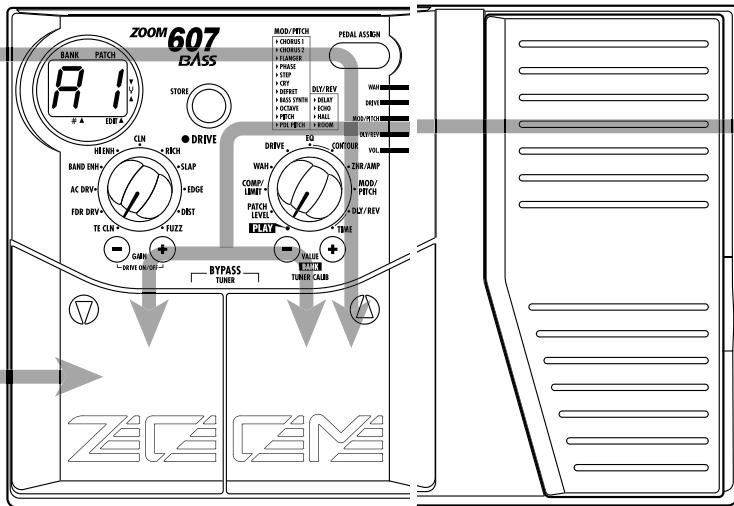
2 Specifying the desired patch
Use the [ ] / [] foot switches to select the patch you want to use next. You can also use the VALUE [+] /[-] keys to switch just the bank.
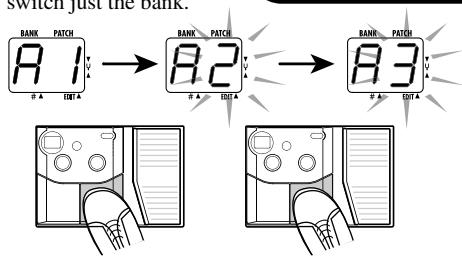
The bank and patch number of the patch to be used next will be shown on the display, but the sound does not yet change.
3 Confirm the patch change
- When the desired patch is shown, press the [] / [] foot switches together.
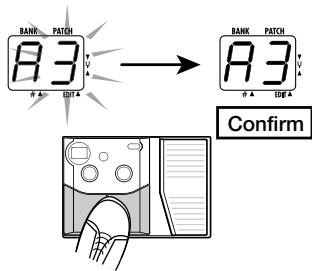
The patch change is confirmed, the sound changes, and the display stops flashing and stays constantly lit.
4 Changing the "Patch call" method back to direct select
- To change the "Patch call" method back to normal direct select operation, simply turn the unit off and back on again.
This will return the patch select method to the default setting.
Restoring the Factory Defaults
The 607 comes with 42 recommended patches (factory default patches). Even if you overwrite any of these patches, you can restore the original contents of the patch at any time.
There are two ways of restoring factory defaults. "All Initialize" returns the entire set of patches to the original condition. "Factory Recall" restores a specific patch to the original condition.
- While holding down the STORE key, turn the unit on.
The indication "AL" flashes on the display.
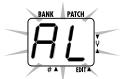
To perform All Initialize
- Press the STORE key once more.
All patch settings are returned to the factory default condition, and the unit switches to play mode. To cancel All Initialize, press the VALUE [-] key.

All user-created patches will be lost when performing All Initialize. Use this function with care.
To perform Factory Recall
- Use the [] / [] foot switches to select the patch you want to return to the original condition.
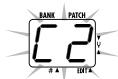
The specified bank and patch number flashes on the display.
During Factory Recall, the VALUE [+] /[-] keys cannot be used to switch the bank only.
- Press the STORE key once more.
The settings of the specified patch are returned to the factory default condition.
If desired, repeat steps 2 and 3 to restore other patches. To terminate the Factory Recall operation, press the VALUE [-] key. The unit will switch to the play mode at this point.
Adjusting the Expression Pedal
The expression pedal of the 607 is adjusted for optimum operation at the factory, but sometimes, readjustment may be necessary. If the action of the pedal seems to be insufficient, or if a large change occurs even if the pedal is only lightly pushed, adjust the pedal as follows.
- While holding down the PEDAL ASSIGN key, turn the unit on.

The indication "dn" flashes on the display.
- With the expression pedal fully raised, press the STORE key.
The display indication changes to "UP".
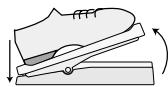
Pedal fully raised

- Push the expression pedal fully down and then lift your foot off the pedal.
When you release your foot, the pedal goes back a little.

- Press the STORE key.
The adjustment is completed, and the unit returns to the play mode.

The point where the STORE key is pressed in step 3 determines the module on/off switching point. If you want the pedal to perform on/off switching with a lighter touch, push the key at a somewhat higher position of the pedal.
Effect Sequence
A patch of the 607 can be thought of as 8 effect modules connected in series, as shown in the illustration below. Depending on the on/off setting of the individual modules, you can use all eight effect modules together or use only specific modules.
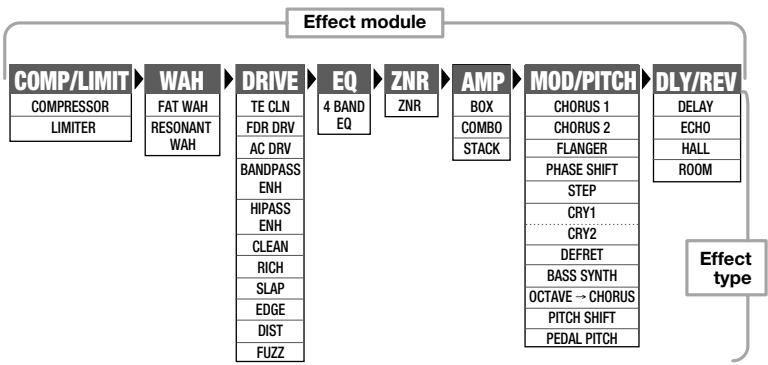
Effect module sequence and effect types
For some effect modules, you can select among several effect types. For example, the MOD/PITCH module offers the choices CHORUS, FLANGER, and PHASE SHIFT. In this module, you can also have two effect types operating in succession, such as OCTAVE CHORUS.
Effect Parameters
This section explains all effect types and parameters in the effect modules.
How to read the "Effect Parameters" listing
Display
Shows the settings that can be selected for each module with the VALUE [+] /[-] keys. Depending on the selected effect module, the effect type, parameter setting value, or both are shown.
Effect type only shown

Effect type
Parameter setting value only shown

Setting value
Effect type and parameter setting value shown
Effect type

Setting value
PLAY/EDIT selector
The illustration shows the selector position for calling up the effect module/effect parameter.
FAT WAH


This effect type applies automatic wah which is dependent on playing intensity. The wide emphasis frequency range gives a solid, fat sound. Higher setting values result in higher input sensitivity for the auto wah effect, so that wah operates also with low input signal levels.

Shifts the frequency emphasized by the wah effect up or
RESONANT WALL

OFF
Turns the WAH module off.
emphasized by the wah effect up or down.
Module on/off
For every effect module, one of the settings is "O F". When this is selected, the respective module is turned off.
Pedal icon
The effect of moving the pedal when the expression pedal has been assigned to the module with the PEDAL
ASSIGN key is explained here.
| PATCH LEVEL | PATCH LEVEL | |
| PATCH LEVEL | ||
| 1 | Adjusts the overall volume of the patch. A value of 25 corresponds to unity gain (input level and output level are equal). | |
| COMP/LIMIT | |
| COMP/LIMIT module | |
| This module is comprised of the compressor and limiter effect types. Use the VALUE [+] / [-] keys to select the effect type and adjust the effect intensity. | |
| COMPRESSOR (Compressor)This effect type attenuates high-level signal components and boosts low-level signal components, thereby keeping the overall signal level within a certain range. The effect prolongs sustain and makes the sound more uniform. Higher setting values result in stronger compression. | |
| LEVEL↑ Original sound → TIME | |
| LIMITER (Limiter)This effect type attenuates peak levels and prevents overload of the next module. Higher setting values result in stronger limiter action. | |
| LEVEL↑ Original sound → TIME | |
| OFF (Off)Turns the COMP/LIMIT module off. |
| WAH | WAH | |
| WAH module | ||
| This module comprises two types of wah. Use the VALUE [+] / [-] keys to select the effect type and adjust the effect intensity. | ||
| F1↓F9 | FAT WAHThis effect type applies automatic wah that is dependent on playing intensity. The wide emphasis frequency range gives a solid, fat sound. Higher setting values result in higher input sensitivity for the auto wah effect, so that wah also operates with low input signal levels. | |
| Shifts the frequency emphasized by the wah effect up or down. | ||
| F1↓F9 | RESONANT WAHThis wah effect has a more narrow emphasis frequency range resulting in a sound with a strong character. Higher setting values result in higher input sensitivity for the auto wah effect. | |
| Shifts the frequency emphasized by the wah effect up or down. | ||
| OF | OFFTurns the WAH module off. | |
| DRIVE | |
| DRIVE module | |
| In addition to five distortion type effects, this module is also comprised of four clean effect types and two enhancers. Use the VALUE [+] / [-] keys to select the effect type and the GAIN [+] / [-] keys to adjust the gain. | |
| Adjusts the drive module gain over the range of 1 - 30 (common to all effect types in the DRIVE module). | |
| EE | TE CLN (TE Clean)High-class clean sound with prominent midrange. |
| Fd | FDR DRV (FDR Drive)Drive sound simulating a built-in type tube amplifier driven to distortion. |
| AC | AC DRV (AC Drive)Overdrive sound with strong midrange. |
| BE | BANDPASS ENH (Bandpass Enhancer)Enhancer using a bandpass filter. Makes the sound more distinct. |
| HE | HIPASS ENH (High-Pass Enhancer)Enhancer using a high-pass filter, resulting in a different sonic character from the bandpass enhancer. |
| CL | CLEAN (clean type effect)Clean sound with flat characteristics. |
| -CL | RICH (clean type effect)Rich clean sound with emphasized bass range. |
| SL | SLAP (clean type effect)Clean sound suitable for the slap playing style. |
| EL | EDGE (distortion effect)Treble-rich overdrive sound. |
| dt | DIST (distortion effect)Distortion sound for hard rock. |
| FU | FUZZ (distortion effect)Wild fuzz sound. |
| Off | OFF (Off)Turns the DRIVE module off. |
| EQ contour | |
| EQ module (basic parameter) | |
| This module contains a 4-band equalizer. Use the VALUE [+] / [-] keys to select the EQ characteristics. | |
| 4 BAND EQ (4-Band Equalizer) Allows boost or cut in the bass/middle/high/presence band. You can select one of 50 available patterns (1 - 50). 1 - 10: Lower values result in attenuated highs and emphasized lows. 11 - 20: Lower values result in lower emphasized frequency. 21 - 24: Lower values result in emphasized midrange. 25: Flat characteristics 26 - 30: Higher values result in emphasized highs. 31 - 40: Higher values result in higher emphasized frequency. 41 - 50: Higher values result in emphasized presence and lows. | |
| OFF (Off) Turns the EQ module off. | |
| CONTOUR | |
| EQ module extended parameters | |
| These parameters serve to adjust the effect operation for the effect type selected with the EQ module basic parameters. | |
| CONTOUR (Contour) | |
| Using the 0 value as a reference (flat setting), negative values cause an increasing boost in the low range and positive values cause an increasing boost in the high range. When the EQ module is On, this parameter is always active. Check this parameter if the 4-band EQ effect type setting does not seem to produce the desired results. |
| ZNR/AMP | |
| ZNR/AMP module | |
| This module is comprised of ZNR (ZOOM Noise Reduction) for reducing noise during play pauses or silent passages, and an amp simulator which simulates the sound of various bass guitar amplifiers. Use the VALUE [+] / [-] keys to adjust the ZNR threshold or select the type of amplifier. | |
| ZNR ←↓→ | ZNR ZNR (ZOOM Noise Reduction) serves for reducing noise during play pauses or silent passages. Higher setting values result in more efficient noise reduction. Set the value as high as possible without causing the sound to be cut off unnaturally. |
| BOX 61 | BOX Simulates a small built-in type bass amplifier. When this setting is selected, the amp simulator is on and ZNR is off. |
| ZNR + BOX 62 ←↓→ | ZNR + BOX ZNR and box amp simulator are both on. Increasing the value results in more efficient noise reduction. |
| COMBO Simulates a large built-in type bass amplifier. When this setting is selected, the amp simulator is on and ZNR is off. | |
| ZNR + COMBO ZNR and combo amp simulator are both on. Increasing the right-digit value results in more efficient noise reduction. | |
| STACK Simulates a stack type bass guitar amplifier. When this setting is selected, the amp simulator is on and ZNR is off. | |
| ZNR + STACK ZNR and stack amp simulator are both on. Increasing the right-digit value results in more efficient noise reduction. | |
| OFF The ZNR/AMP module is off. |
| MOD/PITCH | |
| MOD/PITCH module | |
| This module contains modulation effects such as chorus and flanger, as well as a pitch shifter. Use the VALUE [+] / [-] keys to select the effect type and adjust the effect intensity. | |
| CHORUS 1 This effect mixes a variable pitch-shifted component with the original signal, resulting in full-bodied and expansive sound. Higher setting values result in a more pronounced chorus effect. PITCH + Original sound 0 TIME - PITCH + Effect sound (left channel) TIME Effect sound (right channel) TIME - Adjusts the depth of the effect. | |
| CHORUS 2 This is a bright sounding chorus effect with depth and spread. Higher setting values result in a more pronounced chorus effect. Adjusts the depth of the chorus effect sound. | |
| FLANGER This effect produces a unique, undulating sound by shifting the pitch up and down. Higher setting values result in faster modulation. Adjusts the modulation rate of the effect sound. | |
| PHASE SHIFT (Phaser) This effect mixes a phase-shifted component with the original sound, resulting in a pulsating character. Higher setting values result in faster modulation. Adjusts the modulation rate of the effect sound. | |
| STEP This effect introduces a filter which changes randomly, resulting in an auto-arpeggio sound. Higher setting values give faster step sound change. Adjusts the step sound change rate. | |
| CRY1 (Cry 1) This effect changes the sound in a way similar to a talking simulator. Higher setting values result in a more pronounced sound change. Adjusts the cry effect input sensitivity. |
| CRY2 (Cry 2) This is a cry effect with a different sound character. Higher setting values result in a more pronounced sound change. Adjusts the cry effect input sensitivity. | |
| DEFRET This effect makes the sound of a fretted bass resemble that of a fretless bass. It is especially suitable for playing single notes. Higher setting values result in a more pronounced defret effect. Adjusts the defret effect intensity. | |
| BASS SYNTH (Bass Synthesizer) This effect creates the sound of a bass synthesizer. It is best suited for playing single notes. You can select among various patterns with preset sound character and mixing balance. • b1: Bass synthesizer with fat low end and multiple harmonics (only effect sound is output) • b2: Bass synthesizer with resonant filter (only effect sound is output) • b3: Bass synthesizer with soft sound and few harmonics (only effect sound is output) • b4: b1 effect sound with a slight amount of original sound mixed in • b5: b2 effect sound with a slight amount of original sound mixed in • b6: b3 effect sound with a slight amount of original sound mixed in • b7: b1 effect sound and original sound in 1:1 ratio • b8: b2 effect sound and original sound in 1:1 ratio • b9: b3 effect sound and original sound in 1:1 ratio Adjusts the mixing ratio of effect sound and original sound. | |
| OCTAVER This effect downshifts the sound by one octave and mixes it to the original sound. Higher setting values result in a higher effect sound ratio. Adjusts the mixing ratio of effect sound and original sound. | |
| OCTAVER → CHORUS This effect type is a serial connection of octave and chorus. Higher setting values result in stronger octave sound. Chorus intensity is fixed. | |
| Adjusts the mixing ratio of octave effect sound and original sound. | |
| PITCH SHIFT (Pitch Shift) This effect varies the pitch of the original sound. Nine preset pitch shift patterns are available. •P1/P2: A component shifted by 1 octave down is mixed to the original sound. The mixing ratio differs for P1 and P2. •P3/P4: A component shifted by a perfect fifth down is mixed to the original sound. The mixing ratio differs for P3 and P4. •P5/P6: A component shifted by a perfect fourth up is mixed to the original sound. The mixing ratio differs for P5 and P6. •P7/P8: A component shifted by 1 octave up is mixed to the original sound. The mixing ratio differs for P7 and P8. •P9: A slightly pitch-shifted component is mixed to the original sound, resulting in a chorus with slight modulation. | |
| Original sound P1/P2: Effect sound P3/P4: Effect sound P5/P6: Effect sound P7/P8: Adjusted the mixing ratio between input signal and effect sound. |
| L1 L9 | PEDAL PITCH This effect uses the expression pedal to shift the pitch of the input signal up or down. NOVE | Simply selecting PEDAL PITCH as effect type is not enough to obtain a pitch change when moving the pedal. To enable this function, you must assign the expression pedal to the MOD/PITCH module with the PEDAL ASSIGN key. |
| Adjusts the amount of pitch shift. The relation between pitch shift range and setting values is shown in the table on the below. | ||
| PEDAL PITCH shift range | ||
| Pedal fully raised | ||
| L1 | ±0 cent | |
| L2 | ±0 cent | |
| L3 | ±0 cent | |
| L4 | ±0 cent | |
| L5 | ±0 cent | |
| L6 | -1 octave + original sound | |
| L7 | -700 cent (7 semitones down) + original sound | |
| L8 | -∞ (0 Hz) + original sound | |
| L9 | -∞ (0 Hz) + original sound | |
| Off (Off) Turns the MOD/PITCH module off. | ||
| TIME DLY/REV | DLY/REV | |
| DLY/REV module (basic parameters) | ||
| This module contains delay and reverb effects. Use the VALUE [+] / [-] keys to select the effect type and adjust the effect intensity. | ||
| Adjusts the ratio between original and effect sound (common to all effect types in the DLY/REV module). | ||
| DELAY (Delay) This is a conventional digital delay effect. By using the output in stereo, you can achieve a ping-pong delay where the delay sound alternates between the left and right channels. The right-digit setting values control the feedback (number of repetitions) and the mixing ratio between original sound and effect sound. | LEVEL Original sound Delay sound Delay time TIME | |
| E1 E9 | ECHO (Echo) This is a delay effect with a warm sound similar to a tape echo. By using the output in stereo, you can achieve a ping-pong delay where the delay sound alternates between the left and right channels. The right-digit setting values control the feedback (number of repetitions) and the mixing ratio between original sound and effect sound. | |
| H1 H9 | HALL (Hall) This is a reverb effect that produces a sound similar to the reverberation in a concert hall. Higher right-digit setting values result in stronger reverb. | |
| r1 r9 | ROOM (Room) This is a reverb effect that simulates the reverberation in a room. Higher right-digit setting values result in stronger reverb. | |
| OFF (Off) Turns the DLY/REV module off. | ||
| TIME | |
| DLY/REV module (extended parameters) | |
| These parameters serve to adjust the delay time or reverb time for the effect type selected with the DLY/REV module basic parameters. The parameters are linked to the DLY/REV module and are off when the DLY/REV module is off. | |
| DELAY TIME (Delay Time) (When DELAY or ECHO is selected as effect type) Sets the delay time in the range from 1 - 37. The actual delay time is the setting value x 10 (ms). (Example: A setting of "15" results in a delay time of 150 ms.) | |
| REVERB TIME (Reverb Time) (When HALL or ROOM is selected as effect type) Sets the reverb time in the range from 1 - 10. Higher right-digit setting values result in longer reverb time. |
Specifications
| Built-in effects | max. 9 simultaneous / 35 total |
| Effect modules | max. 8 simultaneous |
| Banks and patches | 7 banks x 6 patches = 42 patches (rewritable, with memory store capability) |
| A/D converter | 20 bit, 64 times oversampling |
| D/A converter | 20 bit, 8 times oversampling |
| Sampling frequency | 31.25 kHz |
| Input | BASS GUITAR input: standard mono phone jack (rated input level -20 dBm输入 impedance 470 kilohms) |
| Output | Standard stereo phone jack (doubles as line and headphone jack) (maximum output level +5 dBm/output load impedance 10 kilohms or more) |
| Display | 2-digit 7-segment LED PEDAL ASSIGN LEDs, DRIVE LED |
| Power requirements | Separately available AC adapter, 9 V DC, 300 mA (center minus plug) (ZOOM AD-0006) Four IEC R6 (size AA) batteries Battery life: approx. 24 hours continuous operation (alkaline batteries) / approx. 7 hours continuous operation (manganese batteries) |
| Dimensions | 233 mm (W) x 159 mm (D) x 54 mm (H) |
| Weight | 600 g (without batteries) |
- 0dBm = 0.775Vrms
- Design and specifications subject to change without notice.
Usage Precautions
- Electrical interference
For safety considerations, the 607 has been designed to provide maximum protection against the emission of electromagnetic radiation from inside the device, and protection from external interference. However, equipment that is very susceptible to interference or that emits powerful electromagnetic waves should not be placed near the 607, as the possibility of interference cannot be ruled out entirely.
With any type of digital control device, the 607 included, electromagnetic interference can
cause malfunctioning and can corrupt or destroy data. Care should be taken to minimize the risk of damage.
- Cleaning
Use a soft, dry cloth to clean the 607. If necessary, slightly moisten the cloth. Do not use abrasive cleanser, wax, or solvents (such as paint thinner or cleaning alcohol), since these may dull the finish or damage the surface.
Please keep this manual in a convenient place for future reference.
Troubleshooting
| No power | Patch does not change |
| Refer to "1. Power-on" on page 8. | Check whether patch call method is set to pre-select (see page 20). |
| No sound | High level of noise |
| Is the expression pedal fully raised? For some patches, the expression pedal controls the volume and the pedal must be pushed down to obtain a suitable volume. | Is ZOOM AC adapter being used? Be sure to use only adapter for 9 V DC, 300 mA with center minus plug (ZOOM AD-0006). |
| Operating the expression pedal does not give the desired effect. | Battery life is short |
| Try adjusting the expression pedal sensitivity (see page 23). | Are manganese batteries being used? Continuous operation time is 24 hours with alkaline batteries but only 7 hours with manganese batteries. The use of alkaline batteries is recommended. |
Patch List
| BANK | PATCH | PATCH NAME | COMMENT | PEDAL |
| A [DEMO] | 1 | SLAP SOLO | Orthodox slap sound with flanger flavoring. | VOLUME |
| 2 | FDR DRIVEN | Overdriven FDR bass amplifier sound. | VOLUME | |
| 3 | MELODY | Solo sound with chorus and echo effects. | CHORUS | |
| 4 | ACOUSTIC | Old style famous tube amp sound. | GAIN | |
| 5 | TRACEY | British famous amplifier sound. | GAIN | |
| 6 | ANALOG SYNTH | Fat & cool bass sound with bass-synth effect. | DELAY | |
| b [DEMO] | 1 | AMPIG | Low range boost bass amplifier sound. | GAIN |
| 2 | BIG FUZZ | Fuzz tone sound. | GAIN | |
| 3 | FRETLESS | Fretless bass sound for lead. | DEFRET | |
| 4 | GROUND FUNKY | Modern funky slap bass sound. | GAIN | |
| 5 | TAURUS | Fat vintage auto-wah bass sound. | GAIN | |
| 6 | HEAVY ROCK | Heavy rock sound with octave effect. | OCTAVE | |
| C [ARTIST/MODEL] | 1 | MILLER'S SLAP | Danceable slap solo sound. | ROOM |
| 2 | Billy's DRIVE | Great for super-fast right hand play. | HALL | |
| 3 | JACO | Fretless bass sound for rear pickup play. | DEFRET | |
| 4 | FLANGING PICK | A.Jackson style flanging sound for pick play. | FLANGER | |
| 5 | MUSIC COMBO | Combo style famous amplifier sound. | VOLUME | |
| 6 | WILD WAH | Combination of resonant-wah with driven sound. | RESONANT WAH | |
| d [COLOR] | 1 | BASS LEAD | Great fat distorted bass sound for lead. | VOLUME |
| 2 | CLEAR CLEAN | Clear clean bass sound. | HALL | |
| 3 | HEAVY DISTORTION | High gain distortion sound. | GAIN | |
| 4 | U.K.ROCK | Tight bass sound with chorus effect. | CHORUS | |
| 5 | S.W.R | Super wide range sound for slap. | VOLUME | |
| 6 | AUTO WAH | Funky auto-wah sound. | FAT WAH | |
| E [ACTIVE] | 1 | CYCLONE | Lead synthesizer bass sound. | GAIN |
| 2 | DROP | A unique "raindrop" sound. | RESONANT WAH | |
| 3 | LINE CHORUS | Chorus tone with doubling effect. | CHORUS | |
| 4 | HIGH TONE AMP | High tone bass amplifier sound with delay effect. | DELAY | |
| 5 | UNITE | Wah and octave funk bass sound. | FAT WAH | |
| 6 | OCTAVE UP | Direct + upper 1-octave pitch shift sound. | PITCH SHIFT | |
| F [VARIATION] | 1 | JET BEAT | For eighth note play with pedal-flanger jet sound. | FLANGER |
| 2 | DETUNE SOLO | Detune bass sound for solo play. | PITCH SHIFT | |
| 3 | TALK | Talking bass sound with cry effect. | CRY | |
| 4 | DRASTIC STEP | Drastic pedal-step solo sound. | STEP | |
| 5 | PHASE SLAP | Slap sound with phase effect. | PHASE SHIFT | |
| 6 | PEDAL PITCH | Overdriven bass sound with pedal pitch shifter effect. | PEDAL PITCH | |
| G [LINE] | 1 | COMP CLEAN | Slap sound with compressor effect. | VOLUME |
| 2 | 70'S DRIVE | Vintage overdriven sound. | GAIN | |
| 3 | FAT CLEAN | Fat clean bass sound. | CHORUS | |
| 4 | SYNTH FEEL | A unique bass sound with bass-synth effect. | BASS SYNTH | |
| 5 | BOTTOM LINE | Heavy bottom bass sound. | OCTAVE | |
| 6 | GROOVE SLAP | Good for slap style of band music. | VOLUME |
It is recommended to set the ZNR (Zoom Noise Reduction) value for each patch to match the guitar being used.
- Contents
- SAFETY PRECAUTIONS
- About power
- AC adapter operation
- Battery operation
- Environment
- Handling
- Alterations
- Features
- Outstanding performance
- Built-in expression pedal
- - Smooth operation feel
- Built-in auto-chromatic tuner
- - Dual power supply enables operation anywhere
- Basic Terms
- ■ Effect module
- ■ Effect type
- ■ Effect parameter
- Patch
- Bank
- Play mode/edit mode
- Operating the Unit on Battery Power
- Top Panel
- Display
- DRIVE LED
- DRIVE selector
- GAIN [+] /[-] keys
- [▼] / [▲] foot switches
- Rear Panel
- INPUT jack
- STORE key
- PEDAL ASSIGN key
- PEDAL ASSIGN LEDs
- PLAY/EDIT selector
- Expression pedal
- OUTPUT jack
- DC 9V (AC adapter) jack
- Selecting Patches for Play
- Power-on
- Set 607 to play mode
- To directly switch the bank
- To adjust the master volume
- Switch patches
- Select the module to be controlled by the pedal
- WAH
- DRIVE
- MOD/PITCH
- DLY/REV
- All PEDAL ASSIGN LEDs out
- Operate the pedal
- To switch the module on and off
- - Push the pedal fully down.
- Using the Tuner Function
- Switch to bypass or mute
- Tune the guitar
- Adjusting the reference pitch of the tuner
- Return to play mode
- Making/Changing DRIVE Module Settings
- Select the DRIVE module distortion type
- Adjust the DRIVE module gain
- 3
- To switch the DRIVE module on or off
- Select the effect parameter
- Adjust the parameter setting value
- Changing the module on/off setting
- Terminate the edit mode
- Storing/Copying Patches
- Press the STORE key in play mode or edit mode.
- Use the [▼]/[▲] for switches to select the target loca in which to
- Press the STORE key once more.
- To cancel the store/copy process
- Changing the "Patch Call" Method
- Changing the "Patch call" method to pre-select
- Specifying the desired patch
- Confirm the patch change
- Changing the "Patch call" method back to direct select
- Restoring the Factory Defaults
- To perform All Initialize
- To perform Factory Recall
- Adjusting the Expression Pedal
- Effect Sequence
- Effect Parameters
- How to read the "Effect Parameters" listing
- FAT WAH
- RESONANT WALL
- OFF
- Module on/off
- Pedal icon
- Specifications
- Usage Precautions
- - Electrical interference
- - Cleaning
- Troubleshooting
- Patch List
Brand : ZOOM
Model : 607
Category : Bass guitar effects pedal