
506 - Bass effects pedal ZOOM - Free user manual and instructions
Find the device manual for free 506 ZOOM in PDF.


| Product type | Bass effects pedal |
| Brand | ZOOM |
| Model | 506 |
| Dimensions (W x H x D) | 147 x 157 x 48 mm |
| Weight (without batteries) | 480 g |
| Power supply | 9V DC, 300 mA AC adapter (ZOOM AD-0006) or 9V alkaline battery (6LR61) |
| Battery life | Approx. 4 hours of continuous operation |
| Number of built-in effects | 24 types (compressor, limiter, wah, distortion, EQ, modulation, delay, reverb, etc.) |
| Max. simultaneous effects | 8 |
| Memory patches | 24 user-programmable patches (6 banks of 4) |
| Preset patches | 24 factory patches |
| Built-in chromatic tuner | Yes, with A calibration range from 435 to 445 Hz |
| Connectors | Mono jack input (instrument), stereo jack output (amp/headphones), CONTROL IN jack (for FP01/FS01), DC IN jack |
| A/D and D/A conversion | 18-bit, 128x oversampling |
| Sampling frequency | 31.25 kHz |
| Instrument input | Nominal input level -20 dBm, input impedance 470 kΩ |
| Output | Max. output level +6 dBm, load impedance ≥ 10 kΩ |
| Optional accessories | Expression pedal FP01, footswitch FS01 |
| Maintenance and cleaning | Soft, dry cloth. Do not use solvents or abrasive products. |
| Safety | Use only the specified adapter. Avoid humidity, extreme temperatures, dust, and shocks. Do not open the housing. |
| Repairability / Spare parts | Not specified by the manufacturer. Contact ZOOM customer support. |
| General information | Compact pedal with ZFx-2 DSP processor. Patch switching via foot pedals. |
Frequently Asked Questions - 506 ZOOM
User questions about 506 ZOOM
0 question about this device. Answer the ones you know or ask your own.
Ask a new question about this device
Download the instructions for your Bass effects pedal in PDF format for free! Find your manual 506 - ZOOM and take your electronic device back in hand. On this page are published all the documents necessary for the use of your device. 506 by ZOOM.
USER MANUAL 506 ZOOM
Thank you for selecting the ZOOM 506 (hereafter simply called the "506").
Please take the time to read this manual carefully so as to get the most out of your 506 and to ensure optimum performance and reliability. Retain this manual for future reference.
ZOOM CORPORATION
NOAH Bldg., 2-10-2, Miyanishi-cho, Fuchu-shi, Tokyo 183, Japan
PHONE: 0423-69-7111 FAX: 0423-69-7115
Printed in Japan 506-5000

1 Major Features
- 24 individual built-in effects provide maximum flexibility. Up to 8 effects can be used simultaneously in any combination.
- Memory capacity for up to 24 user-programmable patches.
- Integrated auto-chromatic bass guitar tuner for simple and precise tuning anywhere.
- Optional foot controller FP01 can be used for pedal wah or pedal pitch, and volume control is also possible.
- Optional foot switch FS01 can be used for bank switching, resulting in enhanced playability.
- Dual power supply principle allows the unit to be powered from an alkaline battery or an AC adapter.
- New DSP (digital signal processor) ZFx-2 developed by Zoom produces high-quality effects from an amazingly compact package.
2 Safety Precautions
USAGE AND SAFETY PRECAUTIONS
In this manual, symbols are used to highlight warnings and cautions for you to read so that accidents can be prevented. The meanings of these symbols are as follows:

Warning

This symbol indicates explanations about dangerous matters. If users ignore this symbol and handle the device the wrong way, bodily injury and damage to the equipment could result.
Please observe the following safety tips and precautions to ensure hazard-free use of the 506.

About power
Warning
Since power consumption of this unit is fairly high, we recommend the use of an AC adapter whenever possible. When powering the unit from a battery, use only an alkaline type.
AC adapter operation
- Be sure to use only an AC adapter which supplies 9 V DC, 300 mA and is equipped with a "center minus" plug (Zoom AD-0006). The use of an adapter other than the specified type may damage the unit and pose a safety hazard.
- Connect the AC adapter only to an AC outlet that supplies the rated voltage required by the adapter
- When disconnecting the AC adapter from the AC outlet, the switch should be turned off and the switch should
- If the unit is not to be used for a long time, disconnect the AC adapter from the outlet.
Battery operation
- Use only a 9V (alkaline) battery (6LR61).
- The 506 cannot be used for recharging.
Pay close attention to the labelling of the battery to make sure you choose the correct type. - If the 506 is not to be used for an extended period of time, remove the battery from the unit.
- If battery leakage has occurred, wipe the battery compartment and the battery terminals carefully to remove all remnants of battery fluid.
- While using the unit, the battery compartment cover should be closed.

Environment
Caution
Avoid using your 506 in environments where it will be
exposed to:
Extreme temperature High humidity or moist
- High humidity of moisture
- Excessive dust or sand
- Excessive vibration or shock

Handling
Caution
The 506 is a precision instrument. Except for the foot switches, do not push other parts with your feet or subject them to strong force.
- Take care that no foreign objects (coins or pins etc.) or liquids can enter the unit.
- Be sure to turn the power to all equipment off before making connections.
- Before moving the unit, turn the power off, and disconnect all cables and the AC adapter.

Alterations
Caution
Never open the case of the 506 or attempt to modify the product in any way since this can result in damage to the unit.
Usage precautions
Electrical interference
For safety considerations, the 506 has been designed to provide maximum protection against the emission of electromagnetic radiation from inside the device, and from external interference. However, equipment that is very susceptible to interference or that emits powerful electromagnetic waves should not be placed near the 506, as the possibility of interference cannot be ruled out entirely.
Whatever the type of digital control device, the 506 included, electromagnetic damage can cause malfunctioning, and can corrupt or destroy data. Since this is an ever-present danger, thorough care should be taken to minimize the risk of damage.
Cleaning
Use a soft, dry cloth to clean the 506. If necessary, slightly moisten the cloth. Do not use abrasive cleanser, wax, or solvents (such as paint thinner or cleaning alcohol), since these may dull the finish or damage the surface.
Connecting cables and input and output jacks
You should always turn off the power to the 506 and all other equipment before connecting or disconnecting any cables. Also make sure to disconnect all cables and the AC adapter before moving the 506.
7 Selecting Patches
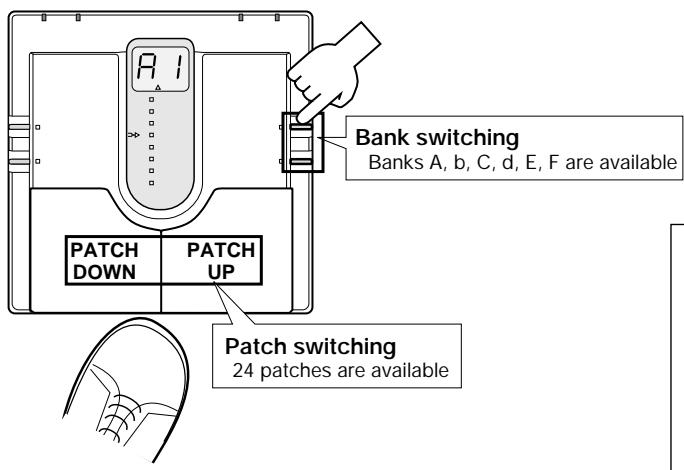
The 24 patches can be selected easily by pressing the patch pedals. The right patch pedal switches to the next patch and the left patch pedal switches to the previous patch.
In the initial condition, the 506 is set up so that the patch pedals select patches continuously, but you can also set up the unit so that patches are switched only within a certain bank [see the section "Patch Switching (Application: Bank Hold)"].
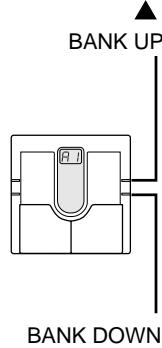
Bank switching is performed with the VALUE + / - keys.
If for example the currently selected patch is patch 2 of bank A, and you want to switch to patch 3 of bank C, you would need to press the UP pedal nine times. Instead, you can press the VALUE + key twice and then the UP pedal once.
If the optional FS01 is connected to the CONTROL IN jack on the rear panel, the foot switch can be used as a bank UP pedal. This allows full foot control, which is highly convenient during a performance.
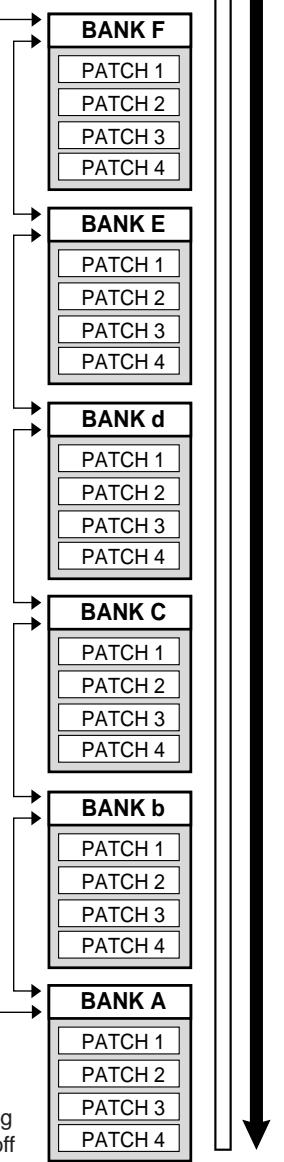
Bank/patch switching when Bank Hold is off
8 Using the Bypass (Mute)/Tuner Mode
In the Bypass mode, the effects of the 506 are temporarily turned off, so that the original sound of the instrument only is heard. In this mode, the auto-chromatic tuning function is also active. It is also possible to activate muting, to prevent the tuning sound from being sent to the output.
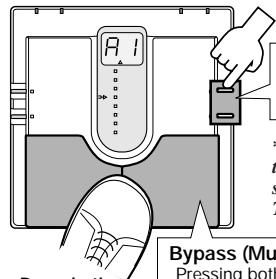
Press both 7
pedals together
Calibration
Select reference pitch for auto-chromatic bass guitar tuner (calibration)
- Reference pitch (A) can be adjusted in the range from 435 to 445Hz . This is shown as "35" to "45" on the display. The normal setting is 440Hz (40).
Bypass and mute condition
Pressing both patch pedals simultaneously activates the Bypass or Mute mode. a For bypass mode, Press and immediately release the patch modes.
ress and immediate
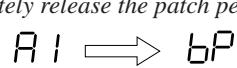
Press
Release immediately
--
Tuner mode
- For mute mode: Press patch pedals for at least 1 second.
Currently selected patch is indicated

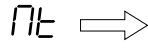

To cancel the bypass or mute condition, simply press one of the patch pedals. The unit then reverts to the previously selected patch.
Tuning function
When the 506 is in the Bypass or Mute mode, the tuning function is activated automatically. Pick an open string to be tuned. The closest note is shown on the display.
Input signal
standby condition

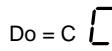




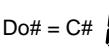








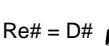


When the tuning function is active, the parameter cursor LEDs serve as tuning meter, designed to enhance tuning precision when making fine adjustments.
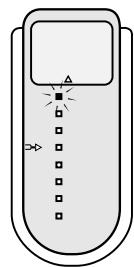
Pitch is too high
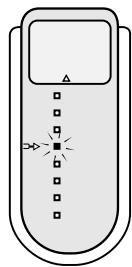
Correctly tuned
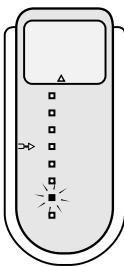
Pitch is too low
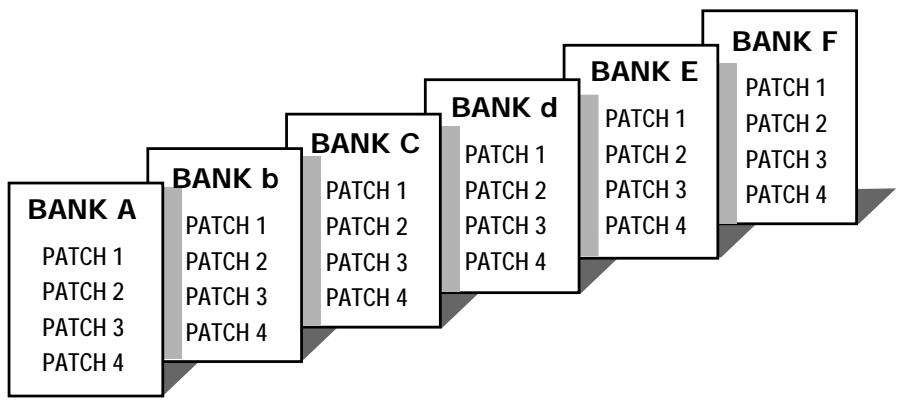
3 What Are Banks and Patches?
- PATCH
A combination of several effects, each with individual parameter settings is called a "patch". The 506 comes with 24 preset patches which can be changed (edited) by the user.
BANK
The 506 calls up patches in sets of four, called a "bank".
4 PATCH LIST
The 506 has memory capacity for 24 patches. At the factory, these are programmed with recommended settings. The user can freely change the contents of any patch, and it is also possible to restore the factory settings.
| BANK | PATCH | PATCH NAME | COMMENT |
| A | 1 | SLAP SOLO | Orthodox slap sound with flanger flavoring |
| 2 | BIG FUZZ | Fuzz tone with straight distortion | |
| 3 | TAURUS | Fat synthesizer bass sound | |
| 4 | OCTAVE CHORUS | Chorus tone with octave effect | |
| b | 1 | VINTAGE | Vintage seventies UK hard rock sound |
| 2 | MILLER'S SLAP | Fashionable, danceable slap sound | |
| 3 | LOVERS' FUNK | Gritty bass for P-funk bass solos | |
| 4 | CHORD CHORUS | Ideal sound for six-string bass upper-range chord play | |
| C | 1 | BILLY DRIVE | Great for super-fast right hand play |
| 2 | UNITE | Wah & octave funk bass sound | |
| 3 | CRAZY PHASE | Percussive slap creates a dazzling effect | |
| 4 | BASS SYNTH | Synthesizer bass mixed with direct sound | |
| d | 1 | FAT SLAP | Straight, fat sound |
| 2 | WILD | Combination of resonant wah with drive sound + pedal pitch | |
| 3 | THICK | Characteristic disco bass sound | |
| 4 | JET ON | For eighth note play with jet sound | |
| E | 1 | SO FAT | Lower-octave addition creates full-bodied sound |
| 2 | NATURAL CLEAN TONE | Practical, basic bass sound | |
| 3 | ATTRACTIVE SYNTH | Distortion + synthesizer sound for on-stage playing | |
| 4 | U. K. ROCK | Chorus + pedal sound ideal for picking | |
| F (LINE OUTPUT SETTING) | 1 | T.M. SLAP | Energetic slap sound |
| 2 | GETTIN' | Picking nuance changes the distortion intensity | |
| 3 | SOLIST | Ideal for ballad solos and backing | |
| 4 | MULTI SYNTH | Synthesizer bass for any kind of playing style |
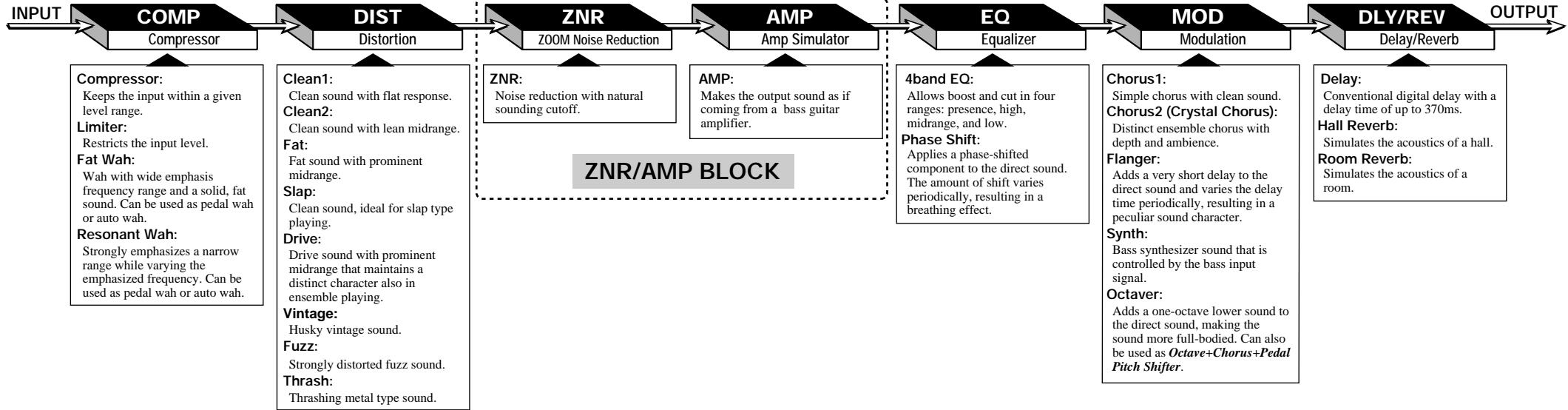
5 Effect Connections
As shown in the illustration below, the 506 can be thought to contain seven "effect modules" which are internally connected. In most effect modules, only one effect may be active at any given time, but the MOD
module can use two effects simultaneously. Therefore the 506 can act like a total of eight single effect devices.
6 Controls and Functions
Top Panel
TUNER indicator
In the Bypass (Mute)/Tuner mode, this indicator shows that the tuner is active, and it serves as a gauge for fine tuning your instrument.
Battery empty warning
When the unit is powered from the battery, this indicator begins to flash when the battery is exhausted.
STORE key
Serves to initiate and execute the store function for patches.
- Direct Load function
When the key is held down for at least 1 second in the Play mode, the Direct Load function is turned on or off.
EDIT key
This key serves to toggle between the Play mode (where effects are used for playing the instrument) and Edit mode (where the user can
freely change patch settings). The Edit mode is also used to select effect
When the key is pressed while a Delay/Reverb effect parameter is selected, the unit switches back to Play mode.
Bank Hold function
When the key is held down for at least 1 second in Play mode, the Bank Hold function is turned on or off.
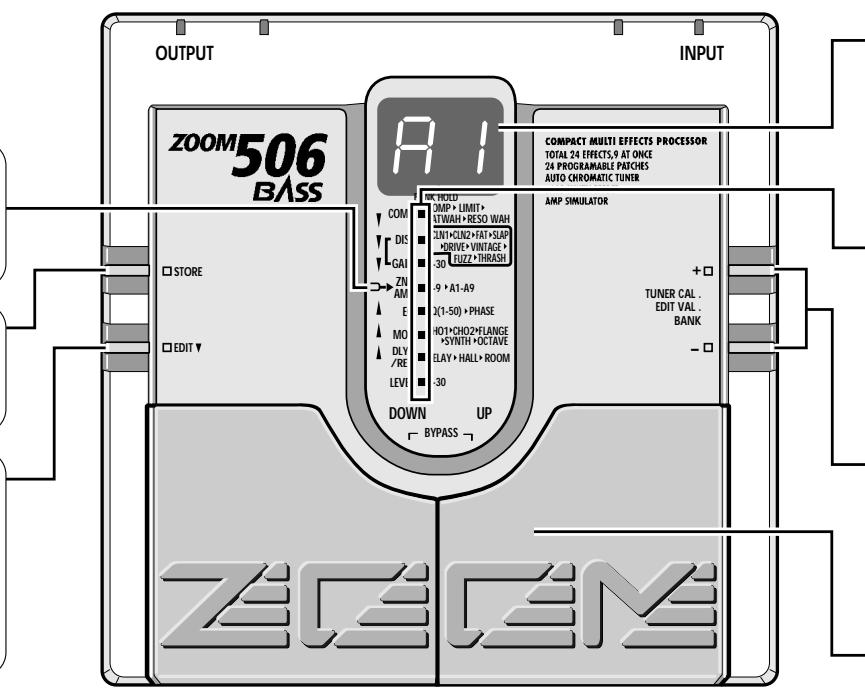
Display
Shows information required to operate the 506.
- Play mode:
Shows the currently selected bank and patch.
- Edit mode:
Shows the value of the parameter currently being edited.
- Bypass (Mute)/Tuner mode:
Shows the pitch of the input signal.
Parameter cursor LEDs
- Play mode:
The currently used effect module lights up.
- Edit mode:
The currently used effect module lights up. When selected for editing, the indicator for the effect module flashes.
- Bypass (Mute)/Tuner mode:
Indicators function as tuning meter
VALUE + /-keys
- Play mode:
The keys serve for bank switching.
- Edit mode:
The keys serve for changing the effect parameter.
- Bypass (Mute)/Tuner mode:
The keys serve for setting the tune reference pitch (calibration).
Patch UP / DOWN pedals
- Play mode:
The pedals serve for patch switching. Pressing both pedals simultaneously activates the Bypass (Mute)/Tuner mode.
- Edit mode:
The pedals serve for selecting effect parameters. Pressing both pedals simultaneously turns the currently selected effect module on or off.
- Bypass (Mute)/Tuner mode:
Pressing a pedal cancels the Bypass (Mute)/Tuner mode.
Rear Panel
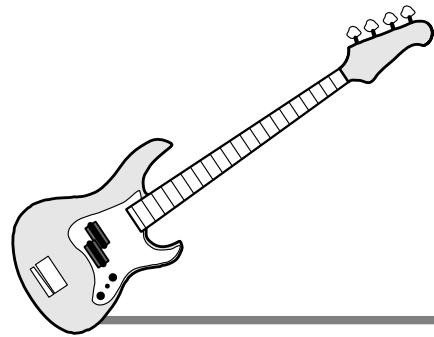
INPUT jack
Serves for connection of the bass guitar. The output level of bass guitars fluctuates considerably, depending on the type of instrument and the playing technique. Use the compressor and limiter of the COMP module to control the input level, or adjust the output level control of the bass guitar to prevent overload.
When the unit is powered from the battery, the INPUT jack also functions as on/off switch. Plugging a shielded cable into the jack turns the 506 on. When not using the unit, the cable should be disconnected to prevent battery drain.
DC IN jack
Serves for connection of an AC adapter (Zoom AD-0006) which delivers 9VDC 300mA with a "center minus" plug configuration. When the AC adapter is connected to this jack, the 506 is turned on.
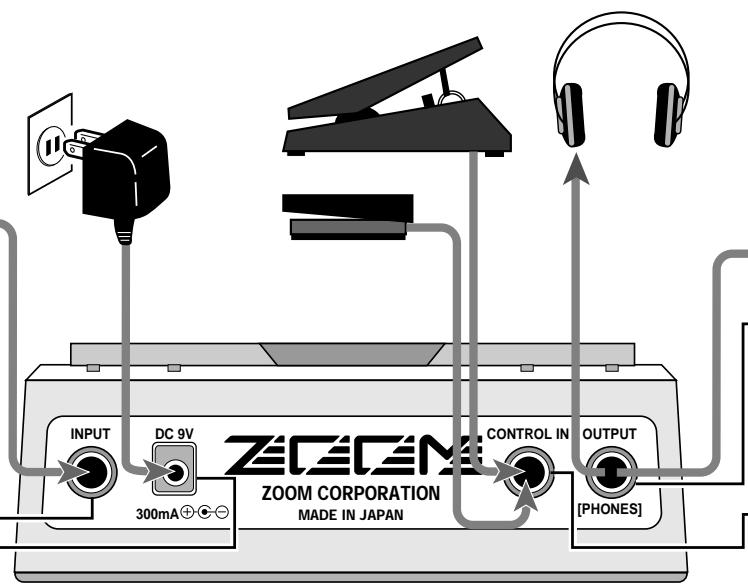
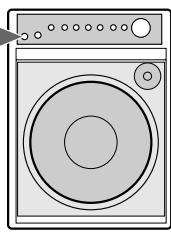
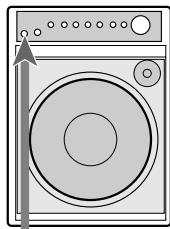
OUTPUT jack
The output signal of the 506 appears at this jack. You can connect either a single bass guitar amplifier, using a monaural shielded cable, or two bass guitar amplifiers, using a Y-type stereo shielded cable, or a pair of stereo headphones. If the volume level is low when using headphones, increase the patch level or master level, or use headphones with low impedance (32 ohms or less).
CONTROL IN jack
When the optional expression pedal FP01 is connected to this jack, it can serve as volume pedal or be used for pedal wah and pedal pitch. When the optional foot switch FS01 is connected, it can serve for bank UP switching.
The 506 comes with 24 predefined patches that have been programmed at the factory. However, the 506 offers many more possibilities for combining effects in innovative ways. To discover these possibilities, we recommend that you try out the editing function, which lets you create your own patches. The mode in which patches can be edited is called the Edit mode.
To switch from normal Play mode to Edit mode, briefly press the EDIT key. Do not keep the EDIT key depressed, because if the key is held for 1 second, the Bank Hold mode will be activated.
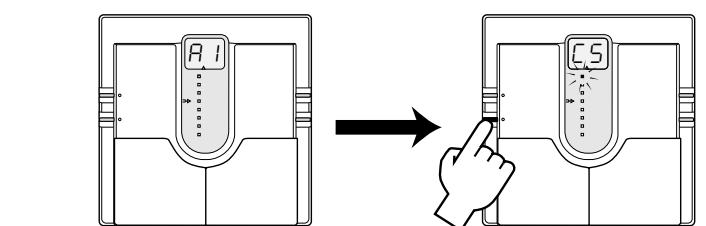
(1) While still in Play mode, select the patch you wish to edit.
(2) Press the EDIT key to activate the Edit mode.
Immediately after switching from the Play mode to the Edit mode, the parameter cursor flashes at the highest position (COMP module), regardless of which patch was selected. The COMP module setting of the current patch is shown on the display.
While Edit mode is active, each push of the EDIT key causes the parameter cursor to move one position down.
The flashing position shows which module is selected for editing. The relation between parameter cursor LEDs and modules is as shown below.
1st parameter cursor LED: COMP module setting
2nd parameter cursor LED: DIST module distortion type setting
3rd parameter cursor LED: DIST module distortion gain setting
4th parameter cursor LED: ZNR and AMP block settings
5th parameter cursor LEDs: EQ module setting
6th parameter cursor LED: MOD module setting
7th parameter cursor LED: DLY/REV module setting
8th parameter cursor LED: PATCH level setting
Use VALUE + / - keys to change parameters.
For an explanation of the various parameters, please refer to the section "Effect Parameters".
When the EDIT key is pressed while the 8th parameter cursor LED flashes, the Edit mode is canceled and the unit returns to the Play mode.

(1) Use the EDIT key to select the parameter you wish to change.
(2) Use the VALUE + / - keys to adjust the parameter.
(3) When the 8th parameter cursor LED is flashing, press the EDIT key to return to the Play mode.
12 Effect Parameters
COMP module
Compressor
The input signal from the bass
guitar is compressed toachieve a uniform volume
achieve a uniform volume level
Setting range: &I_(C1-C9)
Higher values result in
stronger compression.
Limiter
Limits the input signal with
faster response than the
compressor effect. Serves
prevent overload of other modules.
Setting range: L L (L_1 - L_9)
Higher values result in more
Effective limiting
Fat Wah
Wah with wide emphasis
frequency range and a solid,
fat sound.
Setting range: I F (F1-F8)
When set in this range, the
emphasized frequency is
shifted, depending on the dynamics of the boss quite
dynamics of the bass guitarinput . Higher values result in a
more pronounced wah
e
FP (EP)
When this value is selected,
wh can be controlled usingthe pedal EP01 connected to
the pedal FPF connected to the CONTROL IN jack.
Resonant Wah
Strongly emphasizes a narrow
range while varying the
emphasized frequency. Can be
used as pedal wah or auto wah.
Setting range: r I r (r1 - r8)
When set in this range, the
effect functions as auto wahigher on a result in a
Higher values result in a more pronounced auto web
more pronounced auto war effect.
P
When this value is selected,
wan can be controlled using the nodal EP01 connected.
to the penguin P0F connection to the CONTROL IN jacket.
1
Selecting parameters to change
A
As described in "Editing Patches", parameters to be
Taches , parameters tobelected by repeatedly press
edited are selected by repeatably pressing the EDIT key, but you can also use the patch
nodal for this purpose.
peeds for this purpose. Pressing the notch UP pedal (right pedal)
Fitting the patch of P_rad ( _g in P_rad ) moves the parameter cursor (the selected
parameter) up.
Pressing the patch DOWN pedal (left pedal)
moves the parameter cursor (the selected
parameter) down.

2 Effect module on/off switching
Each effect module in the 506
can be considered as a single
compact effect device. Adjusting parameters
then is equivalent to selecting the type of effect device or turning the beam source
effect device or turning the knobs oneffect device. What is called a patch
corresponds to a collection of effect devices
connected in various ways and set to ON or OFF.
As you will know if you have used several
individual effect devices in a performance test of the device will be included.
before, not all devices will be switched onall the time . Depending on the need of the
all the time. Depending on the mood of the song and other factors, devices will be
Song and other factors, we were switched on and off in different
combinations. The same applies to the 506.
The on/off timing and combination of effect
modules are important certain sound.
Except for the distortion gain (3rd
parameter cursor position) and patch level
setting (lowest parameter cursor setting),
the flashing parameter cursor indicates to the normal line effect model on base
the corresponding effect module can be turned on or off
The ZNR and AMP modules are turned on
and off together. When wishing to discard the book,
them individually, you must do this by setting the parameters accordingly.
Effect modules can be switched on and off in three ways.
- Using the VALUE + / - keys
When using the VALUE + key to increase the value, then the setting follows:
the parameter value, the setting following the maximum value is the "effect off" setting
Similarly, when using the VALUE - key to determine how many times the setting
decrease the parameter value, the setting before the minimum value is the "effect off
setting. When the VALUE ^+ key is pressed once in the "effect off" condition, the effect
is turned on and the minimum value is set.
When the VALUE - key is pressed once in
the "effect off" condition, the effect is turned on and the maximum value is set.
- Using a shortcut
Pressing both VALUE + / - keys together for
an effect module functions as a shortcut. Representing the shortcut procedure, several
Repeating the shorical procedure several times turns the effect off. Performing the
time turns the effect off. Performing the shortcut when the effect is off turns it on a
sets the minimum parameter value.
- Using the patch pedals
Pressing both patch pedals together for an effective delay to the effect of Pressing
effect module turns the effect off. Pressing both patch pedals together when the effect is
off turns it on and restores the previously selected parameters.
Effect offindication
EFFECT OFF=
MOD module
Chorus1
Simple chorus which adds a
component with periodically changing pitch to the direct
changing pitch to the direct sound. Suitable for enhancing
body while maintaining a
clean sound.
Setting range: I (C1-C9)
Higher values result in a
stronger
Chorus2 (Crystal Chorus)
Distinct ensemble chorus with depth and ambience
Setting range: C 工 工 (c1-c9)
Higher values result in a
Higher values result in a stronger effect.
Flanger
26\L30(26-30)
values result in a
high-range boost
1\L40(31-40)
values result in a
oosted frequency.
_(41 - 50)
values result in a
presence-range range boost,divin
range boost, giving solid sound.
m = 311 ;
ift
ase-shifted
to the direct sound.
of shift varies
giving a
ect.
P1-P9
ues result in a
Effect.
DLY/REV module
Delay
Conventional digital delay
with a delay time of up to 370 s.
ms. By monitoring this effectin stereo, you can achieve a
In stereo, you can achieve a ping-pong delay.
Setting range: (d1 - d9)
Higher values result in longer
delay time.
Mix and feedback are also
optimized:
Hall Reverb
Simulates the acoustics of a
hall.
Setting range: H I ⇌ H g (H1 - H9)
Higher values result in longer
reverb time.
Mix setting is also optimized.
optimized:
Room Reverb
Simulates the acoustics of a
room
Setting range: r I ⇔ r g (r1 - r9)
Higher values result in longer
reverb time.
MIX SETTING IS ALSO optimized.
PATCH Level
Patch Level
Allows setting the level of
individual patches.
This setting is stored in a fixed effect
patch like ti parameters
jing range: (1 - 30)
Higher values result in
Higher values higher level.

3 Parameter setting shortcut
Normally, parameter values are set by tapping the VALUE + or VALUE - key once for each increment.
To allow a quick operation in effect modules which contain
more than one effect, you can use the shortcut function which
is activated by pressing both VALUE keys simultaneously. For
example, if you are currently at the "Delay" parameter of the
DLY/REV module and the current setting is "d5", you would need to press the VALUE...by 18 minutes to set the "Pcans".
need to press the VALUE + key 18 times to set the "Room effect to "r5". However, you can achieve the same effect by
effect to 15 . However , you can eliminate the same effect byactivating the shortcut twice and then pressing the VALUE +
key

4 Volume control with FPO
When the optional expression padel EP01 is:
When the optional expression peal or is connected to the CONTROL IN jack, it can also be
connected to the CONTROLIN Jack, it can also be used for adjusting the output volume of the 506. However, if
used for adjusting the output volume of the 300. However, if the COMP module parameter is set to a range which activates
pedal wah for Fat Wah or Resonant Wah, or if the Octaver
parameter in the MOD module is set to pedal pitch (Pu or
Pd), this setting has priority and the pedal controls the effect. In other words, the pedal controls the speed but not the EQ.
In other cases, the pedal controls the volume between the EQ module and the MOD module. As opposed to a volume pedal
module and the MOD module. As opposed to a volume pedal connected after the 506, the level can be adjusted without
affecting the sonic impression of reverb and delay effects.

5 Master level adjustment
The 506 also let you set the overall output level
The 500 also tells you set the overall out separately from individual patch levels.
The master level can be adjusted in Play mode, as follows.
Keep both VALUE keys depressed for at least 1 second. The current material level is the value on the display for each
current master level is then shown on the display for 1 second. While the level is displayed, you can use the VALUE + /- keys
While the level is displayed, you can use the VALUE > keys to change it. The setting range is 0-50. At "40", the level is
identical to the individual patch level.
The master level setting is not stored by the unit. After the
power has been turned off, the master level must be set again.
9 Patch Switching (Application: Bank Hold ON)
In the factory default condition, the patch pedal switches all patches, regardless of the bank divisions. This kind of patch switching is called the Bank Hold off condition.
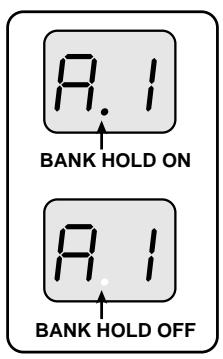
The Bank Hold function limits switching to the four patches within a bank. When the function is activated, the patch pedals switch only between the patches in the current bank. To activate the function, keep the EDIT key depressed for at least 1 second in the Play mode. The BANK HOLD indicator on the display lights up. To turn the function off again, perform the same step (press the EDIT key for at least 1 second). The BANK HOLD indicator on the display goes out.
Bank switching can be performed using the VALUE + / - keys or the optional foot switch FS01 connected to the CONTROL IN jack on the rear panel.
Bank Hold ON
Keeping the EDIT key depressed for at least 1 second activates Bank Hold. To cancel Bank Hold, press the EDIT key again for 1 second.
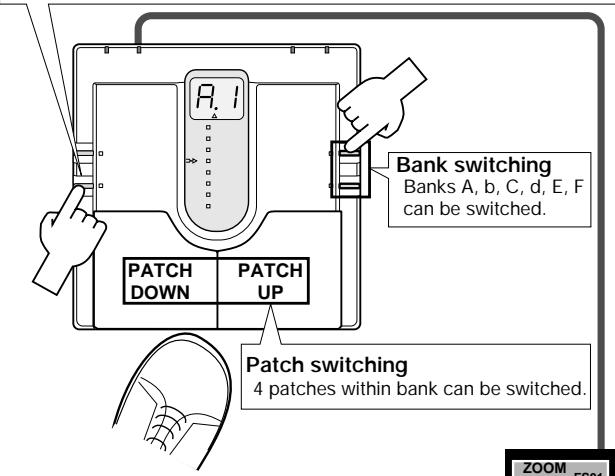
Bank switching (Bank UP pedal)
Using optional foot switch FS01
banks A, b, C, d, E, F can be switched by foot.
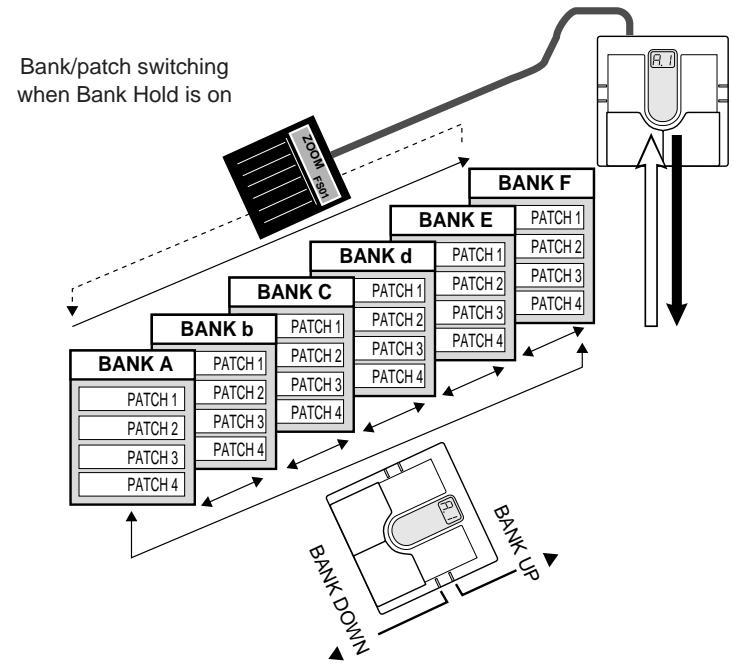
Patch Switching (Application: Direct Load OFF)
In the default condition, the 506 is set up in such a way that pressing a patch pedal immediately switches the patch and alters the output sound. This is called Direct Load ON. This switching principle is most convenient when the desired patches are adjacent or close to each other. However, when wanting to switch to a patch that is further away, it may be desirable not to activate the sound of the other patches in between.
When this is desired, turn the Direct Load function off as follows. When Direct Load has been turned off, switching banks and patches has no effect until the user confirms the selection.
DIRECT LOAD OFF
Keeping STORE key depressed for 1 second
Turns Direct Load off.
The same procedure serves to turn it on.
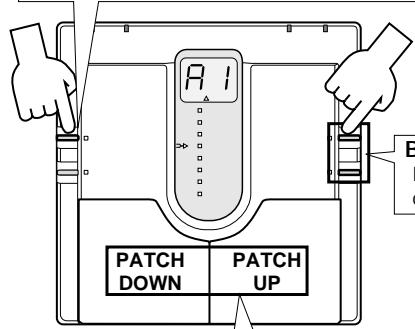
Bank switching Banks A, b, C, d, E, F can be switched.
Patch switching Patches can be switched.
For example, when going from
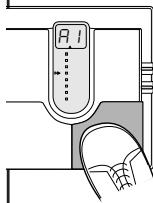
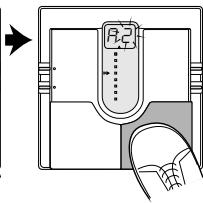
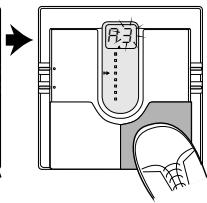
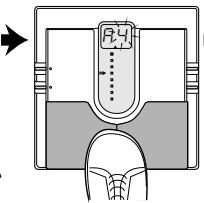
patch 1 to patch 4 with Direct Load active, patches 2 and 3 will briefly be heard when the patch UP pedal is pressed three times. When Direct Load is off, pressing the patch UP pedal will change the number on the display (the number flashes), but until the user confirms the choice, the sound remains that of patch 1.
To turn Direct Load on or off, keep the STORE key depressed for at least 1 second.
To confirm a choice after selecting a patch with Direct Load off, press both patch pedals simultaneously.
Confirming a patch
When display indication flashes, pressing both patch pedals together confirms the patch and switches the output sound.
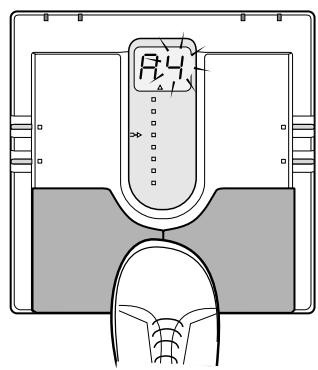
Press both pedals together
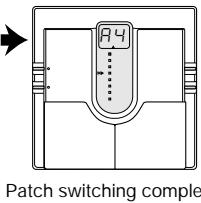
Confirm
13 Storing Patches
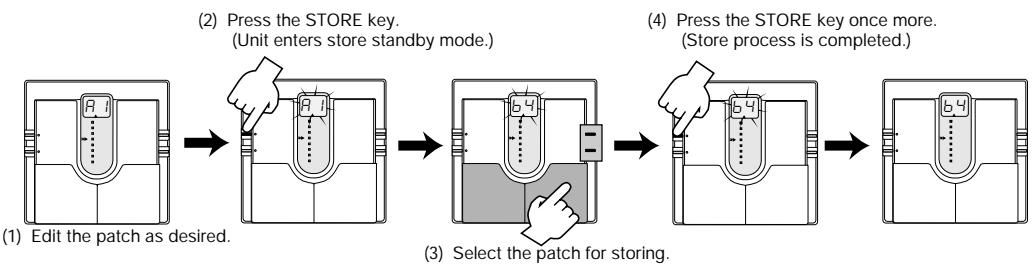
If you have edited (altered) a patch and turn the 506 off without storing the patch, the patch will revert to its old setting. To store an edited patch, use the following simple procedure.
Storing can be carried out in Play mode and Edit mode. After you have edited the patch, press the STORE key. If the unit is currently in Play mode, release the key before 1 second has elapsed, otherwise the Direct Load function will be activated.
The display starts to flash. This condition is called the store standby condition. If you wish, you can abandon the store procedure at this point by pressing the EDIT key. If you press the STORE key once more, the contents of the patch are updated.
You can also change the patch number before storing, so that the edited patch will be stored in a different number.
In this case, the original patch that was used as a starting point for editing will not be changed.
14 Replacing the Battery
If the tuning indicator flashes while the unit is being powered from the battery, the battery is exhausted and should be replaced as described below.
Since the 506 has fairly high rated power consumption, use only a 6LR61 9V (alkaline) battery. Using another kind of battery will result in shorter operation.
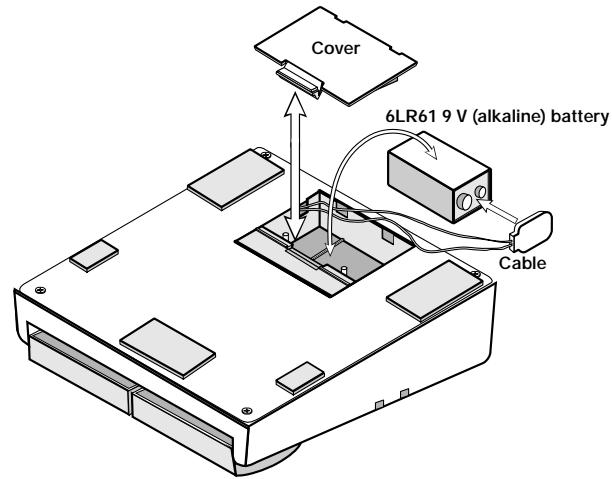
- Turn the 506 upside down and open the cover of the battery compartment. (Push the catch to unlock the cover, then lift it up.)
- Remove the battery from the compartment and disconnect the battery cable. (Grasp the terminal strip and do not pull at the cable.)
- Connect the battery cable to the new battery, taking care to observe correct polarity (+/-) . Then insert the battery into the battery compartment.
- Close the battery compartment cover, taking care not to pinch the cable. (Make sure that the cover is properly locked.)
15 Returning Patches to Factory Settings
The 506 comes with 24 predefined patches that have been programmed at the factory. Also after you have edited and stored your own patches, you can return to the factory default settings at any time. This process is called "recalling". Returning all 24 patches to the original contents and resetting the Bank Hold and Direct Load functions is called "all initialize".
The recall mode is separate from the Play mode and Edit mode. You cannot switch directly to recall mode from these modes. The recall mode can only be activated by turning the unit on in a special way, as described below.
- Turn the unit off by disconnecting the AC adapter or the guitar input cable.
- Keep the STORE key depressed and turn the unit on.
- The indication "AL" flashes on the display.
- To perform "all initialize", press the STORE key once more in this condition. The flashing rate increases and the initialization procedure is carried out. When it is completed, the unit automatically enters the Play mode.
- When wishing to recall only a particular patch, select the patch number in step 3, using the same procedure as for normal patch selection.
- When the desired patch has been selected, press the STORE key. The flashing rate increases and the contents of the selected patch are recalled.
- Recalling of individual patches can be carried out continuously. When you wish to terminate the process, press the EDIT key. The unit then returns to the Play mode. Turning the unit off also terminates the recall condition.
16 Specifications
Effects
Effect modules
Banks and patches
Analog/digital conversion
Digital/analog conv
Sampling frequency
Input
Output
Control input
Display indicator
Power requirements
Maximum number of simultaneous effects: 8
24 effect types: Compressor, Limiter, Fat Wah, Resonant Wah, Clean1,
Clean2, Fat, Slap, Drive, Vintage, Fuzz, Thrash, 4Band Equalizer, Phase,
Chorus1, Chorus2 (Crystal Chorus), Flanger, Synthesizer, Octaver, Delay
Hall, Room, Amp Simulator, ZNR
Maximum number of simultaneous modules: 7 (5 modules + 1 block)
6 banks x 4 patches = 24 patches (edit + store possible)
18 bit, 128 times oversampling
16 bit, linear
31.25 kHz
Bass guitar input (standard monaural phone jack)
Rated input level: -20 dBm
Input impedance: 470 kilohms
Combined line/headphone output (standard stereo phone jack)
Max. output level: +6 dBm
Output load impedance: 10 kilohms or more
For optional FP01 or FS01
2-digit, 7-segment LED
tuning indicator parameter cursor indicator
Optional AC adapter: 9VDC 300mA (Zoom AD-0006)
Battery: 6LR61 9 V (alkaline) battery x 1
Battery life: approx. 4 h continuous operation
480g (without batteries)
- 0 dBm = 0.775 Vrms
Design and specifications subject to change without notice.
- ZOOM CORPORATION
- Major Features
- Safety Precautions
- USAGE AND SAFETY PRECAUTIONS
- About power
- AC adapter operation
- Battery operation
- Environment
- Handling
- Alterations
- Usage precautions
- Electrical interference
- Cleaning
- Connecting cables and input and output jacks
- Selecting Patches
- Using the Bypass (Mute)/Tuner Mode
- Bypass and mute condition
- Tuning function
- What Are Banks and Patches?
- - PATCH
- BANK
- PATCH LIST
- Effect Connections
- Controls and Functions
- Top Panel
- TUNER indicator
- STORE key
- EDIT key
- Display
- Parameter cursor LEDs
- VALUE + /-keys
- Patch UP / DOWN pedals
- Rear Panel
- INPUT jack
- DC IN jack
- OUTPUT jack
- CONTROL IN jack
- Effect Parameters
- COMP module
- Compressor
- Limiter
- Fat Wah
- Resonant Wah
- Selecting parameters to change
- Effect module on/off switching
- MOD module
- Chorus1
- Chorus2 (Crystal Chorus)
- Flanger
- ift
- DLY/REV module
- Delay
- Hall Reverb
- Room Reverb
- PATCH Level
- Parameter setting shortcut
- Volume control with FPO
- Master level adjustment
- Patch Switching (Application: Bank Hold ON)
- Bank Hold ON
- Patch Switching (Application: Direct Load OFF)
- DIRECT LOAD OFF
- Storing Patches
- Replacing the Battery
- Returning Patches to Factory Settings
- Specifications
Brand : ZOOM
Model : 506
Category : Bass effects pedal