
SA-W11 - Loudspeaker SONY - Free user manual and instructions
Find the device manual for free SA-W11 SONY in PDF.



| Product Type | Active Subwoofer |
| Brand | Sony |
| Model | SA-W11 |
| Driver Size | 10 inches (25 cm) |
| Amplifier Power | 100 W RMS |
| Frequency Response | 30 Hz – 150 Hz |
| Impedance | 8 ohms |
| Dimensions (W x H x D) | 430 x 430 x 380 mm |
| Weight | 14 kg |
| Power Supply | AC 120V/240V, 50/60 Hz |
| Power Consumption | 120 W |
| Main Functions | Volume control, Crossover frequency adjust (40-150 Hz), Phase switch (0/180°), Auto power on/off |
| Connections | Line level RCA input, Speaker level input |
| Enclosure Type | Bass reflex (ported) |
| Material | MDF cabinet with black vinyl finish |
| Cleaning and Maintenance | Wipe with a soft, dry cloth. Do not use solvents or abrasive cleaners. |
| Safety Precautions | Place on a stable surface. Keep away from moisture and heat sources. Do not block ventilation. |
| Spare Parts and Repairability | Driver and amplifier module available from Sony service centers. Consult official support for repairs. |
| General Information | Designed for home theater and music systems. Compatible with most AV receivers. |
Frequently Asked Questions - SA-W11 SONY
User questions about SA-W11 SONY
0 question about this device. Answer the ones you know or ask your own.
Ask a new question about this device
Download the instructions for your Loudspeaker in PDF format for free! Find your manual SA-W11 - SONY and take your electronic device back in hand. On this page are published all the documents necessary for the use of your device. SA-W11 by SONY.
USER MANUAL SA-W11 SONY
Operating Instructions____EN
Mode d'emploi F
Do not install the appliance in a confined space, such as a bookcase or built-in cabinet.
Welcome!
Thank you for purchasing the Sony Active Super Woofer. Before operating this woofer, please read this manual thoroughly and retain it for future reference.
TABLE OF CONTENTS
Getting Started
Unpacking 4
Installation 4
Hooking Up the System 5
Basic Operations
Listening to the Sound 8
Adjusting the Sound 9
Additional Information
Precautions 10
Troubleshooting 10
Specifications 11
Unpacking
Check that you received the following items:
• Audio connecting cord (1)
- Speaker cord (2)
Installation
Since the human ear cannot detect the direction and position where the bass sound being reproduced by a woofer (below 150 Hz) comes from, you can install the woofer wherever you like in your room. To obtain a better bass reproduction, we recommend you to install the woofer on a solid floor where the resonance is unlikely to occur.
You can obtain a sufficient heavy bass reproduction from a single woofer. However if you use a couple of the woofers, you can obtain an even more effective heavy bass reproduction.
Notes
• Always install the woofer vertically, keeping a few centimeters from away the wall.
- Do not place an object on the woofer or sit on it.
- If the woofer is installed in the center of a room, the bass could be extremely weakened. This is due to the influence of the standing wave of the room. If this happened, move the woofer away from the center of a room or eliminate the cause of the standing wave, by installing a bookshelf on the wall, etc.
Hooking Up the System
Overview
Use the LINE IN jack or the SPEAKER IN terminals of the woofer when you connect the amplifier.
- If your amplifier has one of the following types of output jacks, connect the LINE IN jack and the amplifier's jack using the supplied audio connecting cord.
— MONO OUT jack
— MIX OUT jack
— SUB WOOFER output jack(s)
— SUPER WOOFER output jack(s)
- If your amplifier does not have the above mentioned output jacks, connect the speaker terminals of the amplifier to the SPEAKER IN terminals instead.
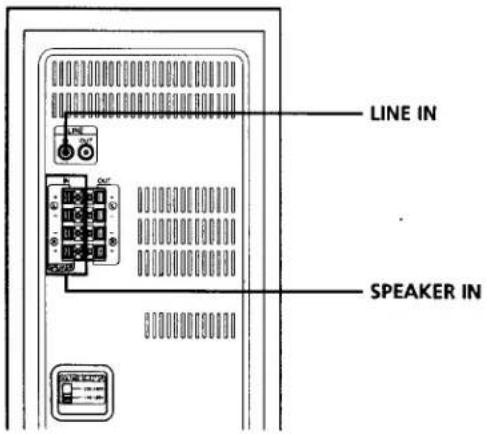
Before you get started
- Turn off the power of the amplifier and the woofer before making any connection.
- Use the audio connecting cords that are supplied to the respective equipment. If there are not enough audio connecting cords to make the necessary connections, you need to purchase some optional audio connecting cords.
- Be sure to make connections firmly to avoid noise.
- Connect the AC power cord from the woofer to a wall outlet.
- You cannot connect the CENTER output jack for use with Dolby Pro Logic function to the woofer. Bass sound is not output with some Dolby Pro Logic modes.
(continued)
Connecting to an amplifier with a single set of speaker terminals
If your amplifier is equipped with a single set of speaker terminals, connect the woofer to the amplifier, and then connect the front speakers to the woofer.
What cords will I need?
Speaker cord (supplied) (1 for each speaker)

Twist the stripped ends of the cord about 2 / x inch (15 mm). Be sure to match the speaker cord to the appropriate terminal on the components: + to + and - to -. If the cords are reversed, the sound will be distorted and will lack bass. It is useful to decide that the speaker cord marked with a line is always the positive (+) and should be connected to the positive (+) terminal to avoid any improper connections.
Hookups
1 Connect the woofer to the amplifier.
Connect the SPEAKER IN terminals of the woofer to the amplifier's speaker terminals with the speaker cords. Be sure to connect both L and R channels.
: signal flow

2 Connect the front speakers to the woofer.
Connect the speakers to the speaker terminals of the woofer.

Connecting to an amplifier with double(A+B) sets of speaker terminals
If your amplifier has double (A+B) sets of speaker terminals, connect both the woofer and the front speakers to the amplifier.
What cords will I need?
Speaker cord (supplied) (1 for each speaker)

Twist the stripped ends of the cord about 2/3 inch (15 mm).
Hookups
1 Connect the front speakers to the amplifier. Connect the speakers to your amplifier's speaker terminals (A).

2 Connect the woofer to the amplifier.
Connect the SPEAKER IN terminals of the woofer to the amplifier's speaker terminals (B) using speaker cords (supplied).

When using the double (A +B) sets of speakers, make sure that you select the "A +B" position with your amplifier.
Note
When you are using speaker terminal (A) only (front speaker only) or when the power of the amplifier is turned off, turn down the volume or turn off the power of the woofer otherwise, hum noise may be heard.
Connecting to an amplifier with a special jack for a super woofer
If your amplifier has a special jack for a super woofer (like a MONO OUT jack, MIX OUT jack, SUB WOOFER jack or SUPER WOOFER jack), connect the LINE IN jack of the woofer to one of those jacks.
What cords will I need?
Audio connecting cord (supplied) (1)

Hookups
Connect the MONO OUT jack of your amplifier to the LINE IN jack of the woofer with the supplied audio connecting cord.

Note
If the output level of your amplifier is not large enough, the sound may not be loud enough. In this case, connect the speaker terminals of the amplifier directly to the SPEAKER IN terminals of the woofer.
When using this woofer for both left (L) and right (R) channels

Setting the VOLTAGE SELECTOR
Set VOLTAGE SELECTOR to position of your local power line voltage.

Connecting the AC power cord
Connect the AC power cord from the woofer and from your amplifier to a wall outlet.
Listening to the Sound
Note
Never set the amplifier's tone control (BASS, TREBLE, etc.) or the equalizer output to a high level or input sinewaves of 20 Hz to 50 Hz recorded on a commercially-available test disc or special sound (bass sound of electronic musical instrument, pop noise of analog disc turntable, sound with abnormally enhanced bass, etc.) in a high level to this unit. These actions may cause damage to the speakers.
When a special disc containing abnormally enhanced bass is played, noise may be output in addition to the original sound. In such a case, decrease the sound level.
Note
The sub woofer output signal (DOLBY digital (AC-3) signal) of the digital surround processor sold singularly is set 10 dB higher by Dolby Laboratories Licensing Corporation. In the case of using normally, adjust the sub woofer level.
1 Turn on the amplifier and select the program source.
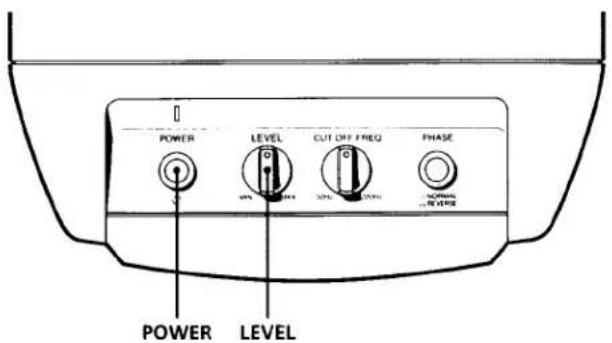
2 Press POWER.
The woofer turns on and the POWER indicator lights up in green.
3 Play the program source.
Adjust the VOLUME so that sound from front speakers is not distorted.
If it is distorted, the sound from the woofer will also be distorted.
To turn off the power
Press POWER to release the switch.
If you hear noise when you turn off the woofer, turn down the LEVEL of the woofer, or turn off the amplifier before turning off the woofer.
Adjusting the Sound
You can adjust the sound of the woofer to suit the sound of your front speakers. Reinforcing the bass sound gives you a greater sense of atmosphere.

Note
If the sound distorts when you turn on the bass reinforcement from your amplifier (such as, DBFB, GROOVE, the graphic equalizer, etc.), turn off the bass reinforcement and adjust the sound.
Note
Selecting NORMAL or REVERSE with the PHASE button reverses the polarity and may provide better bass reproduction in certain listening environments (depending on the type of front speakers, the position of the woofer and the adjustment of the cut-off frequency). It may also change the expanse and tightness of the sound, and effect the feeling of the sound field. Select the setting that provides the sound you prefer when listening in your normal listening position.
1 Adjust the cut-off frequency.
Turn the CUT OFF FREQ control, depending on the reproduction frequencies of your front speakers. 80Hz
Refer to the following when adjusting.

① Typical very small sized speakers: 5 - 7 cm dia.
② Typical small sized speakers: 8 - 15 cm dia.
③ Typical medium sized speakers: 16 - 24 cm dia.
④ Typical large sized speakers: more than 25 cm dia.
To make the most of the low level converter function of Dolby digital, turn the CUT OFF FREQ as high as possible when playing back the Dolby digital (AC-3).
2 Adjust the volume level of the woofer. Turn the LEVEL control so that you can be
Turn the LEVEL control so that you can hear the bass sound a little more than before. Do not raise the bass excessively as this will result in the loss of balance and depth. To increase the volume, turn the control clockwise. To decrease the volume, turn the control counterclockwise.
3 Play your favorite song and movie.
Male vocal tunes and voice containing bass sounds are most suitable for adjustment. Turn the volume for front speakers to the same level as usual. When playing a movie, raise the volume higher than the level for music to produce a more powerful sound.
4 Select the phase polarity. Press the PHASE button to
Press the PHASE button to select the phase polarity.
5 Repeat steps 1 to 4 to adjust for your preference. Once you have adjusted the woofer to the settings you
Once you have adjusted the woofer to the settings you desire, use the VOLUME control on the amplifier to adjust the volume of the woofer with that of the other speakers. You don't need to adjust the woofer settings when you change the volume level of the amplifier.
Precautions
On safety
- Before operating the woofer, be sure that the operating voltage of your woofer is identical with that of your local power supply.
- Unplug the woofer from the wall outlet if it is not to be used for an extended period of time. To disconnect the cord, pull the cord by grasping the plug. Never pull the cord itself.
- Should any liquid or solid object fall into the woofer, unplug the woofer and have the woofer checked by qualified personnel before operating it any further.
- AC power cord must be changed only at the qualified service shop.
When turning on or off an amplifier or other equipment
Lower the volume of the amplifier to minimum.
To avoid damaging the woofer
- Be careful in setting the volume control of the amplifier to avoid an excessive input power.
- Do not attempt to open the enclosuer or remold speaker units and networks.
• The grill net is not removable. Do not remove it.
In case color irregularity is observed on the nearby TV screen
With the magnetically shielded type of the speaker system, the speakers can be installed near a TV set. However, color irregularity may still be observed on the TV screen depending on the type of your TV set.
If color irregularity is observed...
→Turn off the TV set once, then turn it on after 15 to 30 minutes.
If color irregularity is observed again...
→Place the speakers further apart from the TV set.
When howling occurs
Relocate the speaker or turn down the volume of the amplifier.
On installation
- Do not install the woofer near heat sources such as radiators or air ducts, or in a place subject to direct sunlight, excessive dust, mechanical vibration or shock.
- Good ventilation is essential to prevent internal heat build-up in the woofer. Place the woofer in a location with adequate air circulation. Do not place the woofer on a soft surface or too close to a wall as this may obstruct the ventilation hole on the back.
On cleaning the cabinet
Clean the cabinet with a soft cloth lightly moistened with water. Do not use any type of abrasive pad, scouring powder or solvent such as alcohol or benzine.
If you have any questions or problems concerning your woofer that is not covered in this manual, please consult your nearest Sony dealer.
Troubleshooting
If you experience any of the following difficulties while using the woofer, use this troubleshooting guide to help you remedy the problem. Should any problem persist, consult your nearest Sony dealer.
There's no sound.
→ Check that this woofer and components are connected correctly and securely.
→Turn LEVEL clockwise to turn the volume up.
→ Reset the level.
The sound has suddenly stopped.
→The speaker cords may have short-circuited. Connect the cords properly.
The sound is distorted.
→ The input signal is imperfect.
→The input signal level is too high.
→ Set the CUT OFF FREQ as high as possible when playing back the Dolby digital (AC-3).
Severe hum or noise is heard.
→Connect the ground wire of the turntable properly.
→The contacts between the plugs of the connecting cords and the corresponding jacks have not been made properly. Connect the plugs firmly.
→The audio system is picking up some noise from a TV set. Move the audio system away from the TV set or turn the TV set off.
Specifications
System
Type Active Super Woofer (magnetically shielded design)
Speaker unit
Woofer: 16 cm dia. (6 3 /s in.) × 1
Practical maximum output
40 W (6 ohms, DIN)
50 W (50 Hz)
Reproduction frequency range
28 Hz - 200 Hz
High frequency cut-off frequency
50 Hz - 200 Hz
Phase selector
NORMAL, REVERSE
Inputs
Input jacks
LINE IN: Input pin jack
SPEAKER IN: Input terminals
General
| Where purchased | Power requirements |
| China | 220 - 240 V AC, 50/60 Hz |
| Other countries | 110 - 120/220 - 240 V AC adjustable, 50/60 Hz |
Power consumption
45 W
Dimensions Approx. 205 × 380 × 365 mm (w/h/d)
(81/s × 15 × 143/s in.)
Mass 9.5 kg (20 lb 15 oz)
Supplied accessories
Audio connecting cord
(1 phono plug - 1 phono plug) (1)
Speaker cord (2)
Design and specifications are subject to change without notice.
AVERTISSEMENT
40 W (6 ohms, DIN) 50 W (50 Hz)
Plage de fréquences
28 à 200 Hz
Nota
40 W (6 ohmios, DIN) 50 W (50 Hz)
Nota
註
註

- WELCOME
- TABLE OF CONTENTS
- GETTING STARTED
- BASIC OPERATIONS
- ADDITIONAL INFORMATION
- UNPACKING
- INSTALLATION
- NOTES
- HOOKING UP THE SYSTEM
- OVERVIEW
- BEFORE YOU GET STARTED
- CONNECTING TO AN AMPLIFIER WITH A SINGLE SET OF SPEAKER TERMINALS
- WHAT CORDS WILL I NEED
- HOOKUPS
- CONNECTING TO AN AMPLIFIER WITH DOUBLE(A+B) SETS OF SPEAKER TERMINALS
- NOTE
- CONNECTING TO AN AMPLIFIER WITH A SPECIAL JACK FOR A SUPER WOOFER
- WHEN USING THIS WOOFER FOR BOTH LEFT (L) AND RIGHT (R) CHANNELS
- SETTING THE VOLTAGE SELECTOR
- CONNECTING THE AC POWER CORD
- LISTENING TO THE SOUND
- TO TURN OFF THE POWER
- ADJUSTING THE SOUND
- ADJUST THE CUT-OFF FREQUENCY
- ADJUST THE VOLUME LEVEL OF THE WOOFER. TURN THE LEVEL CONTROL SO THAT YOU CAN BE
- PLAY YOUR FAVORITE SONG AND MOVIE
- SELECT THE PHASE POLARITY. PRESS THE PHASE BUTTON TO
- REPEAT STEPS 1 TO 4 TO ADJUST FOR YOUR PREFERENCE. ONCE YOU HAVE ADJUSTED THE WOOFER TO THE SETTINGS YOU
- PRECAUTIONS
- ON SAFETY
- WHEN TURNING ON OR OFF AN AMPLIFIER OR OTHER EQUIPMENT
- TO AVOID DAMAGING THE WOOFER
- IN CASE COLOR IRREGULARITY IS OBSERVED ON THE NEARBY TV SCREEN
- IF COLOR IRREGULARITY IS OBSERVED
- IF COLOR IRREGULARITY IS OBSERVED AGAIN
- WHEN HOWLING OCCURS
- ON INSTALLATION
- ON CLEANING THE CABINET
- TROUBLESHOOTING
- THERE'S NO SOUND
- THE SOUND HAS SUDDENLY STOPPED
- THE SOUND IS DISTORTED
- SEVERE HUM OR NOISE IS HEARD
- SPECIFICATIONS
- SYSTEM
- SPEAKER UNIT
- PRACTICAL MAXIMUM OUTPUT
- REPRODUCTION FREQUENCY RANGE
- HIGH FREQUENCY CUT-OFF FREQUENCY
- PHASE SELECTOR
- INPUTS
- INPUT JACKS
- POWER CONSUMPTION
- SUPPLIED ACCESSORIES
- AVERTISSEMENT
- NOTA
- 註
Brand : SONY
Model : SA-W11
Category : Loudspeaker