
BR-1200 CD - Audio recorder BOSS - Free user manual and instructions
Find the device manual for free BR-1200 CD BOSS in PDF.


| Product Type | Multi-track Digital Audio Recorder |
| Brand | BOSS |
| Model | BR-1200CD |
| Sampling Frequency | 44.1 kHz |
| Resolution | 16-bit linear |
| Number of Tracks | 12 tracks (8 mono + 4 stereo), up to 192 virtual tracks (16 per track) |
| Simultaneous Recording | 2 tracks |
| Simultaneous Playback | 12 tracks |
| Internal Hard Drive | 40 GB (approx. 120 hours of mono recording) |
| CD-R/RW Burner | Yes, built-in |
| Effects | Insert effects (COSM, etc.), effects loops (reverb, chorus, delay), Vocal Tool Box, Mastering Tool Kit, speaker modeling |
| Inputs | GUITAR/BASS (1/4" jack), MIC 1 and 2 (TRS 1/4" jack and XLR with +48V phantom power), LINE IN (RCA jack) |
| Outputs | LINE OUT (RCA jack), PHONES (1/4" stereo jack), DIGITAL OUT (optical), MIDI IN/OUT, USB |
| Pedal Connector | FOOT SW (footswitch), EXP PEDAL (expression pedal) |
| Power Supply | DC 12 V AC adapter (Roland PSB-3U included) |
| Power Consumption | 3.0 A |
| Dimensions | 478 (W) x 297 (D) x 95 (H) mm |
| Weight | 4.1 kg (without adapter) |
| Included Accessories | PSB-3U AC adapter, owner's manual, "Discrete Drums" CD-ROM |
| Care and Cleaning | Use a dry, soft cloth; avoid solvents and alcohol |
| Safety | Do not open, avoid moisture, use only the supplied adapter |
| Repairability | Have all repairs done by an authorized Roland/BOSS service center |
Frequently Asked Questions - BR-1200 CD BOSS
User questions about BR-1200 CD BOSS
0 question about this device. Answer the ones you know or ask your own.
Ask a new question about this device
Download the instructions for your Audio recorder in PDF format for free! Find your manual BR-1200 CD - BOSS and take your electronic device back in hand. On this page are published all the documents necessary for the use of your device. BR-1200 CD by BOSS.
USER MANUAL BR-1200 CD BOSS
Copyright ©2004 BOSS CORPORATION
Section 2 Edition 89
Chorus/Delay/Doubling. 125
Reverb 126
Structure des sections Drum/Bass/Loop Phrase. 154
Batterie. 154
Basse. 154
Correction du timing (Quantize) 162
Correction du timing (Quantize) 176
Section 7 Exploiter I'USB 257
Section 9 Appendices ....287
Listed-algorithmdeseffetsd'insertion.288
BANQUE: GUITAR 288
BANQUE: MIC 290
BANQUE:STEREO 291
BANQUE: SIMUL 292
Bouton LOOP PHRASE IMPORT
"Section 7 Exploiter I'USB" (p. 257)
5. Prise MIDI OUT
"Section 6 MIDI" (p. 241)
6. Prise MIDI IN
"Section 6 MIDI" (p. 241)
7. Prise DIGITAL OUT
9. Prise EXP PEDAL (expression)
| ---|00 |-0 ||00:00:00-00.00 |
| PATTERN |
| ▶DRUM : P001 [ROCK 01-IN ] |
| BASS : P001 [ROCK 01-IN ] |
| LOOP : A001 [A000 ] |
| HARM : |
| TEMP0: 120.0 |
| SETUP | --- | PTN EDIT | |
| ---|00|+0|100:00:00-00:00 | |
| PATTERN | |
| DRUM :2001[ROCK 01-IN] | |
| BASS :PO01[ROCK 01-IN] | |
| LOOF :A001[A000] | |
| HARM : | |
| TEMP0:120.0 | |
| SETUP |---|PTN EDIT| |
| ---|00 |-0 |00:00:00-00.00 | |
| PATTERN | |
| DRUM : P001 [ROCK 01-IN] | |
| BASS : P001 [ROCK 01-IN] | |
| LOOF : A001 [A000] | |
| HARM : | |
| TEMP0: 120.0 | |
| SETUP | --- | PTN EDIT | |
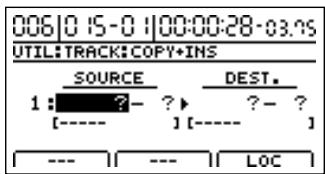
COPY INS (insertion)
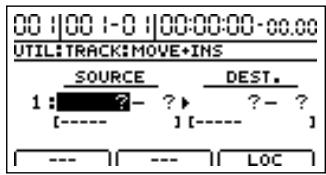
MOVE INS (insertion)
- Effects "Loop" (p. 125)
Vocal Tool Box (p. 131)
- Mastering Tool Kit (p. 146)
Banque "Guitar" U001~U120
Banque "MIC" U001~U050
Banque "Simul" U001~U050
Banque "Stereo" U001~U050
Banque "Guitar" S001~S120
Banque "MIC" S001~S050
Banque "Simul" S001~S050
Banque "Stereo" S001~S050
Chorus/Delay/Doubling
TIME 0.1s~10.0s (Default: 2.0s)
Type LO.MALE, HI.MALE, LO.FEML, HI.FEML
LO.FEML (Low Female)
HI.FEML (High Female)
Input Type LO.MALE, HI.MALE, LO.FEML, HI.FEML
LO.FEML (Low Female)
HI.FEML (High Female)
Structure des sections Drum/Bass/Loop Phrase
Correction du timing (Quantize)
Correction du timing (Quantize)
$$ 1 0 0 \times 0. 7 5 = 7 5 $$
$$ 1 0 0 \times 1. 5 = 1 5 0 $$
$$ 1 4 0 \times 0. 7 5 = 1 0 5 $$
$$ 2 0 0 \times 0. 7 5 = 1 5 0 $$
$$ 1 0 0 \times 0. 7 5 = 7 5 $$
$$ 1 0 0 \times 1. 5 = 1 5 0 $$
$$ 1 4 0 \times 0. 7 5 = 1 0 5 $$
$$ 2 0 0 \times 0. 7 5 = 1 5 0 $$
2MEAS Maj, 2MEAS Min, 4MEAS Maj, 4MEAS Min, 8MEAS Maj, 8MEAS Min, BLUES Maj, BLUES Min
Disc At Once By Song
Disc At Once By Marker
| Position du BR-1200CD | Position MTC des apparEIls MIDI | Décalage (Offset) |
| 01h00m00s00 | 01h30m00s00 | 00h30m00s00 |
| 01h00m00s00 | 00h30m00s00 | 23h30m00s00 |
"Copy Files From BR-1200CD" apparait.
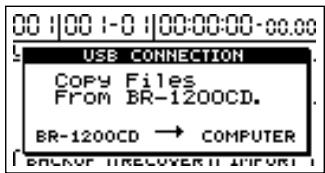
T01__01.AIF T0102_01.AIF
Track 1, V-Track 2 Track 1/2, V-Track 2
T01__02.AIF T0102_02.AIF
:
Track 8, V-Track 15 Track 11/12, V-Track 15
Track 8, V-Track 16 Track 11/12, V-Track 16
"Copy Files From BR-1200CD" apparait.
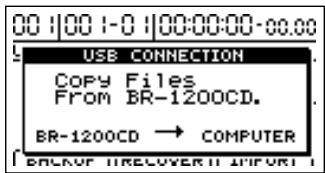
T01__01.AIF T0102_01.AIF
Track 1, V-Track 2 Track 1/2, V-Track 2
T01__02.AIF T0102_02.AIF
:
Track 8, V-Track 15 Track 11/12, V-Track 15
Track 8, V-Track 16 Track 11/12, V-Track 16
Accorder des instruments (Tuner)
COSM Overdrive/Distortion
COSM PreAmp&Speaker
Equalizer/Wah
- 4Band Equalizer
- Wah
Noise Suppressor
Foot Volume
FX
- Compressor
- Limiter
- Acoustic Guitar Simulator
Pickup Simulator
Tremolo - Slow Gear
- Defretter
-Phaser - Flanger
Pitch Shifter - 2x2 Chorus
- Pan
Vibrato - Uni-V
Short Delay
Humanizer - Ring Modulator
- Sub Equalizer
Delay
Chorus
2. ACOUSTIC SIM
Acoustic Guitar Simulator
Compressor
4Band Equalizer
Noise Suppressor
Foot Volume
Modulation
- Flanger
- Chorus
-Phaser
Pitch Shifter - Doubling
Tremolo/Pan
Delay
3. BASS SIM
Compressor/Defretter
- Compressor
- Defretter
Noise Suppressor
Foot Volume
Modulation
- Flanger
- Chorus
-Phaser
Pitch Shifter - Doubling
Tremolo/Pan
4. COSM COMP GUITAR AMP
Compressor/Defretter
- Compressor
- Defretter
Octave
Enhancer
4Band Equalizer/Wah
- 4Band Equalizer
- Wah
Noise Suppressor
Foot Volume
Modulation
- Flanger
- Chorus
-Phaser
Pitch Shifter - Doubling
Tremolo/Pan
Delay
7. COSM BASS AMP
COSM Overdrive/Distortion
COSM PreAmp&Speaker
Equalizer/Wah
- 3Band Equalizer
- Wah
Noise Suppressor
Foot Volume
FX
- Octave
Enhancer - Slow Gear
- Defretter
- Ring Modulator
-Phaser - Flanger
Pitch Shifter - 2x2 Chorus
Short Delay
Vibrato
Humanizer - Tremolo
- Pan
Chorus
Delay
9. COSM COMP BASS AMP
Acoustic Guitar Simulator
Compressor
Noise Suppressor
Delay
18. VO+ACOUSTIC
Acoustic Guitar Simulator
Effect On/Off OFF, ON
Pickup Type SINGLE, HUMBUCK
Effect On/Off OFF, ON
Effect On/Off OFF, ON
Low-Mid Gain -20~+20dB
Hi-Mid Gain -20~+20dB
Effect On/Off OFF, ON
Character LOOSE, TIGHT
Effect On/Off OFF, ON
Effect On/Off OFF, ON
Pre Delay 0.0~40.0ms
Pre Delay 0.0~40.0ms
Low Pre-Dly 0.0~40.0ms
High Pre-Dly 0.0~40.0ms
COSM Comp/Limiter (COSM Compressor/L Limiter)
Effect On/Off OFF, ON
COSM Overdrive/Distortion
Effect On/Off OFF, ON
Effect Level 0~100 (COSM OD BASS AMP uniqueness)
Direct Level 0~100 (COSM OD BASS AMP uniqueness)
Effect On/Off OFF, ON
Active/coupe le simulator Preamp/Speaker.
Gain SW LOW, MIDDLE, HIGH
Effect On/Off OFF, ON
Effect On/Off OFF, ON
Effect On/Off OFF, ON
Tap Time 0~100% (Type= Pan)
Avec I'algorithmme "COSM OD BASS AMP"
| Foot Volume On/Off | OFF, ON |
| Effect On/Off | OFF, ON |
Effect On/Off OFF, ON
Effect On/Off OFF, ON
Sample Rate OFF, 1/2~1/32
Effect On/Off OFF, ON
Effect On/Off OFF, ON
Active/curpe le Pitch Shifter.
Avec l'algorithmme "COSM OD GUITAR AMP" ou "COSM OD BASS AMP"
Voice 1-VOICE, 2-MONO, 2-ST, 1-PEDAL
Pitch Shifter simple.
PEDAL:
Separation -100~+100
Bass GUITAR AMP: 0~100, BASS AMP: -100~+100
Effect On/Off OFF, ON
Effect On/Off OFF, ON
Effect On/Off OFF, ON
Effect On/Off OFF, ON
Effect On/Off OFF, ON
Low-Mid Gain -20~+20dB
Hi-Mid Gain -20~+20dB
Effect On/Off OFF, ON
Mode LPF, BPF, HPF (COSM OD BASS AMP uniqueness)
Effect On/Off OFF, ON
Low-Mid Gain -12~+12dB
Low-Mid Freq 20Hz~8.0kHz
Hi-Mid Gain -12~+12dB
High Type SHLV, PEAK
Effect On/Off OFF, ON
Effect On/Off OFF, ON
Active/curse l'effet Enhancer.
Sensitivity 0~100
Frequency 1.0~10.0kHz
Effect On/Off OFF, ON
ExpM: Ratio 1:1.00~1:16.0, 1:INF
ExpM: Attack 0~100ms
ExpH: Release 50~5000ms
Effect On/Off OFF, ON
CmpM: Attack 0~100ms
Effect On/Off OFF, ON
Dither OFF, 24~8 BIT
| Bloc d'effet | Paramètre | Abréviation |
| Acoustic Guitar Simulator | On/Off | ASIM ON/OFF |
| Pickup Type | ASIM PICKUP | |
| Character | ASIM CHAR | |
| Top-Hi | ASIM TOP-HI | |
| Top-Mid | ASIM TOP-MID | |
| Body | ASIM BODY | |
| Level | ASIM LEVEL | |
| Compressor | On/Off | COMP ON/OFF |
| Sustain | COMP SUST | |
| Attack | COMP ATTACK | |
| Level | COMP LEVEL | |
| 4Band Equalizer | On/Off | EQ ON/OFF |
| Low Gain | EQ LOW | |
| Low-Mid Gain | EQ L.MID G | |
| Low-Mid Freq | EQ L.MID F | |
| Low-Mid Q | EQ L.MID Q | |
| Hi-Mid Gain | EQ H.MID G | |
| Hi-Mid Freq | EQ H.MID F | |
| Hi-Mid Q | EQ H.MID Q | |
| High Gain | EQ HIGH | |
| Level | EQ LEVEL | |
| Noise Suppressor | On/Off | NS ON/OFF |
| Threshold | NS THRESH. | |
| Release | NS REL. | |
| Foot Volume | On/Off | FOOT ON/OFF |
| Modulation | On/Off | MOD ON/OFF |
| Effect Type | MOD TYPE |
| Bloc d'effet | Paramètre | Abréviation |
| Flanger | Rate | FLANGER RATE |
| Depth | FLANGER DEPTH | |
| Manual | FLANGER MANUAL | |
| Resonance | FLANGER RESO | |
| Separation | FLANGER SEP | |
| Chorus | Rate | CHORUS RATE |
| Depth | CHORUS DEPTH | |
| Pre Delay | CHORUS PREDLY | |
| Effect Level | CHORUS LEVEL | |
| Phaser | Rate | PHASER RATE |
| Depth | PHASER DEPTH | |
| Manual | PHASER MANUAL | |
| Resonance | PHASER RESO | |
| Pitch Shifter | P.Shift Type | P.SHIFT TYPE |
| Pitch | P.SHIFT PITCH | |
| D:E Balance | P.SHIFT D:E | |
| Separation | P.SHIFT SEP | |
| Doubling | Delay Time | DOUBL'N DELAY |
| Separation | DOUBL'N SEP | |
| Effect Level | DOUBL'N LEVEL | |
| Tremolo/Pan | Mode | TRM/PAN MODE |
| Rate | TRM/PAN RATE | |
| Depth | TRM/PAN DEPTH | |
| Delay | On/Off | DELAY ON/OFF |
| Type | DELAY TYPE | |
| Feedback | DELAY FEEDBCK | |
| Effect Level | DELAY LEVEL | |
| Delay Time | DELAY TIME |
Algorithm: BASS SIM
| Bloc d'effet | Paramètre | Abréviation |
| Bass Simulator | On/Off | B.SIM ON/OFF |
| Character | B.SIM CHAR | |
| Level | B.SIM LEVEL | |
| Compressor/Defretter | On/Off | CMP/DEF ON/OFF |
| Effect Type | CMP/DEF TYPE | |
| Compressor | Sustain | COMP SUST |
| Attack | COMP ATTACK | |
| Level | COMP LEVEL | |
| Defretter | Sensitivity | DEFRET SENS |
| Attack | DEFRET ATTACK | |
| Depth | DEFRET DEPTH | |
| Level | DEFRET LEVEL | |
| Noise Suppressor | On/Off | NS ON/OFF |
| Threshold | NS THRESH. | |
| Release | NS REL. | |
| Foot Volume | On/Off | FOOT ON/OFF |
| Modulation | On/Off | MOD ON/OFF |
| Effect Type | MOD TYPE | |
| Flanger | Rate | FLANGER RATE |
| Depth | FLANGER DEPTH | |
| Manual | FLANGER MANUAL | |
| Resonance | FLANGER RESO | |
| Separation | FLANGER SEP | |
| Chorus | Rate | CHORUS RATE |
| Depth | CHORUS DEPTH | |
| Pre Delay | CHORUS PREDLY | |
| Effect Level | CHORUS LEVEL | |
| Phaser | Rate | PHASER RATE |
| Depth | PHASER DEPTH | |
| Manual | PHASER MANUAL | |
| Resonance | PHASER RESO | |
| Pitch Shifter | P.Shift Type | P.SHIFT TYPE |
| Pitch | P.SHIFT PITCH | |
| D:E Balance | P.SHIFT D:E | |
| Separation | P.SHIFT SEP | |
| Doubling | Delay Time | DOUBLE'N DELAY |
| Separation | DOUBLE'N SEP | |
| Effect Level | DOUBLE'N LEVEL |
Cannot Select Same Track!
Data Type Not Supported!
HDD Damaged! Can't Access HDD.
Pattern Memory Full!
- Received via drums MIDI channel when the MIDI parameter "Drums Ch." is set to 1-16; plays drum sound.
- Received via bass MIDI channel when the MIDI parameter "Bass Ch." is set to 1-16; plays bass sound.
- Drum sounds correspond to note numbers as follows.
Drum name Note number
Hi-Q D#1 (27)
Stick G1 (31)
Metronome (click) A 1 (33)
Metronome (bell) A#1 (34)
Kick 2 B1 (35)
Kick 1 C2 (36)
Snare 1 D2 (38)
Snare 2 E 2 (40)
Tom 1 F2 (41)
Closed hi-hat F#2 (42)
Tom 2 A 2 (45)
Open hi-hat A#2 (46)
Tom 3 C3 (48)
Crash cymbal C#3 (49)
Tom 4 D3(50)
Ride cymbal D#3 (51)
Cow bell G#3 (56)
Claves D#5 (75)
Control Change
Bank Select (Controller number 0, 32)
| Status | 2nd byte | 3rd byte |
| BnH | 00H | 00H |
| BnH | 20H | 11H |
n = MIDI channel number: 0H - FH (ch.1 - ch.16)
mm,ll = Bank number: 00 00H - 7F 7FH (bank.1 - bank.16384)
- When the MIDI parameter Effects P.C. is set to PC+BANK, this is transmitted via the MIDI channel selected in the Effects Ch. setting when insert effects patches are switched.
Volume (Controller number 7)
| Status | 2nd byte | 3rd byte |
| BnH | 07H | vvH |
n = MIDI channel number: 0H - FH (ch.1 - ch.16)
vv = Volume: 00H-7FH(0-127)
- Received via each track's MIDI channel when the MIDI parameter "MIDI Fader" is set to ON; controls the track volume.
Expression (Controller number 11)
| Status | 2nd byte | 3rd byte |
| BnH | 0BH | vvH |
| n = MIDI channel number: | 0H - FH (ch.1 - ch.16) | |
| vv = Expression: | 00H - 7FH (0 - 127) | |
- Received via the MIDI channel set for the EXP PEDAL when the MIDI parameter "MIDI Fader" is set to ON; controls the effects in the same manner as operating the EXP PEDAL.
Program Change
Status 2nd byte
CnH ppH
n = MIDI channel number:
pp = Program number:
0H-FH (ch.1-ch.16)
00H-7FH(prog.1-prog.128)
- When the MIDI parameter Effects P.C. is set to PC ONLY or PC+BANK, this is received via the MIDI channel selected in the Effects Channel setting and is used to switch the insert effects.
- Bank Select and Program numbers correspond to the insert effect patch banks and numbers as shown below.
| Bank Select | Program Number | Patch | ||
| MSB | LSB | Bank | Number | |
| 00H | 00H | 00H-77H | GUITAR | P001-P120 |
| 01H | 00H-31H | MIC | P001-P050 | |
| 03H | 00H-31H | STEREO | P001-P050 | |
| 04H | 00H-31H | SIMUL | P001-P050 | |
| 01H | 00H | 00H-77H | GUITAR | U001-U120 |
| 01H | 00H-31H | MIC | U001-U050 | |
| 03H | 00H-31H | STEREO | U001-U050 | |
| 04H | 00H-31H | SIMUL | U001-U050 | |
| 02H | 00H | 00H-77H | GUITAR | S001-S120 |
| 01H | 00H-31H | MIC | S001-S050 | |
| 03H | 00H-31H | STEREO | S001-S050 | |
| 04H | 00H-31H | SIMUL | S001-S050 | |
■Channel Mode Messages
All Sound OFF (Controller number 120)
| Status | 2nd byte | 3rd byte |
| BnH | 78H | 00H |
n = MIDI channel number: 0H - FH (ch.1 - ch.16)
- Received via drums MIDI channel when the MIDI parameter "Drums Ch." is set to 1-16; mutes the playing drum sounds.
- Received via bass MIDI channel when the MIDI parameter "Bass Ch." is set to 1-16; mutes the playing drum sounds.
Reset All Controllers (Controller number 121)
| Status | 2nd byte | 3rd byte |
| BnH | 79H | 00H |
n = MIDI channel number: 0H - FH (ch.1 - ch.16)
- Received via the MIDI channel set for the EXP PEDAL when the MIDI parameter "MIDI Fader" is set to ON.
- When this message is received, the EXP PEDAL is reset to 127.
All Note Off (Control number 123)
| Status | 2nd byte | 3rd byte |
| BnH | 7BH | 00H |
n = MIDI channel number: 0H - FH (ch.1 - ch.16)
* Received via bass MIDI channel when the MIDI parameter "Bass Ch." is set to 1-16; turns the playing bass note off.
System Realtime Message
Timing Clock
Status
F8H
- Received during creation of sync tracks in the Sync Track screen.
Start
Status
FAH
- Received when creation of the sync track begins in the Sync Track screen.
-Stop
Status
FCH
- Received when creation of the sync track is finished in the Sync Track screen.
Active Sensing
Status
FEH
- When Active Sensing is received, the unit will begin monitoring the intervals of all further messages. While monitoring, if the interval between messages exceeds approximately 400 ms, the same processing will be carried out as when Reset All Controllers is received, and message interval monitoring will be halted.
System Exclusive Message
Status
FOH
Data byte
iiH,ddH,...eeH
Status
F7H
F0H: System Exclusive Message status
ii = ID number: an ID number (manufacturer ID) to indicate the manufacturer whose Exclusive message this is. Roland's manufacturer ID is 41H.
ID numbers 7EH and 7FH are extensions of the MIDI standard; Universal Non-realtime Messages (7EH) and Universal Realtime Messages (7FH).
dd,...,ee = data: 00H - 7FH (0 - 127)
F7H:
EOX (End Of Exclusive)
Universal Non-realtime System Exclusive Messages
Identity Request Message
Status
FOH
Data byte
7EH,dev,06H,01H
Status
F7H
Byte Explanation
F0H Exclusive status
7EH ID number (Universal Non-realtime Message)
dev Device ID (dev: 10H - 1FH, 7FH)
06H Sub ID#1 (General Information)
01H Sub ID#2 (Identity Request)
F7H EOX (End Of Exclusive)
- Only a device ID of 7FH or message matching the BR-1200CD's device ID is received.
- When this message is received, Identity Reply message (p. 346) will be transmitted.
About Device ID
Exclusive messages are not assigned to any particular MIDI channel. Instead, they have their own special control parameter called device ID. The Roland exclusive messages use device IDs to specify various devices.
How to set the device ID:
- Press [UTILITY], move the cursor to [MIDI], then press [ENTER/YES].
The MIDI settings screen appears.
- Move the cursor to "Device ID," then rotate the TIME/VALUE dial to set the device ID.
The Device ID can be set to any number from 17 to 32. It was set to 17 at the factory.
2. Data Transmission
■Channel Voice Messages
Note off
Status 2nd byte
8nH kkH
3rd byte
vvH
n = MIDI channel number:
kk = Note number:
vv = Note off velocity:
0H-FH (ch.1-ch.16)
00H-7FH(0-127)
00H-7FH(0-127)
Note on
Status 2nd byte
9nH kkH
3rd byte
vvH
n = MIDI channel number:
kk = Note number:
vv = Note on velocity:
0H-FH (ch.1-ch.16)
00H-7FH(0-127)
01H-7FH(1-127)
- Transmitted by drum pattern using the selected MIDI channel number when the MIDI parameter "Drums Ch." is set to 1-16.
- Transmitted by bass pattern using the selected MIDI channel number when the MIDI parameter "Bass Ch." is set to 1-16.
- Transmitted according to the content of the SMF during playback of SMFs.
- Notes sounded by the drum pattern correspond to note numbers as follows.
Rhythm Guide Tone Note Number
Hi-O D#1 (27)
Stick G1 (31)
Metronome (click) A 1 (33)
Metronome (bell) A#1 (34)
Kick 2 B1 (35)
Wrist 6-2-20
Kick 1 C2 (36)
Snare 1 D2 (38)
Snare 2 E2 (40) T-1 E2 (11)
Tom 1 F2 (41)
Closed hi-hat F#2 (42) T-2 A-2 (45)
Tom 2 A 2 (45) O. J. bidet A#2 (46)
Open Hil-Hat A#2 (40) Tom 3 C3 (48)
Crash cymbal C#3(49)
Tom 4 D3 (50)
Ride cymbal D#3 (51)
Cow bell G#3 (56)
Claves D#5 (75)
Polyphonic Key Pressure
Status 2nd byte
AnH kkH
3rd byte
vvH
n = MIDI channel number:
0H-FH (ch.1-ch.16)
kk = note number:
00H-7FH(0-127)
vv = Polyphonic Key Pressure:
00H-7FH(0-127)
- Transmitted according to the content of the SMF during playback of SMFs.
Control Change
- Transmitted according to the content of the SMF during playback of SMFs.
Bank Select (Controller number 0, 32)
Status 2nd byte
3rd byte
BnH 00H
mmH
BnH 20H
IIH
n = MIDI channel number:
0H-FH (ch.1-ch.16)
00 00H - 7F 7FH (bank.1 - bank.16384)
mm, ll = Bank number:
- When the MIDI parameter Effects P.C. is set to PC+BANK, this is transmitted via the MIDI channel selected in the Effects Ch. setting when insert effects patches are switched.
- For the correspondence between Bank Select/Program numbers and the insert effect patch banks/numbers, see p. 343.
Volume (Controller number 7)
Status 2nd byte
2nd byte
3rd byte
BnH 07H
vvH
n = MIDI channel number:
0H-FH (ch.1-ch.16)
vv = Volume:
00H-7FH(0-127)
- When the MIDI parameter "MIDI Fader" is set to ON, this is transmitted via the MIDI channel set for a track when the corresponding track fader is moved.
Expression (Controller number 11)
Status 2nd byte 3rd byte
BnH 0BH vvH
n = MIDI channel number: 0H - FH (ch.1 - ch.16)
vv = Expression: 00H - 7FH (0 - 127)
- When the MIDI parameter "MIDI Fader" is set to ON, this is transmitted via the MIDI channel set for the EXP PEDAL when the EXP PEDAL is operated.
Program Change
Status 2nd byte
CnH ppH
n = MIDI channel number: 0H - FH (ch.1 - ch.16)
pp = Program number: 00H - 7FH (prog.1 - prog.128)
- Transmitted according to the content of the SMF during playback of SMFs.
- When the MIDI parameter Effects P.C. is set to PC ONLY or PC+BANK, this is transmitted via the MIDI channel selected in the Effects Channel setting when insert effects patches are switched.
- For the correspondence between Bank Select/Program numbers and the insert effect patch banks/numbers, see p. 343.
Channel Pressure
Status 2nd byte
DnH vvH
n = MIDI channel number: 0H - FH (ch.1 - ch.16)
vv = Channel Pressure: 00H - 7FH (0 - 127)
- Transmitted according to the content of the SMF during playback of SMFs.
Pitch Bend Change
Status 2nd byte 3rd byte
EnH lIH mmH
n = MIDI channel number: 0H - FH (ch.1 - ch.16)
mm, ll = Pitch Bend value: 00 00H-40 00H-7F 7FH (-8192-0-+8191)
- Transmitted according to the content of the SMF during playback of SMFs.
■Channel Mode Messages
- Transmitted according to the content of the SMF during playback of SMFs.
All Sound Off (Controller number 120)
Status 2nd byte 3rd byte
BnH 78H 00H
n = MIDI channel number: 0H - FH (ch.1 - ch.16)
Reset All Controllers (Controller number 121)
Status 2nd byte 3rd byte
BnH 79H 00H
n = MIDI channel number: 0H - FH (ch.1 - ch.16)
All Notes Off (Controller number 123)
Status 2nd byte 3rd byte
BnH 7BH 00H
n = MIDI channel number: 0H - FH (ch.1 - ch.16)
Omni Off (Controller number 124)
Status 2nd byte 3rd byte
BnH 7CH 00H
n = MIDI channel number: 0H - FH (ch.1 - ch.16)
Omni On (Controller number 125)
Status 2nd byte 3rd byte
BnH 7DH 00H
n = MIDI channel number: 0H - FH (ch.1 - ch.16)
Mono (Controller number 126)
Status 2nd byte 3rd byte
BnH 7EH mmH
n = MIDI channel number: 0H - FH (ch.1 - ch.16)
mm = mono number: 00H - 10H (0 - 16)
Poly (Controller number 127)
Status 2nd byte 3rd byte
BnH 7FH 00H
n = MIDI channel number: 0H-FH (ch.1-16)
System Common Messages
Quarter Frame Messages
Status Second
F1H mmH (= 0nnnddd)
nnn = Message type: 0 = Frame count LS nibble
1 = Frame count MS nibble
2 = Seconds count LS nibble
3 = Seconds count MS nibble
4 = Minutes count LS nibble
5 = Minutes count MS nibble
6 = Hours count LS nibble
7 = Hours count MS nibble
dddd = 4 bit nibble data: OH-FH (0-15)
- If the Sync parameter "Sync Gen." is set to "MTC," quarter frame messages of the time code type specified by "MTC Type" will be transmitted when the BR-1200CD is running (recording or playing). The transmitted time counts are summed to "SMPTE (MTC) Offset Time" as the song top is "00:00:00:00".
Bit Field is assigned as follows.
Frame Count xxxyyyy
xxx Reserved (000)
yyyy Frame No. (0-29)
Seconds Count xxxyyyy
xx Reserved (00)
yyyy Seconds (0-59)
Minutes Count xyyyyyy
xx Reserved (00)
yyyyy Minutes (0-59)
Hours Count xyzzzzz
x Reserved (0)
yy Time Code Type
- The time code types defined by the MIDI specification correspond to the BR-1200CD Sync parameter "MTC Type" as follows.
MIDI specification setting "MTC Type" setting
0 = 24 Frames / Sec 24
1 = 25 Frames / Sec 25
2 = 30 Frames / Sec (Drop Frame) 29D
3 = 30 Frames / Sec (Non Drop Frame 29N or 30
zzzzz Hours
Song Position Pointer
Status 2nd byte 3rd byte
F2H mmH nnH
mm, nn=Song position point: 00H 00H-7FH 7FH
- The current position is transmitted by the Song Position Pointer Message when the BR-1200CD is stopped, or the locate operation has been performed, if the SYNC parameter "Sync Gen." is set to "MIDI CLOCK."
Equipement MIDI
System Realtime Messages
Timing Clock
Status
F8H
- Transmitted when "Sync Gen." is "MIDI CLOCK" in the SYNC parameter.
Start
Status
FAH
- Transmitted when "Sync Gen." is "MIDI CLOCK" in the SYNC parameter.
- Continue
Status
FBH
- Transmitted when "Sync Gen." is "MIDI CLOCK" in the SYNC parameter.
-Stop
Status
FCH
- Transmitted when "Sync Gen." is "MIDI CLOCK" in the SYNC parameter.
Active Sensing
Status
FEH
- This is transmitted at intervals of approximately 200 msec.
System Exclusive Messages
Universal System Exclusive Message
Identity Reply Message
- Receiving Identity Request Message, the BR-1200CD send this message.
| Status | Data byte | Status |
| F0H | 7EH, dev, 06H, 02H, 41H, 71H, 01H | F7H |
| 00H, 00H, 00H, 00H, 00H |
Byte Remarks
F0H Exclusive status
7EH ID number (Universal Non-realtime Message)
dev Device ID (dev: 10H - 1FH)
06H Sub ID#1 (General Information)
02H Sub ID#2 (Identity Reply)
41H ID number (Roland)
0AH 02H Device family code
00H 00H Device family number code
00H 00H 00H 00H Software revision level
F7H EOX (End of Exclusive)
For instructions on setting the device ID, refer to "How to set the device ID:" (p. 344).
OMIDI Machine Control Command
| Status | Data byte | Status |
| F0H | 7FH, Dev, 06H, aaH, ..., bbH | F7H |
Byte Remarks
F0H Exclusive Status
7FH Universal System Exclusive Realtime Header
Dev Device ID (7FH)
06H MMC command message
aaH command
bbH command
F7H EOX (End of Exclusive)
OSTOP (MCS)
| Status | Data byte | Status |
| F0H | 7FH, Dev, 06H, 01H | F7H |
| Byte | Remarks | |
| F0H | Exclusive status | |
| 7FH | Universal System Exclusive Realtime Header | |
| Dev | Device ID (7FH) | |
| 06H | MMC command message | |
| 01H | STOP (MCS) | |
| F7H | EOX (End of Exclusive) |
- If the transport switch [STOP] was pressed, the BR-1200CD transmits this message.
ODEFERRED PLAY (MCS)
| Status | Data byte | Status |
| F0H | 7FH, Dev, 06H, 03H | F7H |
| Byte | Remarks | |
| F0H | Exclusive status | |
| 7FH | Universal System Exclusive Realtime Header | |
| Dev | Device ID (7FH) | |
| 06H | MMC command message | |
| 03H | DEFERRED PLAY (MCS) | |
| F7H | EOX (End of Exclusive) |
- If the transport switch [PLAY] was pressed, the BR-1200CD transmits this message.
RECORD STROBE
| Status | Data byte | Status |
| F0H | 7FH, Dev, 06H, 06H | F7H |
| Byte | Remarks | |
| F0H | Exclusive status | |
| 7FH | Universal System Exclusive Realtime Header | |
| Dev | Device ID (7FH) | |
| 06H | MMC command message | |
| 06H | RECORD STROBE | |
| F7H | EOX (End of Exclusive) |
- Transmitted when recording to the audio tracks begins.
RECORD EXIT
| Status | Data byte | Status |
| F0H | 7FH, Dev, 06H, 07H | F7H |
Byte Remarks
F0H Exclusive status
7FH Universal System Exclusive Realtime Header
Dev Device ID (7FH)
06H MMC command message
07H RECORD EXIT
F7H EOX (End of Exclusive)
- Transmitted when recording to the audio tracks ends.
OMMC RESET
| Status | Data byte | Status |
| F0H | 7FH, Dev, 06H, 0DH | F7H |
Byte Remarks
FOH Exclusive status
7FH Universal System Exclusive Realtime Header
Dev Device ID (7FH)
06H MMC command message
0DH MMC RESET
F7H EOX (End of Exclusive)
- When powered on the BR-1200CD transmits this message.
LOCATE [MCP]
Format2-LOCATE [TARGET]
| Status | Data byte | Status |
| F0H | 7FH, Dev, 06H, 44H, 06H, 01H, hrH, mnH, scH, frH, ffH | F7H |
| Byte | Remarks | |
| F0H | Exclusive status | |
| 7FH | Universal System Exclusive Realtime Header | |
| Dev | Device ID (7FH) | |
| 06H | MMC command message | |
| 44H | LOCATE (MCP) | |
| 06H | Byte count | |
| 01H | "TARGET" sub-Command | |
| hrH, mnH, scH, frH, ffH | Standard Time Specification with subframes | |
| F7H | EOX (End of Exclusive) |
- If the efficient Maker of the locate switch is pressed or when moved, the BR-1200CD transmits this message.
●MIDI Time Code Command
Full Message
Basic operation of quarter frame messages will be handled.
| Status | Data Byte | Status |
| F0H | 7FH, Dev, 01H, 01H, hrH, mnH, scH, frH | F7H |
| Byte | Remarks | |
| F0H | Exclusive status | |
| 7FH | Realtime Universal System Exclusive Header | |
| Dev | Device ID (7FH) | |
| 01H | sub-ID #1 (MIDI Time code) | |
| 01H | sub-ID #2 (Full message) | |
| hrH | hours and type: 0 yy zzzzz | |
| yy | type: | |
| 00 = 24 Flame/sec | ||
| 01 = 25 Flame/sec | ||
| 10 = 30 Flame/sec (Drop Format) | ||
| 11 = 30 Flame/sec (Non Drop Format) | ||
| zzzzzz: | Hours (00 - 23) | |
| mnH | Minutes (00 - 59) | |
| scH | Seconds (00 - 59) | |
| frH | Frames (00 - 29) | |
| F7H | EOX (End of Exclusive) |
- This message is transmitted when the song position moves.
3. Supplementary material
- Decimal/Hexadecimal table
(hexadecimal values are indicated by a following "H")
MIDI uses 7-bit hexadecimal values to indicate data values and the address and size of exclusive messages. The following table shows the correspondence between decimal and hexadecimal numbers.
| D | H | D | H | D | H | D | H |
| 0 | 00H | 32 | 20H | 64 | 40H | 96 | 60H |
| 1 | 01H | 33 | 21H | 65 | 41H | 97 | 61H |
| 2 | 02H | 34 | 22H | 66 | 42H | 98 | 62H |
| 3 | 03H | 35 | 23H | 67 | 43H | 99 | 63H |
| 4 | 04H | 36 | 24H | 68 | 44H | 100 | 64H |
| 5 | 05H | 37 | 25H | 69 | 45H | 101 | 65H |
| 6 | 06H | 38 | 26H | 70 | 46H | 102 | 66H |
| 7 | 07H | 39 | 27H | 71 | 47H | 103 | 67H |
| 8 | 08H | 40 | 28H | 72 | 48H | 104 | 68H |
| 9 | 09H | 41 | 29H | 73 | 49H | 105 | 69H |
| 10 | 0AH | 42 | 2AH | 74 | 4AH | 106 | 6AH |
| 11 | 0BH | 43 | 2BH | 75 | 4BH | 107 | 6BH |
| 12 | 0CH | 44 | 2CH | 76 | 4CH | 108 | 6CH |
| 13 | 0DH | 45 | 2DH | 77 | 4DH | 109 | 6DH |
| 14 | 0EH | 46 | 2EH | 78 | 4EH | 110 | 6EH |
| 15 | 0FH | 47 | 2FH | 79 | 4FH | 111 | 6FH |
| 16 | 10H | 48 | 30H | 80 | 50H | 112 | 70H |
| 17 | 11H | 49 | 31H | 81 | 51H | 113 | 71H |
| 18 | 12H | 50 | 32H | 82 | 52H | 114 | 72H |
| 19 | 13H | 51 | 33H | 83 | 53H | 115 | 73H |
| 20 | 14H | 52 | 34H | 84 | 54H | 116 | 74H |
| 21 | 15H | 53 | 35H | 85 | 55H | 117 | 75H |
| 22 | 16H | 54 | 36H | 86 | 56H | 118 | 76H |
| 23 | 17H | 55 | 37H | 87 | 57H | 119 | 77H |
| 24 | 18H | 56 | 38H | 88 | 58H | 120 | 78H |
| 25 | 19H | 57 | 39H | 89 | 59H | 121 | 79H |
| 26 | 1AH | 58 | 3AH | 90 | 5AH | 122 | 7AH |
| 27 | 1BH | 59 | 3BH | 91 | 5BH | 123 | 7BH |
| 28 | 1CH | 60 | 3CH | 92 | 5CH | 124 | 7CH |
| 29 | 1DH | 61 | 3DH | 93 | 5DH | 125 | 7DH |
| 30 | 1EH | 62 | 3EH | 94 | 5EH | 126 | 7EH |
| 31 | 1FH | 63 | 3FH | 95 | 5FH | 127 | 7FH |
D: decimal
H: hexadecimal
Decimal expressions such as used for MIDI channel, Bank Select, and Program Change will be the value 1 greater than the decimal value given in the above table.
Since each MIDI byte carries 7 significant data bits, each byte can express a maximum of 128 different values. Data for which higher resolution is required must be transmitted using two or more bytes. For example a value indicated as a two-byte value of aa bb HH would have a value of aa x 128 + bb.
For a signed number (+/-) , 40H = -64 , 00H = 0 , and 3FH = +63 . (i.e., the decimal equivalent will be 64 less than the decimal value given in the above table.) For a two-byte signed number, 4000H = -8192 , 0000H = 0 , and 3F7FH = +8191 .
Hexadecimal notation in two 4-bit units is used for data indicated as `Nibbled'. The nibbled two-byte value of 0a0bH would be a x16 + b .
What is the decimal equivalent of 5AH?
From the above table, 5AH = 90
What is the decimal equivalent of the 7-bit hexadecimal values 12 34H?
From the above table, 12H = 18 and 34H = 52
Thus, 18 × 128 + 52 = 2356
What is the decimal equivalent of the nibbled expression 0A 03 09 0DH?
From the above table, 0AH = 10,03H = 3,09H = 9,0DH = 13
Thus, the result is ((10 × 16 + 3) × 16 + 9) × 16 + 13 = 41885
What is the nibbled equivalent of the decimal number 1258?
16)1258
16) 78...10
16) 4.4.14 0.4
From the above table, 0 = 00H 4 = 04H 14 = 0EH 10 = 0AH
Thus the result is 00 04 0E 0AH
MIDI Implementation Chart
| Function... | Transmitted | Recognized | Remarks | |
| Basic Channel | Default Changed | 1-16 1-16 | 1-16 1-16 | Memorized |
| Mode | Default Messages Altered | X X **** | X X X | |
| Note Number: | True Voice | 0-127 **** | 0-127 DRUMS: 27-75, BASS: 0-72 | |
| Velocity | Note On Note Off | 1-127 64 1-127 *1 | 1-127 X X | |
| After Touch | Key's Channel's | O *1 O *1 | X X | |
| Pitch Bend | O *1 | X | ||
| Control Change | 0, 32 0-119 7 11 | O O *1 O *2 O *2 | O X O *2 O *2 | Bank Select Volume Expression |
| Program Change : | True Number | O *1 0-127 | O *7 0-119 | |
| System Exclusive | O | O *3 | ||
| System Common | : Quarter Frame : Song Position : Song Select : Tune Request | O *4 O *5 X X | X X X | |
| System Real Time | : Clock Start : Commands Continue Stop | O *5 O *5 O *5 | O *6 O *6 | |
| Aux Messages | : All Sound Off : Reset All Controllers : Local On/Off : All Notes Off : Omni On/Off : Mono/Poly : Active Sensing : System Reset | O *1 O *1 O *1 O *1 O *1 O | O *8 O *2 O *8 | |
| Notes | *1 When SMF playbacked, transmit in case of SMF. *2 MIDI Folder = ON only *3 Identity Request only *4 Sync Gen. = MTC only *5 Sync Gen. = MIDI CLOCK only *6 Sync Track Recording only *7 Effects Ch., Drums Ch., or Note Ch only *8 Bass = ON and Bass Ch. only | |||
Mode 1: OMNI ON, POLY
Mode 2: OMNI ON, MONO
Mode 3: OMNI OFF, POLY
Mode 4: OMNI OFF, MONO
O:Yes
X:No
Fiche technique
Conversion A/N: 24 bits, methode AF (Guitare/Basse)
24 bits, modulation (VOCAL)
24 bits, modulation (MULTI-TRACK)
24 bits, modulation (STEREO TRACKS)
Conversion A/N: 24 bits, modulation
Prises LINE OUT: -10dBu
Prises LINE OUT (RCA / cinch)
Prises LINE IN (RCA/cinch)
Bass 172, 297-299, 307
Bass Ch. 243
Bass Cut Filter 291, 294, 314, 316
BASS MULTI 289
BASSOD 297
BASS SIM 288
Bass Simulator 288, 294
BASS360 299
Basse 154, 171
Motif 172
Son 172
BASSWAH 310
Batterie 54,154,157
Motifs 56, 160
Sons 60
BD-2 297
BEAT 193,210
Beat 196,209-210
Map 210
Beat Map 209
BEEP 212
BG DRV 297
BG LEAD 297,307
BG RHY 297
BG STK 308
BIPHASE 305
Bit 303
BLOCK < = 119,134,138,143,149
BLUES 297,307
BLUESOD 297
Body 293
Boite a rythmes 245
BoomBox 313
BoomLoB 313
Compressor/Defretter 288-289
CONCERT 299
Connexions 34
Contraste 274
Copie numérique 280
Copier 99,123
Voir aussi "Copy"
COPY 110, 194
Copy
Boucle 194
Motif de basse 182
Rhythm arrangement 208
COPY INS 100
Copyright 239
COSM 116
COSMBASSAMP 289
COSM COMP BASS AMP 290
COSM COMP GUITAR AMP 289
COSM Comp/Limiter 289-290, 296
COSM OD BASS AMP 290
COSM OD GUITAR AMP 288
COSM Overdrive/Distortion 288, 290, 297
COSM PreAmp&Speaker 288, 290, 297
COSM VOCAL COMP 291
Create By Track 188
Cut Off Freq 294,314,316
Cutoff Freq 303
D
DE Balance 303, 306
D.CpProtect 280
DARK 127, 298
Data CD 226
DATA SAVE/LOAD 25,226
D-Comp 296
De-esser 290, 299
DEFAULT 127
Defretter 288-290, 300
Delay 85,116,125,288-292,300
Delay Time 300, 308, 316
Delay time 126
DELAY TYPE 126
DELETE ... 21, 76, 122, 166, 168, 179, 181, 193, 199, 201, 204, 207
Delete
Motif de basse 182
Disc At Once By Marker 91,219
Disc At Once By Song 219-220
Disk Initialize 285
DISP 100, 102, 104, 107-108, 189, 205, 233, 265
Disque amovible 259
Disque dur 284
Capacité 112
Dépannage 6
Installation 6
Precautions 6
Problèmes 338
Distance 291,301
DISTORT 297
Dither 317
DIV 285
DRUM&BASS PATTERN 229
Drums Ch. 243
DRUMS&LP 157,185
DRV STK 297
DS-30A 142,313
DS-50A 142,313
DS-90A 142,313
DST + 297
Durée 178
E
Echanger 103
Ecran 27
Contraste 274
EDIT 23,60,119
EDITED 110
Edition 99
Effacer 106, 108
Patch Write/Copy 122
Effects Ch. 255
Effects P.C. 255
Effects/Rhythm 228
Effet 52,116
Bloc 142, 149
Blogs 118
Final Mastering Track 79-80
FINALIZE 225
Finalize 225
Fine 1/2 306
Flanger 288, 290-291, 302
Flat 300, 304
FLIPTOP 299
FOOT SW 28
Foot Switch 39
Foot Volume 288-291
FootVolumeOn/Off 302
Formant 310
Formant1 310
Formant2 310
Frame 27, 247
Freq 303
Frequency 301, 308, 311-312, 314, 316
Fretless 300
FROM 100, 102
FULLRNG 297
FUNCTION 30
FV-300L 124
FX 288, 290
G
Gain 298,307,314
Gain SW 298
GATE 178-179
GLOBAL 282
GM 170, 183, 243
GS 170, 183, 243
GUITAR/BASS 20,26,50,116
Guitare 118
GUV DS 297
H
H TO HF 305
HTOS 305
HALL 126
HARD 128
Hard Disk Information 284
Harmony Sequence 117, 131, 136-137
HD ACCESS 25
HDD 231, 284
HDD Backup 230
HDD Recover 231
Hed.Dy 304
HF DAMP 126-127
Hi Cut Freq 295,300
HI FREQ 130
HI GAIN 130
HI.FEML 133,138
HI.MALE 133,137
HIGH 83,307
High Depth 295
High Freq 294,315
High Freq Trimmer 314
High Gain 294, 309, 315
High Level 295, 317
High Pre-Dly 295
High Q 294, 315
High Rate 295
High Type 315
Hi-Mid Freq 294,309,315
Hi-Mid Gain 294,309,315
Hi-Mid Q 294,309,315
HPF 303, 311
Hum to Half-tone 305
Hum to Single 305
Human Feel 137
Humanizer 288, 290, 302
Humbucker 305
HVYMTL 297
IMPORT 170, 183, 190, 232, 239, 265, 272
Import 183
IN 21,76
INFO 110,284
Information 27
INITIALIZE 282
Initialize 282
INPUT 21
Input 296,304,316
Input Gain 315-316
INPUT LEVEL 21,62
Input Pan 63
INPUT SELECT 20
Input Select 50,67
INPUT SENS 20,51
Input Sensitivity 51
Input Type 137
Insérer 104
INSERT 104, 121-122, 166, 168, 179, 181, 193, 200, 207, 221
Insert Boucle 204
Insertion 52
INVERSE 304, 313
Invert 303
ISO9660 169,183,190,235
J
JAZZCMB 297
JC-120 297,307-308
JUMBO 293
K
Kit de batterie 158
KNEE 128
L
LCD CONTRAST 274
LOOP PHRASE IMPORT 25,188
LOW 84,307
LOW CUT 125, 127
Low Cut Filter 303
Low Depth 295
LOW FREQ 130
Low Freq 294, 315
Low Freq Trimmer 314
LOW GAIN 130
Low Gain 294, 309, 315
Low Level 295, 317
Low Mix Level 301
Low Pre-Dly 295
Low Q 294, 315
Low Rate 295
LowCutFilter 295,302
Low-Mid Freq 294,309,315
Low-Mid Gain 294,309,315
Low-Mid Q 294,309,315
LowType 315
LPF 303, 311
Lrg.Cn 304
Lrg.Dy 304
M
M.SCOPE 179
Macintosh 258, 267
MANUAL 306, 310
Manual 302, 305
MAPEDIT 134,200,210
MARK 21,90
MARKER 21
Marker 27,43,90,92
Stop 92
Marker Name 91
Mas.Fader Ch. 253
MASTER 40,251
Master 307
Master Sync 245
MASTERING 21, 146
MASTERING TOOL KIT 23, 229
Mastering Tool Kit 117, 315
Edit 149
Patch Copy 151
Patch Write/Copy 150
Microphone electret 279
Microscope 165, 179
MID 83
MID FREQ 130
Mid Freq 294
MID GAIN 130
Mid Gain 294
Mid Level 317
MIDQ 130
Mid Q 294
MIDDLE 307-308
Middle 298-299,307
Middle Freq 299
MIDI 242-243
Cable 242
Canaux 242
Clavier 254
Clock 245
Fader 252
Mode 295,306,309,311
Model 313
Modify Filter 303
Modulation 290-291
MONO 295
On/Off 137,296,313-314
ONLY CUR. PARTITION 285-286
OPTIMIZE 112
ORG 298-299
OUT 21,76
Output 304, 317
Output Level 315
Output Sp. 313
P
P.Shift Type 306
Page principal 30
PAGE SCROLL 31
PAN 22,63,82
Pan 63,82,137,288,290,300,304
PAN-SQR 309
PAN-TRI 309
Paramétrique 308
Partition 284, 286
Patch
Numero 119
Pattern Selection 158, 187
Pattern Setup 158
PC ONLY 255
PC+BANK 255
PEAK 20,51,315
Peak 311-312
PEDAL 306, 310-311
Pedal Pos. 310
Pedal Wah 310
PITCH CORRECTION 132
Pitch Correction 117, 131-132
Edit 133
Parameter 133
Pitch Shift 306
Pitch Shifter 124, 288, 290-291, 306
Pitch Shifter (pedale) 306
Plage de notes 254
Index
PLATE 126
PLAY 22,39,236,239
PLAYER 236, 303
Polarity 311
Port USB 28
POS 203
Position 203
Reverb 64,84,116,125
Edit 126
Send 64,126
Reverb Send 138
REW 22,41
RF ORNG 297
RF RED 297
RF VNTG 297
RHYTHM 229
Rhythm Arrangement 156
Ring Modulator 288, 290-291, 308
Rise Time 308
R-MAN 297
ROOM 126
Rythme 154
s
S TO H 305
Sample Rate 303
Sauvegarde 71, 114, 122
Sauvegarde,voir "Write", "Store" et "Save" 70
Short Delay 126, 288, 290, 308
Sibilant Lvl 299
Silence 137
Simple bobinage 305
SIMUL 20,50,116
Simul 118
SINGLE 300
Single to Hum 305
SLDN 297,307
SLOW 306
Slow Gear 288, 290, 308
Slow gear 308
SMALL 308
SmallTV 313
SMF 169, 183, 236
Import 183
SMF Import 169-170
Sml.Cn 304
Sml.Dy 304
SmlCUBE 313
Smooth 134
SOFT 128
SoftClip 317
Speaker Type 298-299,308
Split Freq H 316
Split Freq L 316
Spr Flat 313
STAGE 305
START 100, 102, 104, 107-108, 152, 189, 205, 233
Statut de piste 23
STD 293
STEP 163, 177
Step 305
Step Rate 305
STEREO 116,295
Stereo 118
Stereo Link 129-130
STEREO MULTI 291
STKCRNC 297
STOP 22,39,41
STORE 71
Sub Equalizer 288, 308
Sub Mixer 277
Suite d'accords 156
SURFACE SCAN 285
Sustain 296
Swing 167, 180
SWING POS 167, 180
SYNC 245-246
TRK 249
Sync Gen. 246
Sync Offset 250
Sync Source 249
Sync Track 248
Threshold 296,302,304,314,317
THRU 303
TIME 126-127
Time 301
TimeDisp. 248
Time Offset 248
TIME/VALUE 25,32,42
TIMES 100
Tiroir 26
TMP 119
TO 100, 102, 122
TO TRACK 204
TONE 127
Tone 296,300,302,305
TOP 203
Top 293
Top-Hi 293
Top-Mid 293
TOUCH 311
Touch Wah 310
Tourne-disque 303
Track Compressor 128
Copy 99-100
Cut 106
Edit 99
Erase 108
Exchange 103
Insert 104
Level 93
Level, Fader 93
Level, Scene 93
Menu 99
Move 101
Mute 46
Name 80
Type 49,185,211
Type Select 54,157,171,211
Track At Once 219
Track Move 101
TRACK MUTE 24
TRACK TYPE 24
TRACK TYPE SELECT . 24, 157, 171, 185-186, 211-212
Transport,boutons 41
Treble 297, 299, 307
Tremolo 288, 290, 309
Tremolo/Pan 288,290-291,309
Trk 1 Ch. 253
Trk 11&12 Ch. 253
TRM-SQR 309
TRM-TRI 309
Troubleshooting 337
TRS 34
TSCREAM 297
Tuner 275
TUNER ON/OFF 21, 275
Tuning 303
TURBOOD 297
TW 310
TWEED 297
TWIN 308
TYPE 85,125-126
Type 133,296-297,300,305,310
Type d'accord 200
Type de piste 171
U
UNDO/REDO 25
Uni-V 288,309
UP 311
USB 258,260,339
USE BASS 49
USE DRUMS + BASS + LOOP 49
USE DRUMS + LOOP 49
User 132
This equipment has been tested and found to comply with the limits for a Class B digital device, pursuant to Part 15 of the FCC Rules. These limits are designed to provide reasonable protection against harmful interference in a residential installation. This equipment generates, uses, and can radiate radio frequency energy and, if not installed and used in accordance with the instructions, may cause harmful interference to radio communications. However, there is no guarantee that interference will not occur in a particular installation. If this equipment does cause harmful interference to radio or television reception, which can be determined by turning the equipment off and on, the user is encouraged to try to correct the interference by one or more of the following measures:
Reorient or relocate the receiving antenna.
Increase the separation between the equipment and receiver.
Connect the equipment into an outlet on a circuit different from that to which the receiver is connected.
— Consult the dealer or an experienced radio/TV technician for help.
This device complies with Part 15 of the FCC Rules. Operation is subject to the following two conditions:
(1) This device may not cause harmful interference, and
(2) This device must accept any interference received, including interference that may cause undesired operation.
Unauthorized changes or modification to this system can void the users authority to operate this equipment.
This equipment requires shielded interface cables in order to meet FCC class B Limit.
Pour le Canada
NOTICE
This Class B digital apparatus meets all requirements of the Canadian Interference-Caising Equipment Regulations.
AVIS
DECLARATION OF CONFORMITY Compliance Information Statement
Model Name: BR-1200CD
Type of Equipment : Digital Recording Studio
Responsible Party: Roland Corporation U.S.
Address: 5100 S.Eastern Avenue, Los Angeles, CA 90040-2938
Telephone: (323) 890-3700
- Copyright ©2004 BOSS CORPORATION
- Section 2 Edition 89
- Structure des sections Drum/Bass/Loop Phrase. 154
- Section 7 Exploiter I'USB 257
- Section 9 Appendices ....287
- Bouton LOOP PHRASE IMPORT
- Prise MIDI OUT
- Prise MIDI IN
- Prise DIGITAL OUT
- Prise EXP PEDAL (expression)
- COPY INS (insertion)
- MOVE INS (insertion)
- - Effects "Loop" (p. 125)
- Vocal Tool Box (p. 131)
- - Mastering Tool Kit (p. 146)
- Chorus/Delay/Doubling
- Type LO.MALE, HI.MALE, LO.FEML, HI.FEML
- LO.FEML (Low Female)
- HI.FEML (High Female)
- Structure des sections Drum/Bass/Loop Phrase
- Correction du timing (Quantize)
- Disc At Once By Song
- Disc At Once By Marker
- Accorder des instruments (Tuner)
- ACOUSTIC SIM
- BASS SIM
- COSM COMP GUITAR AMP
- COSM BASS AMP
- COSM COMP BASS AMP
- VO+ACOUSTIC
- Acoustic Guitar Simulator
- COSM Comp/Limiter (COSM Compressor/L Limiter)
- COSM Overdrive/Distortion
- Gain SW LOW, MIDDLE, HIGH
- Effect On/Off OFF, ON
- Avec I'algorithmme "COSM OD BASS AMP"
- Sample Rate OFF, 1/2~1/32
- Avec l'algorithmme "COSM OD GUITAR AMP" ou "COSM OD BASS AMP"
- PEDAL:
- Bass GUITAR AMP: 0~100, BASS AMP: -100~+100
- Mode LPF, BPF, HPF (COSM OD BASS AMP uniqueness)
- Cannot Select Same Track!
- Data Type Not Supported!
- HDD Damaged! Can't Access HDD.
- Pattern Memory Full!
- Control Change
- Program Change
- ■Channel Mode Messages
- System Realtime Message
- Timing Clock
- Start
- -Stop
- Active Sensing
- System Exclusive Message
- Universal Non-realtime System Exclusive Messages
- Identity Request Message
- About Device ID
- How to set the device ID:
- Data Transmission
- ■Channel Voice Messages
- Note off
- Note on
- Polyphonic Key Pressure
- Bank Select (Controller number 0, 32)
- Volume (Controller number 7)
- Expression (Controller number 11)
- Channel Pressure
- Pitch Bend Change
- All Sound Off (Controller number 120)
- Reset All Controllers (Controller number 121)
- All Notes Off (Controller number 123)
- Omni Off (Controller number 124)
- Omni On (Controller number 125)
- Mono (Controller number 126)
- Poly (Controller number 127)
- System Common Messages
- Quarter Frame Messages
- Song Position Pointer
- Equipement MIDI
- System Realtime Messages
- - Continue
- System Exclusive Messages
- Universal System Exclusive Message
- Identity Reply Message
- OMIDI Machine Control Command
- ●MIDI Time Code Command
- Supplementary material
- - Decimal/Hexadecimal table
- Fiche technique
- D
- E
- G
- H
- J
- K
- L
- M
- P
- Patch
- Index
- s
- U
- NOTICE
- AVIS
- DECLARATION OF CONFORMITY Compliance Information Statement
Brand : BOSS
Model : BR-1200 CD
Category : Audio recorder