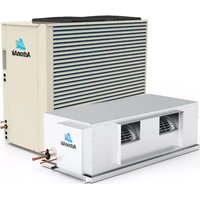
CRV15AS - Air conditioner ActronAir - Free user manual and instructions
Find the device manual for free CRV15AS ActronAir in PDF.


Pick your language and provide your email: we'll send you a specifically translated version.
| Product Type | Split System Air Conditioner |
| Model | CRV15AS |
| Brand | ActronAir |
| Cooling Capacity | 15,000 BTU/h |
| Heating Capacity | 16,000 BTU/h (Reverse Cycle) |
| Power Supply | 230V / 50Hz |
| Indoor Unit Dimensions (W×H×D) | 970 × 300 × 230 mm |
| Outdoor Unit Dimensions (W×H×D) | 850 × 650 × 300 mm |
| Indoor Unit Weight | 12 kg |
| Outdoor Unit Weight | 35 kg |
| Refrigerant Type | R32 |
| Energy Efficiency Ratio (EER) | 3.5 |
| Key Functions | Cooling, Heating, Fan, Dehumidification, Timer, Sleep Mode, Auto Mode |
| Air Filter | Washable, Anti-Mold |
| Noise Level (Indoor) | 22 – 45 dB(A) |
| Noise Level (Outdoor) | 55 dB(A) |
| Safety Features | Overload Protection, Leakage Protection, Auto Restart |
| Maintenance | Clean air filter every 2 weeks, professional cleaning annually |
| Spare Parts Availability | Customer service or authorized dealers |
| Warranty | 5 years on compressor, 1 year on parts |
Frequently Asked Questions - CRV15AS ActronAir
How often should I clean the air filter?
We recommend cleaning the air filter every two weeks for optimal performance. A clogged filter reduces efficiency and can damage the unit.
What does the 'Sleep Mode' do?
Sleep Mode gradually adjusts the temperature to provide a comfortable environment while you sleep, reducing energy consumption.
Can I install the air conditioner myself?
Professional installation is required to ensure proper refrigerant charge, electrical connections, and drainage. DIY installation may void warranty.
Why is my AC not cooling properly?
Common causes include a dirty filter, low refrigerant, or blocked outdoor unit. Check the filter first, then contact a technician if the issue persists.
How do I reset the unit?
Turn off the unit and unplug it for 5 minutes. Plug back in and restart. If the error persists, consult the manual for specific error codes.
What does the 'Timer' function do?
The Timer allows you to schedule when the AC turns on or off, helping you save energy by running only when needed.
Is the ActronAir CRV15AS energy efficient?
With an EER of 3.5, it offers good energy efficiency. Using Energy Saver mode and regular maintenance can further reduce electricity bills.
How do I set the temperature?
Use the remote control to adjust the desired temperature between 16°C and 30°C. Press the Temp Up/Down buttons.
What should I do if water leaks from the indoor unit?
Check if the drain pipe is clogged or improperly installed. Clean the pipe and ensure it is positioned downward. If still leaking, call a technician.
Does the unit have a dehumidification mode?
Yes, select Dry Mode to reduce humidity without significant cooling, ideal for damp conditions.
User questions about CRV15AS ActronAir
0 question about this device. Answer the ones you know or ask your own.
Ask a new question about this device
No questions yet. Be the first to ask one.
Download the instructions for your Air conditioner in PDF format for free! Find your manual CRV15AS - ActronAir and take your electronic device back in hand. On this page are published all the documents necessary for the use of your device. CRV15AS by ActronAir.
USER MANUAL CRV15AS ActronAir


Manual assistant
Powered by Anthropic
Waiting for your message
Product information
Brand : ActronAir
Model : CRV15AS
Category : Air conditioner