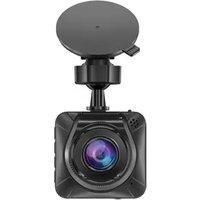
R300 - Dash cam Navitel - Free user manual and instructions
Find the device manual for free R300 Navitel in PDF.


Pick your language and provide your email: we'll send you a specifically translated version.
| Product Type | Dash Cam (Car Camera Recorder) |
| Brand | Navitel |
| Model | R300 |
| Dimensions | Approx. 60 x 40 x 30 mm (2.36 x 1.57 x 1.18 in) |
| Weight | Approx. 50 g (1.76 oz) |
| Power Supply | DC 5V via USB car charger (included) |
| Battery | Built-in rechargeable battery |
| Main Functions | Full HD video recording, motion detection, G-sensor, loop recording, parking mode, night vision |
| Video Resolution | 1920x1080p Full HD @ 30 fps |
| Lens Aperture | F/2.0 |
| Viewing Angle | 140 degrees wide angle |
| Storage | MicroSD card up to 128 GB (Class 10 or higher) |
| Display | 2.7-inch LCD screen |
| GPS | Built-in GPS module for speed and location tracking |
| Wi-Fi | Yes, for smartphone app connection |
| Maintenance & Cleaning | Clean lens with a soft, dry cloth; avoid harsh chemicals |
| Safety | Use only supplied charger; keep away from moisture |
| Spare Parts & Reparability | Contact Navitel service for replacement parts; not user-serviceable |
| General Information | Includes manual, USB cable, car charger, suction mount |
Frequently Asked Questions - R300 Navitel
How do I install the Navitel R300 dash cam?
Mount the camera on the windshield using the suction cup. Connect the USB cable to the car charger and plug into the cigarette lighter. Route the cable discreetly along the windshield edge.
What SD card should I use?
Use a MicroSD card (Class 10 or higher) with capacity from 16GB up to 128GB. Format the card in the camera before first use.
How do I enable loop recording?
Loop recording is enabled by default. The camera will overwrite the oldest files when the card is full. You can adjust the loop duration (1/3/5 min) in settings.
Does the R300 have parking mode?
Yes. Parking mode can be activated via the app or settings. It uses motion detection and G-sensor to record events when the car is parked. Requires constant power (hardwire kit recommended).
How do I reset the dash cam?
Press and hold the reset button (small hole) with a paperclip for 5 seconds. This restores factory settings and may clear minor issues.
Can I view videos on my smartphone?
Yes. Connect to the camera's Wi-Fi (name: Navitel_R300_xxxx) using the Navitel Dash Cam app. The app is available for iOS and Android.
What does the G-sensor do?
The G-sensor detects sudden impacts or collisions. It locks the current video file from being overwritten, preserving evidence in case of an accident.
How do I adjust the video resolution?
Go to Settings > Video Resolution. You can select 1080p Full HD or lower (720p) depending on your storage preference.
Is the Navitel R300 night vision capable?
Yes. It has low-light sensitivity and uses WDR (Wide Dynamic Range) for clear night recordings. Avoid direct light on the lens for best results.
Why does the camera say 'Card Error'?
Either the SD card is not inserted properly, not formatted, or damaged. Format the card in the camera (Settings > Format). If problem persists, replace the card with a recommended type.
User questions about R300 Navitel
0 question about this device. Answer the ones you know or ask your own.
Ask a new question about this device
No questions yet. Be the first to ask one.
Download the instructions for your Dash cam in PDF format for free! Find your manual R300 - Navitel and take your electronic device back in hand. On this page are published all the documents necessary for the use of your device. R300 by Navitel.
USER MANUAL R300 Navitel


Manual assistant
Powered by Anthropic
Waiting for your message
Product information
Brand : Navitel
Model : R300
Category : Dash cam