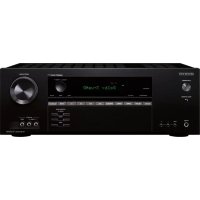
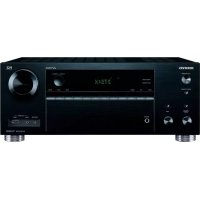
USER MANUAL TX-SR805 ONKYO
Réglage “Powered Zone 2” 103
⑨ Commande MASTER VOLUME (62)
Modes TV, VCR, SAT/CABLE: voyagez page 110
Mode RECEIVER/TAPE
② Bouton OPEN/CLOSE [△]
⑩ Bouton OPEN/CLOSE [△]
2-1.Speaker Settings
Speaker Impedance 6ohms Speakers Type Normal
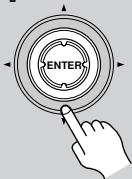
4
| DVD | IN1 |
| VCR/DVR | --- |
| CBL/SAT | --- |
| GAME/TV | --- |
| AUX1 | --- |
| AUX2 | --- |
| Auto Speaker Setup | AUDYSSEY |
| Please select “Next”, when measuring next position, and select “finish”, when ending. |
| Next |
| finish(Calculate) |
| Auto Speaker Setup | AUDYSSEY |
| Calculating... |
8
9
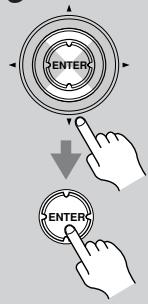
10
| Auto Speaker Setup | AUDYSSEY |
| Save | |
| Review SP Config | |
| Review SP Distance | |
| Review SP Level | |
| Cancel | |
| Auto Speaker Setup | AUDYSSEY |
| Saving... |
Débranche le microphone de configuration.
| Auto Speaker Setup | AUDYSSEY |
| Please unplug microphone. |
Remarques:
| Auto Speaker Setup | AUDYSSY |
| -----Speaker Detect Error----- |
| FL : Yes | FR : No | |
| SL : --- | SR : --- | |
| SBL : --- | SBR : --- | |
| C : Yes | SW : --- | |
| Retry |
| Cancel |
| Auto Speaker Setup | AUDYSSEY |
| -----Speaker Detect Error----- |
| FL: Yes | FR: Yes | |
| SL: --- | SR: No | |
| SBL: --- | SBR: --- | |
| C: Yes | SW: --- | |
| Retry |
| Cancel |
| Auto Speaker Setup AUDYSSEY |
| -----Speaker Detect Error----- |
| FL: Yes FR: Yes |
| SL: --- SR: No |
| SBL: --- SBR: Yes |
| C: Yes SW: --- |
| Retry |
| Cancel |
| Auto Speaker Setup | AUDYSSY |
| -----Speaker Detect Error----- |
| FL: Yes | FR: Yes | |
| SL: --- | SR: Yes | |
| SBL: No | SBR: Yes | |
| C: Yes | SW: --- | |
| Retry |
| Cancel |
| Auto Speaker Setup | AUDYSSEY |
| -----Speaker Detect Error----- |
| FL:Error | FR:Yes |
| SL:Yes | SR:Yes |
| SBL:Yes | SBR:Yes |
| C:Yes | SW:Yes |
| Retry |
| Cancel |
| Auto Speaker Setup | AUDYSSEY |
| Speaker Detect Error |
| Retry |
| Cancel |
| Auto Speaker Setup | AUDYSSEY |
| Writing Error! |
| Retry |
| Cancel |
| Auto Speaker Setup | AUDYSSEY |
| Save | |
| Review SP Config | |
| Review SP Distance | |
| Review SP Level | |
| Cancel | |
TP (Traffic Program)
Types de programmes RDS (PTY)
| Bouton | Format de la source | \(\mathsf{DSD^{+1}}\) | Dolby D | Dolby Digital Plus |
| Multi-canal | Multi-canal | 2 canaux | 1/0, 1+1 | Multi-canal | 2 canaux | 1/0, 1+1 |
| 3/2 | 2ch | sauf */2 | */2 | sauf */2 | */2 |
| Support Mode d'écoute | SACD | DVD, DTV, etc. | Blu-ray, HD DVD |
| [PURE A] | Pure Audio | ✓ | ✓ | ✓ | ✓ | ✓ | ✓ | ✓ | ✓ | ✓ | ✓ |
| [DIRECT] | Direct | ✓ | ✓ | ✓ | ✓ | ✓ | ✓ | ✓ | ✓ | ✓ | ✓ |
| [STEREO] | Stereo | ✓ | ✓ | ✓ | ✓ | ✓ | ✓ | ✓ | ✓ | ✓ | ✓ |
| [SURR] | Multichannel | | | | | | | | | | |
| Dolby D | | | ✓ | ✓ | | | | | | |
| Dolby D Plus | | | | | | | \(\mathsf{✓^{*2}}\) | \(\mathsf{✓^{*2}}\) | | |
| DTS, DTS 96/24 | | | | | | | | | | |
| DTS-ES Discrete/Matrix | | | | | | | | | | |
| DTS-HD High Resolution | | | | | | | | | | |
| DTS-HD Master Audio | | | | | | | | | | |
| Dolby TrueHD | | | | | | | | | | |
| DSD | ✓ | | | | | | | | | |
| Dolby PLII Movie/Dolby PLIIx Movie*3 | ✓ | ✓ | | ✓ | ✓ | | | ✓ | ✓ | |
| Dolby PLII Music/Dolby PLIIx Music*3 | ✓ | ✓ | | ✓ | ✓ | | | ✓ | ✓ | |
| Dolby PLII Game/Dolby PLIIx Game*3 | | ✓ | | | ✓ | | | | ✓ | |
| Dolby Digital EX/Dolby EX | ✓ | | | ✓ | | | | ✓ | | |
| Neo:6 | ✓ | | | ✓ | | | | ✓ | | |
| Neo:6 Cinema | | ✓ | | | ✓ | | | | ✓ | |
| Neo:6 Music | | ✓ | | | ✓ | | | | ✓ | |
| Neural THX 5.1 | | ✓ | | | ✓ | | | | ✓ | |
| Neural THX 7.1 | ✓ | ✓ | | ✓ | ✓ | | | ✓ | ✓ | |
| [THX] | THX Cinema*4 | ✓ | | ✓ | ✓ | | | ✓ | ✓ | | |
| Dolby PLII/Dolby PLIIx THX | ✓ | ✓ | | ✓ | ✓ | | | ✓ | ✓ | |
| Neo:6 THX | ✓ | ✓ | | ✓ | ✓ | | | ✓ | ✓ | |
| Dolby PLII THX Games Mode | | ✓ | | | ✓ | | | | ✓ | |
| Neo:6 THX Games Mode | | ✓ | | | ✓ | | | | ✓ | |
| THX Surround EX | ✓ | | | ✓ | | | | ✓ | | |
| THX Ultra2 Cinema | ✓ | | | ✓ | | | | ✓ | | |
| THX Music Mode | ✓ | | | ✓ | | | | ✓ | | |
| THX Games Mode | ✓ | | | ✓ | | | | ✓ | | |
| LISTENING MODE [▼/▲] | Mono | ✓ | ✓ | ✓ | ✓ | ✓ | ✓ | ✓ | ✓ | ✓ |
| DSP concus par Onkyo | Mono MovieOrchestraUnpluggedStudio-MixTV LogicAll Ch StereoFull MonoT-D | *4 | ✓ | ✓ | ✓ | ✓ | ✓ | ✓ | ✓ | ✓ |
| Bouton | Format de la source | TrueHD+1 | DTS, DTS96/24 | DTS-ES
Discrete/
Matrix |
| Multi-canal | 2
canaux | 1/0, 1+1 | Multi-canal | 2
canaux | 1/0 |
| sauf */2 | */2 | sauf */2 | */2 |
| Support
Mode d'écoute | Blu-ray, HD DVD | DVD, CD, etc. |
| [PURE A] | Pure Audio | ✓ | ✓ | ✓ | ✓ | ✓ | ✓ | ✓ | ✓ | ✓ |
| [DIRECT] | Direct | ✓ | ✓ | ✓ | ✓ | ✓ | ✓ | ✓ | ✓ | ✓ |
| [STEREO] | Stereo | ✓ | ✓ | ✓ | ✓ | ✓ | ✓ | ✓ | ✓ | ✓ |
| [SURR] | Multichannel | | | | | | | | | |
| Dolby D | | | | | | | | | |
| Dolby D Plus | | | | | | | | | |
| DTS, DTS 96/24 | | | | | ✓ | ✓ | | | |
| DTS-ES Discrete/Matrix | | | | | | | | | ✓*2 |
| DTS-HD High Resolution | | | | | | | | | |
| DTS-HD Master Audio | | | | | | | | | |
| TrueHD | ✓ | ✓ | | | | | | | |
| DSD | | | | | | | | | |
| Dolby PLII Movie/Dolby PLIIx Movie*3 | | ✓ | ✓ | | | ✓ | ✓ | | |
| Dolby PLII Music/Dolby PLIIx Music*3 | | ✓ | ✓ | | | ✓ | ✓ | | |
| Dolby PLII Game/Dolby PLIIx Game*3 | | | ✓ | | | | ✓ | | |
| Dolby Digital EX/Dolby EX | | ✓ | | | | ✓ | | | |
| Neo:6 | | ✓ | | | | ✓ | | | |
| Neo:6 Cinema | | | ✓ | | | | ✓ | | |
| Neo:6 Music | | | ✓ | | | | ✓ | | |
| Neural THX 5.1 | | | ✓ | | | | ✓ | | |
| Neural THX 7.1 | | ✓ | ✓ | | | ✓ | ✓ | | ✓ |
| [THX] | THX Cinema*4 | ✓ | ✓ | | | ✓ | ✓ | | | ✓ |
| Dolby PLII/Dolby PLIIx THX | | ✓ | ✓ | | | ✓ | ✓ | | |
| Neo:6 THX | | ✓ | ✓ | | | ✓ | ✓ | | |
| Dolby PLII THX Games Mode | | | ✓ | | | | ✓ | | |
| Neo:6 THX Games Mode | | | ✓ | | | | ✓ | | |
| THX Surround EX | | ✓ | | | | ✓ | | | |
| THX Ultra2 Cinema | | ✓ | | | | ✓ | | | ✓ |
| THX Music Mode | | ✓ | | | | ✓ | | | ✓ |
| THX Games Mode | | ✓ | | | | ✓ | | | ✓ |
| LISTENING MODES
[▲■▼] | Mono | | | | ✓ | ✓ | ✓ | ✓ | ✓ |
| DSP concus
par Onkyo | Mono Movie
Orchestra
Unplugged
Studio-Mix
TV Logic
All Ch Stereo
Full Mono
T-D | ✓ | ✓ | ✓ | ✓ | ✓ | ✓ | ✓ | ✓ |
T-D (Theater-Dimensional)
Réglage T-D (Theater-Dimensional)
Angle d'écoute
| 2-3.Speaker Distance |
| Unit | <feet> |
| Left | 12.0ft |
| Center | 12.0ft |
| Right | 12.0ft |
| Surr Right | 12.0ft |
| Surr Back R | 12.0ft |
| Surr Back L | 12.0ft |
| Surr Left | 12.0ft |
| Subwoofer | 12.0ft |
Remarque:
6.Miscellaneous
1.Volume Setup
2.0SD Setup
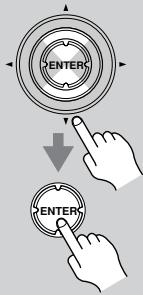
3
Zone2 Maximum Volume
Zone2 Power On Volume
Zone3 Maximum Volume
Zone3 Power On Volume
Réglage "Powered Zone 2"
TX-SR805: 300 W (3Ω, avant)
250 W (4Ω, avant)
150 W (8Ω, avant)
TX-SR875: 320 W (3Ω, avant)
270 W (4Ω, avant)
160 W (8Ω, avant)
Distorsion harmonique totale (DHT)
OPTICAL (IN 1, IN 2), DIGITAL
Entrées analogiques
PHONO, CD, TAPE, AUX 1, GAME/TV,
CBL/SAT, VCR/DVR, DVD, MULTICH
(FRONT, CENTER, SUBWOOFER,
(SURR, SURR BACK), AUX 2
Entrées analogiques
7.1 ch
Sorties audio
Sortie numérique OPTICAL (OUT) Sorties analogiques TAPE, VCR/DVR, PRE OUT (FRONT, CENTER, SUBWOOFER, SURR, SURR BACK, ZONE 2, ZONE 3)
Sorties préampli multicanal 7
Sortie preamplipour subwoofer 1
Sorties pour enceintes ZONE2 R, SURR BACK R, FRONT R, SURR R, CENTER, SURR L, FRONT L, SURR BACK L, ZONE2 L
Ajustar Powered Zona 2 103
Ajustes Zone 2/Zone 3 Out 104
Los terminales FRONT L/R y SARR BACK L/RSEOSEOSEOSEOSEOSEOSEOSEOSEOSEOSEOSEOSEOSEOSEOSEOSEOSEOSEOSEOSEOSEOSEOSEOSEOSEOSEOSEOSEOSEOSEOSEOSEOSEOSEOSEOSEOSEOSEOSEOSEOSEOSEOSEOSEOSEOSEOSEOSEOSEOSEOSEOSEOSEOSEOSEOSEOSEOSEOSEOSEOSEOSEOSEOSEOSEOSEOSEOSEOSEOSEOSEOSEOSEOSEOSEOSEOSEOSEOSEOSEOSEOSEOSEOSEOSEOSEOSEOSEOSEOSEOSEOSEOSEOSEOSEOSEOSEOSEOSEO SEO TX-SR875) en la page 24. El TX-SR805 no permitte la derivacion.
⑦ Entrada MULTI CH: FRONT L/R, CENTER, SUBWOOFER, SURR L/R y SURR BACK L/R
⑩ Boton OPEN/CLOSE [△]
Conectar la antenna FM interior
Auto Power On/Standby
2-1.Speaker Settings
Speaker Impedance
Speakers Type
6ohms
Normal
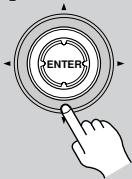
4
| Auto Speaker Setup | AUDYSSEY |
| Do not unplug microphone.
Please keep quiet.
Now Measuring... | |
| SBL: Yes SBR: Yes
C: No SW: Yes | |
| Next
Retry
Cancel | |
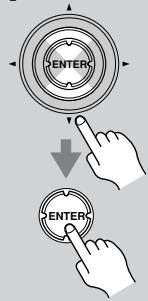
7
Please select "Next", when measuring next position, and select "finish", when ending.
Next
finish(Calculate)
| Auto Speaker Setup | AUDYSSEY |
| Save | |
| Review SP Config | |
| Review SP Distance | |
| Review SP Level | |
| Cancel | |
Las-optiones son:
Review SP Config
TP (Traffic Program)
| Botón | Formato de fuente | DSD*1 | Dolby D | Dolby Digital Plus |
| Multicanal | Multicanal | 2ch | 1/0, 1+1 | Multicanal | 2ch | 1/0, 1+1 |
| 3/2 | 2ch | excepto*/2 | */2 | excepto*/2 | */2 |
| MediosModo de audición | SACD | DVD, DTV, etc. | Blu-ray, HD DVD |
| [PURE A] | Pure Audio | ✓ | ✓ | ✓ | ✓ | ✓ | ✓ | ✓ | ✓ | ✓ | ✓ |
| [DIRECT] | Direct | ✓ | ✓ | ✓ | ✓ | ✓ | ✓ | ✓ | ✓ | ✓ | ✓ |
| [STEREO] | Stereo | ✓ | ✓ | ✓ | ✓ | ✓ | ✓ | ✓ | ✓ | ✓ | ✓ |
| [SURR] | Multichannel | | | | | | | | | | |
| Dolby D | | | ✓ | ✓ | | | | | | |
| Dolby D Plus | | | | | | | ✓*2 | ✓*2 | | |
| DTS, DTS 96/24 | | | | | | | | | | |
| DTS-ES Discrete/Matrix | | | | | | | | | | |
| DTS-HD High Resolution | | | | | | | | | | |
| DTS-HD Master Audio | | | | | | | | | | |
| Dolby TrueHD | | | | | | | | | | |
| DSD | ✓ | | | | | | | | | |
| Dolby PLII Movie/Dolby PLIIx Movie*3 | ✓ | ✓ | | ✓ | ✓ | | | ✓ | ✓ | |
| Dolby PLII Music/Dolby PLIIx Music*3 | ✓ | ✓ | | ✓ | ✓ | | | ✓ | ✓ | |
| Dolby PLII Game/Dolby PLIIx Game*3 | | ✓ | | | ✓ | | | | ✓ | |
| Dolby Digital EX/Dolby EX | ✓ | | | ✓ | | | | ✓ | | |
| Neo:6 | ✓ | | | ✓ | | | | ✓ | | |
| Neo:6 Cinema | | ✓ | | | ✓ | | | | ✓ | |
| Neo:6 Music | | ✓ | | | ✓ | | | | ✓ | |
| Neural THX 5.1 | | ✓ | | | ✓ | | | | ✓ | |
| Neural THX 7.1 | ✓ | ✓ | | ✓ | ✓ | | | ✓ | ✓ | |
| [THX] | THX Cinema*4 | ✓ | | ✓ | ✓ | | | ✓ | ✓ | | |
| Dolby PLII/Dolby PLIIx THX | ✓ | ✓ | | ✓ | ✓ | | | ✓ | ✓ | |
| Neo:6 THX | ✓ | ✓ | | ✓ | ✓ | | | ✓ | ✓ | |
| Dolby PLII THX Games Mode | | ✓ | | | ✓ | | | | ✓ | |
| Neo:6 THX Games Mode | | ✓ | | | ✓ | | | | ✓ | |
| THX Surround EX | ✓ | | | ✓ | | | | ✓ | | |
| THX Ultra2 Cinema | ✓ | | | ✓ | | | | ✓ | | |
| THX Music Mode | ✓ | | | ✓ | | | | ✓ | | |
| THX Games Mode | ✓ | | | ✓ | | | | ✓ | | |
| LISTENING MODE[▼|▲] | Mono | ✓ | ✓ | ✓ | ✓ | ✓ | ✓ | ✓ | ✓ | ✓ | ✓ |
| DSP originalesde Onkyo | Mono MovieOrchestraUnpluggedStudio-MixTV LogicAll Ch StereoFull MonoT-D | ✓ | ✓ | ✓ | ✓ | ✓ | ✓ | ✓ | ✓ | ✓ |
1. En losodos de audicón que no sean DSD Direct y Pure Audio, las fuentes DSD se converten y se gestionan como PCM.
2. Si no hay altevasce envolventes posteriores, dependiendo de la seals de entrada,可以更好 utilizese Dolby Digital.
3. Si no hay altavoces posteriores surround o si se utilizes Powered Zone 2, se utilizes Dolby Pro Logic II.
4. Disponible sólo al utilizing altovasces surround.
Requiere 6.1/7.1 altavoces. No disponible@m间隙 seutiliza Powered Zone 2.
- Requiere 7.1 altavoces. No disponible cuando se utilizes Powered Zone 2.
Fuentes TrueHD y DTS
| Botón | Formato de fuente | TrueHD*1 | DTS, DTS96/24 | DTS-ES Discrete/Matrix |
| Multicanal | 2ch | 1/0, 1+1 | Multicanal | 2ch | 1/0 |
| excepto*/2 | */2 | excepto*/2 | */2 |
| Medios
Modo de audición | Blu-ray, HD DVD | DVD, CD, etc. |
| [PURE A] | Pure Audio | ✓ | ✓ | ✓ | ✓ | ✓ | ✓ | ✓ | ✓ | ✓ |
| [DIRECT] | Direct | ✓ | ✓ | ✓ | ✓ | ✓ | ✓ | ✓ | ✓ | ✓ |
| [STEREO] | Stereo | ✓ | ✓ | ✓ | ✓ | ✓ | ✓ | ✓ | ✓ | ✓ |
| [SURR] | Multichannel | | | | | | | | | |
| Dolby D | | | | | | | | | |
| Dolby D Plus | | | | | | | | | |
| DTS, DTS 96/24 | | | | | ✓ | ✓ | | | |
| DTS-ES Discrete/Matrix | | | | | | | | | ✓*2 |
| DTS-HD High Resolution | | | | | | | | | |
| DTS-HD Master Audio | | | | | | | | | |
| TrueHD | ✓ | ✓ | | | | | | | |
| DSD | | | | | | | | | |
| Dolby PLII Movie/Dolby PLIIx Movie*3 | | ✓ | ✓ | | | ✓ | ✓ | | |
| Dolby PLII Music/Dolby PLIIx Music*3 | | ✓ | ✓ | | | ✓ | ✓ | | |
| Dolby PLII Game/Dolby PLIIx Game*3 | | | ✓ | | | | ✓ | | |
| Dolby Digital EX/Dolby EX | | ✓ | | | | ✓ | | | |
| Neo:6 | | ✓ | | | | ✓ | | | |
| Neo:6 Cinema | | | ✓ | | | | ✓ | | |
| Neo:6 Music | | | ✓ | | | | ✓ | | |
| Neural THX 5.1 | | | ✓ | | | | ✓ | | |
| Neural THX 7.1 | | ✓ | ✓ | | | ✓ | ✓ | | ✓ |
| [THX] | THX Cinema*4 | ✓ | ✓ | | | ✓ | ✓ | | | ✓ |
| Dolby PLII/Dolby PLIIx THX | | ✓ | ✓ | | | ✓ | ✓ | | |
| Neo:6 THX | | ✓ | ✓ | | | ✓ | ✓ | | |
| Dolby PLII THX Games Mode | | | ✓ | | | | ✓ | | |
| Neo:6 THX Games Mode | | | ✓ | | | | ✓ | | |
| THX Surround EX | | ✓ | | | | ✓ | | | |
| THX Ultra2 Cinema | | ✓ | | | | ✓ | | | ✓ |
| THX Music Mode | | ✓ | | | | ✓ | | | ✓ |
| THX Games Mode | | ✓ | | | | ✓ | | | ✓ |
| LISTENING MODE*5 [▲|▲-] | Mono | | | | | ✓ | ✓ | ✓ | ✓ | ✓ |
| DSP originales de Onkyo | Mono Movie Orchestra Unplugged Studio-Mix TV Logic All Ch Stereo Full Mono T-D | ✓ | ✓ | ✓ | ✓ | ✓ | ✓ | ✓ | ✓ |
1. 192kHz Las fuentes TrueHD se procesan como Signals de audio de 192kHz/2 canales, independiente del numero de canales.
2. Si no hay altevoces posteriores surround o si se utilizes Powered Zone 2, se utilizes DTS.
3. Si no hay-altavoces posteriores surround o si se utilizes Powered Zone 2, se utilizes Dolby Pro Logic II.
4. Disponible sólo al utilizes altavoces surround.
*5. Para T-D, Mono Movie, Orchestra, Unplugged, Studio-Mix, y TV Logic, DTS 96/24 se procesa como DTS.
- Requiere 6.1/7.1 altavoces. No disponible cuando se utilizes Powered Zone 2.
- Require 7.1 altavoces. No disponibleMZmtras se utilizes Powered Zone 2.
Fuentes DTS-HD
| Botón | Formato de fuente | DTS-HD High Resolution | DTS-HD Master Audio*1 |
| Multicanal | 2ch | 1/0 | Multicanal | 2ch | 1/0 |
| excepto*/2 | */2 | excepto*/2 | */2 |
| MediosModo de audición | Blu-ray, HD DVD | Blu-ray, HD DVD |
| [PURE A] | Pure Audio | ✓ | ✓ | ✓ | ✓ | ✓ | ✓ | ✓ | ✓ |
| [DIRECT] | Direct | ✓ | ✓ | ✓ | ✓ | ✓ | ✓ | ✓ | ✓ |
| [STEREO] | Stereo | ✓ | ✓ | ✓ | ✓ | ✓ | ✓ | ✓ | ✓ |
| [SURR] | Multichannel | | | | | | | | |
| Dolby D | | | | | | | | |
| Dolby D Plus | | | | | | | | |
| DTS, DTS 96/24 | | | | | | | | |
| DTS-ES Discrete/Matrix | | | | | | | | |
| DTS-HD High Resolution | ✓ | ✓ | | | | | | |
| DTS-HD Master Audio | | | | | ✓ | ✓ | | |
| TrueHD | | | | | | | | |
| DSD | | | | | | | | |
| Dolby PLII Movie/Dolby PLIIx Movie*2 | | ✓*3 | ✓*3 | | | ✓ | ✓ | |
| Dolby PLII Music/Dolby PLIIx Music*2 | | ✓*3 | ✓*3 | | | ✓ | ✓ | |
| Dolby PLII Game/Dolby PLIIx Game*2 | | | ✓*3 | | | | ✓ | |
| Dolby Digital EX/Dolby EX | | ✓*3 | | | | ✓ | | |
| Neo:6 | | ✓*3 | | | | ✓ | | |
| Neo:6 Cinema | | | ✓*3 | | | | ✓ | |
| Neo:6 Music | | | ✓*3 | | | | ✓ | |
| Neural THX 5.1 | | | ✓ | | | | ✓ | |
| Neural THX 7.1 | | ✓ | ✓ | | | ✓ | ✓ | |
| [THX] | THX Cinema*2 | ✓ | ✓ | | | ✓ | ✓ | | |
| Dolby PLII/Dolby PLIIx THX | | ✓ | ✓ | | | ✓ | ✓ | |
| Neo:6 THX | | ✓ | ✓ | | | ✓ | ✓ | |
| Dolby PLII THX Games Mode | | | ✓ | | | | ✓ | |
| Neo:6 THX Games Mode | | | ✓ | | | | ✓ | |
| THX Surround EX | | ✓ | | | | ✓ | | |
| THX Ultra2 Cinema | | ✓ | | | | ✓ | | |
| THX Music Mode | | ✓ | | | | ✓ | | |
| THX Games Mode | | ✓ | | | | ✓ | | |
| LISTENING MODE[▼/▲] | Mono | ✓*3 | ✓*3 | ✓*3 | ✓*3 | ✓ | ✓ | ✓ | ✓ |
| DSP originalesde Onkyo | Mono MovieOrchestraUnpluggedStudio-MixTV LogicAll Ch StereoFull MonoT-D | ✓ | ✓ | ✓ | ✓ | ✓ | ✓ | ✓ | ✓ |
T-D (Theater-Dimensional)
Ajuste T-D (Theater-Dimensional)
Angulo audicion
| 2-3.Speaker Distance |
| Unit | <feet> |
| Left | 12.0ft |
| Center | 12.0ft |
| Right | 12.0ft |
| Surr Right | 12.0ft |
| Surr Back R | 12.0ft |
| Surr Back L | 12.0ft |
| Surr Left | 12.0ft |
| Subwoofer | 12.0ft |
Nota:
Ajustar Powered Zona 2
THD ("total harmonic
COAXIAL (IN 1, IN 2, IN 3),
OPTICAL (IN 1, IN 2), DIGITAL
Entradas analógicas
PHONO, CD, TAPE, AUX 1, GAME/TV,
CBL/SAT, VCR/DVR, DVD, MULTI CH
(FRONT, CENTER, SUBWOOFER, SURREN, SURR BACK), AUX 2
Entradas multicanal
7.1 ch
Salidas de audio
Salida digitale OPTICAL (OUT)
Salidas analógicas TAPE, VCR/DVR, PRE OUT (FRONT, CENTER, SUBWOOFER, SURR, SURR BACK, ZONE 2, ZONE 3)
Pre-salidas multicanal
7
18 Park Way, Upper Saddle River, N.J. 07458, U.S.A.
Tel: 201-785-2600 Fax: 201-785-2650 http://www.us.onkyo.com/
ONKYO EUROPE ELECTRONICS GmbH
Liegnitzerstrasse 6, 82194 Groebenzell, GERMANY
Tel: +49-8142-4401-0 Fax: +49-8142-4401-555 http://www.eu.onkyo.com/
ONKYO EUROPE UK Office
Suite 1, Gregories Court, Gregories Road, Beaconsfield, Buckinghamshire, HP9 1HQ
UNITED KINGDOM Tel: +44-(0)1494-681515 Fax: +44(0)-1494-680452
ONKYO CHINA LIMITED
Unit 1&12, 9/F, Ever Gain PlazaTower 1, 88, Container Port Road, Kwai Chung,
N.T., HONG KONG Tel: 852-2429-3118 Fax: 852-2428-9039
http://www.ch.onkyo.com/

Printed in Japan 10707-4