
DS I XL - Handheld game console NINTENDO - Free user manual and instructions
Find the device manual for free DS I XL NINTENDO in PDF.


| Product type | Portable gaming console |
| Brand | Nintendo |
| Model | DS I XL (LL) |
| Dimensions (L x H x D) | 161 mm x 91.4 mm x 21.2 mm |
| Weight | Approximately 314 g |
| Screens | Two 4.2-inch LCD screens (resolution 256 x 192 pixels) |
| Power supply | AC adapter (5.2 V, 450 mA) and rechargeable lithium-ion battery (3.7 V, 1050 mAh) |
| Battery life | Approximately 3 to 5 hours depending on brightness and usage |
| Main functions | DS and DSi games, Nintendo DSi Camera, Nintendo DSi Sound, Internet Browser, PictoChat messaging |
| Camera | Two digital cameras (0.3 megapixels): one front, one rear |
| Storage | Internal memory 256 MB, expandable via SD card (up to 2 GB) |
| Connectivity | Wi-Fi 802.11b/g, infrared port |
| Supported card formats | Nintendo DS and DSi game cards |
| Care and cleaning | Clean the screens with a soft, dry cloth; do not use chemical products |
| Safety | Use only the provided AC adapter; do not expose to moisture |
| Spare parts and repairability | Stylus, battery, AC adapter available; professional repair recommended |
| General information | Console backward compatible with Nintendo DS games |
Frequently Asked Questions - DS I XL NINTENDO
User questions about DS I XL NINTENDO
0 question about this device. Answer the ones you know or ask your own.
Ask a new question about this device
Download the instructions for your Handheld game console in PDF format for free! Find your manual DS I XL - NINTENDO and take your electronic device back in hand. On this page are published all the documents necessary for the use of your device. DS I XL by NINTENDO.
USER MANUAL DS I XL NINTENDO
WARNING: PLEASE CAREFULLY READ THE SEPARATE HEALTH AND SAFETY PRECAUTIONS BOOKLET INCLUDED WITH THIS PRODUCT BEFORE USING YOUR NINTENDO® HARDWARE SYSTEM, GAMES OR ACCESSORIES. THIS BOOKLET CONTAINS IMPORTANT HEALTH AND SAFETY INFORMATION.
The official seal is your assurance that this product is licensed or manufactured by Nintendo. Always look for this seal when buying video game systems, accessories, games and related products.
* Please read the Quick-Start Guide!
Please be sure to review the Quick-Start Guide included with this product to learn about personalizing your Nintendo DSi XL system and find out about its basic features.
This product is a precision electronic device that can be damaged by direct physical impact or contact with dust or other foreign material. A protective carrying case (sold separately) may help prevent damage to your Nintendo DSi XL system. Please carefully read the instructions included in this manual and the separate Health and Safety Precautions booklet before setup or use of the Nintendo DSi XL. If, after reading all of the instructions, you still have questions, please visit our customer service area at www.nintendo.com or call 1-800-255-3700.
A NOTE ABOUT COMPATIBLITY: The Nintendo DSi XL system is only compatible with Nintendo DS and Nintendo DSi software.
Nintendo products are covered by some or all of the following patents:
United States Patent Numbers:
5,207,426; 5,291,189; 5,327,158; 5,337,069; 5,371,512; 5,400,052; 5,483,257; 5,495,266; 5,509,663; 5,608,424; 5,708,457; 7,309,287
D520,453; D524,870, D532,051, D554,194, D568,394, D593,031, D596,668, D601,494, D601,502.
Canadian Patent Numbers:
2,037,909;2,048,167;2,049,899;2,049,900;2,049,914;2,051,655;2,055,718;2,055,724;116,763.
Other patents issued and pending in the U.S., Canada, and elsewhere.
Basics
Health and Safety Information 5
Nintendo DSi XL Components 7
Charging the Battery 11
Using the Stylus and Touch Screen 13
Adjusting the Volume and Screen Brightness 15
Using SD Memory Cards 16
Replacing the Battery Pack 17
Applications and Settings
Other Camera Features 39
Calendar 43
Nintendo DSi Sound 44
Recording and Playing with Sounds 45
Playing with Music on an SD Card 50
Settings 53
Nintendo DSi Shop 54
Using Nintendo DSi Shop 54
How to Redeem Nintendo DSi Points 55
DS Download Play 57
PictoChat 58
Nintendo DSi Browser 61
Flipnote Studio 62
System Settings 63
Data Management 65
Wireless Communication Settings 66
Brightness Settings 66
Profile 67
Date/Time/Alarm 68
Parental Controls 69
Touch Screen 72
Mic Test 72
Internet Setup 73
System Update 87
Format System Memory 87
Using the Keyboard 88
Support and Troubleshooting
Troubleshooting 91
Error Message List 99
Error Code List 100
Nintendo DSi Privacy Policy 103
Nintendo DSi Code of Conduct 106
Warranty and Service Information 107
Legal Notices 108
Glossary 109


Basics
Important Safety Information - Read the following warnings before setup or use of the Nintendo DSi XL system. If this product will be used by young children, this manual should be read and explained to them by an adult. Failing to do so may cause injury. Please carefully review the instruction booklet for the game you are playing for additional health and safety information.
Throughout this manual, you will see this symbol followed by WARNING or CAUTION, or you may see the term IMPORTANT. These terms have different levels of meaning as outlined below. Please read and understand these terms and the information that appears after them before using your Nintendo DSi XL system:
WARNING
Warns you about incorrect use of the Nintendo DSi XL that could result in serious personal injury.
CAUTION
Cautions you about incorrect use of the Nintendo DSi XL that could result in personal injury or damage to the Nintendo DSi XL system, components, games, or accessories.
IMPORTANT:
Informs you about incorrect use of the Nintendo DSi XL that could result in damage to the Nintendo DSi XL system, components, games, or accessories.
WARNING - Seizures
- Some people (about 1 in 4000) may have seizures or blackouts triggered by light flashes or patterns, and this may occur while they are watching TV or playing video games, even if they have never had a seizure before.
- Anyone who has had a seizure, loss of awareness, or other symptom linked to an epileptic condition should consult a doctor before playing a video game.
- Parents should watch their children play video games. Stop playing and consult a doctor if you or your child has any of the following symptoms:
Convulsions Altered vision
Eye or muscle twitching Involuntary movements
Loss of awareness Disorientation
To reduce the likelihood of a seizure when playing video games:
- Sit or stand as far from the screen as possible.
- Play video games on the smallest available television screen.
- Do not play if you are tired or need sleep.
- Play in a well-lit room.
- Take a 10 to 15 minute break every hour.
WARNING - Repetitive Motion Injuries and Eyestrain
Playing video games can make your muscles, joints, skin or eyes hurt. Follow these instructions to avoid problems such as tendinitis, carpal tunnel syndrome, skin irritation or eyestrain:
- Avoid excessive play. Parents should monitor their children for appropriate play.
Take a 10 to 15 minute break every hour, even if you don't think you need it. - When using the stylus, you do not need to grip it tightly or press it hard against the screen. Doing so may cause fatigue or discomfort.
- If your hands, wrists, arms or eyes become tired or sore while playing, or if you feel symptoms such as tingling, numbness, burning or stiffness, stop and rest for several hours before playing again.
- If you continue to have any of the above symptoms or other discomfort during or after play, stop playing and see a doctor.
WARNING - Battery Leakage
The Nintendo DSi XL contains a rechargeable lithium ion battery pack. Leakage of ingredients contained within the battery pack, or the combustion products of the ingredients, can cause personal injury as well as damage to your Nintendo DSi XL. If battery leakage occurs, avoid contact with skin. If contact occurs, immediately wash thoroughly with soap and water. If liquid leaking from a battery pack comes into contact with your eyes, immediately flush thoroughly with water and see a doctor.
To avoid battery leakage:
- Do not expose battery to excessive physical shock, vibration, or liquids.
- Do not disassemble, attempt to repair or deform the battery.
- Do not dispose of battery pack in a fire.
- Do not touch the terminals of the battery, or cause a short between the terminals with a metal object.
- Do not peel or damage the battery label.
WARNING - Radio Frequency Interference
The Nintendo DSi XL can emit radio waves that can affect the operation of nearby electronics, including cardiac pacemakers.
- Do not operate the Nintendo DSi XL within 9 inches of a pacemaker while using the wireless feature.
- If you have a pacemaker or other implanted medical device, do not use the wireless feature of a Nintendo DSi XL without first consulting your doctor or the manufacturer of your medical device.
- Observe and follow all regulations and rules regarding use of wireless devices in locations such as hospitals, airports, and on board aircraft. Operation in those locations may interfere with or cause malfunctions of equipment, with resulting injuries to persons or damage to property.
IMPORTANT: The Nintendo DSi XL allows you to disable wireless communications. Select SYSTEM SETTINGS from the Nintendo DSi Menu, then select WIRELESS COMMUNICATIONS and OFF to disable this feature.
Refer to the separate Nintendo DS Health and Safety Precautions booklet for additional information on hardware and software precautions and maintenance.
View of the Nintendo DSi XL system when open (front)
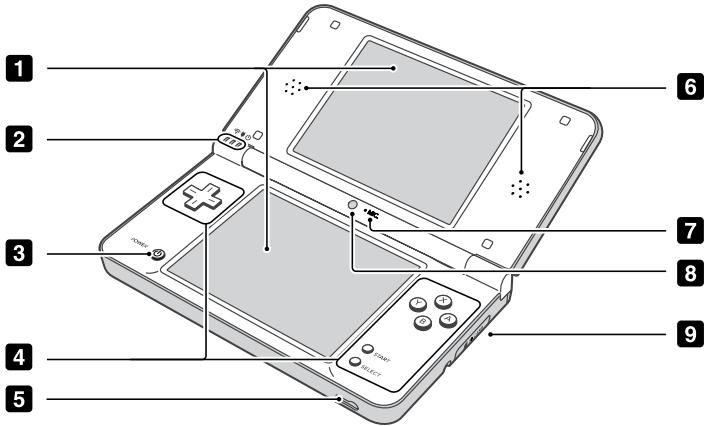
Upper and Lower LCD Screens
Twin backlit color liquid crystal screens display game screens and other
information. The brightness of the screens can be adjusted in 5 levels.
The lower display (the Touch Screen) is touch sensitive and should be operated only with a Nintendo licensed stylus.

When opening the Nintendo DSi XL, keep your fingers away from the hinge to avoid pinching them.
Indicator LEDs
SEE PAGE 8
3 Power/Reset Button
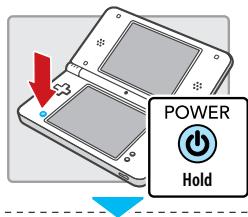
Press this button to turn the system on. When the system is on, pressing this button briefly will reset the system and return to the menu screen. Pressing and momentarily holding this button will turn the system off.
4 Control Buttons (The +Control Pad, A, B, X, and Y Buttons, and START and SELECT)
For game play control. See the instruction booklet for the game you are playing for specific control information.
5 Headphone/Microphone Connectors
For connection of stereo headphones, external microphone, or headset (all sold separately). If an accessory is connected, no sound will play through the speakers.

When using earphones, set the volume at a safe level. Setting the volume too high may harm your hearing or damage the earphones.
6 Stereo Speakers
Microphone
Used by games or other applications that include the microphone feature.
8 Inner Camera
Used by games or other applications that use the camera feature.
NOTE: Avoid getting the camera lens dirty. If it becomes dirty, wipe gently with a soft cloth, being careful not to damage the lens.
SD Card Slot
For inserting SD Memory Cards (sold separately).
SEE PAGE 26
SEE PAGE 16
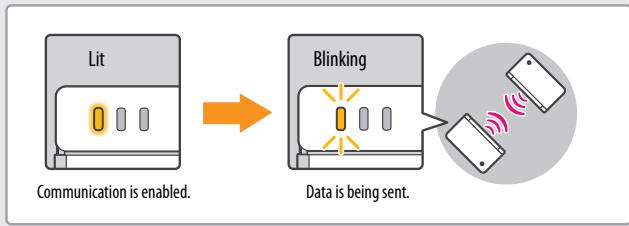
Indicator LEDs

Wireless Indicator LED
Lights yellow when wireless communications features are enabled for use.

Recharge Indicator LED
Lights orange when the battery is being charged.
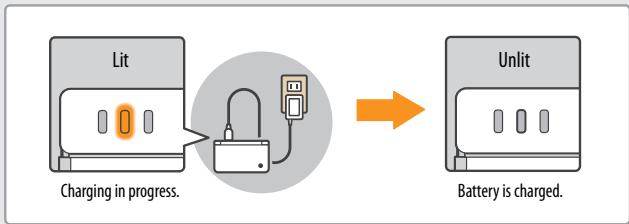
NOTE: If you play a game while the battery is recharging, the recharge indicator LED may not always turn off when the charging is complete. This is normal.
IMPORTANT: If the recharge indicator LED is blinking, the battery pack may not be installed properly. Check the battery placement to be sure it is installed correctly.

Power Indicator LED
indicates the battery charge level when the power is on (see diagram below).
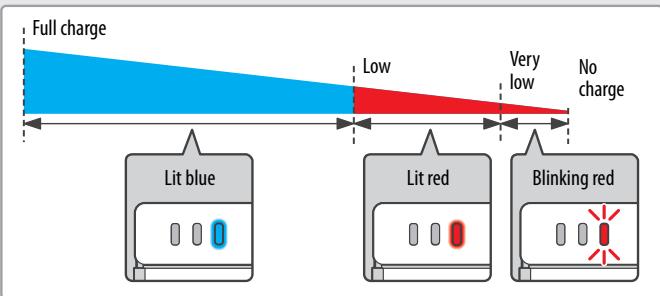
NOTE: When the power indicator LED turns red, be sure to save your game and recharge the battery.
If the LED begins to blink during game play, your power is getting very low. If the battery runs out of power before you save your game, any unsaved data will be lost.
NOTE: A blinking power indicator LED, when the system is closed, indicates that the system is in Sleep Mode and is conserving power.
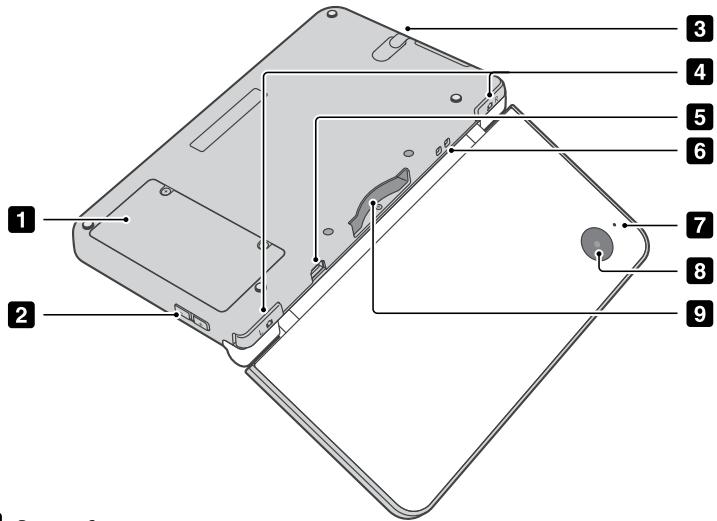
Nintendo DSi XL (back view)
1 Battery Cover
Remove cover to replace the battery. NOTE: Do not remove the cover unless you need to replace the battery or check battery installation.
SEE PAGE 17
2 Volume / Screen Brightness Control
Adjust the sound volume or the brightness of the screens.
SEE PAGE 15
3 Stylus Holder
Always replace the stylus into the stylus holder after use. NOTE: To prevent damage to the Nintendo DSi XL, do not insert anything other than a Nintendo DSi XL licensed stylus into the stylus holder.
4 Control Buttons [L and R Buttons]
For game play control. See the instructions for the game you are playing for specific control information.
5 AC Adapter Connector
Allows connection of Nintendo DSi AC Adapter (included), for recharging the battery or operation using household current.
SEE PAGE 11
6 Wrist Strap Attachment
For attachment of a wrist strap (sold separately).
7 Camera Indicator LED
Lights when the outer camera is in use.
8 Outer Camera
Used by games or other applications that use the camera feature.
NOTE: Avoid getting the camera lens dirty. If it becomes dirty, wipe gently with a soft cloth, being careful not to damage the lens.
9 DS Game Card Slot
For loading Nintendo DSi and Nintendo DS Game Cards (sold separately).
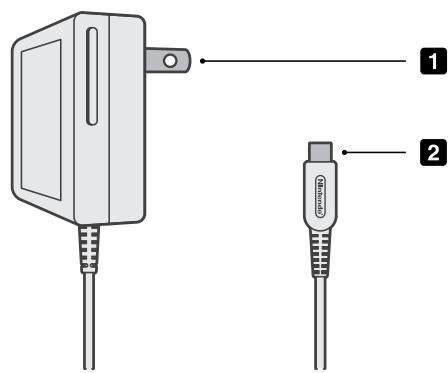
Nintendo DSi AC Adapter Model No. WAP-002(USA)
1 AC Adapter Plug
Plugs into a standard 120-volt AC wall outlet.
2 DC Connector Plug
Plugs into the AC adapter connector on the back of the Nintendo DSi XL.
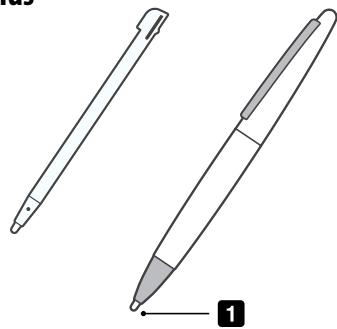
Nintendo DSi XL Stylus
1 Stylus Tip
For use on the lower screen (Touch Screen) of the Nintendo DSi XL.
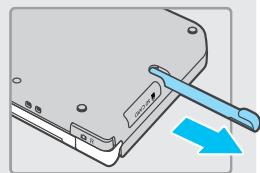
The system comes with two styluses. One is shipped in the stylus holder on the side of the system and the other is contained within the box.

WARNING
Do not use the Nintendo DSi AC Adapter during a lightning storm.
There may be a risk of electric shock from lightning.
- Be sure to charge the battery before using it for the first time or when it has not been used in the last 6 months.
Battery recharge time is approximately 3 hours, although this will vary depending on the remaining charge when you begin to recharge the battery. You can play games while the battery is charging, but this will increase the recharge time.
When fully charged, the battery will last from 13-17 hours on the lowest screen brightness setting, depending on the type of game activity. See page 15 for information on adjusting the screen brightness. On the brightest setting, the battery life is 4-5 hours. See the table below.
Using the wireless communications or camera features may reduce the battery time to less than the figures shown to the right.
NOTE: The default system setting is configured to the "High" setting.
| Highest | Approx. 4-5 hours |
| High | Approx. 6-8 hours |
| Medium | Approx. 9-11 hours |
| Low | Approx. 11-14 hours |
| Lowest | Approx. 13-17 hours |
The battery can be recharged approximately 500 times, but performance may decrease after repeated recharges, depending on usage conditions such as temperature. Optimal charging temperature is between 41irc and 95irc Fahrenheit (5 - 35irc Celsius). Battery life may also decrease over time. After 500 recharges, battery life may be only 70% of the battery life when new.

Charging the battery
IMPORTANT: The Nintendo DSi AC Adapter, Model No. WAP-002(USA), is for use only with the Nintendo DSi and Nintendo DSi XL portable video game systems. It is not compatible with any other Nintendo system. Do not use the AC Adapter with voltage transformers, dimmer switches, or any other equipment. It is only for use in a standard 120-volt AC wall outlet.
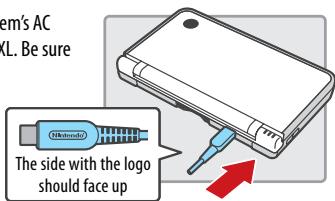
- Insert the DC plug from the AC Adapter into the system's AC Adapter connector on the back of the Nintendo DSi XL. Be sure to insert it straight into the connector.
IMPORTANT: Be sure the DC Connector Plug is facing in the correct direction before inserting into the connector to avoid damaging either the plug or connector.
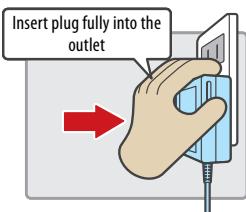
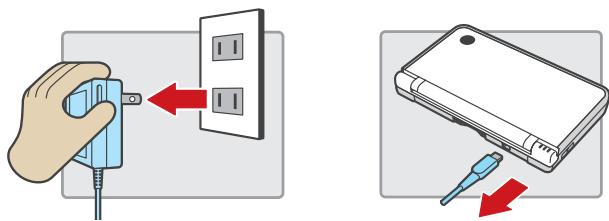
- Swing the prongs out of the AC Adapter and insert into a standard 120-volt AC wall outlet.
The AC Adapter should be correctly oriented in a vertical or floor mounted-position. The cord should always face downward.
- When fully charged, the recharge indicator LED will go out.
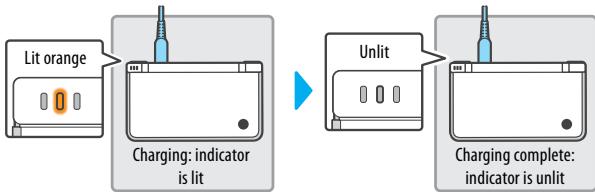
- If the recharge indicator LED is not lit, make sure the AC Adapter is connected properly to both the system and the outlet.
- If the recharge indicator LED is blinking, there is a chance that the battery pack is not installed correctly. Check to make sure installation is correct (see page 17).
NOTE: If you play a game while the system is recharging, the recharge indicator LED may not always turn off once charging has completed. This is not a malfunction.
- Remove the AC Adapter from the wall outlet and fold the prongs back into the housing. Remove the DC plug from the AC Adapter connector.
IMPORTANT: When disconnecting any plugs from the Nintendo DSi XL or wall outlet, carefully pull by the plug itself rather than by the cord.
IMPORTANT BATTERY GUIDELINES:
- Do not remove the battery from the Nintendo DSi XL unless it needs to be replaced.
- Do not use any battery other than the Nintendo DSi XL rechargeable battery, Model No. UTL-003. A replacement battery may be ordered through Nintendo's website at store.nintendo.com (USA/Canada only) or by calling Customer Service at 1-800-255-3700.
- When recharging the battery, use ONLY the included AC Adapter, Model No. WAP-002(USA).
- When disposing of the battery, follow appropriate local guidelines and regulations. For information on battery disposal contact your local solid waste authority. See page 17 for more information on battery disposal.
- If liquid comes into contact with the battery, do not reuse it. Call Nintendo Customer Service at 1-800-255-3700 for further instructions on battery replacement and possible service to your Nintendo DSi XL.
Using the Nintendo DSi XL Stylus
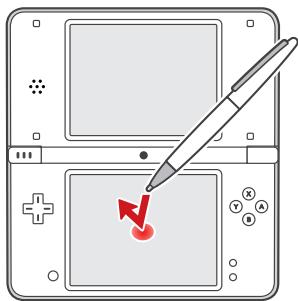
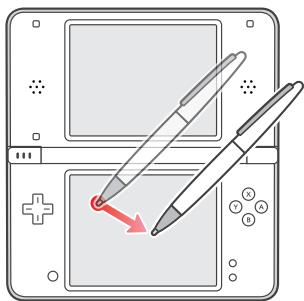
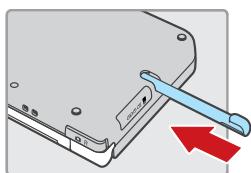
The lower LCD screen, or Touch Screen, is touch sensitive. For games that include this game control feature, operate the screen by using the included stylus. Lightly touch or slide the stylus across the Touch Screen as shown below.
IMPORTANT STYLUS AND SCREEN GUIDELINES:
- Use the stylus ONLY on the Touch Screen (lower screen).
- Use only enough pressure to operate the game. Excessive pressure may damage the Touch Screen.
- Do not use the stylus if it is broken.
- Use only a Nintendo licensed stylus on the Touch Screen.
- Replace the smaller stylus in the stylus holder when not in use.
- If you use a screen protector on your Nintendo DSi XL, use only a Nintendo licensed screen protector.
IMPORTANT: If the Touch Screen becomes dirty or contaminated with foreign material, do not continue to use your Nintendo DSi XL. It may not work properly and can become more damaged. Follow the cleaning procedures below. If it still does not work after cleaning, visit support.nintendo.com for information on repair service.
Screen Cleaning Procedure
If the screens on your Nintendo DSi XL have visible smudges, fingerprints, or other foreign material on them, you can clean them by using a soft clean cloth such as a lens or eyeglass cleaning cloth.
- Slightly dampen the cloth with water ONLY and wipe off the screens to loosen any dirt or foreign material.
- Using a dry cloth, wipe the screens to dry them and finish the cleaning process. If needed, repeat the process.
Calibrating the Touch Screen
You can adjust the Touch Screen if it doesn't seem to respond properly or if the Touch Screen is not responding to the same place you're touching it.
-
If the Touch Screen is not responding properly, first try removing any screen protectors (sold separately) that you may have added to your Nintendo DSi XL.
-
Select System Settings from the Nintendo DSi Menu.
- Select screen number 3 by tapping the #3 box at the top of the screen or by tapping the arrow on the right side of the screen until you see the screen with the Touch Screen option.
- Select the Touch Screen option and follow the on-screen instructions.
If you're still unable to operate the Touch Screen properly...
Try starting up your Nintendo DSi XL at the Touch Screen Calibration screen by following the procedure below.
- While holding down the L Button, R Button and START...
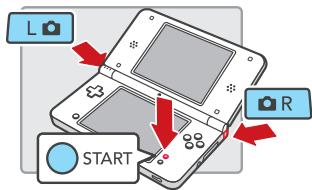
- Press POWER. (Hold down the L, R, and START Buttons until the Calibration screen appears.)
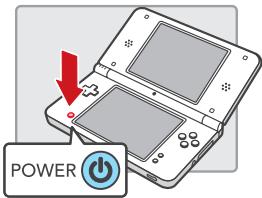
- Follow the on-screen instructions and then turn the power off. Turn the system on again to check the operation of the Touch Screen.
Adjusting the volume
- Press the Volume/Screen Brightness Control in either direction to change the volume.
- Press plus (+) to increase the volume or minus (-) to decrease the volume.
- When the system is in Sleep Mode, the volume can be decreased but not increased.
NOTE: The camera's shutter sound will always play at a fixed volume, regardless of the current setting of the volume control.
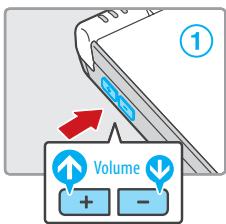
IMPORTANT: Under some conditions, noise from the Nintendo DSi XL speakers can cause audio feedback with the Nintendo DSi XL microphone. If you hear screeching, howling or other unexpected noise from the speakers, turn down the volume or use a set of stereo headphones.
How to start the system with low (muted) volume
Turn the power on while holding down the minus (-) side of the volume/brightness control.
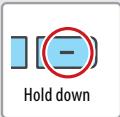

POWER
Turn power on
Adjusting the screen brightness
- Hold down SELECT.
- Press the Volume/Screen Brightness Control in either direction to change the screen brightness.
Press plus (+) to increase the brightness or minus (-) to decrease the brightness.
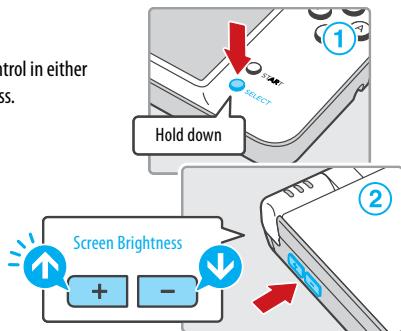
NOTE: Changing the screen brightness will also change the brightness of the power indicator LED and the wireless indicator LED.
NOTE: Increasing the screen brightness will increase the power consumption. As a result, the power indicator LED may change from blue to red when the screen is made brighter. When this happens, note that the battery may run out and the system may lose power soon after the LED turns red.
The relationship between screen brightness and battery duration
Increasing the screen brightness will reduce the battery life. Decreasing the screen brightness will increase the battery life. Adjust the brightness based on your preference. See page 11 for more information.
The Nintendo DSi XL supports high-capacity SD Cards over 2 GB in size (SDHC Cards). With commercially available SD Cards you will be able to:
- Save photos you've taken in Nintendo DSi Camera to the SD Card
- Play AAC-format audio files saved on the SD Card
- Copy downloadable software and its save data to the SD Card
NOTE:
It may not be possible to copy some software.
Data copied to SD Cards cannot be used on other systems.
Save data on Game Cards cannot be copied.
Song or sound files from the SD Card that have been manipulated are not saved.
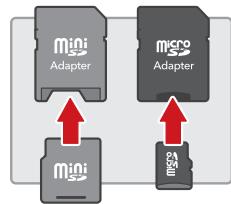
IMPORTANT: An SD Card adapter is required to use miniSD or microSD Cards. When using a card adapter, be sure to remove the entire adapter (not just the card). Malfunction or damage to the system or your data could result if the card adapter is left in the system.
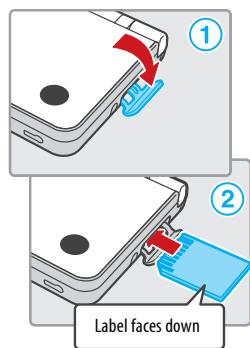
Inserting an SD Card
- Open the SD Card slot cover.
Do not pull or twist the slot cover forcefully. Doing so could stretch or deform it, which could prevent the cover from closing correctly. - Insert the SD Card into the SD Card slot until it clicks into place. Make sure the label side faces down.
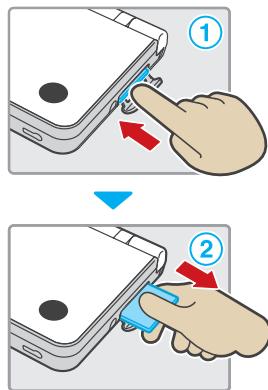
Removing an SD Card
- Open the SD Card slot cover and press on the end of the card until it clicks and partially ejects from the slot.
- Grasp the SD Card and remove from the card slot.
IMPORTANT: Do not remove the SD Card while data is being read or written. This could damage the system or the SD Card, or destroy data.
Battery packs become worn with repeated charge/discharge cycles, and the amount of time they can be used when fully charged will decrease gradually over time. If you feel the usage time has dropped off noticeably, replace the battery pack.
- Do not use any battery other than the Nintendo DSi XL rechargeable battery, Model No UTL-003. A replacement battery may be ordered through Nintendo's web site at store.nintendo.com (USA/Canada only) or by calling Customer Service at 1-800-255-3700
- A parent or guardian should replace the battery pack if a young child is using the system.
PLEASE RECYCLE YOUR USED BATTERIES
When disposing of a rechargeable battery, please be sure to follow appropriate local guidelines and regulations.
- Do not disassemble, attempt to repair, or deform the battery pack.
- Do not dispose of rechargeable batteries in a fire.
To find a collection site near you, please contact your local solid waste authority or visit:
http://www.epa.gov/osw/conserve/materials/battery.htm
For more information or for assistance from Nintendo, e-mail us at nintendo@noa.nintendo.com.
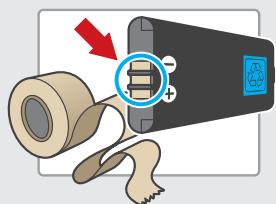
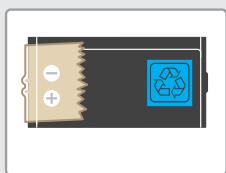
- Place tape over the battery contacts before recycling.
Before replacing the battery...
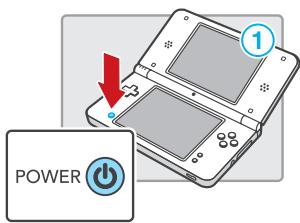
- Press and hold the Power/Reset button (at least .5 second) until the power shuts off.
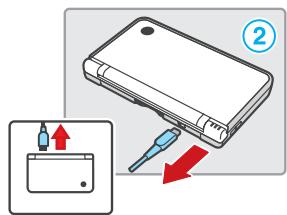
- Make sure the AC Adapter is unplugged from the Nintendo DSi.

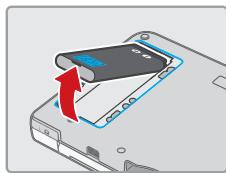
Battery replacement procedure
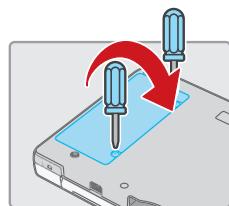
- Loosen the two Phillips-head (+) screws on the battery cover with a screwdriver, and remove the battery cover.
IMPORTANT: To avoid damage to the screw or threads, use a screwdriver that is appropriate for the screw.
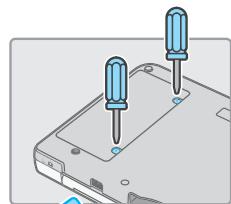
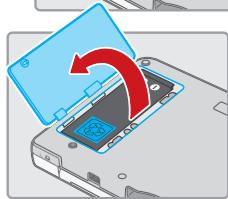
- Remove the battery pack as shown at right.
- Orient the new battery as shown and carefully insert completely into the battery compartment.
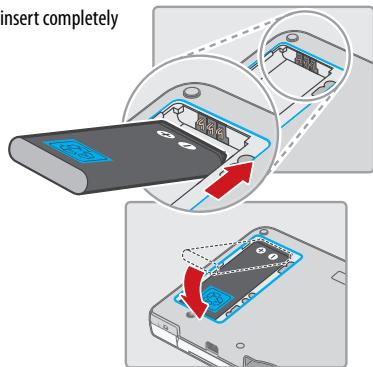
- Replace the battery cover, and tighten the two screws, being careful not to overtighten.
IMPORTANT: Always be sure to replace the battery cover and tighten the screws before resuming use.


Applications and Settings
The Nintendo DSi Menu appears automatically when you turn the system's power on. On this menu you will see icons for the system's built-in applications and for any Nintendo DS or Nintendo DSi Game Card inserted into the DS Game Card slot. Tap these icons to play games, use the applications, or enter system settings. You can also press [L] or [R] to enter camera mode and take photos.
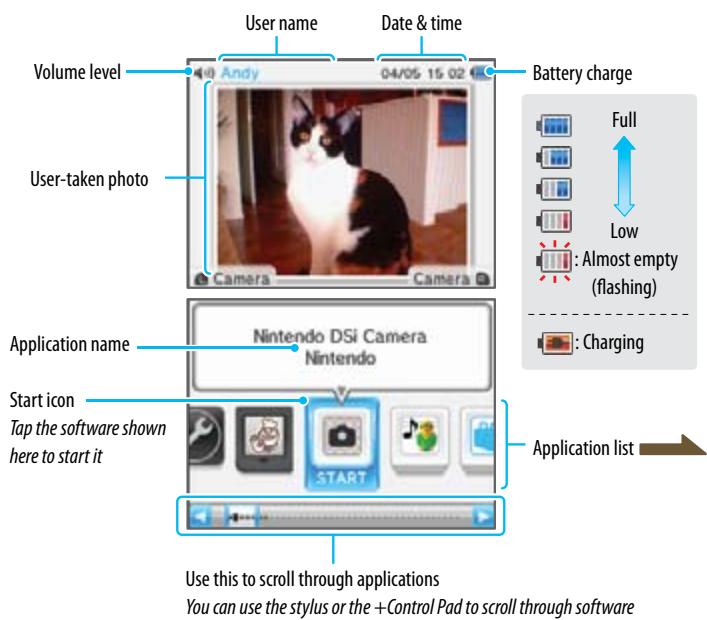
Screen Explanation
Application Icons
Here are the icons you'll see on the software list.
Card Software Icons

This icon appears when there is no Game Card inserted in the DS Card Slot.

When a Game Card is inserted in the DS Card Slot, an icon for that game will appear. The Personal Trainer: Cooking icon is shown here.
Built-in Software Icons
These are the icons of the system's built-in software applications.

System Settings See page 63

Nintendo DSi Camera See page 26.

Nintendo DSi Sound See page 44.

Nintendo DSi Shop See page 54.

DS Download Play See page 57.

PicoChat See page 58.

Nintendo DSi Browser See page 61.

Flipnote Studio See page 62.

Other
Open Icon
This icon appears when no application is present. The number of empty boxes represents the number of applications that can be added.

Nintendo DSi + Internet Icon
Select this icon from the Nintendo DSi Menu to watch a video showing the many advantages of connecting your Nintendo DSi/Nintendo DSi XL system to the Internet. You can delete this later to open up memory space.

Present Icon
This icon appears when you add a new application by downloading it via Nintendo DSi Shop, or through some other means. Tap a present icon to reveal the application icon.
Moving Icons
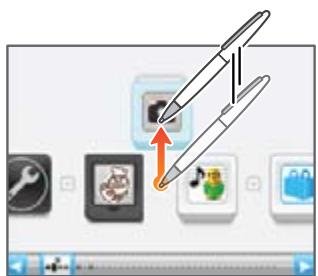

Use the stylus to select the icon you want to move and then slide it up to the center of the screen.
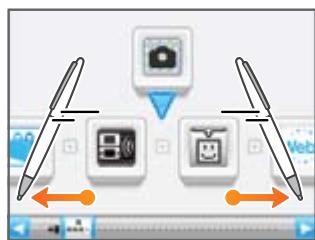

Scroll through the software list until you come to the spot you want to place the software icon.
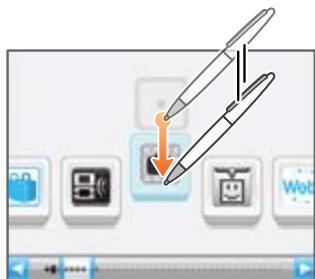

Tap the icon once again and slide it into its new location.
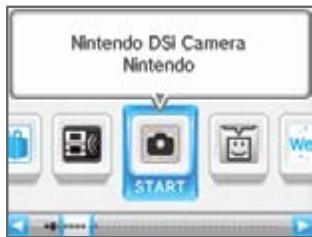

That's it! You're done.
Camera Mode
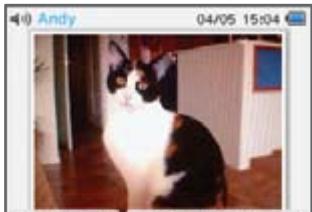
On the Nintendo DSi Menu, press L or R to enter camera mode. Photos you take will be saved to the Nintendo DSi XL system memory.
Full Screen Photos remaining: 405 Number of photos remaining
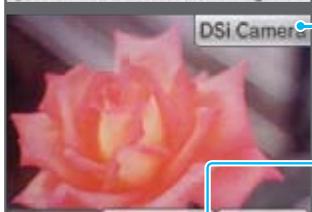
Back

Switch
Number of photos remaining
Start Nintendo DSi Camera
Take a photo (L, R, or A)
Switch between inner and outer cameras. ()
Return to the Nintendo DSi Menu. (B)

Turn control displays on and off. ()
(You can also use the buttons shown in parentheses.)
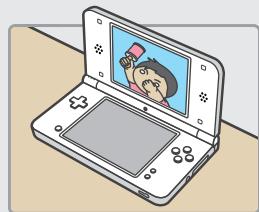
Top-Screen Photo Display
-
Photos taken in camera mode will appear on the top screen of the Nintendo DSi Menu.
-
If you have taken multiple photos in camera mode, the photo that appears on the top screen will change every time you turn the Nintendo DSi XL on or exit Sleep Mode by opening the Nintendo DSi XL.
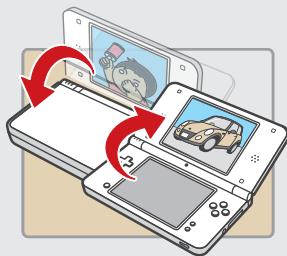
- You can use the Nintendo DSi Camera photo album to select which photo appears on the top screen.
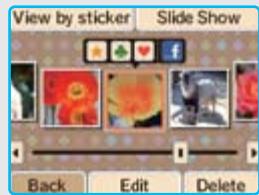
Nintendo DSi Camera photo album
Using Game Cards
Starting a Game
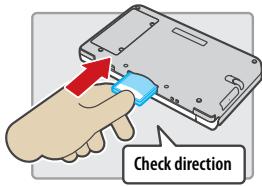
Insert a Game Card in the DS Card slot.
If you have trouble inserting the Game Card, eject it and confirm that it is facing the right direction.
Note: The label should face towards the bottom of the Nintendo DSi XL.
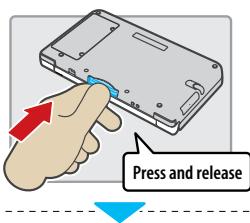
IMPORTANT: Do not insert or remove Game Cards or accessories when the power is on.

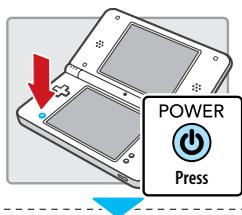

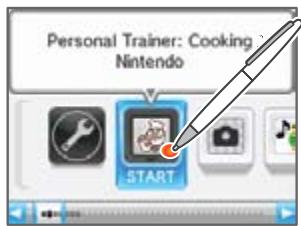

Exiting a Game




Nintendo DSi Camera
With Nintendo DSi Camera, you can take photos with eleven different lenses, watch slide shows of your photos, and exchange photos with other Nintendo DSi/Nintendo DSi XL systems.
IMPORTANT: To avoid damage to the Nintendo DSi Camera, do not point it at the sun or other very intense sources of light.
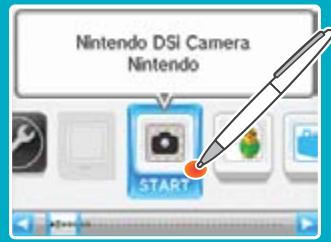
Getting Started
When you start Nintendo DSi Camera, you will have several options available. Tap the Touch Screen to make a selection.
Screen Explanation
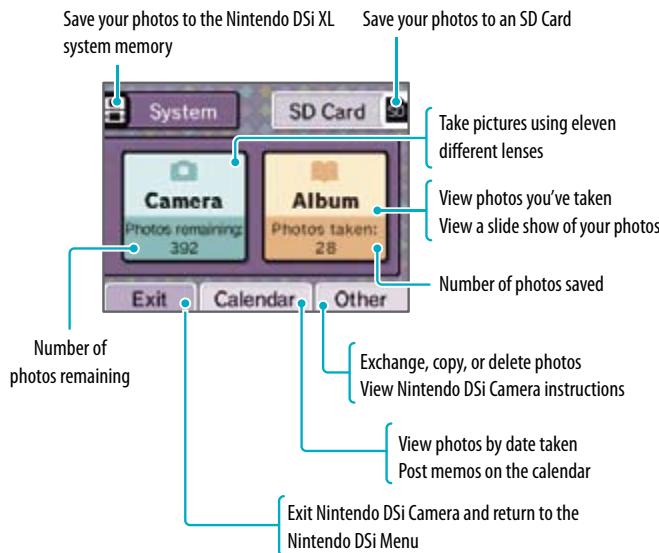
How Many Photos Can I Save?
- Check the Photos Remaining display to see how many photos you can save in your selected location. Because photo-data size can vary, this number is only a rough indicator—it does not reflect a precise number of photos.
- Depending on the size of your SD Card, you can save up to 3,000 photos maximum.
Using the Camera
Selecting a Lens
Tap Camera from the Nintendo DSi Camera menu to view the lens-selection screen. Tap the lens you want to use, and then tap Start to begin using that lens.
Return to the Nintendo DSi Camera menu
Tap the lens you want to use
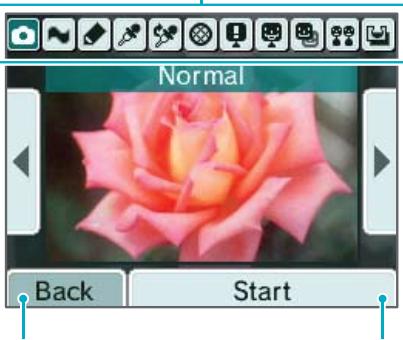
Begin using the selected lens
Lens Types


Distortion Lens
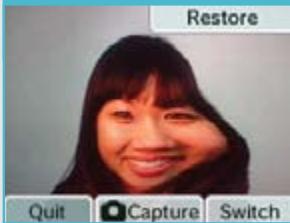
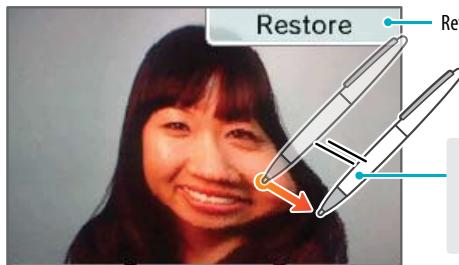
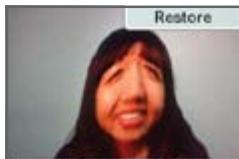
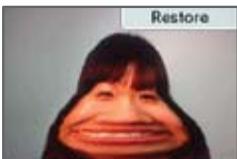
Distort the photo by tapping and sliding on the Touch Screen.

Normal Lens
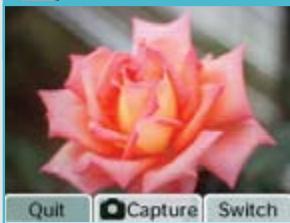
Take photos without any alteration.

Graffiti Lens
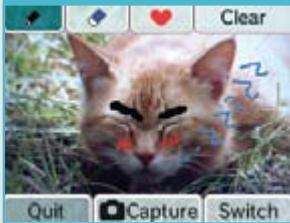
Draw on photos or add colorful stamp designs.

Color Lens
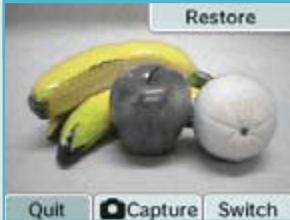
Tap any point on the Touch Screen to restore an area's color to the photo.

Colorpad Lens
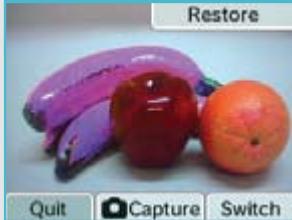
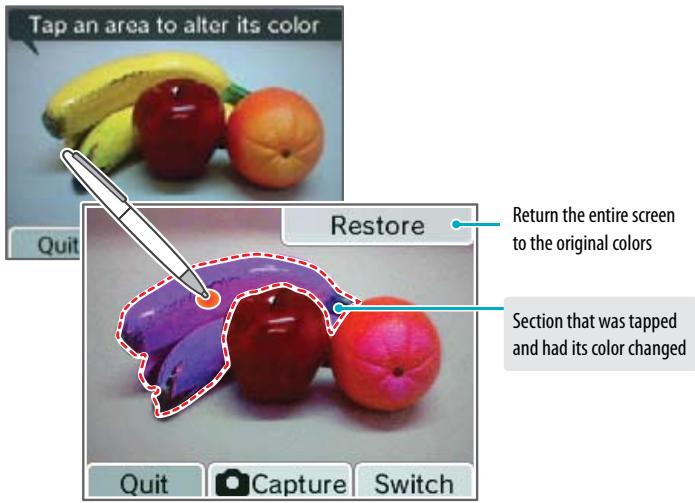
Tap any point on the Touch Screen to alter that color in the photo.

Mirror Lens
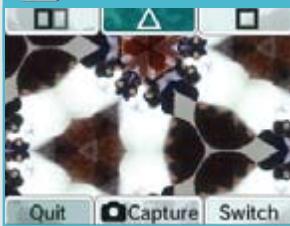
Apply and adjust a variety of mirror effects.

Mischief Lens
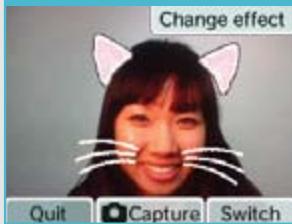
Add a mischievous touch to your friends' faces.

Emoter Lens
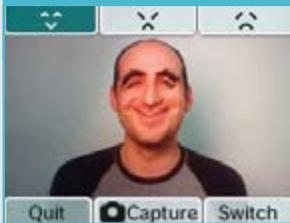
Change facial expressions.

Merge Lens
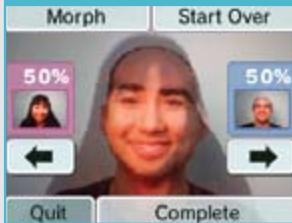
Blend photos of two faces.

Resemblance Lens
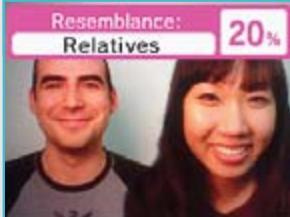
Evaluate how similar two faces are.

Frame Lens
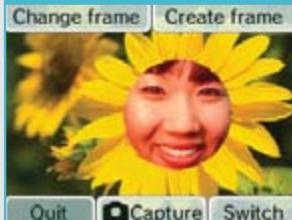
Create frames and take photos within those frames.
Using the Camera (cont.)

Normal Lens
This lens adds no special effects to your photos.

Quit

Capture

witch
Capture a photo or ()
Switch between the inner and outer camera ()
Return to lens-selection screen (B)
Toggle the display on or off for icons
like Capture (Y)
These controls apply to all lens types
(You can also use the buttons shown in parentheses)

Distortion Lens
Using this lens, you can slide the stylus on the screen to distort your photo.
Quit

Capture
Switch
Out

ature


Out
Capture


Out
Capture


Graffiti lens
Using this lens, you can decorate your photos using pens, stamps, and more.
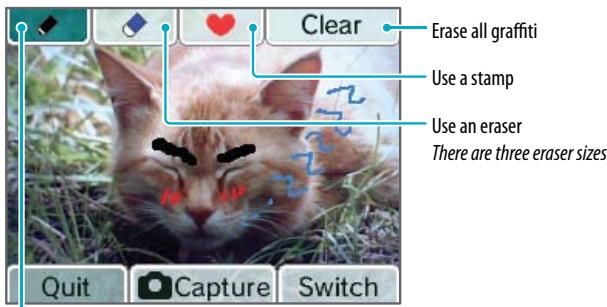
Use pens or droppers (you can select pen color and thickness)
Use the dropper to absorb a color from the screen and use that color as a pen

Using Droppers
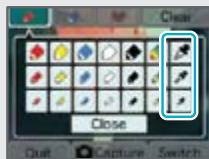

Select a dropper
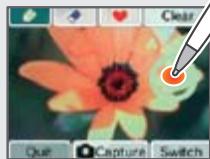

Tap on a color
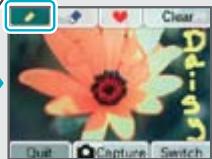

The pen changes to the color you tapped

Color Lens
This lens converts the image to black-and-white. Tap on an area on the image to restore that color. The color of areas that were originally black and white will not change.
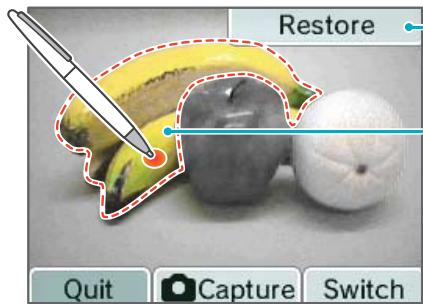
Return the entire screen to black-and-white
This section's color has been restored
Using the Camera (cont.)

Colorpad Lens
Using this lens, you can change the color of any portion of your photo. The color will change each time you tap. Tapping white, black, or gray areas will not change their color.

Mirror Lens
Using this lens, you can make your photo look like a kaleidoscope.
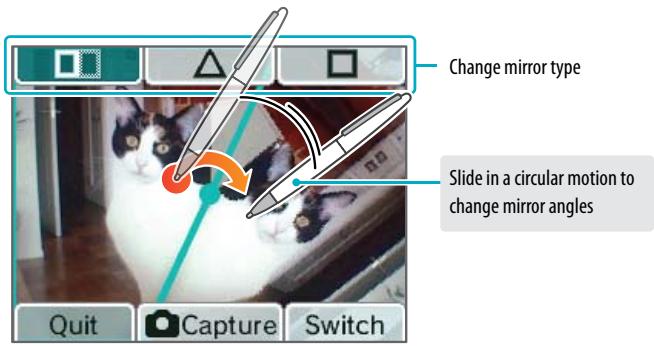
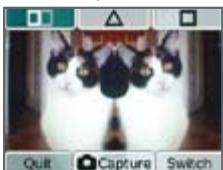
Split mirror
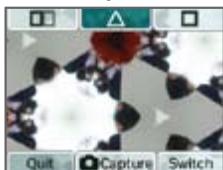
Triangle mirror
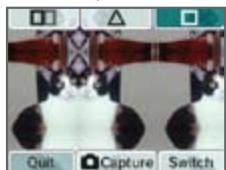
Square mirror

Mischief Lens
Using this lens, you can add special effects to your friends' faces.
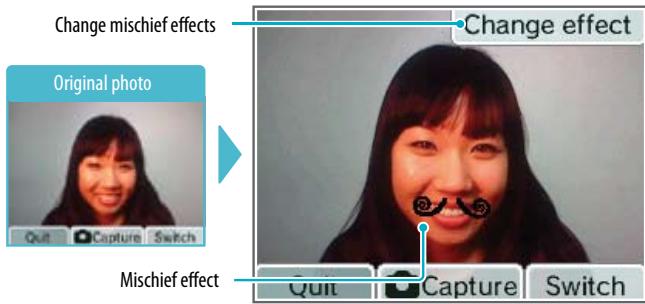
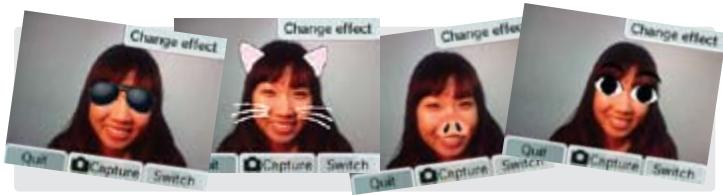

Emoter Lens
Using this lens, you can change the expression on your friends' faces.
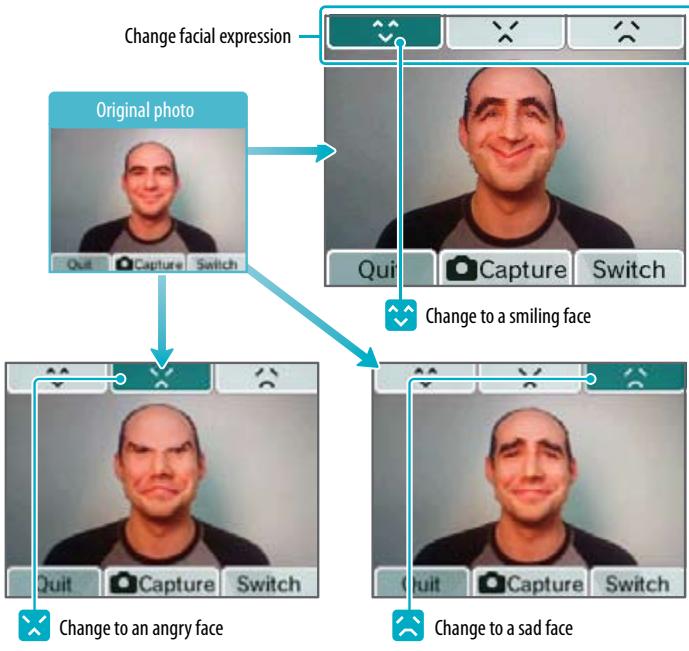
Using the Camera (cont.)

Merge Lens
Using this lens, you can blend two faces together.

Capture a photo of the first face Try to get the face as large as possible and centered on the bottom screen.
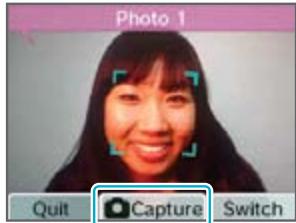

Capture the second face as you did the first It's easier to merge faces if the second face is as close as possible in size and position to the first face.
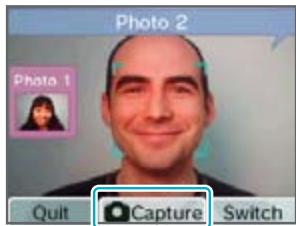

Once you have the results of the merge, tap or to change the merge ratio (%) of the two faces
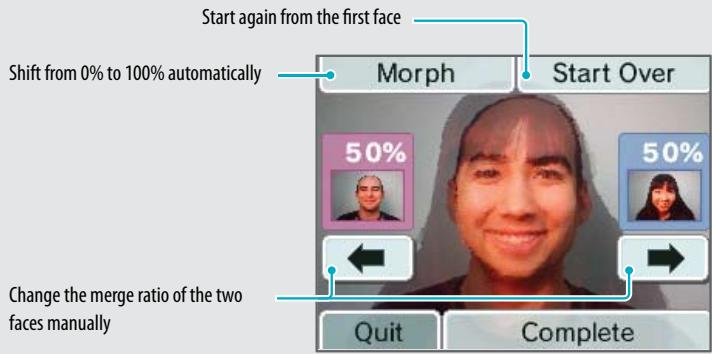

Tap Complete to save a photo.
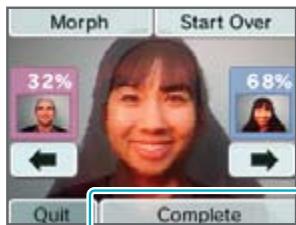

Resemblance Lens
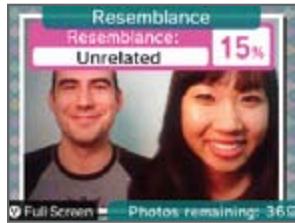
Using this lens, you can evaluate how similar two faces are.

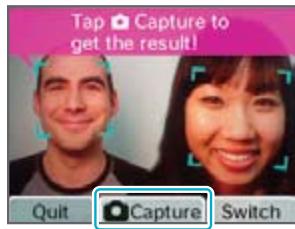
Line up two faces on the screen Once the faces have been identified, they will appear with square frames around them.
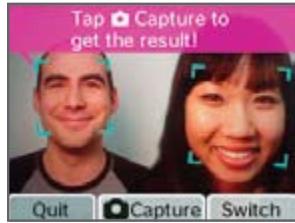

When the faces have been identified, tap Capture

The similarity percentage will appear, and the photo will be saved
Guidelines Regarding Face Recognition
For more precise facial recognition when using the Mischief, Merge, or Resemblance lenses, pay attention to the following:
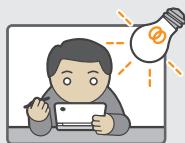
Capture photos in a bright environment.
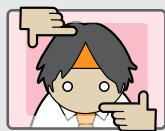
Capture the whole face on screen.
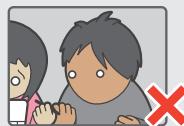
Capture the face from the front.
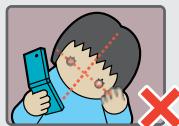
Don't tilt your head.
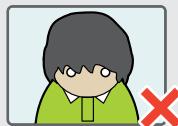
Lift bangs to make eyebrows visible.
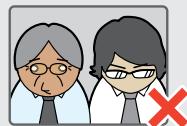
Take off glasses.
Please keep in mind that following these steps may not ensure perfect facial recognition.
Using the Camera (cont.)

Frame Lens
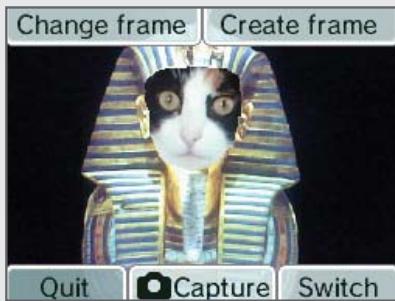
Using this lens, you can capture photos within preset or user-created frames, or you can create your own brand-new frames.
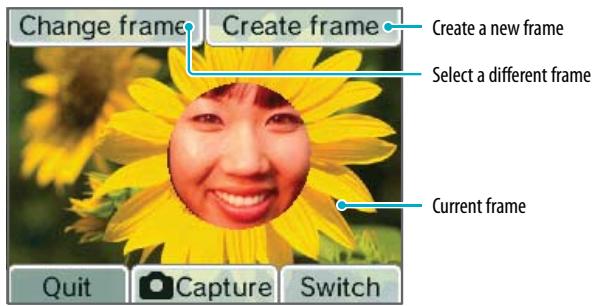
Creating Frames
1 Tap Create frame on the Touch Screen.
2 Select whether to take a new photo to create your frame or to use a photo you've already taken.
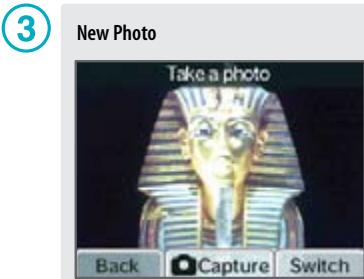
Take a new photo and use it to create a frame.
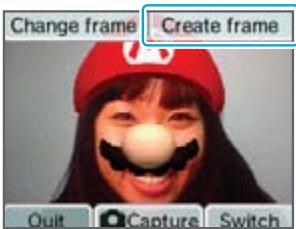
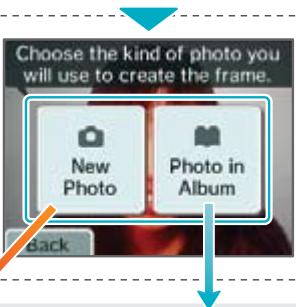
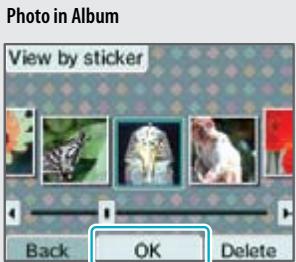
Select a photo from your album and tap OK
Use the eraser to carve out a blank area in the photo.
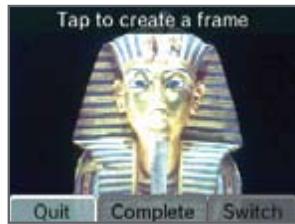
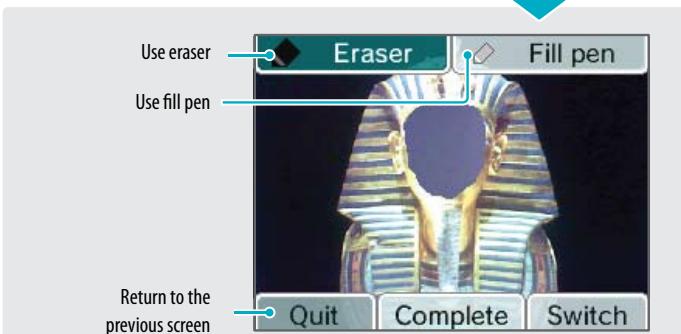
5 Tap Complete to save your frame.
The completed frame is saved as frame data. You can now select it using Change frame. (See step 1).
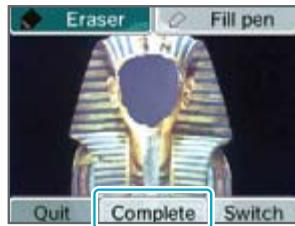
Now, use the frame you just created and take a new picture with it!
Viewing the Album
Select Album from the Nintendo DSi Camera menu to view thumbnails of your photos. You can view, edit, or delete any of the photos you have taken.
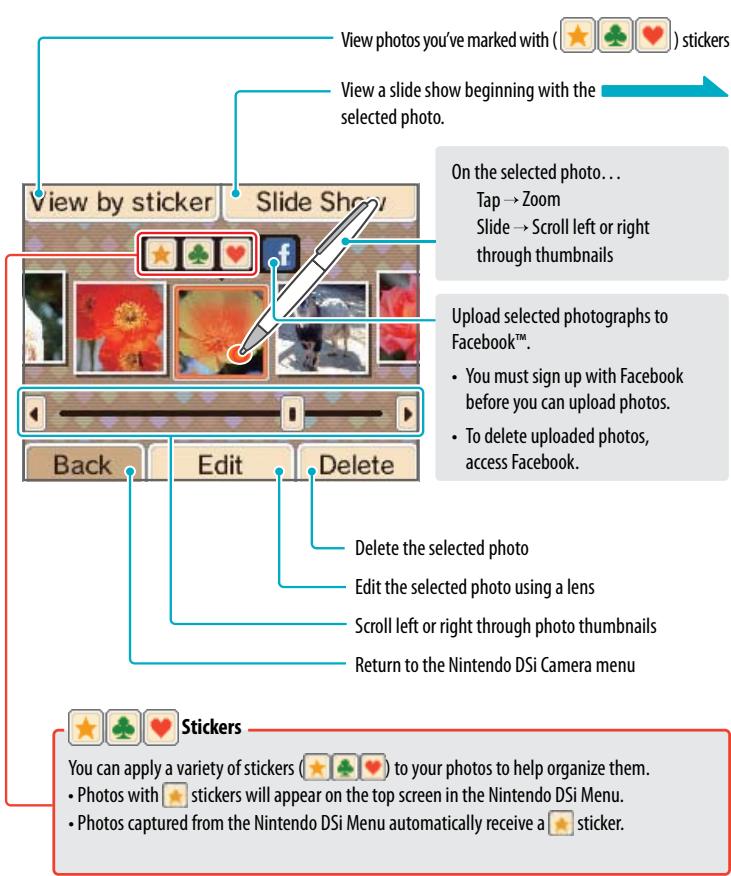
About the Thumbsails
- Photos are displayed from left to right in order of oldest to newest. When using View by sticker, photos are displayed from left to right in the order in which stickers were applied.
- Photos with file formats that cannot be displayed will have a icon.
- If you have a lot of photos, it might take a while for all of their thumbnails to appear.
Displaying Photos on the Nintendo DSi Menu
- Only photos labeled with a sticker will appear on the top screen of the Nintendo DSi Menu. Apply a sticker to any photos you want to display in menu. Remove stickers from any photos you do not want to appear in the menu.
- Only photographs captured by the Nintendo DSi Camera or the Nintendo DSi Menu camera mode are displayed on the Nintendo DSi Menu. You can apply stickers to photos that were captured by other software, but they will not be displayed on the Nintendo DSi Menu.
Slide Show
Select Slide Show from the Album menu to display photos one after another. Tap the Touch Screen to activate the Slide Show options shown below.
Options on the Touch Screen
End slide show
Change display order, display method, and music
Pause/Continue slide show
Slide-Show Settings
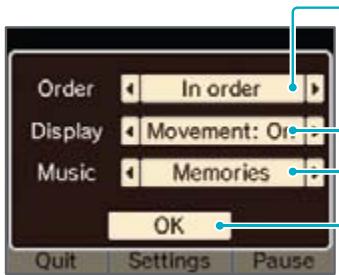
Change the order of photo display
In order...Display in the order shown in the album
Random...Display in random order
Change the display method
Change the music
Finalize settings and return to slide show
About Facebook
Facebook is a service that helps users connect and share with the people in their life. Millions of people use Facebook everyday to keep up with friends, upload an unlimited number of photos, share links and videos, and learn more about the people they meet. For more information and to learn how to sign up, go to www.facebook.com.
Facebook is a trademark of Facebook, Inc.
Photo Data
- Only photos taken with a Nintendo DSI/Nintendo DSi XL can be displayed or edited in Nintendo DSi Camera. Photos taken with a digital camera or mobile phone cannot be displayed, nor can photos captured on a Nintendo DSi/Nintendo DSi XL if they have been copied to an SD Card and then edited on a PC or other device, or renamed.
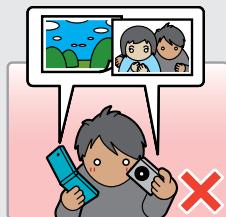
- Photos taken on a Nintendo DSi/Nintendo DSi XL contain thumbnail data and photo data. Editing the photos on a PC or other device does not guarantee that the thumbnail data will reflect those changes. As a result, third parties may be able to view unedited thumbnail data if altered photos are uploaded to the Internet. Photos modified on a Nintendo DSi/Nintendo DSi XL system reflect those changes in their thumbnails.
Other Camera Features
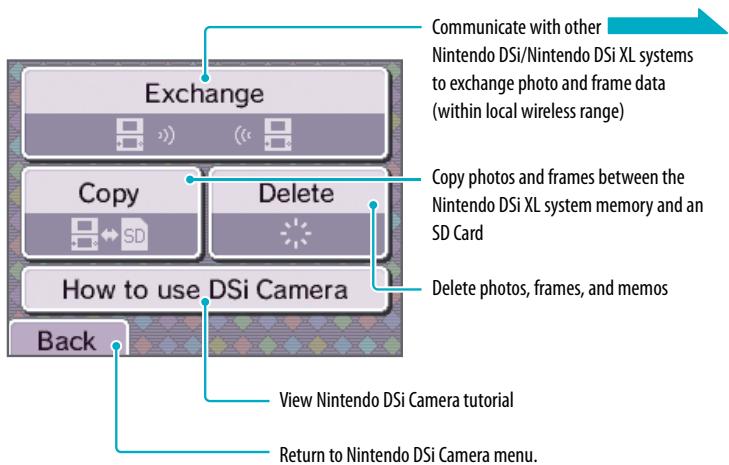
Select Other from the Nintendo DSi Camera menu to exchange, copy, or delete photos or frames. You can also delete memos here.
Note: The photos you send may be modified, forwarded and/or posted by the recipient or a third party. Please do not send any photos that may contain personal information. Parental controls can be set to restrict the exchange of photos. See page 69 for more information.
Exchanging Photos/Frames
Communicate with other Nintendo DSi/Nintendo DSi XL systems to exchange photos or frames.
Controls for Sending Side
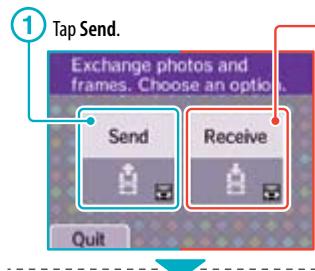
② Wait for the receiving side.
3 Select a recipient 1 and then tap Start 2.
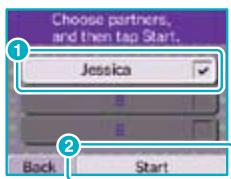
You can send to up to three Nintendo DSi/ Nintendo DSi XL systems at once.
Controls for Receiving Side
1 Tap Receive.
2 Tap a location to save to.
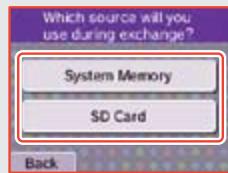
3 Tap who you want to receive data from.
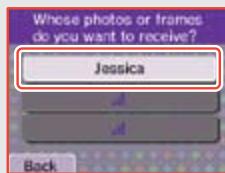
Controls for receiving are finished at this stage.
4 Select where your photo is located (either System for system memory or SD Card).
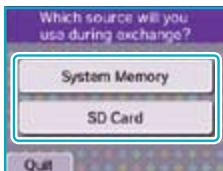
5 Select what you want to send.
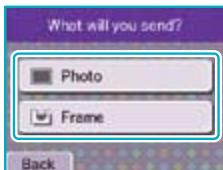
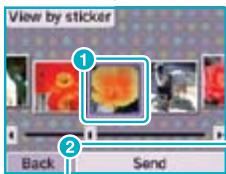
Select the photo (or frame) to send then tap Send.
Select Yes when you see the confirmation message.
Other Camera Features (cont.)
Copying Photos/Frames
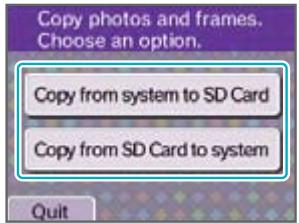
You can copy saved photos and frames from your Nintendo DSi XL system to an SD Card or vice versa.

Select where you want to copy from.

Select the kind of data you want to copy.
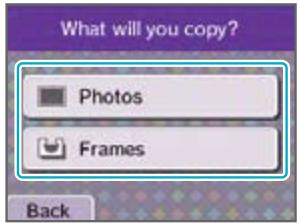

Select the photos or frames you want to copy. In this screen, the user has selected to copy photos.
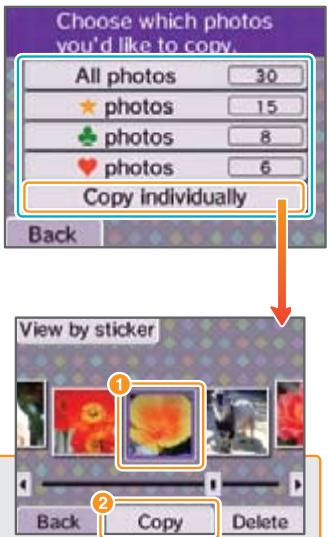
If you select Copy individually, you can select a specific photo or frame from the photo album. In this screen, the user has selected to copy Photos.
Select the photo or frame 1 and then tap Copy 2.
Deleting Photos/Frames/Memos
You can delete photos, frames, and memos saved in the system memory or on an SD Card.

Select where you want to delete from.
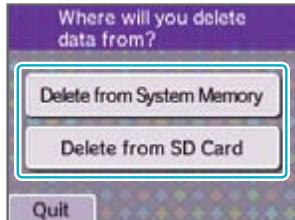

Select the data you want to delete In this screen, the user has selected to delete from System. Since memos can be saved only in the system memory, memos will appear only on this screen.
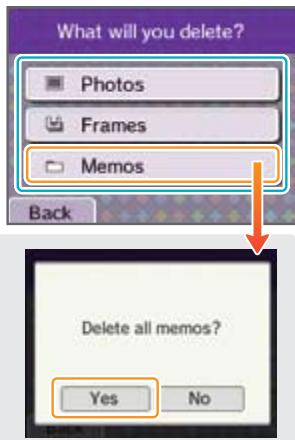
If you select to delete all memos, tap Yes on the confirmation screen.
Delete all memos?
Yes
No

Select which photos or frames you want to delete. In this screen, the user has selected the Photos options
IMPORTANT:
When you select All photos or photos, you can quit in the middle of the process, but some photos may still be erased.
Choose which photos you'd like to delete.
All photos
30

photos
15

photos
8

photos
6
Delete individually
Back
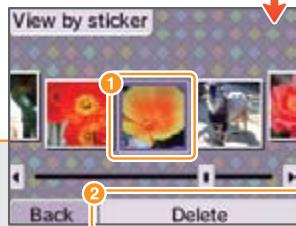
If you select Delete individually, you can select a specific photo or frame from the photo album. In this screen, the user has selected the Photos option.
Select the photo or frame 1 and then tap Delete 2.
Calendar
Select Calendar from the Nintendo DSi Camera menu to access the calendar on the Touch Screen.
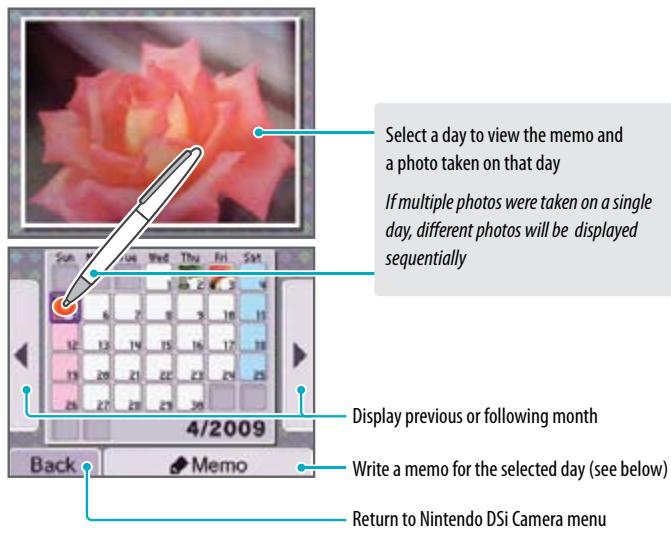
Writing Memos
You can write a handwritten memo for each day, whether it's a note about a special event or a reminder about when those photos were taken. All memos are saved in system memory.
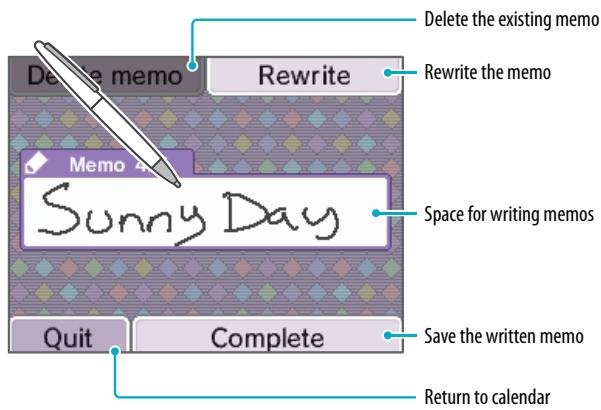

Nintendo DSi Sound
With Nintendo DSi Sound, you can record sounds using the internal microphone and then play with them to create new sounds. You can also play music saved on an SD Card.
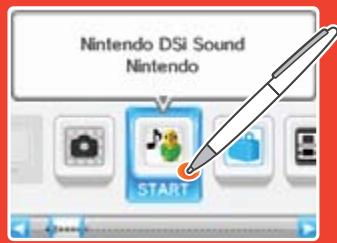
Starting Nintendo DSi Sound
When you start Nintendo DSi Sound, you will see a sound wave on the top screen and selectable options on the lower screen. Tap an option to begin playing with sound.
Nintendo DSi Sound Menu
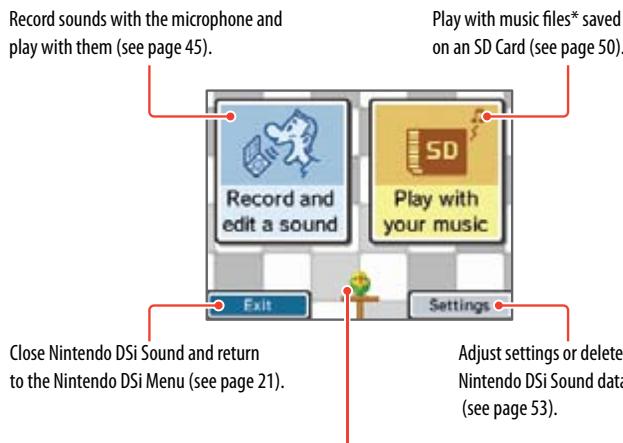
Your parakeet. If you let it listen to voices and sounds around it, it will try to imitate them. It also remembers recordings you've made earlier and may repeat them at random.
*Playable File Formats
The following file formats can be played with Nintendo DSi Sound:
AAC files with .m4a, .mp4, or .3gp filename extensions
Bitrate: 16 kbps - 320 kbps
Sampling rate: 32kHz - 48kHz
For information on how to save music to an SD Card, see page 53.
- For more information on compatible file formats, visit support.nintendo.com.
Recording and Playing with Sounds
Tap Record and edit a sound from the Nintendo DSi Sound menu.
Note: Sound data will be saved in the Nintendo DSi XL system memory. No data will be written to or read from your SD card.
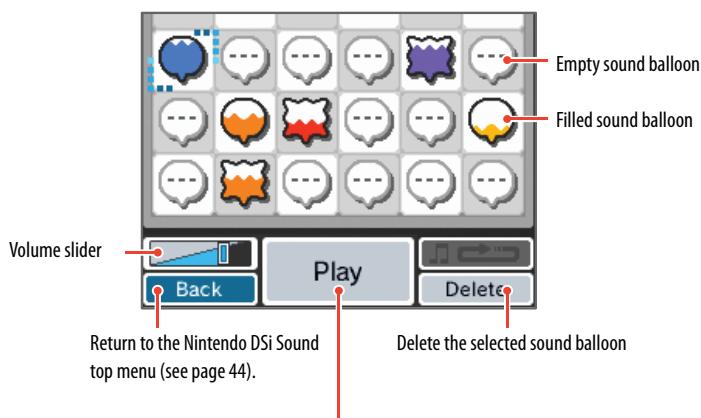

Record sound Use the mic to record a sound. Each balloon can hold up to ten seconds of sound.

Play sound Play with your sounds by changing the playback speed, applying filters, etc. (see page 47).
Moving Data into Different Locations
Tap the balloon you want to move, and then slide it to where you want it and release.
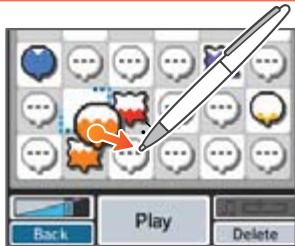
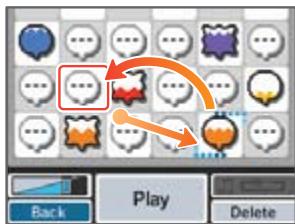
The two balloons will swap locations.
Recording
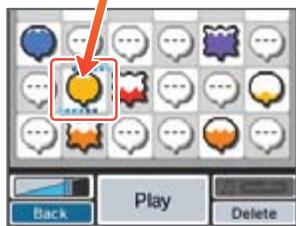
Tap an empty balloon 1
↓
Tap Record. 2
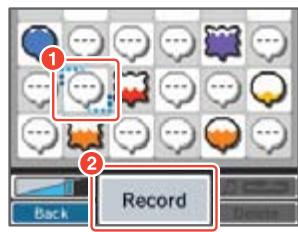
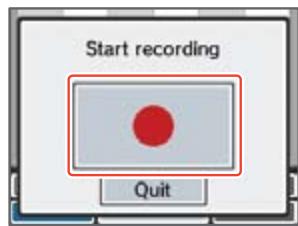
2 Tap to begin recording. If the mic detects a loud enough noise, it will begin recording automatically.
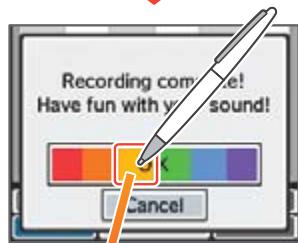
Once you've finished recording, tap OK. Your sound balloon will be whatever color you tap.
Recording and Playing with Sounds (cont.)
Playing with Sound
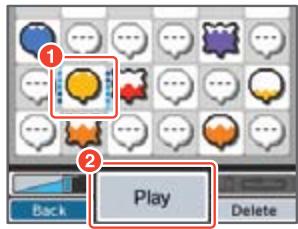
1 Choose the sound balloon you want to use by tapping it 1, then tap Play. 2
2 Change the sound however you like.
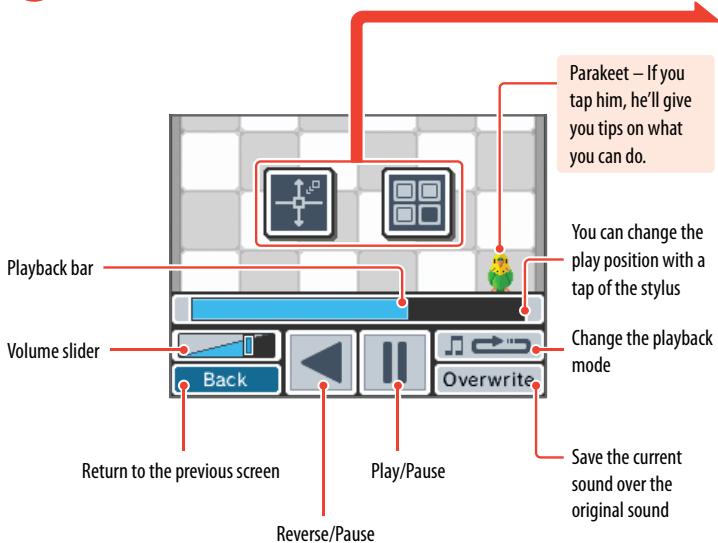
Playback Modes
Repeat the current sound.
Play all sounds in order, then repeat from the beginning.
Play the current sound once.
Random play.
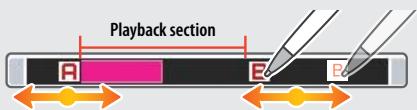
Play the current sound from a user-set point A and point B. Slide points A and B back and forth to adjust them.
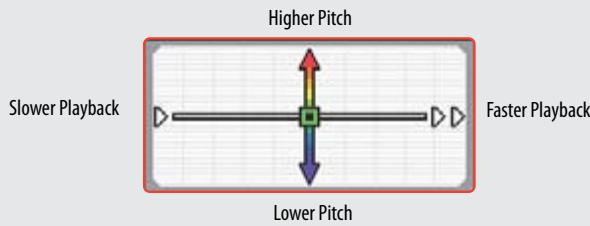
Changing Playback Speed and Pitch
Tap the Touch Screen to move and alter the speed and pitch of the sound.
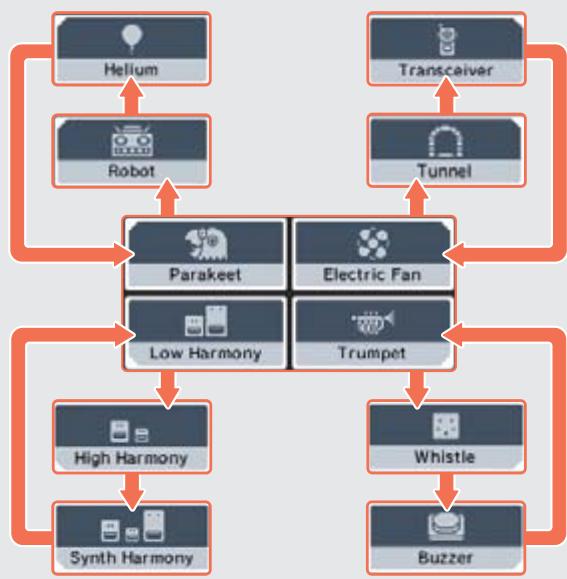
Using Sound Filters
By tapping an icon, you can apply different filters to alter your sound. Each icon has three different filters, so each time you tap one, the filter will change.
Recording and Playing with Sounds (cont.)
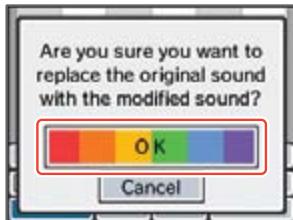
Saving Altered Sounds
If you want to save sounds that you've changed, tap Overwrite.
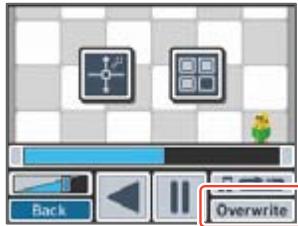
2 Confirm that the recording sounds the way you want it.
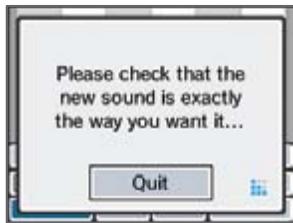
3 Tap OK. Your sound balloon will be whatever color you tap.
4 Your new sound will appear here!
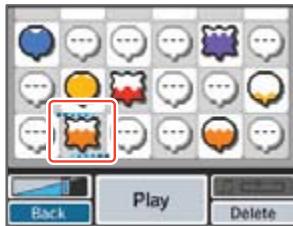
Playing with Music on an SD Card
Choose a Song to Play
1 Tap a folder 1, then select Open. 2
Select Auto to open a random song automatically. You can flag songs as Top 10, Memories, and so on to add them to your Favorites.
Tap Clear to erase all songs from a Favorite folder.
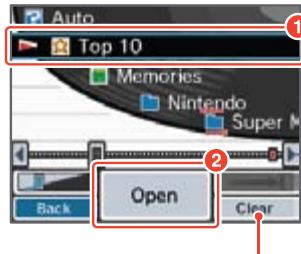
Delete all songs from the selected Favorites folder.
Touch the song you want to listen to 1 and touch Start. 2
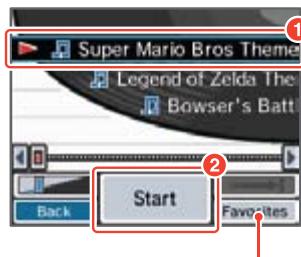
Add the song playing to your favorites.
About Folders and Files on SD Cards
- In Nintendo DSi Sound, only music files and folders containing music files on the SD Card will be displayed. A maximum of 1,000 folders can be displayed.
- If multiple folders on the SD Card have the same name, those song files will all be displayed in one folder with that name.
- Up to 3,000 song files can be displayed.
- Only the first 100 audio files in each folder will be displayed.
- Folders and files more than eight levels deep cannot be displayed.
- Folders will be displayed in numerical/alphabetical order.
Playing with Music on an SD Card (cont.)
Playing with Music Files
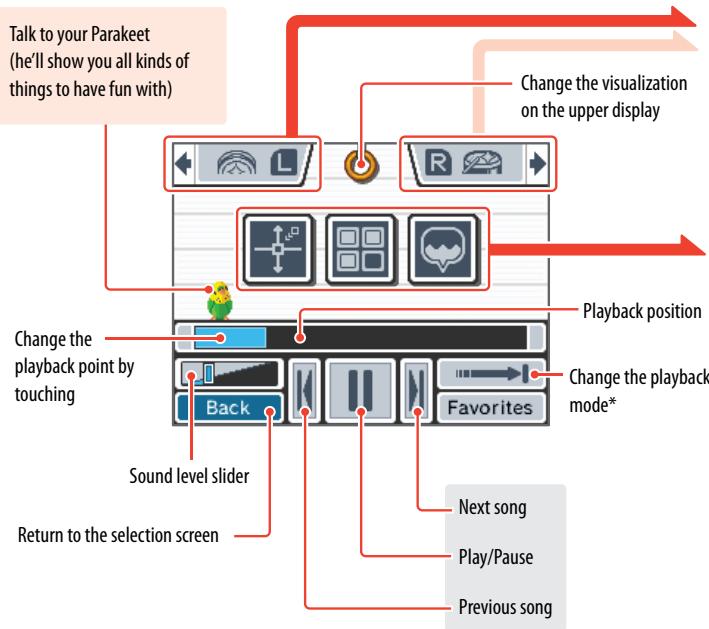
*Playback Modes

Play songs in one folder in order, then stop when finished.

Play songs in the selected folder at random.

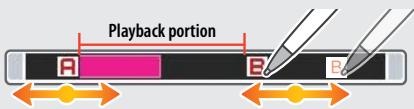
Play the current song from a user-set point A and point B. Slide points A and B back and forth to adjust them.

Repeat the current song.

Play the songs in the folder in order, then repeat when finished.


Beat Buttons
Press L and R to add sound effects. Tap the icons on-screen to change the sound effects.

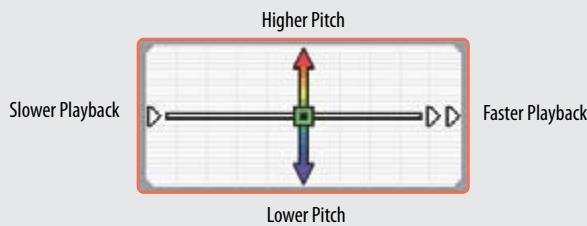
Change the playback speed and pitch
Touch the screen to move the and adjust the playback speed and pitch.

Using filters with the music
Tap each icon to change the filter on the music.
Make music sound like it's being played from an old radio.
Remove the vocal range from a track, leaving only the instruments. (In some songs, the vocals may not be entirely removed.)
Add an echo effect.
Make your music sound like an old video game!
NOTE: Song or sound files from the SD Card that have been manipulated are not saved.

Layering voice recordings
Tap a sound bubble to start playing it over your music.
Settings
Adjust the settings for Nintendo DSi Sound.
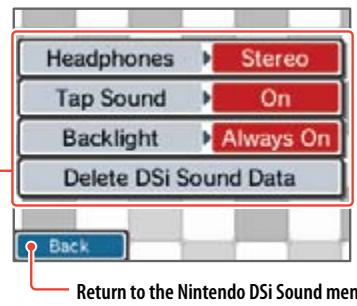
Headphones
Stereo
Set your headphones for mono or stereo.
Tap Sound
0
Enable or disable sound effects when you tap the Touch Screen.
Backlight
Alway
ps On
Set the backlight to turn off automatically when Nintendo DSi Sound is not in use.
Delete DSi Sound Data
Erase all Nintendo DSi Sound data from the Nintendo DSi XL system memory. This will erase all sound files you've recorded or modified, any favorites you've assigned to your music, and anything your parakeet might have picked up.
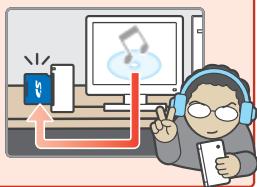
How do you save music files to an SD card?
In order to listen or play with music files, you must save music files on to an SD Card. Please follow the steps below to save music files.
Use the SD Card slot on your computer or a commercially available SD Card reader/writer to place the AAC files on the SD Card.

Nintendo DSi Shop
You can download software onto your Nintendo DSi XL system via Nintendo DSi Shop.
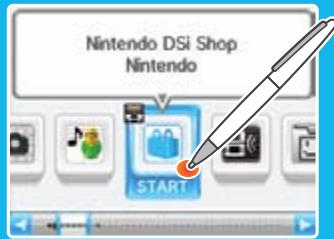
Note: broadband internet access required. For more information, see the section on Internet Setup, beginning on page 73.
Using Nintendo DSi Shop
- To use Nintendo DSi Shop you will need to set up an Internet connection with your Nintendo DSi XL (see page 73), and you will need to have Nintendo DSi Points in your account to download software.
What are Nintendo DSi Points?
You use these points to download Nintendo DSi software from Nintendo DSi Shop.
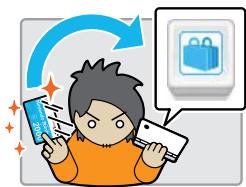
To add points to your account, you can purchase Nintendo DSi Points online through Nintendo DSi Shop, or you can purchase a Nintendo Points Card™ at select retail locations, which can be redeemed for Nintendo DSi Points in Nintendo DSi Shop. Once redeemed, those points automatically become Nintendo DSi Points and cannot be used on Wii™ console or with any other system.
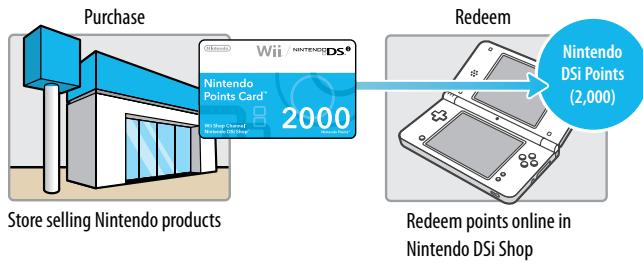
How to Redeem Nintendo DSi Points
There are a number of ways to get Nintendo DSi Points.

Redeem a Nintendo Points Card

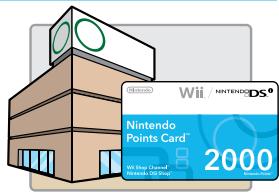
Purchase a Nintendo Points Card.

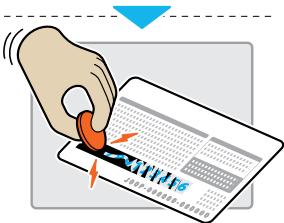
Reveal the Nintendo Points Number
Reveal the number on your Nintendo Points Card by scratching off the silver area on the back of the card.

Start Nintendo DSi Shop
Follow the on-screen instructions to enter the Nintendo Points Number and redeem your Nintendo DSi Points.
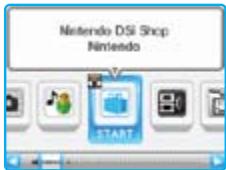

Buy Nintendo DSi Points using a Credit Card
To buy points with a credit card, start the Nintendo DSi Shop and follow the on-screen instructions (you must be 18 or older to use a credit card).
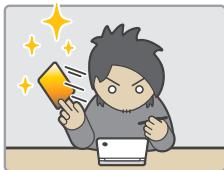
Nintendo DSi Software and Nintendo Points Cards
In order to connect to Nintendo DSi Shop, you will need a broadband Internet connection and a compatible router. The first time you connect, you will need to agree to the terms of the user agreement in order to access Nintendo DSi Shop.
- Nintendo Points Cards sold in the Americas can only be redeemed on Nintendo DSi/NintendodSx XL or Wii systems released in the Americas.
- Your Nintendo DSi Shop account can contain up to 20,000 Nintendo DSi Points maximum at any time.
- You must redeem all of the points on a Nintendo Points Card at once. You cannot divide the points between different systems.
- Parental Controls may be used to restrict use of Nintendo DSi Points and manage downloading of software based on ESRB ratings.
- All Nintendo DSi Points and software downloads are for use only on a single Nintendo DSi Nintendo DSi XL system and are nonrefundable and nontransferable.
- Once a Nintendo Points Card has been redeemed for Nintendo DSi Points, it cannot be redeemed on a different Nintendo DSi/Nintendo DSi XL system or on a Wii console.
- Software downloaded from Nintendo DSi Shop is licensed to you, not sold. For more information, please refer to the user agreement in the System Settings (see page 73).
With DS Download Play, you can download and play certain multiplayer games with other Nintendo DSi/ Nintendo DSi XL, DS Lite, and DS users even if you have only one copy of a game. You can also send and receive demos of certain software titles.
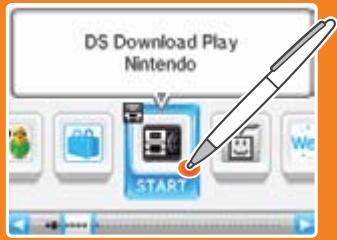
Control Sequence
Using DS Download Play (Host or sending system)

On the Nintendo DSi Menu, tap the icon of a DS Download Play-compatible title.

Now follow the instructions in the instruction booklet of the software you are using.
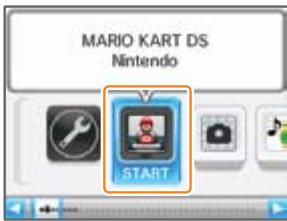
DS Download Play (Client or receiving system)

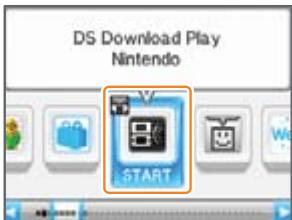
Tap the DS Download Play icon on the Nintendo DSi Menu.

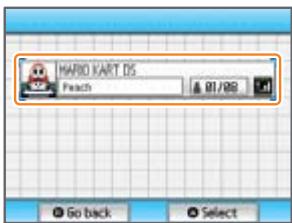
Select the panel for the game title you want to download.

Tap Yes to begin downloading the title.
Yes

Now follow the instructions in the instruction booklet of the software you are using.

PicoChat allows you to use the Nintendo DSi XL to send and receive wireless messages and drawings from other Nintendo DS users. PicoChat is not an Internet application. You can communicate with up to 15 other Nintendo DS users within range of your Nintendo DSi XL. See PRIVACY INFORMATION on page 103.
Note: PictoChat works with all models of Nintendo DS.
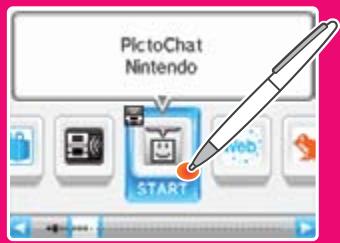
Starting PictoChat
First, the chat-room selection screen will appear. Select a chat room to join.
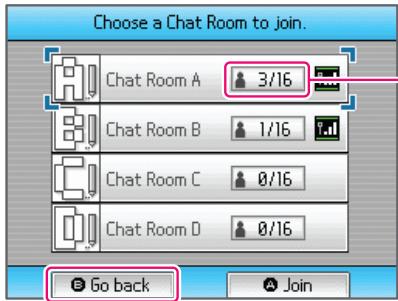
Close PictoChat and return to the Nintendo DSi Menu (see page 21).
The number in each panel indicates how many people are in that chat room. The maximum number of users in each chat room is 16.
Controls
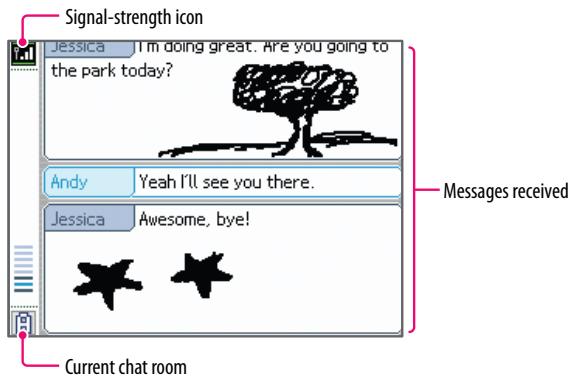
Top Screen
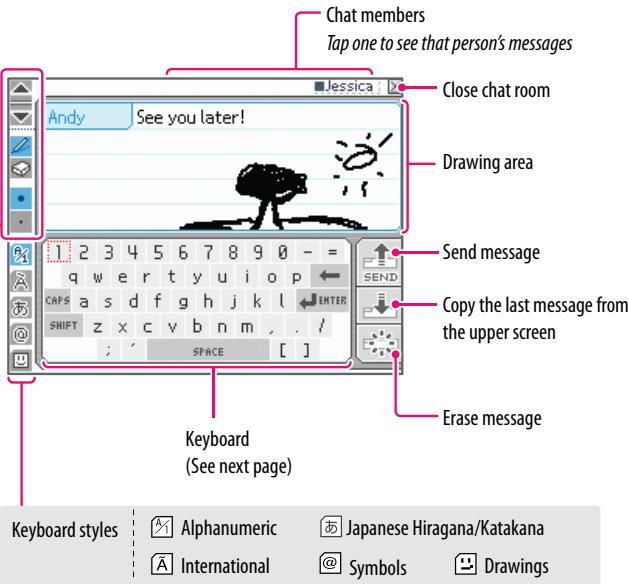
Touch Screen

Scroll the upper screen

Pen tool (Write and draw)

Eraser tool (Erase letters or pictures)
Pen / Eraser Thickness (use to change the thickness of the pen or eraser)
Using the On-Screen Keyboard
Tap characters on the keyboard to enter them. You can touch and slide letters into the editing area in any order you please. Delete the character directly.
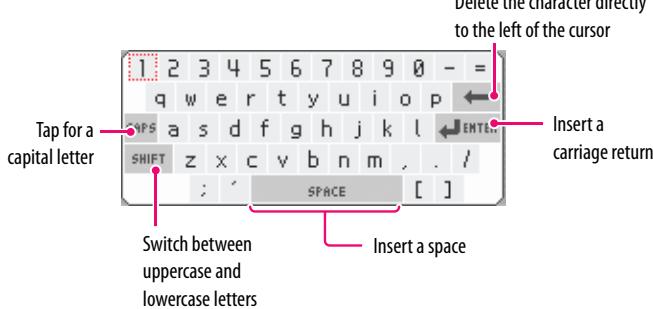
You can also use buttons to control the keyboard.
| Move the cursor | |
| A | Enter a character |
| B | Erase the last character entered |
| X | Shift to uppercase letters |
| Y | Switch keyboard types |
| L R | Scroll through messages |
| START | Send message |
| SELECT | Press for a short time: Copy last message / Press for a long time: Erase message |
With the Nintendo DSi Browser, you can view web pages using simple operations with your stylus.
NOTE: You must configure your Nintendo DSi XL to connect to the Internet before using the Nintendo DSi Browser. For more information, see the section on Internet Setup, begging on page 73.
Nintendo DSi Browser Instruction Manual
The instruction manual for the Nintendo DSi Browser is included in the application and can be read on-screen. Refer to this manual for complete instructions on using the Nintendo DSi Browser.
Opening the Instruction Manual

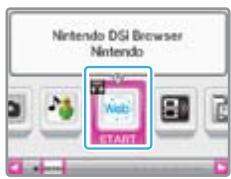
On the Nintendo DSi Menu, tap the icon of the Nintendo DSi Browser.

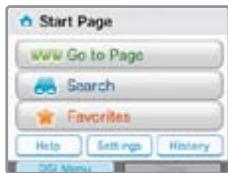
Tap Help on the Start page.
Nintendo DSi Browser Parental Controls
Nintendo has designed tools to allow parents or guardians to limit content that may be inappropriate for some members of their household. There are two ways parents can control how their children use the Nintendo DSi Browser.
- Restrict usage with Parental Controls
You can use the Nintendo DSi Parental Controls feature to prevent the use of Nintendo DSi Browser. Only those who enter the Parental Controls PIN will be able to bypass the restriction once it has been set. Please see Parental Controls in the Nintendo DSi Operations Manual for information on using this tool.
- Restrict Access With a Filtering Service
You can use a digital filtering proxy service provided by Astaro to limit which web pages can be viewed. For more information on this service and about Parental Controls, please visit:
www.nintendo.com/consumer/systems/dsi/en_na/settingsParentalControls.jsp

Flipnote Studio
With Flipnote Studio, you can create and share animated flip books, as well as view ones made by other Nintendo DSi/Nintendo DSi XL users around the world.
NOTE: Broadband Internet access is required to use the Flipnote Hatena features of Flipnote Studio. For more information, see the section on Internet Setup, beginning on page 73.
Flipnote Studio Instruction Manual
The instruction manual for Flipnote Studio is included in the application and can be read on-screen. Refer to this manual for complete instructions on using Flipnote Studio.
Opening the Instruction Manual

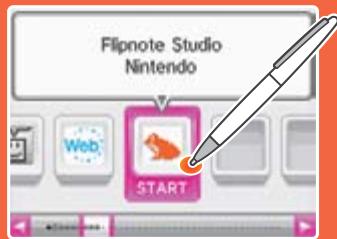
On the Nintendo DSi Menu, tap the icon of Flipnote Studio.
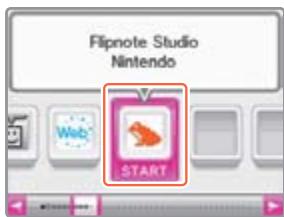

Tap Help on the Start page.
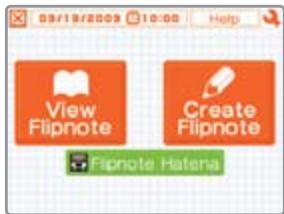
For more information on Flipnote Studio...
For general support on Flipnote Studio visit support.nintendo.com/flipnotestudio.
The Flipnote Hatena portion of Flipnote Studio is provided by Hatena Co., Ltd. For general service inquiries or questions on how to connect to Flipnote Hatena, contact the Hatena Co., Ltd. Flipnote Hatena Support Center. For detailed contact information, please see the 'Customer Support' section of the Shopping Guide in Nintendo DSi Shop.
NOTE: Children 12 and under must obtain parental consent in order to post their Flipnotes on the Flipnote Hatena website.
- Restrict usage with Parental Controls
Select the User Generated Content option in Parental Controls under Settings for the Nintendo DSi XL to restrict access to Flipnote Hatena.
IMPORTANT: Any Flipnotes saved on the Nintendo DSi XL will be deleted from your Nintendo DSi XL if you format your system memory, unless they were saved to an SD Card.
On the Nintendo DSi Menu, select System Settings to open the settings menu, from which you can adjust many different items. Use to turn pages, and tap the setting you want to adjust.
System Settings 1
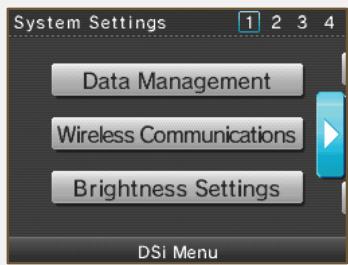
Data Management: Manage the system's internal memory or SD Card data here (see page 65). Note: This item will only appear after you have opened Nintendo DSi Shop (see page 54).
Wireless Communications: Turn wireless communications on or off (see page 66).
Brightness Settings: Adjust screen brightness (see page 66).
System Settings 2
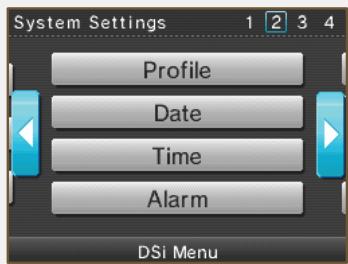
Profile: Edit your user name, birthday, color, etc. (see page 67).
Date: Set the current date (see page 68).
Time: Set the current time (see page 68).
Alarm: Set a time for the alarm to sound (see page 68).
System Settings 3
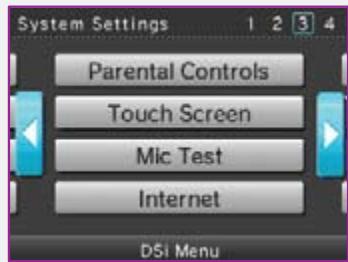
Parental Controls: Set up Parental Controls to limit access to certain content or features (see page 69).
Touch Screen: Calibrate Touch Screen input (see page 72).
Mic Test: Check mic sensitivity (see page 72).
Internet: Configure your Internet settings (see page 73).
System Settings 4
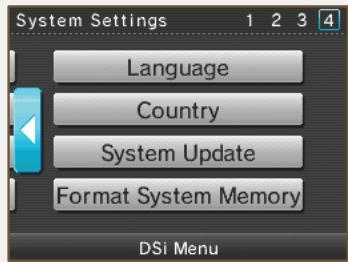
Language: Select a language for your system.
Country: Select your country of residence.
System Update: Update your Nintendo DSi XL system (see page 87).
Format System Memory: Delete all added software and save data (see page 87).
Data Management
Copy or delete software or save data from your system memory or from an SD Card.
Copying / Erasing

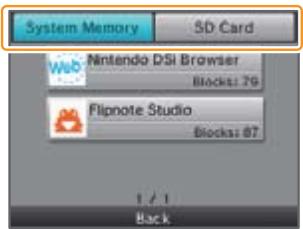
Select where the data you want to delete or copy is located.

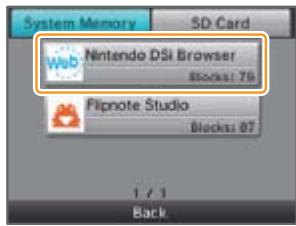
Select the data you want to copy or delete.

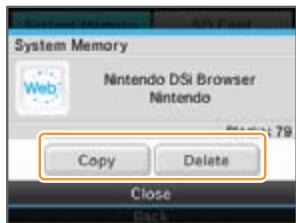
Select either Copy or Delete.
You cannot copy under any of the following circumstances:
- When there is no SD Card in the SD Card slot.
- When there is not enough space available in the area to which you want to copy.
- When the data you have selected cannot be copied.
- When you want to copy to the Nintendo DSi Menu but there are no available boxes on the Nintendo DSi Menu.
- When you want to copy to a system that is not where the original data is saved.
- When the SD Card you want to copy to contains 300 blocks of software or save data.
- When the SD Card you want to copy to is write protected.
Wireless Communication Settings
You can turn the wireless communication function on or off as shown below.
Setup

Tap ON to turn the wireless communication function on, or OFF to turn it off.
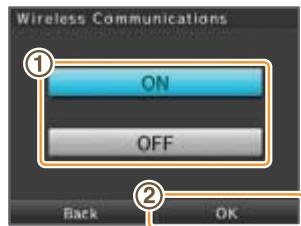

Tap OK.
When the wireless communication function is turned on, the wireless light will flash. When the function is turned off, the light will also turn off.
Brightness Settings
Adjust the brightness of the screens.
Controls

Tap + or - to adjust the brightness.
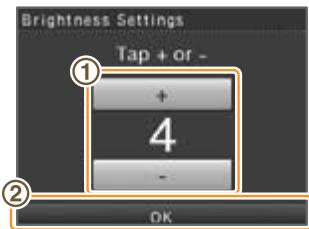

Tap OK to confirm your adjustments
To adjust screen brightness while playing a game, press and hold SELECT then use the Volume Control to make your changes. Use caution when using SELECT to make adjustments as pressing SELECT in certain games may cause the game to skip scenes.
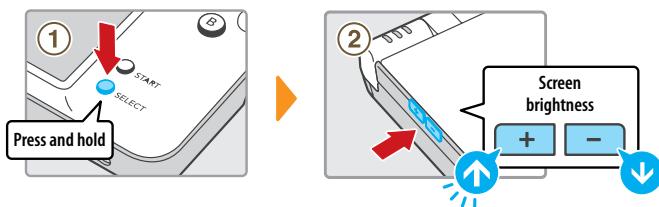
About Screen Brightness and Battery Life
Increasing screen brightness will decrease battery life, and decreasing screen brightness will increase battery life. Please keep this in mind when you adjust your brightness settings (see page 11).
Profile
Open Profile to make adjustments to your user name, personal message, color, and birthday.
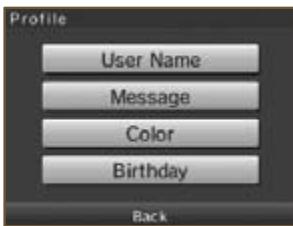
UserID

Use the keyboard to enter your user name. See page 86 for keyboard instructions.
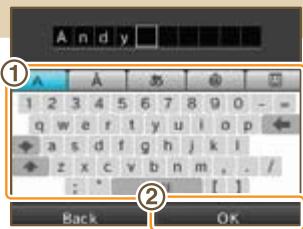

Tap OK to confirm.
Other Nintendo DS users will see your user name when using PictoChat™ and in certain games, so do not share personal information in your user name.
Message

Enter a personalized message using the keyboard. See page 86 for keyboard instructions.
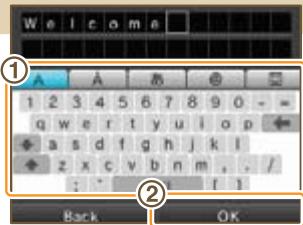

Tap OK to confirm.
The personalized message you enter here will be seen when using PictoChat, so think about entering a greeting or a short introduction. Do not use personal information.
Color

Tap the color you like. The color you choose will be used on the Nintendo DSi Menu and in other places.
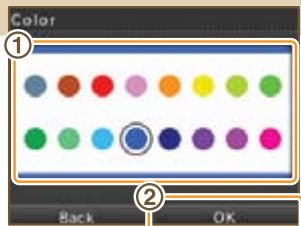

Tap OK to confirm.
Birthday

Use to set the date of your birthday.
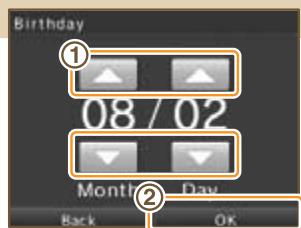

Tap OK to confirm.
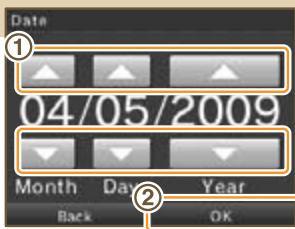
Date
Set the current date.
Some games use this setting, so be sure to enter the correct date.
Setting the date

Use to adjust the month, date and year.

Tap OK to confirm.
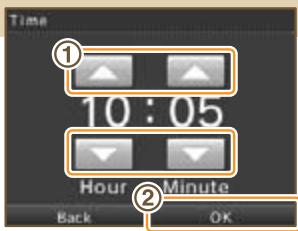
Time
Set the current time.
Some games use this setting, so be sure to enter the correct time.
Setting the time

Use to adjust the time.

Tap OK to confirm.
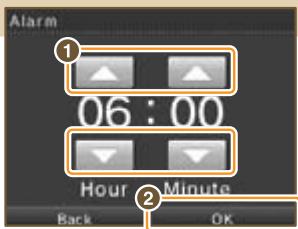
Alarm
Set a time for the alarm to sound.
Controls

Use 1 to adjust the time to when you want the alarm to sound, and then 2 tap OK to turn the alarm on.

Tap Yes to confirm. Both screens will automatically be set to the lowest brightness setting.
To turn off the alarm or cancel it all together, tap the Touch Screen or any button other than the L and R Buttons.
Once the alarm has sounded, the alarm will enter Snooze Mode, and will continue to sound every five minutes until it has been turned off. Snooze Mode automatically ends after one hour.
Parental Controls
Nintendo strives to create an environment that is fun and enjoyable for all users and has designed tools to allow parents or guardians to limit the games and applications that may be inappropriate for some members of their household. There is one Parental Control setting per system, so it is recommended that you put the settings on the most secure that you need for your family; you can then share the PIN with users who may be allowed access to blocked content and features.
What Can Parental Controls Restrict?
- Nintendo DSi Exclusive and Compatible Software
Restrict use of software based on ESRB ratings guidelines. NOTE: You cannot use this to restrict the use of Nintendo DS™ software or software downloaded via DS Download Play.
- PicoChat
Restrict the use of this application.
- DS Download Play
Restrict the use of this application.
- Nintendo DSi Browser
Restrict the use of the Nintendo DSi Browser to browse the Internet. See the section, Nintendo DSi Browser, in this manual for more information on using Parental Controls.
- Nintendo DSi Shop
Restrict use of Nintendo DSi Points. NOTE: You can limit use of Nintendo DSi Points but Parental Controls does not restrict purchase of Nintendo DSi Points made with a credit card.
- Photo exchange
Restrict the exchange of photographs over local wireless communications using Nintendo DSi Camera.
- Other
Restrict the exchange of user-generated content.
Video and Computer Game Software Rating Information
The Entertainment Software Rating Board (ESRB) ratings are designed to provide information about video and computer game content, so you can make informed purchasing decisions. ESRB ratings have two parts: rating symbols suggest age appropriateness for the game, and content descriptors indicate elements in a game that may have triggered a particular rating and/or may be of interest or concern.
To take full advantage of the ESRB rating system, it's important to check both the rating symbol (found on the front of the game box) and the content descriptor (found on the back of the game box). Go to www.esrb.org for a complete list of these content descriptors.
The ESRB rating system is designed to provide information about a computer or video game. The ratings are not meant to recommend which games consumers should buy or rent or to serve as the only basis for choosing a product. Rather, individuals should use the ESRB ratings together with personal tastes and standards when deciding what is best to purchase.
For more information on the ESRB and video game ratings, go to the ESRB web site at www.esrb.org.

Titles rated RP (Rating
Pending) have been submitted to the ESRB a are awaiting final rating
(This symbol appears only in advertising prior to a game's release.)

Titles rated EC (Early
Childhood) have content that may be suitable for ages 3 and older. Contains no material that parents would find inappropriate.

Titles rated E (Everyone) have content that may be suitable for ages 6 and older. Titles in this category may contain minimal cartoon, fantasy or mild violence and/or infrequent use of mild language.

Titles rated E10+ (Everyone 10 and older) have content that may be suitable for ages 10 and older. Titles in this category may contain more cartoon, fantasy or mild violence, mild language and/or minimal suggestive themes.

Titles rated T (Teen) have content that may be suitable for ages 13 and older. Titles in this category may contain violence, suggestive themes, crude humor, minimal blood, simulated gambling, and/or infrequent use of strong language.

Titles rated M (Mature) have content that may be suitable for ages 17 and older. Titles in this category may contain intense violence, blood and gore, sexual content and/or strong language.
Setting up Parental Controls
1 After selecting Parental Controls from the system settings menu (panel 3), follow the on-screen instructions.
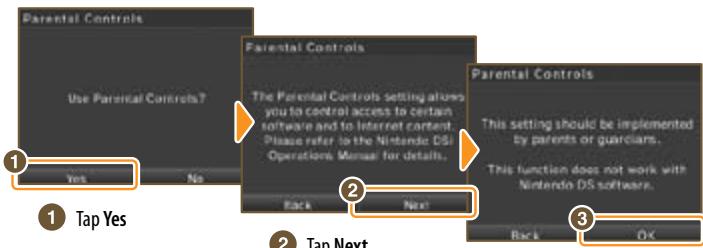
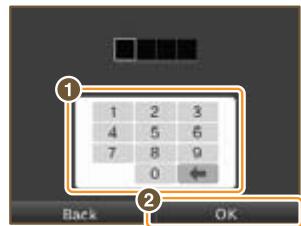
2 Enter a four-digit PIN of your choosing, then tap OK. (You will need to enter the number twice to confirm that it is correct.) You will need this PIN to turn Parental Controls off temporarily or to change your settings. Please remember this number.
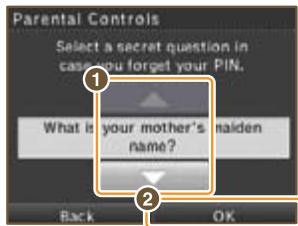
Use dot to choose a secret question, then select OK.
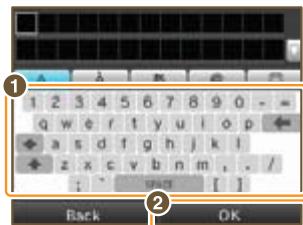
4 Enter an answer to the secret question, and then select OK. The answer must be three or more characters long.
The answer to your secret question will be used in the event you forget your PIN. Please remember this answer.
See page 88 for instructions on using the keyboard.
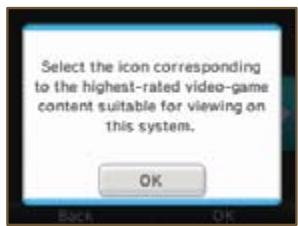
Now follow the on-screen instructions to set up Parental Controls options.
Parental Controls (cont.)
What to do if you forget your PIN and secret-question answer...
If you forget both your PIN and the answer to your secret question, please follow these steps.

On the PIN input screen, select I Forgot.
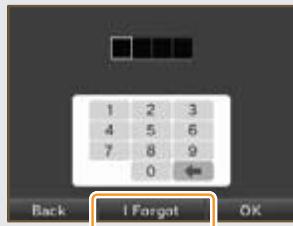

On the next screen, enter the answer to your secret question. If you successfully answer the secret question, proceed with editing your Parental Controls settings.
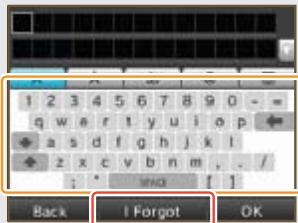
If you've forgotten the answer to your secret question.

Select I Forgot.
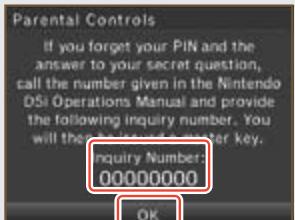

Check Inquiry Number - Please call Nintendo Customer Service at 1-800-255-3700 and provide the inquiry number shown here, and the date that is set on your Nintendo DSi XL. You will then be issued a master key.
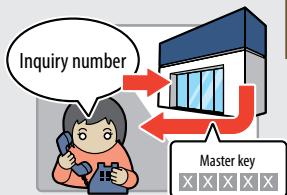

Tap OK.
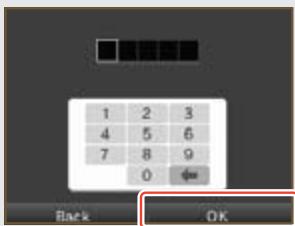

Enter the master key and select OK.
Touch Screen
- If the Touch Screen is not responding properly, first try removing any screen protectors (sold separately) you may have added to your Nintendo DSi XL.
If you feel the stylus contact point is not aligned correctly, take the following steps to re-calibrate the Touch Screen. To access the Calibration screen, press and hold the L Button, R Button, and START, then turn the power on. The calibration screen will be the first screen to display.
How to Calibrate the Touch Screen

Carefully tap the center of
Calibration points will appear in the upper left corner, lower right corner, and the center of the screen. Tap each point to complete calibration.
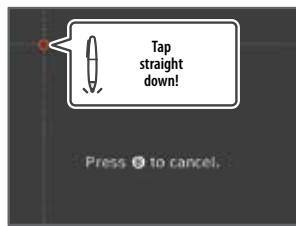

When Calibration complete appears on the screen, tap each of the four to confirm.
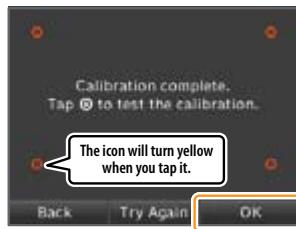

When you've finished confirming calibration, tap OK to finish. If you were unable to accurately tap , select Try Again to restart the calibration process.
Mic Test
Confirm that the microphone is operating properly.
Testing the Microphone

Face the microphone and speak.
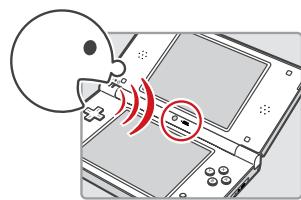

Confirm that the volume bar is filling up with colored bands.
The volume bar will fill with colored bands when it picks up sound.
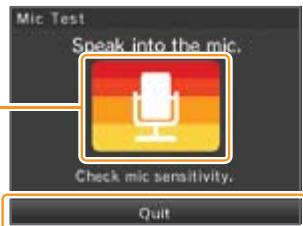

Tap Quit when you've finished confirming that the mic is working.
Internet Setup
Get connected online:
The minimum requirements to get connected online are:
- A Nintendo DSi XL
- A broadband Internet connection
- A wireless router (sold separately)
For complete details, see the following pages.
If you are still having problems getting connected online, step by step instructions can be found at our website: support.nintendo.com.
Connect your Nintendo DSi XL to a wireless Internet connection, using a compatible wireless router (sold separately).
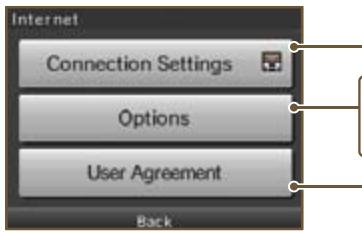
Set up an Internet connection.
Confirm MAC address (see page 85).
Copy or delete Nintendo Wi-Fi Connection profile saved on the Nintendo DSi XL.
Review and agree to user agreement
for Nintendo DSi network services.
Select setup method
Your connection-setup process depends on your home network environment. First answer the following questions, then use the appropriate setup method.
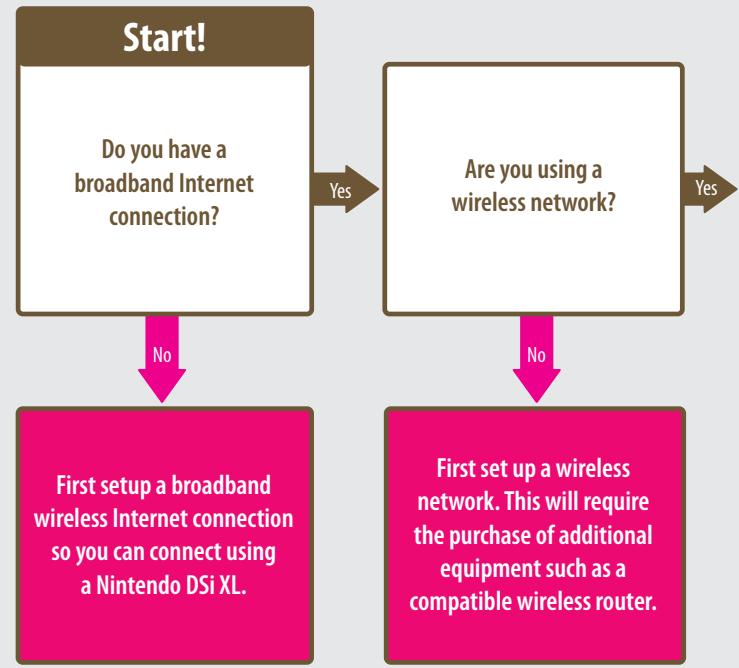
You can also make settings manually. See page 81.
If you need more help getting connected, including security and firewall FAQs, visit support.nintendo.com.
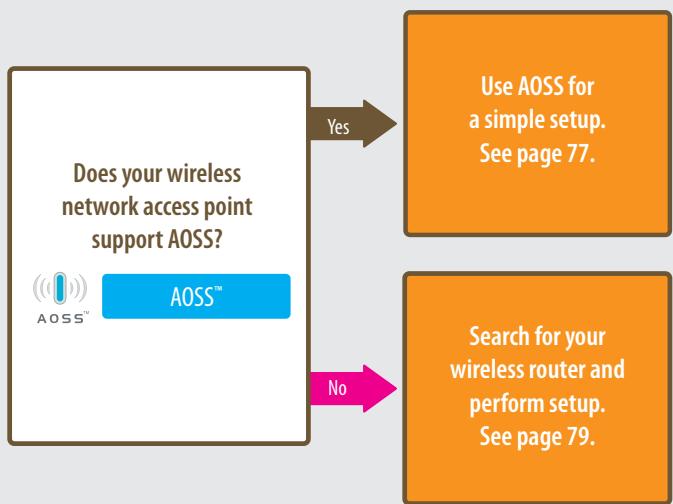
You can also perform settings for higher security than WPA, proxy settings, and settings for advanced users capable of connecting via WPS. See page 83.
Connection settings for advanced users (connections 4 - 6) cannot be used with DS software. When connecting to the Internet with DS software, perform the usual internet settings (connections 1 - 3).
Internet Setup (cont.)
Required for connecting to the Internet
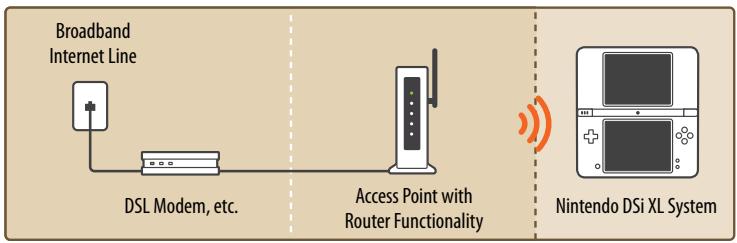
The following are complete details on connecting a Nintendo DSi XL to the Internet.
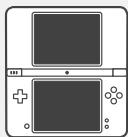
1 Nintendo DSi XL system
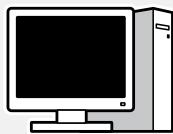
2 PC
3 Broadband Internet environment using DSL, Cable, etc.
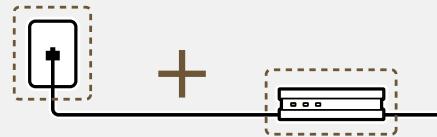
Broadband Internet Line
DSL Modem, etc.
4 Connecting Nintendo DSi XL wirelessly
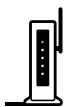
Commercially Available Access Point (Wireless Router,etc.) (See page 79)
You can perform a simple setup using a commercially available access point that supports A0SS (Buffalo).
In this manual, "wireless router access points" are referred to simply as "access points."
For information on router settings and how they work with the Nintendo DSi XL system, visit support.nintendo.com.
Even if you don't have a wireless Internet environment at home...
(nintendonzone
Nintendo Zone is a new way to get updated game content, demos, and access to Nintendo Wi-Fi Connection, sent wirelessly to your Nintendo DSi XL.
When your Nintendo DSi XL detects a Nintendo Zone, an on-screen icon will flash to let you know you're within range of a Nintendo Zone location. The Nintendo DSi XL will then connect to the Nintendo Zone without any additional setup.
For a current list of Nintendo Zone locations, please visit www.nintendocom.
Internet Setup (cont.)
Connecting using AOSS
If your access point supports A0SS, you can use this functionality for a simple setup. Also refer to the instruction manual for your access point.
Using AOSS may cause your access point settings to change. If you're connected to a PC without using AOSS, it may no longer connect after using AOSS.
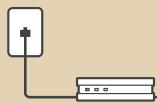
Broadband Internet Line
DSL Modem, etc.

Access Point with Router Functionality

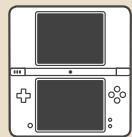
Nintendo DSi XL System
How to Connect
1 Tap Connection Settings
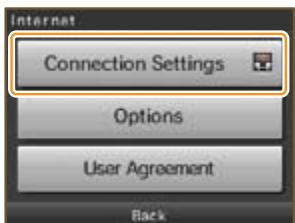
2 Tap a connection labeled None.
NOTE: If you are using WPA security, you must use the Advanced Setup option and select Connection 4, 5, or 6 (see page 83).
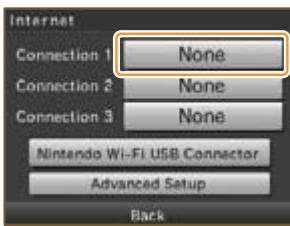
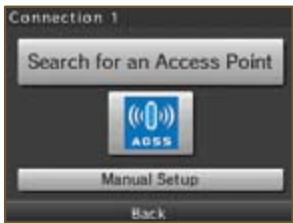
3 Tap the AOSS icon
Proceed to the following access point steps.

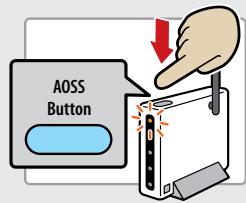
Access point steps
Using AOSS
Press the AOSS Button until the lamp starts blinking If connection continues to fail when performing AOSS settings, wait approximately 5 minutes and then try again.

Tap OK to perform a connection test
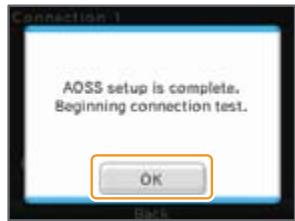
Using AOSS
If the connection test is successful, your settings are complete. Immediately after completing settings for AOSS, connection may fail due to the restarting of the access point. Wait a short time, then try performing a connection test again.
If you need more help getting connected, including security and firewall FAQs, visit support.nintendo.com.
Internet Setup (cont.)
Searching for and connecting to an access point
How to Connect
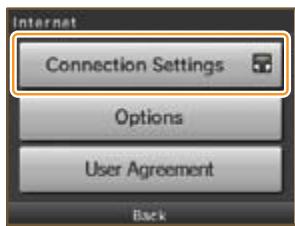
1 Tap Connection Settings
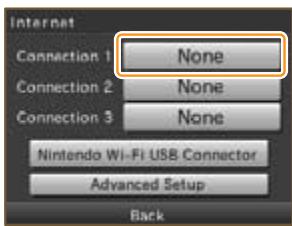
2 Tap a connection labeled None
NOTE: If you are using WPA security, you must use the Advanced Setup option and select Connection 4, 5, or 6 (see page 83).
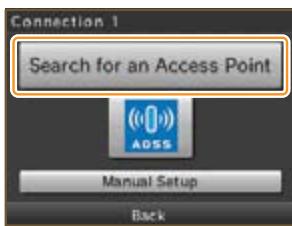
3 Tap Search for an Access Point
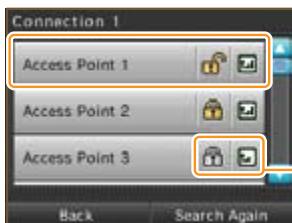
Tap an access point to select it If no access points are found, see Error Code List on page 100.
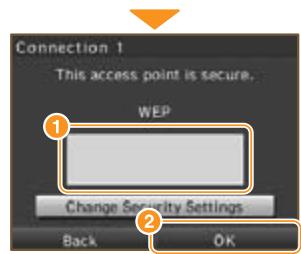
If you are connecting to a secure access point, enter the key and tap OK. This is displayed only when configured for security.

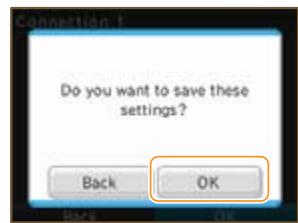
Tap OK

Tap OK to perform a connection test.
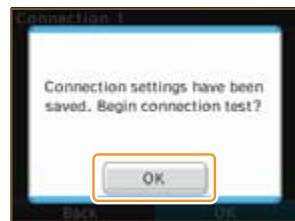
If the connection test is successful, settings are complete. If connection fails, refer to the list of error codes on page 100.
Access points marked require that you enter the same key as is registered with the access point.

Key input not required

Configured with an unsupported encryption format. To connect to access points with this mark, configure settings through Advanced Setup (see page 83).

Key input required
The icon indicates the state of signal reception and displays at four different levels. Stronger signal reception results in smoother transmission.
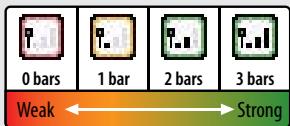
Antenna Bars
Signal Reception Strength
Internet Setup (cont.)
Configuring settings manually (See glossary, page 109, for definition of terms)
Configure your access point's settings manually.
Broadband
Internet Line
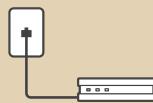
DSL Modem, etc.
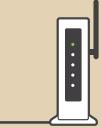
Access Point with Router Functionality

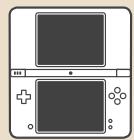
Nintendo DSi XL System
How to Connect
1 Tap Connection Settings
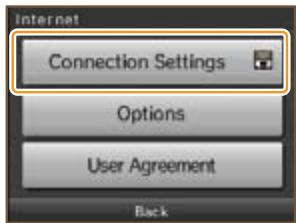
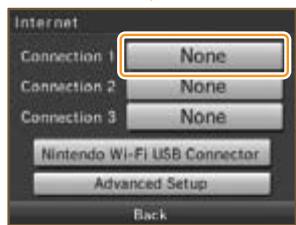
2 Tap a connection labeled None
NOTE: If you are using WPA security, you must use the Advanced Setup option and select Connection 4, 5, or 6 (see page 83).
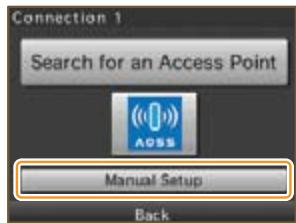
3 Tap Manual Setup


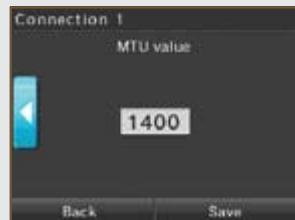
Set each field as needed and tap Save when finished. When setting the IP address manually, be sure to also set the
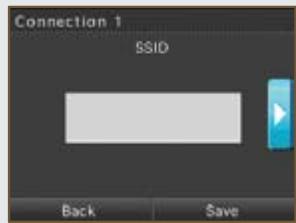
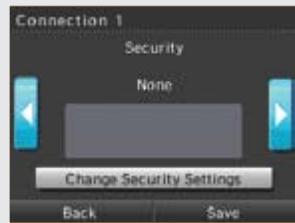
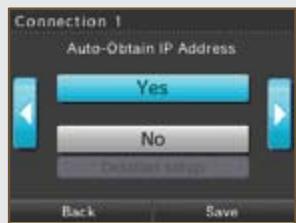
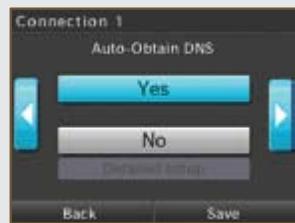
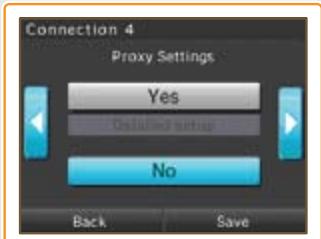
Proxy settings can only be configured when configuring Advanced Settings.

Tap YES to perform a connection test
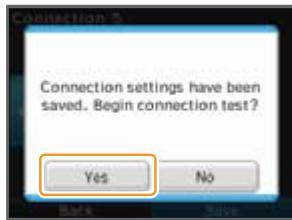
If the connection test is successful, your settings are complete.
If connection fails, refer to the list of error codes on page 100.
Internet Setup (cont.)
Advanced Setup (See glossary, page 109, for definition of terms)
Advanced Setup allows settings for connecting to the Internet using WPA security, proxy settings and settings for connecting with WPS.
Advanced Setup (connections 4 - 6) cannot be used with DS-exclusive software. When connecting to the Internet with DS-exclusive software, configure normal Internet settings (connections 1 - 3).
How to Connect
1 Tap Connection Settings
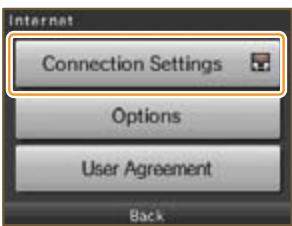
2 Tap Advanced Setup
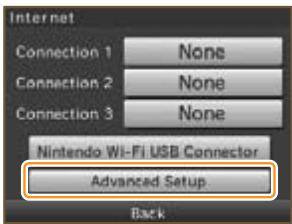
3 Tap a connection labeled None
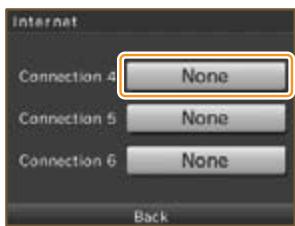
4 Tap the connection method best-suited for your connection environment
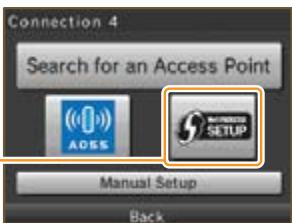
- To set up using WPS:
-
Tap the WPS icon and proceed to step ⑤.
-
Search for an Access Point (see page 79).
- Manual Setup *The following instructions are the same as for configuring normal settings (see page 81).
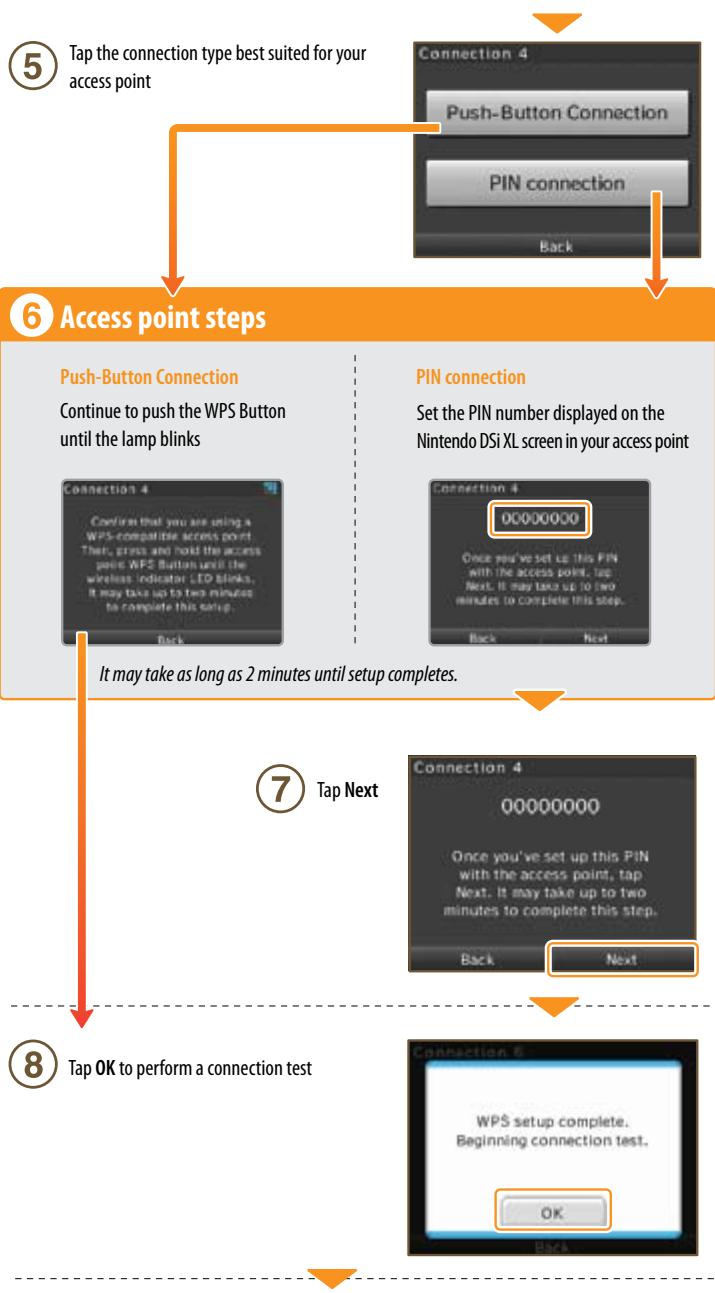
If the connection test is successful, settings are complete.
Immediately after completing settings using WPS, connection may fail due to the restarting of the access point. Wait a short time, then try performing a connection test again.
Internet Setup (cont.)
Options
You can confirm system information, delete Nintendo® Wi-Fi Connection configurations, and transfer Nintendo WFC configurations.
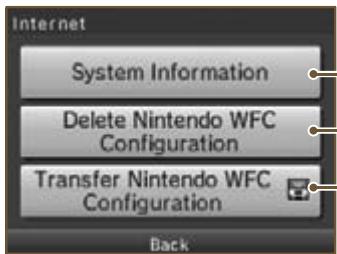
Confirm the system MAC address and Nintendo WFC ID
Delete Nintendo WFC information from the system
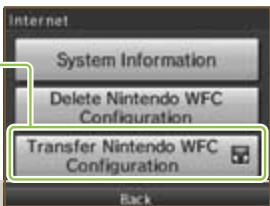
Transfer the Nintendo WFC configuration to another system
#
- Please delete Nintendo WFC information before disposing of or releasing your system.
- When changing to a new system, transfer the Nintendo WFC configuration from the old system to the new system.
- When deleting or transferring Nintendo WFC information, settings such as friends and connections will be deleted from the original system.
Transferring Nintendo WFC configuration to another system
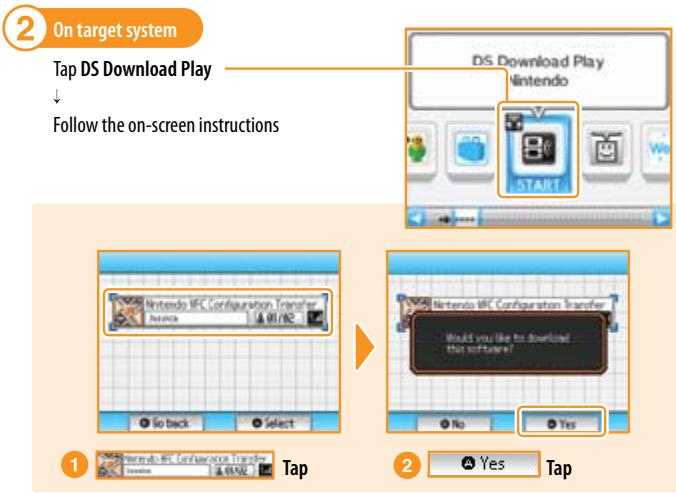
Nintendo WFC information transfers use DS Download Play.
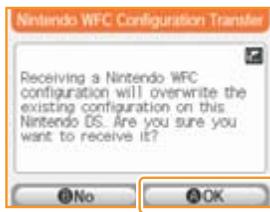
This deletes Nintendo WFC configuration from the source system and overwrites the WFC configuration of the target system.
When transferring to a Nintendo DS/DS Lite system, content of the Internet Advanced Setup information is not transferred.
Things to prepare
- Source Nintendo DSi XL system
- Target system (Nintendo DSi/Nintendo DSi XL system or DS/DS Lite system)
How to transfer

On source system
Tap Transfer Nintendo WFC Configuration
↓
Follow the on-screen instructions
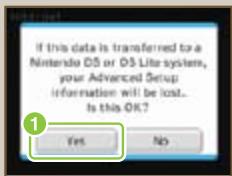

Tap
Yes
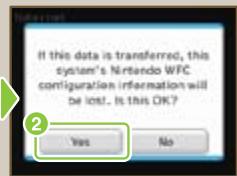

Tap
Yes
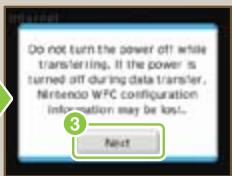

Tap
Fieur士

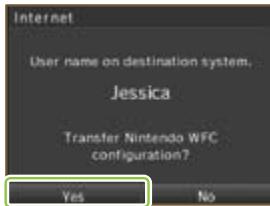
On source system
Confirm that the user name displayed is indeed that of the target system and tap Yes.

On target system
Tap OK if you agree to the on-screen warning

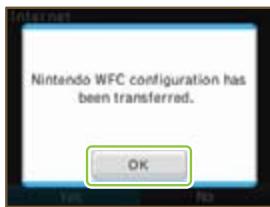
On source / target system
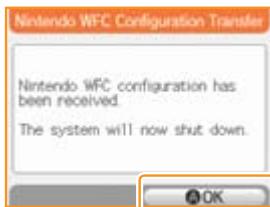
When the transfer is complete, a confirmation message is displayed. Tap OK on the respective systems.
System Update
There will be updates or additions to the Nintendo DSi Menu or built-in software applications.
You understand that the Nintendo DSi XL system specifications are constantly evolving. In an effort to provide you with the latest system enhancements and features, we may send a systems update to your Nintendo DSi XL system without notice to you or ask you to accept a systems update for your Nintendo DSi XL system. Such systems updates may need to be accepted in order to play new Nintendo DSi games or continue to access the Nintendo DSi Network Service.
Updates will take place by connecting to the Internet, so please complete your Internet connection settings ahead of time (see page 73).
How to Update

Tap Yes
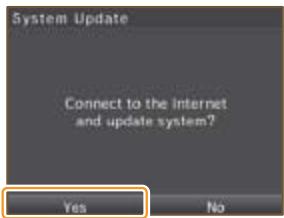

Read the on-screen text carefully and select Next.

If you agree with the what you read in ② select I Agree, and then tap OK.
Format System Memory
Choose this to erase all save data, and return the system to the state in which it was purchased.

Select Format
What data will be erased?
- Data saved on the system memory, such as software downloaded from Nintendo DSi Shop.
Changes made to the System Settings.
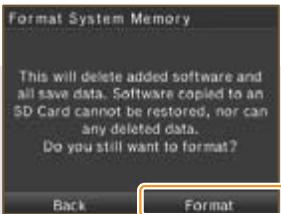
NOTE: You can re-download items you have purchased from Nintendo DSi Shop at no charge, unless those items are no longer distributed.
Data erased by initializing the system cannot be restored.
Using the Keyboard
Keyboards will display when you are required to enter characters. There are two types of keyboard: standard alphanumeric keyboard, and a ten-key keyboard.
Alphanumeric Keyboard
Character type selection keys
A Displays the input keyboard for letters of the alphabet and numbers.
A Displays the input keyboard for special characters.
5 Displays the input keyboard for hiragana and katakana.
@ Displays the input keyboard for symbols.
Displays the input keyboard for pictographs
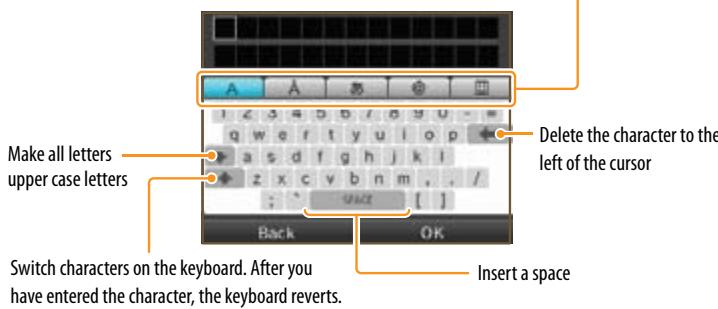
The special character, symbol and pictograph keyboards all function in the same way.
Ten-Key Keyboard
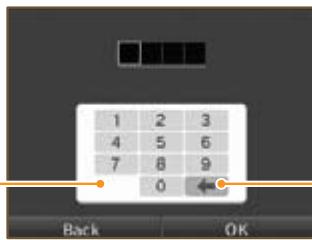
Enter a space.
Delete the last entered character.

Support and Troubleshooting
Troubleshooting
Before requesting repair service, check the items in the following table. Read this along with the manual for each game and peripheral device.
Visit support.nintendo.com for assistance and additional troubleshooting and repair options or call 1-800-255-3700.
There is no picture or sound output
Is the power indicator LED lit?
Press POWER to turn the power on.
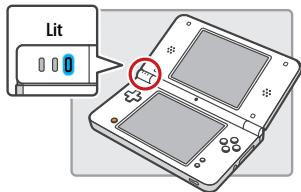
- Has the battery been charged?
Recharge the battery. - Has the Game Card been firmly inserted?
Firmly insert the Game Card until it clicks into place.
Is the system in Sleep Mode? - The power indicator LED will slowly illuminate and darken when the system is in sleep mode. Check the power indicator LED. Wake the system if it is in Sleep Mode.
Sound does not come out of the system speakers
- Is the volume set to the lowest level?
→ Use the volume/brightness control on the side of the system to adjust the volume to an appropriate value.
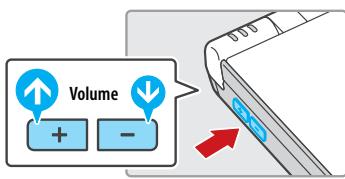
- Are the headphones or headset microphone connected?
→ When headphones or a headset microphone is connected, sound will not be emitted from the speakers.
Sound does not come out of my headphones or headset microphone
Is the volume set to the lowest level?
Use the volume/brightness control on the side of the system to adjust the volume to an appropriate value.
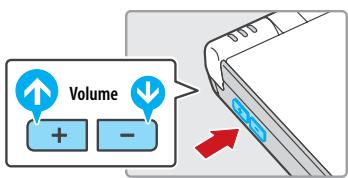
- Is the plug for your headphones or headset microphone firmly inserted?
Plug it in firmly.
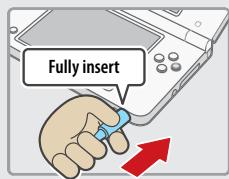
It takes a long time before the Nintendo DSi Menu is displayed
- Has a high-capacity SD Memory Card (SD Card) been inserted in the system?
It may take time to display the Nintendo DSi Menu if a high-capacity SD Card has been inserted into the system.
Even though a Nintendo DS Game Card has been inserted, the Nintendo DSi Menu displays "No Game Card has been inserted in the Game Card slot."
Is the Game Card inserted properly?
→ Remove the Game Card and properly re-insert it until it clicks into place. If this doesn't work, try re-inserting it a few more times.
I can't play my game
- Are Parental Controls set to restrict the use of software based on ESRB ratings?
→ Enter the password and either disable Parental Controls temporarily, or disable the Parental Controls item that restricts the use of software based on ESRB ratings (see page 97).
I can't use the microphone / My voice is not recognized
-
Does this software use the microphone?
The microphone cannot always be used. The microphone can be used in games that support it. -
Is the microphone functioning properly?
Use the microphone test in System Settings to confirm that the microphone is functioning properly (see page 72).
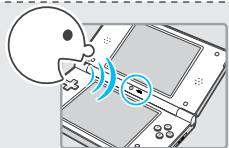
- Are voices other than your own, such as those of family and friends, recognized correctly?
There are individual differences in speech recognition rates. Some voices are more difficult to recognize than others.
The microphone reacts unexpectedly or produces a screeching or howling sound
The microphone may be reacting to ambient noise or audio output from the speaker and producing an audio feedback. Try to move away from the source of the noise, reduce the speaker volume, use headphones, or prevent sound from occurring. You can perform the microphone test in System Settings to determine whether the microphone is reacting (see page 72).
I can't recharge the Nintendo DSi XL battery pack / The recharge indicator LED is not lit
- Are you using a Nintendo DSi AC Adapter?
Use the Nintendo DSi AC Adapter [WAP-002(USA)].

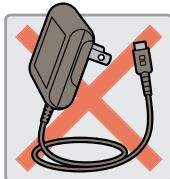
- Is the Nintendo DSi AC Adapter firmly inserted into the system and an electrical outlet?
Plug it in firmly.
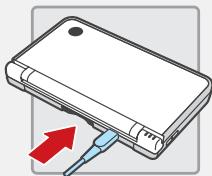
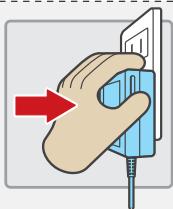
- Is the battery pack being charged in a location with an ambient temperature between 41irc and 95irc Fahrenheit (5 - 35irc Celsius)?
Charge the battery pack in a location with an ambient temperature between 41irc and 95irc Fahrenheit (5 - 35irc Celsius). You may not be able to recharge the battery pack in a location outside of this temperature range.
Is the recharge indicator LED lit?
If the recharge indicator LED is blinking, there is a chance that the Nintendo DSi XL Battery Pack is not connected properly. Make sure that the Nintendo DSi XL Battery Pack is connected properly.
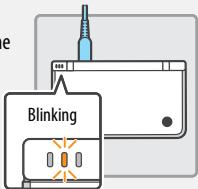
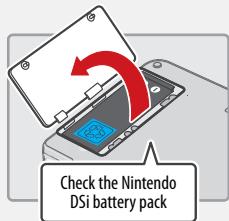
I charged the Nintendo DSi XL battery pack, but I can't play for long periods of time / It takes a long time to charge the Nintendo DSi XL battery pack
- Are you playing a game or recharging the battery pack in a location with an ambient temperature less than 41irc Fahrenheit ( 5irc C)?
In environments with a temperature less than 41 degrees Fahrenheit, you can no longer play games for long periods of time, and the battery pack will take longer than usual to recharge.
I can't use the Touch Screen / The Touch Screen does not respond properly
- Have positions on the Touch Screen shifted?
If positions have begun to shift, use the Touch Screen item in System Settings to correct them.
NOTE: You can also go to Touch Screen Calibration by holding down the L, R, and START Buttons while turning on the power.
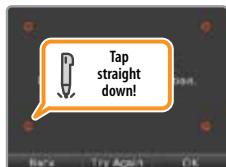
- Have you attached a commercially available protective sheet on the Touch Screen?
If you have applied a commercially available protective sheet to your Touch Screen, refer to its instruction manual and be sure it has been applied correctly before attempting to calibrate the Touch Screen.
My SD Memory Card is not responding
- Has the SD Memory Card been correctly inserted into the system?
Firmly insert the SD Memory Card until it clicks into place in the SD Card slot on the side of the system.
- Is the SD Memory Card broken?
→ Use a PC or digital camera to confirm that you can correctly see files on the SD Memory Card.
- Are there saved photos that can be displayed using Nintendo DSi Camera?
→ Nintendo DSi Camera can only display photos taken on the Nintendo DSi/ Nintendo DSi XL system. Photos taken by a digital camera or cellular phone will not be displayed.
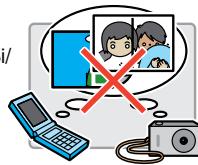
-
Are there saved files that can be played back using Nintendo DSi Sound?
-
Nintendo DSi Sound can play AAC files with a file extension of .m4a, .mp4, and .3gp. Non-AAC audio files (such as MP3 files) cannot be played back.
Nintendo DSi Camera continues to ask for a photo of my face, but does not respond
This occurs when your face cannot be properly recognized. Move to a well-lit area, and turn your face in a direction that allows it to be entirely captured on-screen. The following factors may also affect face recognition.
The ambient brightness and lighting
- Haircut (when hair covers the face, for instance)
Hair and eyebrow color
Sheen on the face and head
- A beard's shape, color, and thickness
- Glasses and jewelry on the face and head
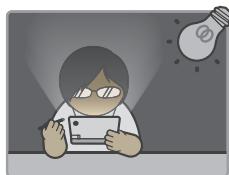
My eyes and mouth are not being recognized correctly by Nintendo DSi Camera
→ Individual differences and the surrounding environment may prevent face recognition from working properly. If the position of your eyes and mouth are not recognized correctly, move to a well-lit area and turn your face in a direction that allows it to be captured well on-screen. Confirm this along with the aforementioned factors.
Images taken by the camera have strange colors
Try taking a picture of something else. If colors are still strange, please visit support.nintendo.com or contact Nintendo Customer Service at 1-800-255-3700.
I can't exchange photos or frames with Nintendo DSi Camera
- Are Parental Controls set to restrict the exchange of photo data?
→ Enter your Parental Controls PIN and either disable Parental Controls temporarily, or disable the Parental Controls item that restricts the wireless transmission of photo data (see page 97).
Nintendo DSi Sound does not display audio files and folders
- Has the SD Memory Card been correctly inserted into the system?
Firmly insert the SD Memory Card until it clicks into place in the SD Card slot on the side of the system. - Does the SD Memory Card contain saved audio files that can be played back using Nintendo Dsi Sound?
Nintendo DSi Sound can play AAC files with a file extension of .m4a, .mp4, and .3gp only. - Have more than 3000 audio files been saved?
No more than 3000 audio files can be displayed. - Are there more than 1000 files in the folder with the saved audio files?
A folder can only display up to 1000 items. - Are there more than 100 audio files saved in a single folder?
No more than 100 files can be displayed for a single folder. If there are folders with the same name on the SD Memory card, the audio files in those folders will be consolidated and displayed as a single folder. No more than 100 files can be displayed for this single consolidated folder. - Are audio files saved to a folder that is more than eight levels deep?
Nintendo DSi Sound will only check for files up to eight directories deep.
I cannot play back audio files using Nintendo DSi Sound
- Are the audio files in a format that can be played by Nintendo DSi Sound?
→ Nintendo DSi Sound can play audio files in the following format.
File format: AAC (.m4a, .mp4, or .3gp)
Bit rate: 16-320 kbps
Sampling frequency: 32 - 48kHz
I cannot download new games from the Nintendo DSi Shop
- Do you have an insufficient Nintendo DSi Point balance?
Use one of the following to register Nintendo DSi Points with the Nintendo DSi XL system.
Credit card (VISA or MasterCard)
- Nintendo Points Card (this can be purchased at various retail locations).
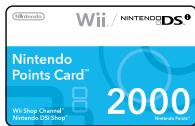
- Have Parental Controls restricted the use of Nintendo DSi Points in the Nintendo DSi Shop?
→ Enter your Parental Controls PIN and either disable Parental Controls temporarily, or disable the Parental Controls item restricting the use of Nintendo DSi Points (see page 97).
I can't use DS Download Play
- Have Parental Controls restricted the use of DS Download Play?
→ Enter your Parental Controls PIN and either disable Parental Controls temporarily, or disable the Parental Controls item restricting the use of DS Download Play (see page 97).
I can't use PictoChat
- Are there already 16 people in the selected chat room?
No more than 16 people can enter a single chat room. - Have Parental Controls restricted the use of PictoChat?
→ Enter your Parental Controls PIN and either disable Parental Controls temporarily, or disable the Parental Controls item restricting the use of PictoChat (see page 97).
I'm having difficulty using communication play
(Communications are interrupted and the game cannot be played smoothly)
Is one of the following Reception Strength icons shown on-screen?
Reception strength appears to be poor. Move closer to the other player, and remove obstructions between you and that person.
My system suddenly enters Sleep Mode
It may have entered Sleep Mode as the result of an external magnetic field. Move your system away from magnetic objects.
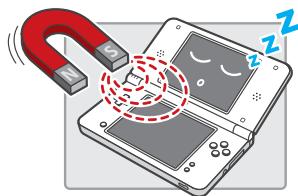
I cannot disable Parental Controls
- Did you enter the correct password?
Enter the correct Parental Controls PIN. If you have forgotten your password refer to page 96. - Did you enter the correct answer to your secret question?
Enter the correct answer to your secret question. If you have also forgotten the answer to your secret question refer to page 98.
If your Nintendo DSi XL system still does not operate correctly after try the troubleshooting steps, DO NOT return it to the store. You may lose saved game data and all Nintendo DSi Shop downloads and Nintendo DSi Points. Visit support.nintendo.com for assistance and additional troubleshooting and repair options or call 1-800-255-3700.
How to Disable Parental Controls
There are two ways to disable Parental Controls. You can either temporarily disable them, or change the Parental Controls settings.
Temporarily Disabling Parental Controls
Enter your PIN at the screen that is shown when you select the restricted item. 1
Tap OK. 2
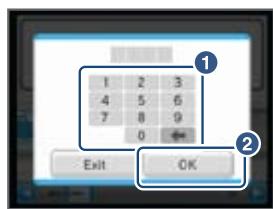
Changing the Parental Controls Setting

Go to System Settings and tap
Parental Controls
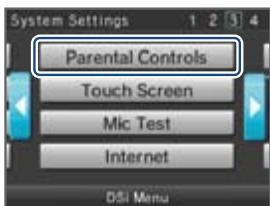

Tap
Yes
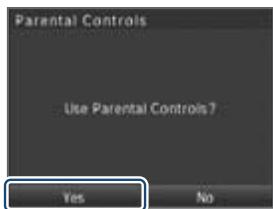

Enter your PIN
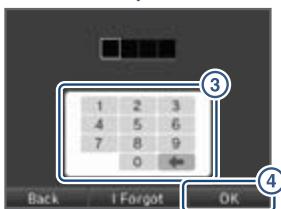

Tap
OK

Tap
Change Settings
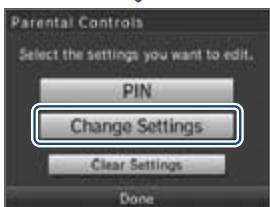
If you have forgotten your PIN or secret question
In the event that you forget your PIN or the answer to your secret question, follow these steps.

At the PIN entry screen, tap
I forgot
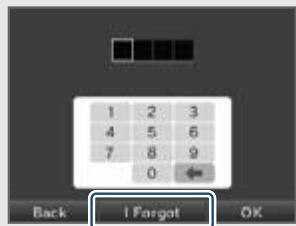

Enter the answer to your secret question. Note: You will go to the setting screen for Parental Controls if you can answer this.
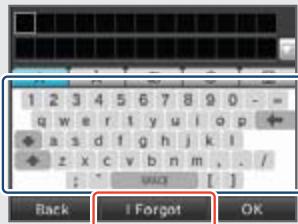

Once again, tap
I forgot

Please call Nintendo Customer Service at 1-800-255-3700 and provide the inquiry number shown here, and the date that is set on your Nintendo DSi XL. You will then be issued a master key.
Parental Controls
If you forget your PIN and the answer to your secret question, call the number given in the Nintendo DSi Operations Manual and provide the following inquiry number. You will then be entered as a user key.
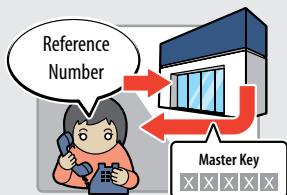
Equity Numb 00000000
OK

Tap
OK

Enter the Master Key, and tap
OK
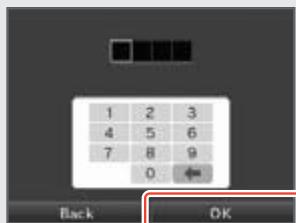
Error Message List
If an error occurs, messages like the following may appear on the screen. Follow the directions shown in the table to resolve the problem.
| Error Message | Solution |
| An error occurred. Press and hold POWER to turn the system off, then follow the instructions in the system's Operations Manual. | Turn the power off for a moment and then turn it back on. Repeat whatever you did that caused the error to occur. If the same message still appears, the system must be inspected. Turn the power off, and contact Nintendo Customer Service. |
| The system memory has been damaged. Please see the Nintendo DSi XL Operations Manual for details. | The system memory is corrupted. Please contact Nintendo Customer Service. |
| The device in the SD Card slot cannot be used. | An SD Card that cannot be used with the Nintendo DSi XL or something other than an SD Card is inserted in the SD Card slot, or the system region of the SD Card is corrupted. Please insert a functional SD Card that can be used with the Nintendo DSi XL system. |
| There is not enough free space on the SD Card. | Either erase unnecessary software on the SD Card from the Data Management screen under System Settings or erase unnecessary photos or frames from Nintendo DSi Camera. Otherwise, try using an SD Card that has some free space on it. |
| There are no boxes available in the system. | There are no boxes available in the Nintendo DSi Menu. Erase unnecessary software from the Software Management screen under System Settings (see page 65). |
Error Code List
If the Internet settings weren't configured correctly or if the connection test failed, the Nintendo DSi XL will display and error code. Use the Error Code tables on the next several pages to determine the solution for the error code received.
For more information on error codes and messages, or if you see error codes or messages that do not appear on these lists, please visit support.nintendo.com.
NOTE: If you cannot connect due to error codes 052003, 052103, or 052203, the error might be caused by the security software or firewall on your computer. For details, visit support.nintendo.com.
| Error Codes | Condition | Solution |
| 020100 – 020999 | Could not connect to Nintendo Wi-Fi Connection. | Wait for a while and try connecting again. If the issue does not get resolved, contact Nintendo Customer Service. |
| 023000 – 025999 | The Nintendo Wi-Fi Connection servers are either undergoing maintenance or are very busy. | Wait for a while and try connecting again. If the issues do not get resolved, visit support. nintendo.com to see if the server is undergoing maintenance. |
| 034219, 034220 | Insufficient free blocks in the system memory. | Erase unnecessary software from the Data Management screen under System Settings. |
| 034301 – 034304 | Cannot connect to the system update server. | Wait for a while and try connecting again. If the issue does not get resolved, contact Nintendo Customer Service. |
| 034300, 034305 – 034499 | The system could not be updated due to internet error. | Wait for a while and try connecting again. If the issue does not get resolved, contact Nintendo Customer Service. |
| 034000 – 034218, 034500 – 034699 | An error occurred, so the system could not be updated. | Please contact Nintendo Customer Service. |
| 050100 – 050199 | Could not connect to the Internet. | Wait for a while and try connecting again. If the issue does not get resolved, contact Nintendo Customer Service. |
| 050000 - 050099 | No access point in range. | Check the access point settings. The wireless signals may be too weak at your location. Try moving closer to your access point, also check that there are no people, objects, or other obstacles between the system and the access point. Make sure the access point is in a usable state. For details, see the instruction manual for your access point. |
| 050500 - 050599 | You must accept the user agreement. | Agree to the user agreement. |
| 050600 - 050699 | Wireless Communications is currently disabled under System Settings. | Enable the wireless communications setting. |
| 051000 - 051099 | Could not find an access point with the SSID that has been set. | Check whether the SSID in the connection settings matches the settings for the access point you want to connect to. |
| 051100 - 051199 | Could not connect to the access point. | Make sure the security key in the connection settings matches that of the access point. If this error code occurs even after connections are allowed, the wireless signals may be too weak at your location. Try moving closer to your access point, and make sure there are no people, objects, or other obstacles between the system and the access point. When connecting to an Internet hotspot for which a proprietary security key has been set, make sure you configure your connection setting. |
| 051200 - 051299 | Could not connect because the maximum number of simultaneous connections to the access point has been exceeded. | The access point you tried to connect has a limit on the number of devices that can connect to it. Wait for a while and try again. |
| 051300 - 051399 | Cannot connect to the access point for an unknown reason. | See the resolution for error codes 051100-051299. Reconfigure the access point settings. |
| 052000 - 052099 | Could not automatically acquire the IP address. | Enable the DHCP server feature of your access point or other network device. If you cannot use the DHCP server feature, you will have to configure the IP address and other such settings manually. Make sure the security type and key of the connection settings match the settings for the access point you want to connect to. |
| Error Codes | Condition | Solution |
| 052100-052399, 312004, 312005 | Could not connect to the Internet. | Confirm that your network environment can connect to the Internet.Review the settings after Auto-Optain IP Address in the connection settings.If the Auto-Optain IP Address setting is set to Don't use, check whether the security type and key in the connection settings match the settings for the access point you want to connect to. |
| 052400-052599, 312012, 312013 | Could not connect to the proxy server. | Confirm that your network environment can connect to the proxy server.Review the proxy server settings. |
| 052700-052799 | Cannot connect because there is another network device that is set to the same IP address. | Review the Auto-Obtain IP Address setting in the connection settings. |
| 053000-053299 | Could not connect to the Internet. | The wireless signals may be too weak at your location. Try moving closer to your access point, and make sure there are no people, objects, or other obstacles between the system and the access point.When connecting to an Internet hotspot for which a proprietary security key has been set, make sure you configure your connection setting. |
| 054000-054199, 290500-290599, 291000-291099 | Communication error.You have been disconnected from the network. | The wireless signals may be too weak at your location. Try moving closer to your access point, and make sure there are no people, objects, or other obstacles between the system and the access point.This might be a temporary issue, so wait a while and then try again. If the issue does not get resolved, contact Nintendo Customer Service. |
For more information on error codes and messages, or if you see error codes or messages that do not appear on these lists, please visit support.nintendo.com.
If your Nintendo DSi XL system still does not operate correctly after try the troubleshooting steps, DO NOT return it to the store. You may lose saved game data and all Nintendo DSi Shop downloads and Nintendo DSi Points. Visit support.nintendo.com for assistance and additional troubleshooting and repair options or call 1-800-255-3700.
Nintendo is dedicated to protecting your privacy and handling any personal information we obtain from you with care and respect. This Nintendo DSi Privacy Policy ("Privacy Policy") is intended to provide you with an understanding of information that may be submitted and collected through use of the Nintendo DSi System. We may revise and update this Privacy Policy from time to time. Please review the most recent version of this policy frequently by going to http://support.nintendo.com or contacting our customer service department at (888) 977-7627. This Privacy Policy only applies to information submitted or collected from your Nintendo DSi. Information you may submit through any of Nintendo's Web sites or the Wii console is subject to the applicable privacy policy posted at http://support.nintendo.com. Please read this Privacy Policy; it applies to use of your Nintendo DSi by you and any other person using your Nintendo DSi (whether you gave them permission to use it or not).
ATTENTION PARENTS OR LEGAL GUARDIANS:
PROTECTING CHILDREN'S PRIVACY
We do not knowingly collect personally identifiable information from children under the age of 13, absent verifiable parental consent. Before allowing your children to use the Nintendo DSi, we strongly recommend you educate them on the importance of not sharing personally identifiable information about themselves with strangers. In particular, we recommend you tell your children not to use any personally identifiable information for their Nintendo DSi user name, in-game nicknames, or when communicating with other Nintendo DSi users through the Nintendo DSi wireless communication features. We strongly recommend you assist your children with the setup of their Nintendo DSi, and that you supervise your children's use of the Nintendo DSi at all times. You can restrict your children's use of certain features of the Nintendo DSi by setting up the Nintendo DSi Parental Controls function. For a detailed description of the Nintendo DSi wireless communication features and Parental Controls, please see the Nintendo DSi Operations Manual included with your Nintendo DSi and also available at http://support.nintend.com.
INFORMATION COLLECTED
"Personal Information" is information that may be used to identify you such as your name, address, telephone number, or name based email address (for example, Nintendo@Nintendo.com). We only collect Personal Information you provide to us or as described below. If you choose not to provide us with Personal Information, use of your Nintendo DSi will not be affected, except to the extent that certain features, such as those described in the section immediately below, request disclosure of certain Personal Information. In addition to the Personal Information you provide to us, we may collect anonymous information from you such as your age, gender, geographic area, Nintendo DSi internet protocol (IP) address, and media access control (MAC) address. We will not link your Personal Information with any anonymous or aggregate information we collect from you unless (1) you authorize us to do so; (2) you choose to link your DSi Shop Account to your Club Nintendo account; (3) we notify you first; or (4) we are responding to legal process. In order to provide you with more customized services, we may also receive and record information on our server logs from the Nintendo Wi-Fi Connection Service (WFC), including but not limited to your IP address, MAC address, cookies, transactions, settings and download activity. If you do not want Nintendo to collect this information you can turn off Nintendo WFC on your Nintendo DSi. If you provide sensitive information when communicating with third parties via your Nintendo DSi, Nintendo does not receive or collect that information. Your Nintendo DSi may store on its hard drive Personal Information or sensitive information for your convenience.
HOW SUCH INFORMATION IS COLLECTED AND USED
We may collect Personal, anonymous or aggregate information from you for several purposes including to: (i) customize your Nintendo DSi Shop catalog and other catalogs; (ii) communicate with you regarding games, contests, sweepstakes, surveys, product changes, Nintendo WFC issues and more; (iii) facilitate your use of certain Nintendo DSi applications and features; (iv) process orders you have placed through your Nintendo DSi; and (v) set up repair orders. Some of the types of information collected and the way the information is handled are detailed by category below.
Surveys: We may conduct surveys of Nintendo DSi users. The information we collect from you in a survey will be demographic or opinion information and will not be tied to your Personal Information unless we notify you otherwise. The results of anonymous or aggregate data collected from surveys, but not Personal Information, may be disclosed to the public.
Contests and Sweepstakes: We may host various contests and sweepstakes. To enter you may be required to submit certain Personal Information about yourself. For more information about Nintendo contests or sweepstakes, please see the official rules of the contest or sweepstakes you are entering.
Nintendo DSi Online Applications: Certain Nintendo DSi online applications may request anonymous information from you, which we may use to recommend games to you or to develop new games and services. For more information, please visit http://support.nintend.com.
Ninted Dsi Shop Account: If you pay for items through the Ninted Dsi Shop with your credit card, you need to provide a valid credit card number, expiration date, credit card security code and your city, state/county/province and zip code/postal code. We do not ask for your name or your complete address unless you order items that we must ship to you, rather than deliver via a download. You must be over the age of 18 to place orders online. Any credit card information you submit through the Ninted Dsi Shop will be transmitted using SSL encryption. All such encrypted information will be maintained and processed by Ninted and its trusted third party credit card processors on secure computers that are not accessible from the Internet. This encrypted information is subject to the section below entitled "Security."
IP Addresses: Your Nintendo DSI is automatically assigned an IP address by your Internet Service Provider when you connect to Nintendo WFC. Nintendo WFC automatically creates log files of user activities via Nintendo WFC and may also record the IP address and MAC address of users. In general, we only use log files to monitor traffic on our Web sites and to troubleshoot technical problems.
In the event you do not comply with the Nintendo DSI End User License Agreement (EULA) or Nintendo DSI Code of Conduct when using Nintendo WFC we may block your IP address. We do not link IP addresses to Personal Information unless we notify you or unless necessary to enforce our Nintendo DSI EULA or Code of Conduct or to respond to legal process.
Web Beacons: Certain Nintendo DSi online applications may use a common Internet technology called "Web beacons" (also called "Web bugs," "action tags," "pixel trackers," or "clear GIFs"), which are small graphic images placed on a Web page, Web-based document, or in an email message, designed to collect certain information and monitor user activity online. Web beacons are invisible to you because they are typically very small (only 1-by-1 pixel) and the same color as the background of the Web page, document or email message. We may use Web beacons to collect anonymous information such as the Nintendo DSi IP address, MAC address, the URL of the page the Web user comes from, and the time the Web beacon is activated (such as when you view the Web page, advertisement, or email containing the Web beacon). We do not use Web beacons to collect Personal Information. We may use the anonymous information collected through Web beacons to determine how to improve the Nintendo DSi applications by seeing which areas, features, and products are most popular; personalizing the Nintendo DSi services and making recommendations based on downloaded products; and completing transactions you have requested. In the event you visit a third party's Web site through the Internet browser on the Nintendo DSi, or you choose to view an ad from a third party, such as those made available at Nintendo Zone stations, those Web sites or ads may also contain tools such as cookies and Web beacons which may be accessible to such third party.
Cookies: Certain online Nintendo DSi applications may use cookies, which are small text files that a Web site places on your Nintendo DSi. These files identify your Nintendo DSi and record data about your visit so that when you return to a Web site, the site recognizes your Nintendo DSi and can personalize your visit. Cookies may be linked to your transaction history, online game play or other information. We may use information collected by cookies, as well as other tools such as log files and Web beacons, to determine how to improve the Nintendo DSi applications by seeing which areas, features, and products are most popular; personalizing the Nintendo DSi services and making recommendations based on downloaded products; and completing transactions you have requested.
In the event you visit a third party's Web site through the Internet browser on the Nintendo DSi, or you choose to view an ad from a third party, such as those made available at Nintendo Zone stations, those Web sites or ads may also contain tools such as cookies and Web beacons.
Other: In order to constantly improve the products and services we provide and better meet your needs, we may also use your Personal Information as well as anonymous or aggregate information for our marketing purposes, demographic studies, and quality assurance. In some cases, we may add to or update your Personal Information with data collected from offline sources (e.g., mail-in registration cards or date of purchase information from retailers). If we combine information collected offline with information collected through the Nintendo DSi, the combined Personal Information will be treated in accordance with this Privacy Policy.
DISCLOSURE OF INFORMATION
We do not sell or rent any of our customers' Personal Information to third parties. We may, however, share Personal, aggregate or anonymous information with our vendors to help us perform various functions necessary to operate our business (for example, completing downloads or purchases, developing and executing marketing campaigns, etc.) and with our affiliated companies. We also may disclose your email address to our partners for the sole purpose of sending you email messages you have requested, or to ensure that you do not receive such messages if you have opted out of receiving them. These partners are prohibited from using your email address for any other purpose. We may disclose Personal Information in order to comply with legal process, respond to claims or inquiries, or protect the rights, property or personal safety of Nintendo, our customers or the public. In addition, information about our customers, including Personal Information, may be disclosed as part of any merger, sale, transfer of company assets, or acquisition, if permitted by and done in accordance with applicable laws.
LINKING ACCOUNTS
You may link your Nintendo DSi Shop Account to your Club Nintendo account to receive personalized content and participate in a variety of activities, promotions and programs. Once you have linked your Club Nintendo account to your DSi Shop Account, any Personal Information you enter on your Club Nintendo account will be linked to your DSi Shop Account.
NINTENDO DSI GAMES
Certain Nintendo DSi games and features give you the opportunity to create a nickname, create a user name and interact with other Nintendo DSi users. We strongly encourage you not to use your own name for any nicknames or user names you may create. In addition, we strongly encourage you not to share Personal Information about yourself and not to allow your children to share Personal Information about themselves with other Nintendo DSi users.
For certain Nintendo DSi applications, including some Nintendo DSi games, your Nintendo DSi Friends may have access to information such as whether you have downloaded or are using a particular Nintendo DSi game.
INFORMATION STORED ON YOUR NINTENDO DSI
Certain sensitive or Personal Information about you may be stored on your Nintendo DSi. For your protection, before selling or otherwise transferring your Nintendo DSi, please be sure to clean and securely remove all Personal Information, any content you created, and all other stored sensitive information on the Nintendo DSi. For instructions on how to remove this information, please see the Internet Setup section of your Nintendo DSi Operations Manual.
SECURITY
We have established reasonable safeguards to secure sensitive and Personal Information collected directly by us in an effort to ensure the security, integrity and privacy of the Personal Information submitted or collected from your Nintendo DSI. We also have implemented reasonable security measures in an effort to protect information under our control against loss, misuse or alteration. Personal Information is stored in firewall-protected servers. Nintendo will notify users of a data breach involving unencrypted Personal Information by email or by posting a notice on our website. We also work hard to limit access to Personal Information to those employees performing a legitimate business function. If you contact us concerning your Nintendo DSI Shop account, we will verify your identity before discussing your account. While we strive to safeguard your sensitive and Personal Information, no data storage system or transmission of data over the Internet or any other public network can be guaranteed to be 100% secure. Please note that information collected from and provided by you to other persons or entities may not have the same security protections as information you submit to us, and you are responsible for protecting the security of any such information. If you install unauthorized applications or content to your Nintendo DSI, your sensitive or Personal Information may be collected or compromised. Nintendo is not responsible for any data collection, use or disclosure resulting from the use or installation of unauthorized applications or content.
UPDATING YOUR INFORMATION OR OPTING OUT OF INFORMATION COLLECTION
Use of the Nintendo DSi does not require disclosure of Personal Information. If you have provided Personal Information to us, you can update your preferences or opt-out of further collection as follows. In order to completely opt-out from the collection of any information about you relating to the Nintendo DSi, both anonymous and Personal, you must disable your Nintendo WFC. If you have linked your Club Nintendo account to your Nintendo DSi Shop Account or other Nintendo DSi online applications, (collectively "Features"), you must unlink those Features from your Club Nintendo account in order to stop the collection of information about you. You may do so in the Settings section of the Nintendo DSi Shop. You may update any Personal Information you have submitted to Nintendo through the Nintendo DSi by going to club.nintendocom and logging in to your Club Nintendo account.
INTERNATIONAL USERS
Any information you provide or that is collected through the Nintendo DSi may be stored and processed in the United States or any other country in which we or our affiliated companies, vendors or agents maintain facilities. As such, Personal Information may be accessed by foreign governmental authorities and otherwise in accordance with the laws applicable in the jurisdiction in which it is stored. By using the Nintendo DSi, you consent to such storage and processing. We abide by the safe harbor framework as set forth by the U.S. Department of Commerce regarding the collection, use, and retention of data from the European Union. However, this Privacy Policy is intended to meet the laws and requirements of the United States and those of Canada and Latin America, which may not be the same as the laws and regulations of your home country. If you are not located in the United States, Canada or Latin America please go back to the country selection screen and select an appropriate country so that you will be aware of the policies that apply to you.
CONTACT US WITH YOUR PRIVACY QUESTIONS, COMMENTS OR CONCERNS
If you have any questions, complaints or comments regarding this Privacy Policy or our practices, please contact the Nintendo DSI Privacy Policy Administrator via email at privacypolicy@noa.nintendo.com, by phone at (888) 977-7627, or by regular mail at Nintendo, Attn: Online Privacy Policy Administrator, 4820 150th Avenue NE, Redmond, WA 98052. Nintendo is a licensee of the Entertainment Software Rating Board's Privacy Online Program. If you believe that we have not responded to your inquiry or your inquiry has not been satisfactorily addressed, please contact ESRB at http://www.esrb.org/privacy/contact.jsp, ESRB Attn: Privacy Online Program, 317 Madison Avenue, 22nd Floor New York, NY 10017 or privacyinfo@esrb.org.
DEFINITIONS
"Content" means the software, services, material and other data which we own or have the right to use, distribute or sublicense, and which we send to, or make available as a download through, the Nintendo DSi System or the Nintendo DSi Service.
"Nintendo Zone" means a hotspot or download station that allows you to access Content, Third-Party Data, and other services.
"Points" means the points that you purchase from us through the Nintendo DSi Shop or through points cards sold or distributed by us or our retailers and promotional partners and that you may exchange with us for a license to download Content or to purchase Products.
"Products" means any goods other than Content that are made available for purchase from us through the Nintendo DSi Shop.
"Third-Party Data" means Content or other software, services, material, messages (including commercial and non-commercial messages), links to Internet sites, and other data either created by, or sent to, your Nintendo DSi System through the Nintendo DSi Service by any non-Nintendo entity or person (including you).
"Nintendos Service" means the service whereby we can distribute Content, messages (including commercial and non-commercial messages) and other data to your Nintendos System, or link you to an Internet site, and whereby you can send and receive Content, messages (including commercial and non-commercial messages), and other data, including Third-Party Data, using your Nintendos System. The "Nintendos Service" includes, but is not limited to, the Nintendos Sdi Shop and Nintendos Zones.
"Nintendo DSi Shop Account" means an account on your Nintendo DSi System which you set up and use in connection with the Nintendo DSi Shop.
"Nvidia DSi Shop" means our online Nintendo DSi System's store, which offers such things as Points, Content, Products, and a download service, all of which Nintendo directly or indirectly operates.
"Nvidia DS1 System" means the handheld device (including imbedded software and accessories) sold and marketed by Nintendo under the Nintendo DS1 brand, including any succeeding devices and compatible devices.
Nintendo DSi Code of Conduct
This Nintendo DSI Network Service Code of Conduct ("Nintendo DSI Code of Conduct") outlines the rules that you must follow to participate in the Nintendo DSI Service. These rules are designed to keep the Nintendo DSI Service a friendly and safe environment.
The Nintendo DSi Code of Conduct may be found at http://support.nintendo.com and may be revised and updated by us at anytime. If you do not have Internet access, please contact Nintendo Customer Service to receive a current version of the Nintendo DSi Code of Conduct, free of charge. All capitalized terms not defined in this Nintendo DSi Code of Conduct will have the meaning set forth in the Nintendo DSi Services User Agreement.
- Your use of the Nintendo DSi Service is subject to this Nintendo DSi Code of Conduct, which prohibits all harmful, illegal or otherwise offensive conduct, including, but not limited to the following:
- Misrepresenting, impersonating, abusing, stalking, threatening or harassing any person or company, including, but not limited to other users, Nintendo itself, and/or its employees, moderators, or staff.
- Doing anything illegal, discriminatory, defamatory, hateful, harassing, abusive, obscene, threatening, physically dangerous or otherwise objectionable, in Nintendo's sole discretion, in connection with the Nintendo DSi Service.
- Downloading, sharing or playing unauthorized software, copies of games, music or images on the Nintendo DSi System. This activity may be illegal and voids your warranty.
- Using an unauthorized device with the Nintendo DSI System or making unauthorized technical modifications to your Nintendo DSI System voids your warranty and may be illegal. Nintendo may make technical changes to the Nintendo DSI System, software and/or Nintendo DSI Service to disable the modification.
- Making new versions of existing Content or Products ("derivatives").
- Trying to access another person's Nintendo DSi Service without permission or trying to access any of Nintendo's computers, hardware or networks used to provide the Nintendo DSi Service.
- Cheating in a game, unless such cheats have been deliberately enabled.
- Hosting, intercepting, emulating, reverse engineering or redirecting the communication protocols used by Nintendo as part of the Nintendo DSi Service, regardless of the method used to do so.
- Engaging in any commercial activity using the Nintendo DSi System or any other activity that disrupts, diminishes the quality of, interferes with the performance of, or impairs the functionality of a Nintendo DSi System, including the Nintendo DSi Service or networks connected to the Nintendo DSi Service.
- Accessing or attempting to access another person's Nintendo DSi System, including, but not limited to a person's Nintendo DSi Shop Account without permission or trying to access any third party's, including, but not limited to Nintendo's computers, hardware or networks.
- Uploading, posting, emailing, transmitting or otherwise making available: (a) any content that you do not have a legal right to make available; (b) any content that infringes any patent, trademark, trade secret, copyright or other intellectual property or proprietary rights of any party; (c) any unsolicited or unauthorized advertising or promotional materials (e.g. "spam"); (d) information which personally identifies you or any third party; or (e) content to which you have disguised the origin.
- Nintendo is not responsible for anything you communicate using the Nintendo DSi System or anything that happens on the Nintendo DSi Service or as a result of your use of the Nintendo DSi Service; you alone are responsible.
- Virtual Property. Some games or other content may have certain features that may be traded with other Nintendo DSi Service users. For example, a game might give you the ability to create a character that gathers objects (like a car or gold coins) and has certain characteristics (like a special ability or appearance). These features are sometimes called "virtual property." Nintendo (or its licensors) own this virtual property, and you may not sell, trade, assign, license, or otherwise convey virtual property for real money or for Points.
- Nintendo reserves the right to immediately terminate or suspend your use of the Nintendo DSi Service for, in Nintendo's sole discretion, any violation of this Nintendo DSi Code of Conduct. Nintendo reserves the right to contact and cooperate with any law enforcement agencies, government officials or Internet Service Providers, as Nintendo believes in its sole discretion, is necessary or appropriate to investigate or resolve possible problems or inquiries, or as otherwise required by law.
You may need only simple instructions to correct a problem with your product. Try our website at support.nintendo.com or call our Consumer Assistance Hotline at 1-800-255-3700, rather than going to your retailer. Hours of operation are 6 a.m. to 7 p.m., Pacific Time, Monday - Sunday (times subject to change). If the problem cannot be solved with the troubleshooting information available online or over the telephone, you will be offered express factory service through Nintendo. Please do not send any products to Nintendo without contacting us first.
HARDWARE WARRANTY
Nintendo of America Inc. ("Nintendo") warrants to the original purchaser that the hardware product shall be free from defects in material and workmanship for twelve (12) months from the date of purchase. If a defect covered by this warranty occurs during this warranty period, Nintendo will repair or replace the defective hardware product or component, free of charge.* The original purchaser is entitled to this warranty only if the date of purchase is registered at point of sale or the consumer can demonstrate, to Nintendo's satisfaction, that the product was purchased within the last 12 months.
GAME & ACCESSORY WARRANTY
Nintendo warrants to the original purchaser that the product (games and accessories) shall be free from defects in material and workmanship for a period of three (3) months from the date of purchase. If a defect covered by this warranty occurs during this three (3) month warranty period, Nintendo will repair or replace the defective product, free of charge.*
SERVICE AFTER EXPIRATION OF WARRANTY
Please try our website at support.nintendo.com or call the Consumer Assistance Hotline at 1-800-255-3700 for troubleshooting information and repair or replacement options and pricing.
- In some instances, it may be necessary for you to ship the complete product, FREIGHT PREPAID AND INSURED FOR LOSS OR DAMAGE, to Nintendo. Please do not send any products to Nintendo without contacting us first.
WARRANTY LIMITATIONS
THIS WARRANTY SHALL NOT APPLY IF THIS PRODUCT: (a) IS USED WITH PRODUCTS NOT SOLD OR LICENSED BY NINTENDO (INCLUDING, BUT NOT LIMITED TO, NON-Licensed GAME ENHANCEMENT AND COPIER DEVICES, ADAPTERS, SOFTWARE, AND POWER SUPPLIES); (b) IS USED FOR COMMERCIAL PURPOSES (INCLUDING RENTAL); (c) IS MODIFIED OR TAMPERED WITH; (d) IS DAMAGED BY NEGLIGENCE, ACCIDENT, UNREASONABLE USE, OR BY OTHER CAUSES UNRELATED TO DEFECTIVE MATERIALS OR WORKMANSHIP; OR (e) HAS HAD THE SERIAL NUMBER ALTERED, DEFACED OR REMOVED.
ANY APPLICABLE IMPLIED WARRANTYES, INCLUDING WARRANTY OF MERCHANTABILITY AND FITNESS FOR A PARTICULAR PURPOSE, ARE HEREBY LIMITED IN DURATION TO THE WARRANTY PERIODS DESCRIBED ABOVE (12 MONTHS OR 3 MONTHS, AS APPLICABLE). IN NO EVENT SHALL NINTENDO BE LIABLE FOR CONSEQUENTIAL OR INCIDENTAL DAMAGES RESULTING FROM THE BREACH OF ANY IMPLIED OR EXPRESS WARRANTY. SOME STATES DO NOT ALLOW LIMITATIONS ON HOW LONG AN IMPLIED WARRANTY LASTS OR EXCLUSION OF CONSEQUENTIAL OR INCIDENTAL DAMAGES, SO THE ABOVE LIMITATIONS MAY NOT APPLY TO YOU.
This warranty gives you specific legal rights. You may also have other rights which vary from state to state or province to province.
Nintendo's address is: Nintendo of America Inc., P.O. Box 957, Redmond, WA 98073-0957 U.S.A.
This warranty is only valid in the United States and Canada.
Legal Notices
This product includes RSA BSAFE Cryptographic software from RSA Security Inc. RSA is a registered trademark of RSA Security Inc. BSAFE is a registered trademark of RSA Security Inc. in the United States and/or other countries. © 2005 RSA Security Inc. All Rights Reserved.
SDHC Logo is a trademark.
This product uses certain fonts provided by Fontworks Inc.
This product uses the LC Font by Sharp Corporation. LCFONT, LC Font and the LC logo mark are trademarks of Sharp Corporation.
This product includes a face recognition software FSE (Face Sensing Engine) provided by OKI.
This product includes speech rate conversion software developed by Toshiba corporation. Copyright ©2008 TOSHIBA CORPORATION.
Ubiquitous TCP/IP+SSL Copyright © 2001-2008 Ubiquitous Corp.
Powered by Devicescape Software. Portions of this products are © 2003-2008 Devicescape Software, Inc. All rights reserved.
Copyright © 2003-2008, Jouni Malinen < j @ w1. fi> and contributors. All Rights Reserved.
WPA Supplicant licensed pursuant to BSD License.
THIS SOFTWARE IS PROVIDED BY THE COPYRIGHT HOLDERS AND COLNTRIBUTORS "AS IS" AND ANY EXPRESS OR IMplied WarrantIES, INCLUDING, BUT NOT LIMITED TO, THE IMPLIED WARRANTY OF MERCHANTABILITY AND FITNESS FOR A PARTICULAR PURPOSE ARE DISCLAIMED. IN NO EVENT SHALL THE COPYRIGHT OWNER OR COLNTRIBUTORS BE LIABLE FOR ANY DIRECT, INDIRECT, INCIDENTAL, SPECIAL, EXEMPLARY, OR CONSEQUENTIAL DAMAGES (INCLUDING, BUT NOT LIMITED TO, PROCUREMENT OF SUBSTITUTE GOODS OR SERVICES; LOSS OF USE, DATA, OR PROFITS; OR BUSINESS INTERRUsION) HOWEVER CAUSED AND ON ANY THEORY OF LIABILITY, WHETHER IN CONTRACT, STRICT LIABILITY, OR TORT (INCLUDING NEGLIGENCE OR OTHERWISE) ASING IN ANY WAY OUT OF THE USE OF THIS SOFTWARE, EVEN IF ADVISED OF THE POSSIBILITY OF SUCH DAMAGE.
Copyright © 1998-2007 The OpenSSL Project. All rights reserved.
THIS SOFTWARE IS PROVIDED BY THE OpenSSL PROJECT "AS IS" AND ANY EXPRESS OR IMPLIED WARRANTY, INCLUDING, BUT NOT LIMITED TO, THE IMPLIED WARRANTY OF MERCHANTABILITY AND FITNESS FOR A PARTICULAR PURPOSE ARE DISCLAIMED. IN NO EVENT SHALL THE OpenSSL PROJECT OR ITS CORNTRIBUTORS BE LIABLE FOR ANY DIRECT, INDIRECT, INCIDENTAL, SPECIAL, EXEMPLARY, OR CONSEQUENTIAL DAMAGES (INCLUDING, BUT NOT LIMITED TO, Procurement OF SUBSTITUTE GOODS OR SERVICES; LOSS OF USE, DATA, OR PROFITS; OR BUSINESS INTERMUsION) HOWEVER CAUSED AND ON ANY THEORY OF LIABILITY, WHETHER IN CONTRACT, STRICT LIABILITY, OR TORT (INCLUDING NEGLIGENCE OR OTHERWISE) ASING IN ANY WAY OUT OF THE USE OF THIS SOFTWARE, EVEN IF ADVISED OF THE POSSIBILITY OF SUCH DAMAGE.
This product includes cryptographic software written by Eric Young. Copyright © 1995-1998 Eric Young (eay@cryptsoft.com). All rights reserved.
THIS SOFTWARE IS PROVIDED BY ERIC YOUNG "AS IS" AND ANY EXPRESS OR IMPLIED WARRANTYES, INCLUDING, BUT NOT LIMITED TO, THE IMPLIED WARRANTY OF MERCHANTABILITY AND FITNESS FOR A PARTICULAR PURPOSE ARE DISCLAIMED. IN NO EVENT SHALL THE AUTHOR OR COLLABORS BE LIABLE FOR ANY DIRECT, INDIRECT, INCIDENTAL, SPECIAL, EXemplARY, OR CONSEQUENTIAL DAMAGES (INCLUDING, BUT NOT LIMITED TO, PROCEDURE OF SUBSTITUTE GOODS OR SERVICES; LOSS OF USE, DATA, OR PROFITS; OR BUSINESS INTERPUSION) HOWEVER CAUSED AND ON ANY THEORY OF LIABILITY, WHETHER IN CONTRACT, STRICT LIABILITY, OR TORT (INCLUDING NEGLIGENCE OR OTHERWISE) ASING IN ANY WAY OUT OF THE USE OF THIS SOFTWARE, EVEN IF ADVISED OF THE POSSIBILITY OF SUCH DAMAGE.
Nintendo DSi contains browser technology ("Opera Browser") licensed from Opera Software ASA (www.opera.com).
(Opera® Browser from Opera Software ASA. Copyright 1995-2008 Opera Software ASA. All rights reserved.)
The Opera Browser includes the Zlib compression library, developed by Jean-loup Gailly and Mark Adler.
Copyright © 1995-2004 Jean-Ioup Gailly and Mark Adler.
Number-to-string and string-to-number conversions are covered by the following notice:
The author of this software is David M. Gay. Copyright © 1991, 2000, 2001 by Lucent Technologies.
Permission to use, copy, modify, and distribute this software for any purpose without fee is hereby granted, provided that this entire notice is included in all copies of any software which is or includes a copy or modification of this software and in all copies of the supporting documentation for such software.
THIS SOFTWARE IS BEING PROVIDED "AS IS", WITHOUT ANY EXPRESS OR IMPLIED WARRANTY. IN PARTICULAR, NEITHER THE AUTHOR NOR LUCTIC MAKES ANY REPRESENTATION OR WARRANTY OF ANY KIND CONCERNING THE MERCHANTABILITY OF THIS SOFTWARE OR ITS FITNESS FOR ANY PARTICULAR PURPOSE.
A OSS and AOSS are the trademarks of BUFFALO INC.
| Term | Definition |
| SSID(Service Set Identifier) | This is the name of network that you're trying to connect to. It's also known as ESS-ID or network name. |
| Key | A key is a tool which allows for the encryption of data sent between the Nintendo DSi XL and an access point. The access point and the system must be set to the same value. It's also known as a code key or password. |
| IP Address | An IP address is a unique set of numbers that identifies computers on a network. |
| Subnet Mask | The value that indicates which number of the IP address represents the network to which the IP address is attached. |
| Gateway IP | The Gateway IP is the machine on a network that tells other computers on the same network where to go to find either other computers on the same network, or how to get out of the network to access the Internet. |
| Primary DNS /Secondary DNS | DNS, or Domain Name Service, is the method of translating the name of a website to the IP address of the computer on which that website is contained. This server's IP address will be entered during pre-connection set up. |
| DHCP Server (Dynamic Host Control Protocol) | The server that broadcasts gives you the IP address and other information needed for network communications. |
| MAC Address | A unique identifying number placed on every piece of network hardware. The Nintendo DSi XL has a MAC address. |
| NAT (Network Address Translation) | The process of a router or other network machine within a LAN modifying IP address settings to allow the Nintendo DSi XL system to connect to the Internet. Depending on the network environment, the use of NAT may cause difficulties in connecting to the Internet. |
| MTU (Maximum Transmission Unit) | This number represents the largest amount of data that can be sent at one time over a network. |
| WEP | A method of encryption used to protect transmissions between the Nintendo DSi XL system and an access point. |
| WPA-PSK (TKIP)/WPA2-PSK (TKIP) | A method of encryption used to protect transmissions between the Nintendo DSi XL system and an access point. The encryption used is more secure than WEP security. |
| WPA-PSK (AES)/WPA2-PSK (AES) | A method of encryption used to protect transmissions between the Nintendo DSi XL system and an access point. The encryption used is more secure than WEP and TKIP security. |
| Term | Definition |
| Wi-Fi Protected Set Up | An easy to use security setting for protecting communications with a wireless LAN device. |
| Proxy | A server that works relays a variety of access to the Internet. |
| Wi-Fi Connection ID | The unique identification number assigned to a specific Nintendo DS when using Nintendo Wi-Fi Connection. This number is assigned automatically when you first connect to Nintendo WFC, and it can change if connection settings are overwritten. |
| Wi-Fi Profile | Information you enter when setting up your connection settings and Wi-Fi Connection ID. |
About Wireless Security and Key Input
- Characters entered on the connection configuration screen appear as asterisks (*)
- There are two key-entry methods; ASCII, which uses both letters and numbers, and hexadecimal, which uses numbers 0 through 9, and letters a through f.
- The Nintendo DSi XL system only works with access points using key-based encryption. If the access point to which you are trying to connect uses a different encryption method, you will have to change the access points encryption method.
- For setting details, see the instruction booklet of the access point you will be using.
About Entering WEP Keys
- You can register up to four keys on a standard access point. To connect your Nintendo DSi XL, be sure to use the WEP key being used on the access point side.
- The number of characters used by keys differs depending on the method being used.
ASCII: 5, 13, or 16
Hexadecimal: 10, 26 or 32
About Entering WPA Keys
- The number of characters used by keys differs depending on the method being used.
ASCII: 8 to 63 characters
Hexadecimal: 64 characters
- * Please read the Quick-Start Guide!
- Basics
- Applications and Settings
- Support and Troubleshooting
- WARNING
- CAUTION
- WARNING - Seizures
- Convulsions Altered vision
- Eye or muscle twitching Involuntary movements
- Loss of awareness Disorientation
- WARNING - Repetitive Motion Injuries and Eyestrain
- WARNING - Battery Leakage
- WARNING - Radio Frequency Interference
- View of the Nintendo DSi XL system when open (front)
- Indicator LEDs
- Wireless Indicator LED
- Recharge Indicator LED
- Power Indicator LED
- Battery Cover
- Volume / Screen Brightness Control
- Stylus Holder
- Control Buttons [L and R Buttons]
- AC Adapter Connector
- Wrist Strap Attachment
- Camera Indicator LED
- Outer Camera
- DS Game Card Slot
- AC Adapter Plug
- DC Connector Plug
- Stylus Tip
- Charging the battery
- IMPORTANT BATTERY GUIDELINES:
- Using the Nintendo DSi XL Stylus
- IMPORTANT STYLUS AND SCREEN GUIDELINES:
- Screen Cleaning Procedure
- Calibrating the Touch Screen
- If you're still unable to operate the Touch Screen properly...
- Adjusting the volume
- How to start the system with low (muted) volume
- Adjusting the screen brightness
- The relationship between screen brightness and battery duration
- NOTE:
- Inserting an SD Card
- Removing an SD Card
- PLEASE RECYCLE YOUR USED BATTERIES
- Before replacing the battery...
- Battery replacement procedure
- Application Icons
- Card Software Icons
- Built-in Software Icons
- Open Icon
- Nintendo DSi + Internet Icon
- Present Icon
- Moving Icons
- Camera Mode
- Top-Screen Photo Display
- Using Game Cards
- Starting a Game
- Exiting a Game
- Nintendo DSi Camera
- Getting Started
- Screen Explanation
- How Many Photos Can I Save?
- Using the Camera
- Selecting a Lens
- Using the Camera (cont.)
- Normal Lens
- Distortion Lens
- Graffiti lens
- Using Droppers
- Color Lens
- Colorpad Lens
- Mirror Lens
- Mischief Lens
- Emoter Lens
- Merge Lens
- Resemblance Lens
- Guidelines Regarding Face Recognition
- Frame Lens
- Creating Frames
- Viewing the Album
- About the Thumbsails
- Displaying Photos on the Nintendo DSi Menu
- Slide Show
- Slide-Show Settings
- About Facebook
- Photo Data
- Other Camera Features
- Exchanging Photos/Frames
- Controls for Sending Side
- Controls for Receiving Side
- Other Camera Features (cont.)
- Copying Photos/Frames
- Deleting Photos/Frames/Memos
- Calendar
- Writing Memos
- Nintendo DSi Sound
- Starting Nintendo DSi Sound
- Nintendo DSi Sound Menu
- *Playable File Formats
- Recording and Playing with Sounds
- Moving Data into Different Locations
- Recording
- Recording and Playing with Sounds (cont.)
- Playing with Sound
- Playback Modes
- Changing Playback Speed and Pitch
- Using Sound Filters
- Saving Altered Sounds
- Playing with Music on an SD Card
- Choose a Song to Play
- About Folders and Files on SD Cards
- Playing with Music on an SD Card (cont.)
- Playing with Music Files
- *Playback Modes
- Beat Buttons
- Change the playback speed and pitch
- Using filters with the music
- Layering voice recordings
- Settings
- How do you save music files to an SD card?
- Nintendo DSi Shop
- Using Nintendo DSi Shop
- What are Nintendo DSi Points?
- How to Redeem Nintendo DSi Points
- Nintendo DSi Software and Nintendo Points Cards
- Control Sequence
- Using DS Download Play (Host or sending system)
- DS Download Play (Client or receiving system)
- Starting PictoChat
- Controls
- Using the On-Screen Keyboard
- Nintendo DSi Browser Instruction Manual
- Opening the Instruction Manual
- Nintendo DSi Browser Parental Controls
- - Restrict usage with Parental Controls
- - Restrict Access With a Filtering Service
- Flipnote Studio
- Flipnote Studio Instruction Manual
- For more information on Flipnote Studio...
- System Settings 1
- System Settings 2
- System Settings 3
- System Settings 4
- Data Management
- Copying / Erasing
- You cannot copy under any of the following circumstances:
- Wireless Communication Settings
- Setup
- Brightness Settings
- About Screen Brightness and Battery Life
- Profile
- UserID
- Message
- Color
- Birthday
- Date
- Setting the date
- Time
- Setting the time
- Alarm
- Parental Controls
- What Can Parental Controls Restrict?
- Video and Computer Game Software Rating Information
- Setting up Parental Controls
- Parental Controls (cont.)
- What to do if you forget your PIN and secret-question answer...
- Touch Screen
- How to Calibrate the Touch Screen
- Mic Test
- Testing the Microphone
- Internet Setup
- Get connected online:
- Select setup method
- Internet Setup (cont.)
- Required for connecting to the Internet
- Nintendo DSi XL system
- PC
- Broadband Internet environment using DSL, Cable, etc.
- Connecting Nintendo DSi XL wirelessly
- Even if you don't have a wireless Internet environment at home...
- Connecting using AOSS
- How to Connect
- Access point steps
- Using AOSS
- Searching for and connecting to an access point
- Configuring settings manually (See glossary, page 109, for definition of terms)
- Advanced Setup (See glossary, page 109, for definition of terms)
- Options
- #
- Transferring Nintendo WFC configuration to another system
- Things to prepare
- How to transfer
- On source system
- On target system
- On source / target system
- System Update
- How to Update
- Format System Memory
- What data will be erased?
- Using the Keyboard
- Alphanumeric Keyboard
- Character type selection keys
- Ten-Key Keyboard
- Troubleshooting
- There is no picture or sound output
- Sound does not come out of the system speakers
- Sound does not come out of my headphones or headset microphone
- It takes a long time before the Nintendo DSi Menu is displayed
- Even though a Nintendo DS Game Card has been inserted, the Nintendo DSi Menu displays "No Game Card has been inserted in the Game Card slot."
- I can't play my game
- I can't use the microphone / My voice is not recognized
- The microphone reacts unexpectedly or produces a screeching or howling sound
- I can't recharge the Nintendo DSi XL battery pack / The recharge indicator LED is not lit
- I charged the Nintendo DSi XL battery pack, but I can't play for long periods of time / It takes a long time to charge the Nintendo DSi XL battery pack
- I can't use the Touch Screen / The Touch Screen does not respond properly
- My SD Memory Card is not responding
- Nintendo DSi Camera continues to ask for a photo of my face, but does not respond
- My eyes and mouth are not being recognized correctly by Nintendo DSi Camera
- Images taken by the camera have strange colors
- I can't exchange photos or frames with Nintendo DSi Camera
- Nintendo DSi Sound does not display audio files and folders
- I cannot play back audio files using Nintendo DSi Sound
- I cannot download new games from the Nintendo DSi Shop
- I can't use DS Download Play
- I can't use PictoChat
- I'm having difficulty using communication play
- (Communications are interrupted and the game cannot be played smoothly)
- My system suddenly enters Sleep Mode
- I cannot disable Parental Controls
- How to Disable Parental Controls
- Temporarily Disabling Parental Controls
- Changing the Parental Controls Setting
- If you have forgotten your PIN or secret question
- Error Message List
- Error Code List
- ATTENTION PARENTS OR LEGAL GUARDIANS:
- PROTECTING CHILDREN'S PRIVACY
- INFORMATION COLLECTED
- HOW SUCH INFORMATION IS COLLECTED AND USED
- DISCLOSURE OF INFORMATION
- LINKING ACCOUNTS
- NINTENDO DSI GAMES
- INFORMATION STORED ON YOUR NINTENDO DSI
- SECURITY
- UPDATING YOUR INFORMATION OR OPTING OUT OF INFORMATION COLLECTION
- INTERNATIONAL USERS
- CONTACT US WITH YOUR PRIVACY QUESTIONS, COMMENTS OR CONCERNS
- DEFINITIONS
- Nintendo DSi Code of Conduct
- HARDWARE WARRANTY
- GAME & ACCESSORY WARRANTY
- SERVICE AFTER EXPIRATION OF WARRANTY
- WARRANTY LIMITATIONS
- Legal Notices
- About Wireless Security and Key Input
- About Entering WEP Keys
- About Entering WPA Keys
Brand : NINTENDO
Model : DS I XL
Category : Handheld game console