MMV - Mouse Mars Gaming - Free user manual and instructions
Find the device manual for free MMV Mars Gaming in PDF.


Pick your language and provide your email: we'll send you a specifically translated version.
| Product Type | Wired Gaming Mouse |
| Dimensions (L x W x H) | 128 x 68 x 40 mm |
| Weight | 68 g (without cable) |
| Power Source | USB 2.0, 5V DC |
| Connection Type | USB-A, Braided Cable |
| Sensor | Optical, up to 6400 DPI |
| Button Count | 6 (left, right, middle, 4 programmable) |
| DPI Settings | 4 adjustable levels (800/1600/3200/6400) |
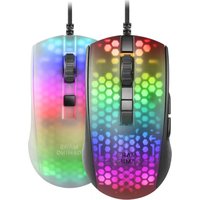
| Lighting | RGB, 16.8 million colors |
| Polling Rate | 1000 Hz (1 ms) |
| Cable Length | 1.8 m |
| Operating Systems | Windows, macOS, Linux |
| Warranty | 2 years |
| Cleaning Instructions | Wipe with dry cloth; avoid liquids |
| Safety Warnings | Keep away from water; do not disassemble |
| Spare Parts Availability | Contact support; no user-replaceable parts |
| Repairability | Not designed for user repair |
| Included Accessories | Mouse, user manual |
Frequently Asked Questions - MMV Mars Gaming
Is the Mars Gaming MMV mouse compatible with Mac?
Yes, the MMV works with macOS as a standard USB mouse. However, custom software (if any) is only for Windows.
How do I adjust the DPI?
Press the DPI button located near the scroll wheel to cycle through preset levels (800/1600/3200/6400 DPI).
Can I customize the RGB lighting?
RGB lighting is hardware-controlled and cannot be customized without software. If the mouse includes software, download it from the Mars Gaming website.
How do I clean the mouse?
Unplug the mouse and wipe the surface with a soft, dry cloth. Do not use alcohol or wet wipes, as they may damage the coating.
What should I do if the mouse stops working?
First, try a different USB port on your computer. If it still doesn't work, restart your system. If the issue persists, contact Mars Gaming support.
Does the MMV mouse have onboard memory?
No, the MMV does not have onboard memory; DPI and lighting settings revert to default when unplugged.
Is the mouse suitable for left-handed users?
The MMV is an ambidextrous design but has side buttons only on the left, making it better suited for right-handed users.
What is the cable length?
The braided cable is 1.8 meters (approximately 6 feet) long, allowing flexible placement.
Can I use the mouse on a glass surface?
Optical sensors may struggle on transparent glass. Use a mousepad for best performance.
How do I download the user manual?
Visit the support page on the Mars Gaming website and search for 'MMV' to download a PDF manual.
User questions about MMV Mars Gaming
0 question about this device. Answer the ones you know or ask your own.
Ask a new question about this device
No questions yet. Be the first to ask one.
Download the instructions for your Mouse in PDF format for free! Find your manual MMV - Mars Gaming and take your electronic device back in hand. On this page are published all the documents necessary for the use of your device. MMV by Mars Gaming.
USER MANUAL MMV Mars Gaming
Manual assistant
Powered by Anthropic
Waiting for your message
Product information
Brand : Mars Gaming
Model : MMV
Category : Mouse