BXL1 - Wall mount SANUS - Free user manual and instructions
Find the device manual for free BXL1 SANUS in PDF.


Pick your language and provide your email: we'll send you a specifically translated version.
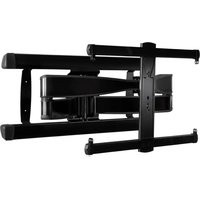
| Product Type | Wall Mount |
| Brand | Sanus |
| Model | BXL1 |
| TV Size Compatibility | 13 to 42 inches |
| Max Weight Capacity | 30 kg (66 lbs) |
| VESA Compatibility | 75x75mm to 200x200mm |
| Tilt Range | +5° / -5° (fixed) |
| Distance from Wall | 1.5 inches (38 mm) |
| Mounting Type | Fixed, low-profile |
| Material | Steel, powder coated |
| Dimensions (WxHxD) | 12.2 x 8.1 x 1.5 inches (310 x 206 x 38 mm) |
| Weight | 2.1 kg (4.6 lbs) |
| Included Hardware | M4, M5, M6, M8 bolts, spacers, washers |
| Wall Plate Dimensions | 12.2 x 8.1 inches (310 x 206 mm) |
| Stud Spacing | Up to 16 inches (406 mm) on center |
| Leveling | Yes, post-installation adjustment |
| Cable Management | Yes, integrated clips |
| Safety Certification | UL listed |
| Warranty | 5 years limited |
| Recommended Tools | Stud finder, drill, socket wrench, level |
| Cleaning Instructions | Wipe with damp cloth, mild detergent |
Frequently Asked Questions - BXL1 SANUS
What is the maximum TV size for the Sanus BXL1 mount?
The Sanus BXL1 is designed for TVs from 13 to 42 inches. Always check the weight capacity and VESA pattern for compatibility.
Does the BXL1 tilt?
Yes, it offers a small tilt range of +5/-5 degrees to reduce glare. It is not a full-motion mount.
What VESA patterns does the BXL1 support?
It supports VESA patterns from 75x75mm up to 200x200mm. Use the included hardware kit for proper installation.
How far from the wall does the BXL1 mount the TV?
The TV sits about 1.5 inches (38 mm) from the wall, giving a low-profile appearance.
Can the BXL1 be mounted on concrete walls?
Yes, but you need to use appropriate anchors (not included) for concrete or brick. Follow the manual for installation guidelines.
What tools are needed for installation?
You will need a stud finder, drill, socket wrench, level, and the included hex key. All mounting hardware is provided.
Is the BXL1 compatible with curved TVs?
It is primarily designed for flat-back TVs. Curved TVs may have non-standard VESA patterns or weight distribution, so check compatibility.
How do I adjust the level after mounting?
The BXL1 has a post-installation leveling feature. Loosen the lag bolts slightly, adjust the TV, then retighten.
Does the mount come with a warranty?
Yes, Sanus offers a 5-year limited warranty against defects in materials and workmanship.
Can I use the BXL1 for a monitor?
Yes, as long as the monitor is within the weight and VESA limits. It works well for small TVs and monitors.
User questions about BXL1 SANUS
0 question about this device. Answer the ones you know or ask your own.
Ask a new question about this device
No questions yet. Be the first to ask one.
Download the instructions for your Wall mount in PDF format for free! Find your manual BXL1 - SANUS and take your electronic device back in hand. On this page are published all the documents necessary for the use of your device. BXL1 by SANUS.
USER MANUAL BXL1 SANUS
Manual assistant
Powered by Anthropic
Waiting for your message
Product information
Brand : SANUS
Model : BXL1
Category : Wall mount