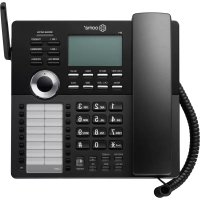
2613 - Desk Phone Ooma - Free user manual and instructions
Find the device manual for free 2613 Ooma in PDF.


Pick your language and provide your email: we'll send you a specifically translated version.
| Product Type | Desk Phone |
| Brand | Ooma |
| Model | 2613 |
| Dimensions (approx) | 8.5 x 7.1 x 4.1 inches (216 x 180 x 104 mm) |
| Weight (approx) | 1.6 lbs (0.73 kg) |
| Power Supply | AC adapter, 9V DC, 500mA |
| Display | Backlit LCD, 2 lines |
| Keypad | Full alphanumeric with dedicated function keys |
| Speakerphone | Full-duplex speakerphone |
| Caller ID | Yes, with call waiting support |
| Mute Function | Yes |
| Redial | Last number redial |
| Pause | Yes, during dialing |
| Adjustable Ringer Volume | 4 levels plus off |
| Headset Jack | 2.5mm headset jack |
| Wall Mountable | Yes, with optional bracket |
| Maintenance | Wipe with a soft dry cloth; avoid liquids |
| Safety | Keep away from water; use only supplied power adapter |
| Spare Parts & Repairability | Replacement handset cords, AC adapters, and base units available |
| General Information | Designed for office and home use; compatible with standard analog phone lines and VoIP adapters |
Frequently Asked Questions - 2613 Ooma
How do I set up my Ooma 2613 desk phone?
Connect the handset cord to the base and handset. Plug the telephone line cord into the LINE port on the base and the wall jack. Connect the AC adapter to the base and power outlet. Lift the handset to check for dial tone.
Why is there no dial tone?
Ensure the telephone line cord is securely connected to both the LINE port and the wall jack. Check that the power adapter is plugged in and the base has power. Try connecting a different phone to the same jack to rule out line issues.
How do I use the speakerphone?
During a call, press the SPEAKER button. The speaker will activate, and you can place the handset down. Press SPEAKER again or lift the handset to switch to handset mode.
How do I adjust the volume?
During a call, use the VOLUME UP/DOWN buttons on the right side of the base to adjust handset or speakerphone volume. The ringer volume can be adjusted using the RINGER switch on the bottom.
How do I mute a call?
Press the MUTE button during a call. The mute indicator will light up. Press again to unmute. The caller will not hear you while muted.
How do I redial the last number?
Lift the handset or press SPEAKER, then press the REDIAL button. The last dialed number will be called.
Does this phone support caller ID?
Yes, the Ooma 2613 supports Caller ID. Incoming caller information is displayed on the LCD screen. You must subscribe to Caller ID service from your phone provider.
How do I clean the phone?
Use a soft, dry cloth to wipe the surface. Do not use liquid cleaners or spray directly. Avoid getting moisture into any openings.
Can I use a headset with this phone?
Yes, the phone has a 2.5mm headset jack on the side. Plug a compatible headset into the jack. The handset speaker and microphone will be disabled when a headset is connected.
How do I reset the phone to factory settings?
There is no factory reset button. The phone stores only basic settings; unplugging the power for 10 seconds will clear temporary settings. For persistent issues, refer to the user manual.
User questions about 2613 Ooma
0 question about this device. Answer the ones you know or ask your own.
Ask a new question about this device
No questions yet. Be the first to ask one.
Download the instructions for your Desk Phone in PDF format for free! Find your manual 2613 - Ooma and take your electronic device back in hand. On this page are published all the documents necessary for the use of your device. 2613 by Ooma.
USER MANUAL 2613 Ooma


Manual assistant
Powered by Anthropic
Waiting for your message
Product information
Brand : Ooma
Model : 2613
Category : Desk Phone