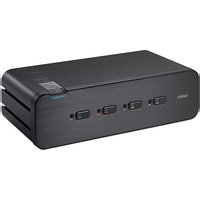
F1DN108F-3 - Network switch BELKIN - Free user manual and instructions
Find the device manual for free F1DN108F-3 BELKIN in PDF.


Pick your language and provide your email: we'll send you a specifically translated version.
| Product Type | Network Switch |
| Brand | Belkin |
| Model | F1DN108F-3 |
| Number of Ports | 8 |
| Supported Data Rates | 10/100/1000 Mbps |
| Dimensions (approx.) | 200 x 130 x 30 mm (7.9 x 5.1 x 1.2 in) |
| Weight (approx.) | 500 g (1.1 lb) |
| Power Supply | External power adapter (5V DC) |
| Plug and Play | Yes |
| Auto MDI/MDI-X | Yes |
| Flow Control | IEEE 802.3x full-duplex |
| LED Indicators | Power, Link/Activity per port |
| Cooling | Passive (fanless) |
| Operating Temperature | 0°C to 40°C (32°F to 104°F) |
| Humidity | 10% to 90% non-condensing |
| Cleaning Instructions | Use a dry, soft cloth. Do not use liquids or sprays. |
| Safety Precautions | Keep away from water and heat sources. Do not open the device. |
| Repairability | Not user-serviceable. Contact Belkin support for issues. |
| Certifications | FCC, CE, RoHS |
Frequently Asked Questions - F1DN108F-3 BELKIN
How do I connect the Belkin F1DN108F-3 switch?
Connect the power adapter to the switch and plug into an outlet. Use Ethernet cables to connect your devices (e.g., computers, routers) to any of the 8 ports. The switch automatically detects and configures the connections.
Does this switch support Gigabit Ethernet?
Yes, the F1DN108F-3 supports 10/100/1000 Mbps speeds, making it ideal for high-speed networking.
How can I reset the Belkin switch?
This switch does not have a reset button. Power cycling the device (unplugging and replugging the power adapter) will clear temporary issues.
What do the LEDs on the switch mean?
The power LED indicates the switch is on. Each port has a link/activity LED: solid green means a connection is established, blinking indicates traffic.
Is this switch wall-mountable?
The Belkin F1DN108F-3 is designed for desktop use. It does not include mounting brackets, but you can place it on a flat surface.
Does it support PoE (Power over Ethernet)?
No, this switch does not support PoE. It only passes data; devices requiring PoE need their own power source.
What are the dimensions of the switch?
Approximately 200 x 130 x 30 mm (7.9 x 5.1 x 1.2 inches).
Can I use this switch with a router?
Yes, connect one of the ports to your router's LAN port to extend your network. All other ports will then have internet access.
Is it compatible with all Ethernet cables?
It works with Cat5, Cat5e, Cat6, and Cat6a cables for optimal performance.
How should I clean the switch?
Use a dry, soft cloth to wipe the exterior. Do not use water, solvents, or abrasive cleaners.
User questions about F1DN108F-3 BELKIN
0 question about this device. Answer the ones you know or ask your own.
Ask a new question about this device
No questions yet. Be the first to ask one.
Download the instructions for your Network switch in PDF format for free! Find your manual F1DN108F-3 - BELKIN and take your electronic device back in hand. On this page are published all the documents necessary for the use of your device. F1DN108F-3 by BELKIN.
USER MANUAL F1DN108F-3 BELKIN
Manual assistant
Powered by Anthropic
Waiting for your message
Product information
Brand : BELKIN
Model : F1DN108F-3
Category : Network switch