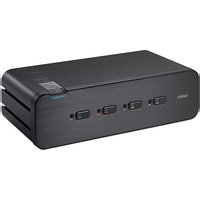
F1DN102F-3 - Network switch BELKIN - Free user manual and instructions
Find the device manual for free F1DN102F-3 BELKIN in PDF.


Pick your language and provide your email: we'll send you a specifically translated version.
| Product Type | 2-Port DisplayPort KVM Switch |
| Brand | Belkin |
| Model | F1DN102F-3 |
| Dimensions (L x W x H) | 4.5 x 3.0 x 1.0 inches (114 x 76 x 25 mm) |
| Weight | 0.5 lbs (0.23 kg) |
| Power Supply | USB bus-powered (5V, 500mA) |
| Video Interface | DisplayPort 1.2, supports up to 4K@60Hz |
| USB Ports | 2x USB 2.0 Type A (shared peripherals) |
| Number of Computers Supported | 2 |
| Switching Method | Front panel button, hotkey commands, or mouse control |
| LED Indicators | Power and selected computer LEDs |
| Compatible Operating Systems | Windows, macOS, Linux, Chrome OS |
| Cable Length (included) | 3.3 ft (1 m) USB and DisplayPort cables |
| Materials | Metal chassis with plastic front panel |
| Operating Temperature | 32°F to 104°F (0°C to 40°C) |
| Storage Temperature | 14°F to 140°F (-10°C to 60°C) |
| Humidity | 0% to 80% RH, non-condensing |
| Certifications | FCC, CE, RoHS |
| Warranty | 2 years limited |
| Maintenance | Clean with dry cloth; no liquid cleaners |
| Safety Precautions | Use only provided cables; avoid static discharge |
| Spare Parts / Repairability | No user-serviceable parts; contact Belkin support |
Frequently Asked Questions - F1DN102F-3 BELKIN
How do I switch between computers on the Belkin F1DN102F-3 KVM switch?
You can switch between computers by pressing the front panel button, using hotkey commands (e.g., Scroll Lock+Scroll Lock+1 or 2), or moving the mouse to the edge of the screen (if enabled).
Does the Belkin F1DN102F-3 support 4K resolution?
Yes, it supports DisplayPort 1.2 and can drive up to 4K@60Hz on both connected computers.
Can I use a USB hub with this KVM switch?
Yes, the built-in USB 2.0 ports allow you to share peripherals like keyboards, mice, and USB drives. For higher bandwidth devices, a powered USB hub may be required.
Is the Belkin F1DN102F-3 compatible with macOS?
Yes, it is compatible with macOS, Windows, Linux, and Chrome OS. No additional drivers are needed for basic operation.
Why is my screen not displaying after switching?
Ensure both computers are powered on and the DisplayPort cables are securely connected. Try pressing the switch button again or reconnecting the cables. If the issue persists, check your computer's display settings for external monitor detection.
Can I use the KVM switch with a laptop?
Yes, as long as your laptop has a DisplayPort output (or an adapter to DisplayPort). For laptops without DisplayPort, use a USB-C to DisplayPort adapter.
How do I reset the Belkin F1DN102F-3 to factory defaults?
The switch does not have a user-accessible reset button. To reset, unplug the USB power cable and reconnect it after 10 seconds. This clears any temporary glitches.
What is the maximum cable length I can use with this KVM?
For best performance, keep DisplayPort cables under 10 ft (3 m). Longer cables may cause signal degradation, especially at 4K resolution.
Does the KVM switch support audio?
The F1DN102F-3 does not have dedicated audio ports. Audio must be routed separately via USB or your computer's audio output.
How do I clean and maintain the KVM switch?
Use a soft, dry lint-free cloth to wipe the exterior. Do not use liquids, sprays, or abrasive cleaners. Keep the vents free of dust to ensure proper airflow.
User questions about F1DN102F-3 BELKIN
0 question about this device. Answer the ones you know or ask your own.
Ask a new question about this device
No questions yet. Be the first to ask one.
Download the instructions for your Network switch in PDF format for free! Find your manual F1DN102F-3 - BELKIN and take your electronic device back in hand. On this page are published all the documents necessary for the use of your device. F1DN102F-3 by BELKIN.
USER MANUAL F1DN102F-3 BELKIN
Manual assistant
Powered by Anthropic
Waiting for your message
Product information
Brand : BELKIN
Model : F1DN102F-3
Category : Network switch