
BCS452210M - Oven AEG - Free user manual and instructions
Find the device manual for free BCS452210M AEG in PDF.


Pick your language and provide your email: we'll send you a specifically translated version.
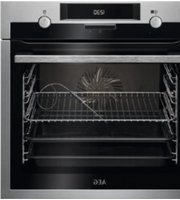
| Product Type | Built-in Electric Oven |
| Brand | AEG |
| Model | BCS452210M |
| Dimensions (H x W x D) | 595 x 594 x 567 mm |
| Weight | 34 kg |
| Power Supply | 220-240 V, 50-60 Hz |
| Energy Efficiency Class | A+ |
| Energy Consumption (Conventional) | 0.93 kWh |
| Energy Consumption (Fan Forced) | 0.78 kWh |
| Oven Capacity | 72 liters |
| Temperature Range | 30°C - 275°C |
| Number of Functions | 8 |
| Functions | True Fan Cooking, Pizza, Moist Fan Baking, Grill, Turbo Grill, Bottom Heat, Defrost, Keep Warm |
| Cleaning Type | Pyrolytic Self-Cleaning |
| Display | TFT Touchscreen |
| Control Type | Touch Control |
| Safety Features | Child Lock, Residual Heat Indicator, CoolTouch Door, Auto Shut-off |
| Interior Light | LED |
| Number of Shelves | 2 wire shelves + 1 baking tray |
| Door Type | Hinged drop-down |
| Repairability Index | 8.4/10 |
| Spare Parts Availability | 10 years minimum |
Frequently Asked Questions - BCS452210M AEG
How to preheat the AEG BCS452210M oven?
Select the desired function (e.g., True Fan Cooking) using the touch display, then set the temperature. The oven will preheat automatically. You can monitor the progress on the display.
How to activate the child lock?
Press and hold the lock icon on the touchscreen for 3 seconds. The child lock will engage, disabling all controls until deactivated.
How to clean the oven using the pyrolytic function?
Remove all accessories and large food debris. Select the Pyrolytic cleaning function. The oven will heat to high temperature (approx. 480°C) to burn off residues. After cooling, wipe remaining ash with a damp cloth.
What accessories are included with the oven?
The oven comes with 1 wire shelf, 1 universal baking tray, and 1 grill rack. Additional accessories can be purchased separately.
How to troubleshoot an error code E06?
Error code E06 indicates a temperature sensor fault. Try turning the oven off at the mains for 10 seconds and restart. If persists, contact AEG service.
Can I use aluminum foil in the oven?
Yes, but avoid contact with the heating elements and do not cover the oven floor entirely. Use foil only on baking trays to catch drips.
How to replace the oven light bulb?
Disconnect the power. Remove the glass cover by turning it anti-clockwise. Replace with a 40W, 300°C resistant halogen bulb. Reassemble and restore power.
What is the maximum temperature for baking?
The maximum temperature is 275°C. For most baking, use the True Fan Cooking function at 160-180°C for even results.
How to set the timer?
Touch the clock icon, then set the desired time using the +/- buttons. Choose between Minute Minder or Duration (cooking time). Confirm with the check mark.
Is the oven compatible with a smart home system?
This model does not have Wi-Fi connectivity. However, it can be used with AEG's Kitchen Companion via a separate device if supported.
User questions about BCS452210M AEG
0 question about this device. Answer the ones you know or ask your own.
Ask a new question about this device
No questions yet. Be the first to ask one.
Download the instructions for your Oven in PDF format for free! Find your manual BCS452210M - AEG and take your electronic device back in hand. On this page are published all the documents necessary for the use of your device. BCS452210M by AEG.
USER MANUAL BCS452210M AEG
Manual assistant
Powered by Anthropic
Waiting for your message
Product information
Brand : AEG
Model : BCS452210M
Category : Oven