TA-250MIC v.2 - Receiver Taga Harmony - Free user manual and instructions
Find the device manual for free TA-250MIC v.2 Taga Harmony in PDF.


Pick your language and provide your email: we'll send you a specifically translated version.
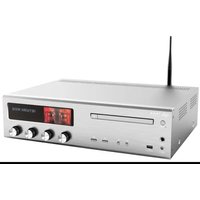
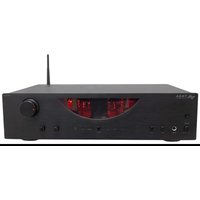
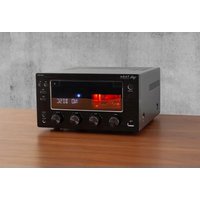
| Product Type | Stereo Receiver |
| Brand | Taga Harmony |
| Model | TA-250MIC v.2 |
| Dimensions (W x H x D) | 430 mm x 100 mm x 300 mm |
| Weight | 8.5 kg |
| Power Output | 2 x 50 W RMS (8 ohms) |
| Frequency Response | 20 Hz - 20 kHz (±0.5 dB) |
| Total Harmonic Distortion | < 0.05% |
| Inputs | 4x RCA, 1x Phono (MM), 1x Optical, 1x Coaxial, 1x USB |
| Outputs | Speaker terminals, 1x Subwoofer Pre-out, Headphone jack |
| Supported Audio Formats | MP3, WMA, WAV, FLAC (via USB) |
| Built-in DAC | 24-bit / 192 kHz |
| Radio Tuner | FM/AM with 30 presets |
| Remote Control | Included |
| Power Supply | AC 230 V, 50 Hz |
| Power Consumption | 200 W (max) |
| Standby Power | < 0.5 W |
| Cleaning Instructions | Wipe with a dry, soft cloth. Avoid solvents. |
| Safety Features | Overload protection, short circuit protection |
| Spare Parts & Repairability | Contact authorized service center for parts |
| General Information | Designed for home audio systems. Includes microphone input for karaoke? |
Frequently Asked Questions - TA-250MIC v.2 Taga Harmony
How do I connect my turntable to the TA-250MIC v.2?
Use the Phono input (RCA) on the back panel. Ensure your turntable has a moving magnet (MM) cartridge.
Can I play music from a USB drive?
Yes, insert a USB drive into the USB port. The receiver supports MP3, WMA, WAV, and FLAC files.
How to set up the FM radio?
Connect the included FM antenna. Press Tuner on the remote or front panel, then use Auto Tune or manual search.
What is the power output of this receiver?
It delivers 2 x 50 W RMS into 8 ohms, sufficient for most bookshelf speakers.
Why is there no sound from my speakers?
Check speaker connections, ensure the Speaker A/B is selected, and volume is turned up. Also verify the input source is correct.
How do I connect a subwoofer?
Use the Subwoofer Pre-out (RCA) on the back. Connect it to your powered subwoofer's input.
Can I use headphones?
Yes, plug headphones into the Headphone jack on the front panel. Speakers will mute automatically.
What is the microphone input for?
The MIC input allows you to connect a microphone for karaoke or announcements. Adjust mic volume separately.
How to reset the receiver?
Unplug it from AC power for 30 seconds, then plug it back in. This restores default settings.
Does it support Bluetooth?
No, the TA-250MIC v.2 does not have built-in Bluetooth. Use an external Bluetooth receiver connected to an available RCA input.
User questions about TA-250MIC v.2 Taga Harmony
0 question about this device. Answer the ones you know or ask your own.
Ask a new question about this device
No questions yet. Be the first to ask one.
Download the instructions for your Receiver in PDF format for free! Find your manual TA-250MIC v.2 - Taga Harmony and take your electronic device back in hand. On this page are published all the documents necessary for the use of your device. TA-250MIC v.2 by Taga Harmony.
USER MANUAL TA-250MIC v.2 Taga Harmony


Manual assistant
Powered by Anthropic
Waiting for your message
Product information
Brand : Taga Harmony
Model : TA-250MIC v.2
Category : Receiver