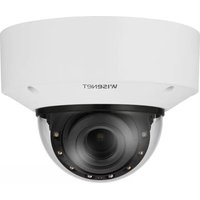
XND-6081VZ - Surveillance Camera Hanwha - Free user manual and instructions
Find the device manual for free XND-6081VZ Hanwha in PDF.


Pick your language and provide your email: we'll send you a specifically translated version.
| Product Type | Network Dome Camera |
| Brand | Hanwha |
| Model | XND-6081VZ |
| Resolution | 2 Megapixels (1920x1080) |
| Lens | 2.8-12mm Varifocal |
| Night Vision | Up to 30m IR |
| Video Compression | H.265, H.264, MJPEG |
| Field of View | Horizontal: 104°(W) - 37°(T) |
| Ingress Protection | IP66 |
| Power Supply | PoE (IEEE 802.3af), 12V DC |
| Power Consumption | Max 12.95W (PoE), 10W (DC) |
| Dimensions (Diameter x Height) | 147.0 x 126.5 mm |
| Weight | Approx. 1.2 kg |
| Operating Temperature | -40°C to 55°C |
| Storage Temperature | -40°C to 60°C |
| Network Interface | RJ-45 10/100 Base-T |
| Audio Support | 1-channel audio input/output |
| Alarm I/O | 1 input, 1 output |
| SD Card Slot | Micro SD/SDHC/SDXC (max 128GB) |
| Maintenance | Clean lens with soft dry cloth; avoid solvents |
| Security | Password protection, HTTPS, IP filtering |
| Spare Parts / Repairability | Contact Hanwha support for replacement parts |
Frequently Asked Questions - XND-6081VZ Hanwha
How do I reset the XND-6081VZ to factory defaults?
Press and hold the reset button (inside the dome) for 5 seconds while the camera is powered on. The camera will reboot with factory settings.
What is the default IP address and login credentials?
Default IP is 192.168.1.100. Username: admin, Password: admin (change after first login).
Can this camera be used outdoors?
Yes, it has an IP66 weatherproof rating, suitable for outdoor use.
Does the camera support Power over Ethernet (PoE)?
Yes, it supports PoE (IEEE 802.3af) and also 12V DC input.
How do I install the camera on a ceiling or wall?
Use the mounting template provided, drill holes, and secure with screws. Connect cables before final mounting.
What video compression formats are available?
Supports H.265, H.264, and MJPEG for flexible bandwidth and storage.
Can I record video to a Micro SD card?
Yes, the camera has a Micro SD slot supporting up to 128GB for edge recording.
How do I clean the camera lens?
Use a soft, dry cloth to gently wipe the lens. Avoid abrasive cleaners or solvents.
What is the warranty period for this camera?
Hanwha offers a standard 2-year warranty from the date of purchase.
Is this camera compatible with third-party VMS software?
Yes, it supports ONVIF Profile G and S for integration with various VMS platforms.
User questions about XND-6081VZ Hanwha
0 question about this device. Answer the ones you know or ask your own.
Ask a new question about this device
No questions yet. Be the first to ask one.
Download the instructions for your Surveillance Camera in PDF format for free! Find your manual XND-6081VZ - Hanwha and take your electronic device back in hand. On this page are published all the documents necessary for the use of your device. XND-6081VZ by Hanwha.
USER MANUAL XND-6081VZ Hanwha


Manual assistant
Powered by Anthropic
Waiting for your message
Product information
Brand : Hanwha
Model : XND-6081VZ
Category : Surveillance Camera