Kiros-INT - Thermostat Vemer - Free user manual and instructions
Find the device manual for free Kiros-INT Vemer in PDF.


Pick your language and provide your email: we'll send you a specifically translated version.
| Product Type | Thermostat |
| Brand | Vemer |
| Model | Kiros-INT |
| Dimensions (W x H x D) | Approx. 80 x 80 x 30 mm |
| Weight | Approx. 100 g |
| Power Supply | 230 V AC, 50/60 Hz |
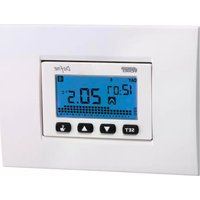
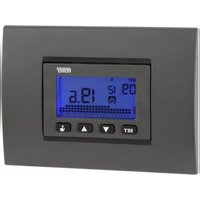
| Display Type | Digital LCD |
| Main Functions | Temperature control, programmable scheduling, manual override, frost protection |
| Temperature Range | 5 °C to 30 °C |
| Control Type | Electronic, with touch or button interface |
| Mounting | Wall-mounted (flush or surface) |
| Electrical Rating | Max. 16 A (resistive load) |
| Protection Class | IP20 (indoor use) |
| Maintenance | Clean with a soft, dry cloth; avoid liquids |
| Safety | Complies with low voltage and EMC directives |
| Spare Parts and Repairability | No user-serviceable parts; contact authorized service center |
| General Information | User manual available for download in PDF format from notice-facile.com |
Frequently Asked Questions - Kiros-INT Vemer
How do I install the Vemer Kiros-INT thermostat?
Turn off the power at the circuit breaker. Connect the wires according to the wiring diagram in the manual. Mount the thermostat on the wall using the provided screws. Restore power and configure the settings.
How do I set the desired temperature?
Press the + or - buttons to adjust the temperature. The current setpoint will flash on the display. Wait a few seconds to confirm.
How do I program a weekly schedule?
Enter the programming menu by pressing the Menu button. Use +/- to set the time and temperature for each period. Save by pressing OK.
What should I do if the display is blank?
Check if the power supply is on and the circuit breaker is not tripped. Ensure the thermostat is properly connected. If the issue persists, contact technical support.
How do I reset the thermostat to factory settings?
Press and hold the Reset button (usually on the side or back) for 5 seconds. The display will show a confirmation message. Release the button.
Is the thermostat compatible with floor heating?
Yes, the Kiros-INT is designed for electric floor heating systems and can also control other resistive loads up to 16 A.
Can I use the thermostat with a heat pump?
This model is intended for on/off control of resistive loads. For heat pumps, a different thermostat with changeover control is recommended.
How do I change the temperature unit from Celsius to Fahrenheit?
Access the settings menu (usually by holding the Menu button). Navigate to 'Unit' and select °C or °F using the +/- buttons.
What does the 'frost protection' function do?
When activated, the thermostat maintains a minimum temperature (typically 5 °C) to prevent freezing when the room is unoccupied.
Where can I download the full user manual?
The manual is available for free on notice-facile.com in PDF format. You can access it directly from the product page.
User questions about Kiros-INT Vemer
0 question about this device. Answer the ones you know or ask your own.
Ask a new question about this device
No questions yet. Be the first to ask one.
Download the instructions for your Thermostat in PDF format for free! Find your manual Kiros-INT - Vemer and take your electronic device back in hand. On this page are published all the documents necessary for the use of your device. Kiros-INT by Vemer.
USER MANUAL Kiros-INT Vemer
Manual assistant
Powered by Anthropic
Waiting for your message
Product information
Brand : Vemer
Model : Kiros-INT
Category : Thermostat