FPC-100 - Flat Screen Mount Gabor - Free user manual and instructions
Find the device manual for free FPC-100 Gabor in PDF.


Pick your language and provide your email: we'll send you a specifically translated version.
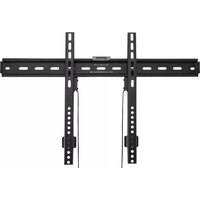
| Product Type | Flat Screen Mount |
| Brand | Gabor |
| Model | FPC-100 |
| VESA Compatibility | 75 x 75 mm and 100 x 100 mm |
| Maximum Screen Size | Up to 32 inches |
| Maximum Weight Capacity | 15 kg (33 lbs) |
| Material | Steel with powder coating |
| Color | Black |
| Mount Type | Fixed (low profile) |
| Wall Plate Dimensions | 200 x 100 mm |
| Distance from Wall | 20 mm |
| Level Adjustment | Yes, via bubble level included |
| Included Hardware | Mounting screws, wall anchors, and bubble level |
| Installation | Requires drilling into solid wall or studs |
| Safety Features | Safety locking brackets prevent accidental dislodging |
| Cleaning and Maintenance | Wipe with dry cloth; avoid abrasive cleaners |
| Spare Parts Availability | Contact Gabor customer support for replacements |
| Repairability | Designed for easy replacement of worn parts |
| Compliance | CE, RoHS |
| Package Contents | Wall bracket, screen bracket, hardware kit, instruction manual |
| Warranty | 2 years |
Frequently Asked Questions - FPC-100 Gabor
What is the maximum screen size this mount can support?
The Gabor FPC-100 supports flat screens up to 32 inches.
What VESA patterns does the mount accommodate?
It is compatible with VESA 75x75 mm and 100x100 mm patterns.
What is the weight limit of the FPC-100 mount?
The maximum load capacity is 15 kg (33 lbs).
Is the mount fixed or adjustable?
It is a fixed low-profile mount with no tilt, swivel, or extension.
How far from the wall will the screen sit?
The mount holds the screen approximately 20 mm from the wall.
What tools are needed for installation?
You will need a drill, a Phillips screwdriver, and a level (bubble level included).
Can this mount be installed on drywall?
Yes, but it must be anchored into wood studs or use suitable wall anchors for solid surfaces.
Does the mount come with all necessary hardware?
Yes, it includes screws, anchors, and a bubble level. You may need additional bolts for specific TV models.
How do I clean the mount?
Wipe with a dry or slightly damp cloth. Do not use abrasive cleaners.
What if I lose a screw or part?
Contact Gabor customer support for replacement parts. Provide the model number FPC-100.
User questions about FPC-100 Gabor
0 question about this device. Answer the ones you know or ask your own.
Ask a new question about this device
No questions yet. Be the first to ask one.
Download the instructions for your Flat Screen Mount in PDF format for free! Find your manual FPC-100 - Gabor and take your electronic device back in hand. On this page are published all the documents necessary for the use of your device. FPC-100 by Gabor.
USER MANUAL FPC-100 Gabor
Manual assistant
Powered by Anthropic
Waiting for your message
Product information
Brand : Gabor
Model : FPC-100
Category : Flat Screen Mount