AMCM-860DS - Uncategorized Blonder Tongue - Free user manual and instructions
Find the device manual for free AMCM-860DS Blonder Tongue in PDF.


Pick your language and provide your email: we'll send you a specifically translated version.
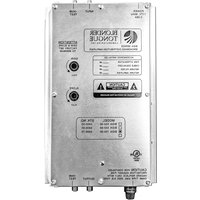
| Product Type | RF Modulator |
| Brand | Blonder Tongue |
| Model | AMCM-860DS |
| Frequency Range | 54-860 MHz |
| RF Output Level | +45 dBmV typical |
| Modulation Format | QAM (digital) or NTSC (analog) |
| Input Signals | Composite video, stereo audio (RCA) |
| Power Supply | 12V DC, 500mA (adapter included) |
| Dimensions (W x D x H) | 8.5 x 5.5 x 1.75 inches (approx.) |
| Weight | 1.5 lbs (approx.) |
| Operating Temperature | 0-40°C |
| Connectors | F-type (RF output), RCA (video/audio input) |
| Key Features | Agile modulator, SAW filter, front panel setup |
| Cleaning Instructions | Use soft dry cloth; avoid liquids |
| Safety Precautions | Use only supplied power adapter; ensure ventilation |
| Spare Parts & Repairability | Contact Blonder Tongue or authorized dealer |
Frequently Asked Questions - AMCM-860DS Blonder Tongue
How do I connect video and audio inputs?
Connect your source's composite video and stereo audio outputs to the RCA jacks labeled VIDEO and AUDIO L/R on the modulator.
How do I set the output channel?
Use the front panel controls or DIP switches (if present) to select the desired RF channel within 54-860 MHz. Refer to the manual for exact steps.
Can the AMCM-860DS modulate digital signals?
Yes, it supports QAM modulation for digital signals and also NTSC for analog signals.
What power supply is required?
The unit requires 12V DC at 500mA. An adapter is included; do not use any other power source.
No output signal. What should I check?
Verify that the power LED is lit, inputs are connected correctly, and the output channel is not interfering with a strong local station. Also check the RF output level setting.
How can I adjust the RF output level?
The output level is typically adjustable via an internal potentiometer or front panel control. Turn it carefully to increase or decrease the level.
Is this modulator compatible with all TVs?
Yes, any TV with a coaxial input can receive the modulated signal. Ensure the TV is tuned to the same channel as the modulator.
How do I configure the DIP switches?
DIP switches are usually located on the rear panel. Consult the manual for the binary settings corresponding to your desired channel and modulation mode.
Where can I download the user manual?
The manual is available for free download at notice-facile.com in PDF format. Search for 'AMCM-860DS'.
What is the warranty on this product?
Blonder Tongue typically offers a 2-year limited warranty. Contact their support for specific terms and claims.
User questions about AMCM-860DS Blonder Tongue
0 question about this device. Answer the ones you know or ask your own.
Ask a new question about this device
No questions yet. Be the first to ask one.
Download the instructions for your Uncategorized in PDF format for free! Find your manual AMCM-860DS - Blonder Tongue and take your electronic device back in hand. On this page are published all the documents necessary for the use of your device. AMCM-860DS by Blonder Tongue.
USER MANUAL AMCM-860DS Blonder Tongue


Manual assistant
Powered by Anthropic
Waiting for your message
Product information
Brand : Blonder Tongue
Model : AMCM-860DS
Category : Uncategorized