Q2101-TE - Surveillance Camera AXIS - Free user manual and instructions
Find the device manual for free Q2101-TE AXIS in PDF.


Pick your language and provide your email: we'll send you a specifically translated version.
| Product Type | Surveillance Camera |
| Brand | AXIS |
| Model | Q2101-TE |
| Dimensions (W x H x D) | 120 mm x 90 mm x 80 mm |
| Weight | 0.6 kg |
| Power Supply | Power over Ethernet (PoE) IEEE 802.3af |
| Resolution | 1920 x 1080 (Full HD) |
| Lens | Vari-focal, 2.8-8 mm, F1.4 |
| Night Vision | IR LED, up to 30 m |
| Field of View | 100° horizontal |
| Weather Rating | IP66, IK10 |
| Operating Temperature | -40°C to 60°C |
| Video Compression | H.264, H.265, Motion JPEG |
| Main Functions | Motion detection, tampering alarm, PTZ control (if applicable) |
| Maintenance | Clean dome with soft, dry cloth; avoid solvents |
| Safety | Use only with approved PoE injector; ensure proper grounding |
| Spare Parts & Repairability | Replacement lens and IR LED module available; consult service manual |
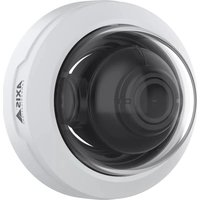
| General Information | AXIS Q2101-TE is a robust outdoor network dome camera designed for reliable surveillance |
Frequently Asked Questions - Q2101-TE AXIS
How do I install the AXIS Q2101-TE camera?
Mount the camera on a solid surface using the provided bracket, connect Ethernet cable for both data and PoE power, and adjust the lens focus via the web interface.
What is the default IP address of the camera?
The default IP is obtained via DHCP. Use AXIS IP Utility to discover the camera on your network, or assign a static IP through the device's web interface.
Can the camera operate in low light conditions?
Yes, it features Infrared LEDs for night vision up to 30 meters, automatically switching to black and white in low light.
What is the maximum resolution supported?
The camera supports up to 1920x1080 pixels at 30 frames per second (Full HD).
Is the AXIS Q2101-TE weatherproof?
Yes, it has an IP66 rating for dust and water resistance, and IK10 for impact resistance.
How do I set up motion detection?
Access the camera's web interface, go to Detectors > Motion Detection, draw detection areas, and configure sensitivity and threshold.
Can I store video recordings locally?
The camera supports microSD card (up to 256 GB) for edge storage, or you can stream to an NVR or network storage.
How do I update the firmware?
Download the latest firmware from AXIS website, then upload it via the web interface under System > Maintenance > Firmware Upgrade.
What should I do if I forget the admin password?
Press and hold the reset button (located near the cable) for 10 seconds to restore factory defaults. This will erase all settings.
What is the warranty period for this camera?
AXIS provides a limited 3-year warranty for hardware defects. Check the documentation for terms and conditions.
User questions about Q2101-TE AXIS
0 question about this device. Answer the ones you know or ask your own.
Ask a new question about this device
No questions yet. Be the first to ask one.
Download the instructions for your Surveillance Camera in PDF format for free! Find your manual Q2101-TE - AXIS and take your electronic device back in hand. On this page are published all the documents necessary for the use of your device. Q2101-TE by AXIS.
USER MANUAL Q2101-TE AXIS

Manual assistant
Powered by Anthropic
Waiting for your message
Product information
Brand : AXIS
Model : Q2101-TE
Category : Surveillance Camera