
T6D - Sports Watch SUUNTO - Free user manual and instructions
Find the device manual for free T6D SUUNTO in PDF.


| Product type | Heart rate monitor sports watch |
| Brand | SUUNTO |
| Model | T6D |
| Weight (watch) | 55 g |
| Weight (belt) | 39 g |
| Power (watch) | CR2032 3V battery |
| Power (belt) | CR2032 3V battery |
| Battery life | Approximately 1 year in normal use (3 hours of exercise per week) |
| Transmission frequency (belt) | 2.465 GHz (ANT) and 5.3 kHz |
| Transmission range | Up to 10 m |
| Water resistance (watch) | 100 m (ISO 2281) |
| Water resistance (belt) | 20 m (ISO 2281) |
| Operating temperature | -20 to +60 °C |
| Storage temperature | -30 to +60 °C |
| Heart rate display | 30 to 240 bpm |
| Heart rate limits | 30 to 230 bpm |
| Recording memory | Up to 30 logs, max 99 hours per log |
| Main functions | Heart rate, EPOC, Training Effect, altimeter, stopwatch, alarms, PODs (speed/distance/cadence/GPS sensors) |
| Care and cleaning | Clean with a damp cloth and mild soap. Avoid chemicals. |
| Safety | Consult a doctor if you have a pacemaker or other implanted device. |
| Spare parts and repairability | CR2032 battery, transmitter belt, PODs. Replace the battery carefully to maintain water resistance. |
| Software compatibility | Suunto Training Manager and www.movescount.com |
Frequently Asked Questions - T6D SUUNTO
User questions about T6D SUUNTO
0 question about this device. Answer the ones you know or ask your own.
Ask a new question about this device
Download the instructions for your Sports Watch in PDF format for free! Find your manual T6D - SUUNTO and take your electronic device back in hand. On this page are published all the documents necessary for the use of your device. T6D by SUUNTO.
USER MANUAL T6D SUUNTO
calories
EPOC
- lap time
- training effect
Training
display 2^*
row 1: distance
row 2: speed
views: altitude
- ascent
average speed
chrono - descent
1 Introduction 5
2 Getting started 6
2.1 Basic settings 6
2.2 Setting activity class 7
2.3 Menu navigation 9
2.4 Modes and views 10
2.5 Button lock 11
3 Using TIME mode 13
3.1 Setting time 14
3.2 Setting dual time 14
3.3 Setting date 15
3.4 Setting alarm 15
4 Settings before training 17
4.1 Personal settings 17
4.1.1 Maximum heart rate 18
4.1.2 Fitness METs level 19
4.2 Units settings 19
4.3 General settings 21
4.3.1 Setting tones 21
4.3.2 Setting icons 22
4.3.3 Setting backlight 22
4.4 Configuring TRAINING mode displays 23
4.5 Setting reference altitude 26
4.6 Setting heart rate limits 27
4.7 Selecting log parameters 29
5 Using TRAINING mode 31
5.1 Putting on your transmitter belt 31
5.2 Using timers 32
5.3 Using Training Effect 34
5.4 Using EPOC 36
5.5 Starting a training session 36
5.6 During training 37
5.7 After training 38
5.7.1 Viewing logbook 38
5.7.2 Using www.movescount.com 39
6 Using PODs 40
6.1 Pairing a POD 40
6.2 Using autolap 41
6.3 Using distance intervals 42
6.4 Using speed limits 42
6.5 Using autopause 43
6.6 Calibrating your POD 44
7 Troubleshooting 45
Pairing your transmitter belt 45
8 Care and maintenance 47
8.1 General guidance 47
8.2 Replacing wristop battery 48
8.3 Replacing belt battery 49
9 Specifications 50
9.1 Technical data 50
9.2 Trademark 51
9.3 Copyright 51
9.4 CE 52
9.5 ICES 52
9.6 FCC 52
9.7 Patent notice 53
9.8 Disposal of device 53
10 Disclaimers 54
10.1 User's responsibility 54
10.2Warnings 54
Index 55
1 INTRODUCTION
Thank you for choosing Suunto t6d as your training companion. Suunto t6d is a high-precision heart rate monitor designed to make your training as beneficial as possible.
Suunto t6d gives you extremely accurate feedback on your fitness level. Before you start regular training with Suunto t6d, you should first learn the values of EPOC and other body parameters in your normal training sessions. This way you will learn to assess what type of training will help you to reach your goals.
Key features include:
- Personalized training features
- Log recorder that records each training session
- Functional extensions through Suunto PODs (Peripheral Observation Devices)
- Training planning and analysis at www.movescount.com
2 GETTING STARTED
2.1 Basic settings
Press any button to activate your Suunto t6d. You will be prompted to set your PERSONAL settings: your physical characteristics and activity class. The device suggests a default fitness METS level, but if you know your real fitness METS, you should use that value.
NOTE: The maximum performance capacity measured in a laboratory test is sometimes given as ml oxygen/kg/min (VO₂ max). If you want to compare the maximum performance capacity calculated by the program in METs to your measured VO₂ max, use the relation 1 MET = 3.5 ml/min/kg.
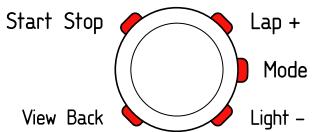
- Change the values with the [Lap +] and [Light -] buttons.
- Accept the settings and move to the next setting with the [Mode] button.
- Return to the preceding setting by pressing the [View Back] button.
- After setting the fitness METS level, continue to UNITS and GENERAL settings, or quick exit to TIME mode by pressing the [Start Stop] button.
2.2 Setting activity class
The activity class (ACT CLASS) is a rating of your current activity level. Use the following classifications to help you determine your activity class.
Activity class 1
If you do not participate regularly in recreational sports or heavy physical activity, use 1.
Activity classes 2 and 3
If you participate regularly in recreational sports or do physical work, and your weekly exercise is:
- less than 1 hour, use 2.
more than 1 hour, use 3.
Activity classes 4-7
If you participate regularly in sports or other physical activity, and you engage weekly in heavy exercise:
under 30 minutes, use 4.
30-60 minutes, use 5.
1-3 hours, use 6.
over 3 hours, use 7.
Activity classes 7.5 - 10
If you train on a regular basis or participate in competitive sports, and your weekly exercise is:
- 5-7 hours, use 7.5.
7-9 hours, use 8.
9-11 hours, use 8.5.
11-13 hours, use 9.
13-15 hours, use 9.5.
over 15 hours, use 10.
2.3 Menu navigation
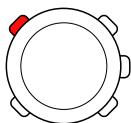
Access the settings menu by keeping [Mode] pressed.
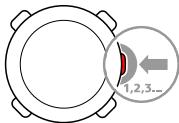
Scroll through the menus and sub menus with [Lap +] and [Light -].
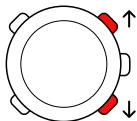
Enter a menu and a sub menu, or accept a setting value with [Mode].
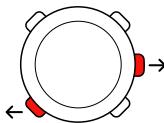
Return to the previous menu with [View Back].
At any time you can exit by pressing [Start Stop].
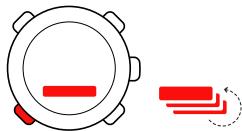
2.4 Modes and views
Modes
There are two modes: TIME and TRAINING. Switch between modes with [Mode]. The indicators on the left-hand side of the screen show which mode is enabled.
TRAINING mode has two displays, DISPLAY 1 and DISPLAY 2.
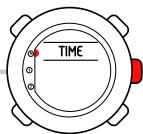
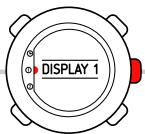
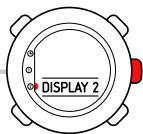
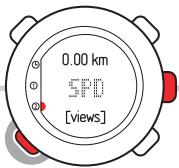
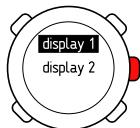
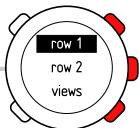
You can customize each TRAINING display. In the settings menu, go to DISPLAYS. Enter DISPLAY 1 or DISPLAY 2 and then enter ROW 1, ROW 2 or VIEWS to select the information you want to display.
Views
Each mode has different views containing supplementary information, such as the altitude in TIME mode or calories in TRAINING mode. Go to DISPLAYS settings to define which views are shown in the TRAINING mode displays. Change views in TIME and TRAINING modes with [View Back].
2.5 Button lock
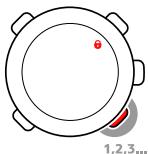
You can lock and unlock the buttons in both TIME and TRAINING mode by keeping [Light -] pressed.
en
When the buttons are locked, you can still change views and turn on the backlight. We recommend you lock the buttons, for example, after you have started a training session or are storing the device in a travel bag.
3 USING TIME MODE
In TIME mode you can view the time of day in two time zones: the time at your actual location and in another time zone (dual time). The current date is displayed on the top row of the screen.
Use [View Back] to scroll through the following views:
Day: name of the current weekday
- Seconds: seconds as numbers
- Dual time: time in another time zone
Altitude: your altitude from the sea level
You can change the following TIME mode settings in the settings menu:
| Setting | Value | Description |
| alarm | on / off / 00:00 | Alarm feature: on or off / hours and minutes |
| time | hours / minutes / seconds | Main time: hours, minutes and seconds |
| date | year / month / day | Current date: year, month and day |
| dual time | hours / minutes | Dual time: hours and minutes |
en
3.1 Setting time
To set time:
- In the settings menu, enter TIME.
- Scroll to TIME with [Lap +] and [Light -] and enter with [Mode].
- Change the time with [Lap +] and [Light -] and accept with [Mode].
- Reset seconds with [Light -]. To set specific seconds, keep [Lap +] pressed. The seconds start running. Accept the correct seconds with [Mode].
- Press [Start Stop] to exit.
3.2 Setting dual time
To set dual time:
- In the settings menu, enter TIME.
- Scroll to DUAL TIME with [Light -] and [Lap +] and enter with [Mode].
- Change the time with [Lap +] and [Light -] and accept with [Mode].
- Press [Start Stop] to exit.
Possible real life situation: Knowing the time at home
You are traveling abroad and you set the dual time to be the time at home. The main time is the time at your current location. Now you always know the local time and you can quickly check what time it is at home.
NOTE: We recommend that you set the current time at your current location as the main time because the alarm clock operates according to the main time.
en
3.3 Setting date
To set the date:
- In the settings menu, enter TIME.
- Scroll to DATE with [Lap +] and [Light -] and enter with [Mode].
- Change the day, month, and year with [Lap +] and [Light -] and accept with [Mode].
- Press [Start Stop] to exit.
3.4 Setting alarm
You can set up to three alarms on your Suunto t6d.
To set the alarms:
- In the settings menu, enter TIME.
- Scroll to ALARM with [Lap + ] and [Light -] and enter with [Mode].
- Scroll through the alarms with [Lap +] and [Light -] and enter with [Mode].
- Set the alarm on or off with [Lap +] and [Light -] and accept with [Mode].
- Change the alarm time with [Lap +] and [Light -] and accept with [Mode].
- Press [Start Stop] to exit.
When the alarm sounds, acknowledge it by pressing any button. If you do not acknowledge the alarm, it will automatically stop sounding after 30 seconds.

TIP: You can use one alarm on workdays and the others on weekends. You can also use
the extra alarms as reminders or snooze options.
4 SETTINGS BEFORE TRAINING
Before you start training, you need to define PERSONAL and UNITS settings. To be able to measure your altitude, you should also set the reference altitude. These settings ensure accurate measurements and calculations.
You are prompted to define the PERSONAL settings the first time you wake up the device (by pressing any button). If you want to learn more about these settings and modify them, continue reading. Otherwise, you can skip to Chapter 5 Using TRAINING mode.
4.1 Personal settings
Through the PERSONAL settings you tune your Suunto t6d according to your physical traits and activity. Many of the calculations use these settings, so it is important that you are as accurate as possible when defining the values.
| Setting | Value | Description |
| weight | kg / lb | Weight according to selected units in UNITS settings |
| height | cm / ft | Height according to selected units in UNITS settings |
| act.class | 1 - 10 | Activity class: 1 to 10 |
| sex | male / female | Gender: male or female |
| birth year | year | Year of birth |
| max hr | 000 | Maximum heart rate according to selected units in UNITS settings |
| fitness METS | 00.0 | Fitness METS value |
To change PERSONAL settings:
- In the settings menu, enter PERSONAL.
- Scroll through the settings with [Lap +] and [Light -] and enter with [Mode].
- Change the values using [Lap +] and [Light -].
- Accept the setting and move to the next setting with [Mode].
- Repeat steps 3 and 4 for remaining settings.
- Press [Start Stop] to exit.
4.1.1 Maximum heart rate
Enter your real maximum heart rate, if you know it. Otherwise, you can calculate it using the formula 210-(0.65 x AGE).

TIP: Ask your coach or doctor how to safely determine your real maximum heart rate.
4.1.2 Fitness METs level
Fitness METs (metabolic equivalents) value shows how much energy your body is able to consume compared to the energy consumption at rest. Roughly, the better your fitness level, the higher your maximum MET value is. Suunto t6d suggests a default fitness METS level, but if you know your real METs, you should use that value.

NOTE: The maximum performance capacity measured in a laboratory test is sometimes as ml oxygen/kg/min (VO₂ max). If you want to compare the maximum performance acity calculated by the program in METs to your measured VO₂ max, use the relation 1 T = 3.5 ml/min/kg .
4.2 Units settings
The UNITS settings define measurement units, as well as time and date format. You should define these according to your own preferences.
| Setting | Value | Description |
| time | 12h / 24h | Time format: 12 hour or 24 hour |
| date | d.m / m.d / day | Date format: day-month, month-day or weekday |
| HR | bpm / % | Heart rate units: beats per minute or percentage of maximum heart rate |
| temp | °C / °F | Temperature units: Celsius or Fahrenheit |
en
| Setting | Value | Description |
| alti | m/ft | Altitude measurement units: meters or feet |
| asc | m / s, m / min, m / h, ft / s, ft / min, ft / h | Ascent units: meters per second, minute, or hour / feet per second, minute or hour |
| dist | km / mi | Distance units: kilometers or miles |
| spd unit | Foot km / h, min /, Bike km / h, min /, GPS km / h, min / | Speed units for Foot POD, Bike POD, and GPS POD: kilometers per hour, minutes per kilometer or miles per hour, minutes per mile according to selected distance units |
| height | cm / feet | Height units: centimeters or feet |
| weight | kg / lb | Weight units: kilograms or pounds |
To change UNITS settings:
- In the settings menu, enter UNITS.
- Scroll through the units settings with [Lap +] and [Light -] and change the units with [Mode].
- Enter height and weight unit settings with [Mode] and change the units with [Lap +] and [Light -].
- Accept the height and weight units with [Mode].
- Press [Start Stop] to exit.
4.3 General settings
In the GENERAL settings you can set button tones and icons on or off, modify backlight settings, and pair HR belts and PODs. Define the GENERAL settings according to your own preferences.
| Setting | Value | Description |
| pair | HR Belt, HR Belt2, Foot POD, Bike POD, Cad POD, GPS POD, SPD POD | Pairing POD options |
| tones | on / off | Button tones: indicate with a tone when a button is pressed |
| icons | on / off | Icons: mode icon appears on the screen when a mode is selected |
| light | normal, off, night use | Backlight: normal (switched on with [Light -]), off (no light activation), or night use (switched on with any button) |
4.3.1 Setting tones
When you set the tones on, they indicate when you have pressed a button.
To set the tones:
-
In the settings menu, enter GENERAL.
-
Scroll to TONES with [Lap +] and [Light -].
- Set the tones on or off with [Mode].
- Press [Start Stop] to exit.
4.3.2 Setting icons
When the icons are enabled and you switch to a mode, a mode icon is briefly shown on the screen before the main display opens.
To set the icons:
- In the settings menu, enter GENERAL.
- Scroll to ICONS with [Lap +] and [Light -].
- Set the icons on or off with [Mode].
- Press [Start Stop] to exit.
4.3.3 Setting backlight
You can set the backlight on or off and adjust the backlight settings of the Suunto t6d display.
The backlight has three possible settings:
-
NORMAL: The light switches on when you press [Light -] and stays on for a short period after the last press of a button.
-
OFF: The light cannot be switched on by pressing a button or during alarm.
- NIGHT USE: The light is switched on when you press any button and stays on for a short while after the last press of a button and when an alarm sounds. NIGHT USE significantly reduces battery lifetime.
To set the backlight:
- In the settings menu, enter GENERAL.
- Scroll to LIGHT with [Lap +] and [Light -] and enter with [Mode].
- Scroll through the settings with [Lap +] and [Light -] and accept the setting with [Mode].
- Press [Start Stop] to exit.

NOTE: Heavy use of the backlight significantly reduces battery life. To save power, backlight blinks when used in TRAINING mode and is inactive when searching for HR or PODs.
4.4 Configuring TRAINING mode displays
In TRAINING mode, you can browse and record various data during your training sessions. Both displays have three configurable rows. Select which functions and parameters you want to be shown in each row of the displays.
| Content | Description |
| altitude | Altitude from sea level according to selected units in UNITS settings |
| ascent | Total ascent: vertical movement upwards during training according to selected units in UNITS settings |
| avg HR | Average heart rate of training session |
| avg spd | Average speed of training session according to selected units in UNITS settings |
| cadence | Cadence data (if paired with Cadence POD) |
| calories | Calories consumed since the log start |
| chrono | Recording time since the log start |
| day time | Current time |
| distance | Distance from the log start according to selected units in UNITS settings |
| descent | Total descent: vertical movement downwards during training according to selected units in UNITS settings |
| empty | No supplementary information |
| EPOC | Measure of the accumulated training load |
| HR | Current heart rate according to selected units in UNITS settings |
| lap | Current lap number |
| lap time | Elapsed time of current lap |
| lap dist | Covered distance during current lap (if paired with a wireless speed and distance POD) |
| lap spd | Average speed of current lap (if paired with a wireless speed and distance POD) |
| speed | Speed according to selected units in UNITS settings (if paired with a wireless speed and distance POD) |
| TE | Training Effect, shows the total load of a workout |
| temp | Current temperature |
| vert. spd | Rate of ascent/descent |
To configure TRAINING mode displays:
- In the settings menu, enter DISPLAYS.
- Scroll to DISPLAY 1 or DISPLAY 2 with [Lap +] and [Light -] and enter with [Mode].
- Scroll to the row or view with [Lap +] and [Light -] and enter with [Mode].
- Scroll through the functions with [Lap +] and [Light -] and enable a function with [Mode]. A tap is displayed next to the enabled function.
- Press [Start Stop] to exit.
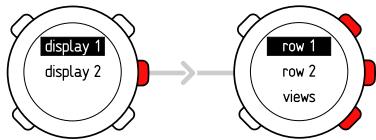

TIP: If you want to disable a training display, choose EMPTY for ROW 1 and ROW 2.
4.5 Setting reference altitude
To ensure you get correct altitude readings, you first have to set an accurate reference altitude. To do this, go to a location where you know the altitude, for example, with the help of a topographical map, and set the reference altitude to match the map reading. Suunto t6d constantly measures absolute air pressure. Based on this measurement and your last altitude reference value, it estimates the current altitude.

NOTE: Changes in local weather conditions will affect altitude readings. If local weather
changes often, it is advisable to reset the current altitude reference value frequently, preferably before starting your journey when the reference values are available. If low weather is stable, you do not need to set reference values.
To set the reference altitude:
-
In the settings menu, enter REFER.
-
Change the value with [Lap +] and [Light -].
- Accept the setting with [Mode].
- Press [Start Stop] to exit.
Possible real life situation: Using altitude measurement during training
You participate in half marathon. Before you start the race you set the correct reference altitude to your Suunto t6d. You start the log recorder and set off. During running you compare your current altitude to the altitude at the start. At some point you notice that the altitude value has decreased. You realize that the rest of the route is going to be uphill, because the starting and finishing line are the same. You adjust your running pace according to the altitude variation.
4.6 Setting heart rate limits
Setting upper and lower heart rate limits for yourself helps you exercise at the preferred intensity. An alarm notifies you when your heart rate is above or below the set limits. In the HR LIMITS settings menu, you can set the heart rate limits on or off and define the upper and lower limits.
| Setting | Value | Description |
| HR limits | ON / OFF | Heart rate limits feature: on or off |
| High | 000 / % | Higher heart rate limit according to selected units in UNITS settings |
| Low | 000 / % | Lower heart rate limit according to selected units in UNITS settings |
To change the heart rate limit settings:
- In the settings menu, enter TRAINING.
- Scroll to HR LIMITS with [Lap +] and [Light -] and enter with [Mode].
- Set the heart rate limits on or off with [Lap +] and [Light -] and accept with [Mode].
- Set the high and low limits with [Lap +] and [Light -] and accept with [Mode].
- Press [Start Stop] to exit.

NOTE: In the log, the training session is divided into different zones according to your HR limits regardless whether the limit alarm is on or off.
4.7 Selecting log parameters
Before you start recording your training sessions, select the type of data you want to save in your log or view during your workout. The parameters you select can be analyzed in more detail in the Suunto Training Manager software.
| Setting | Value | Description |
| inter | 2s / 10s | Recording interval: 2 or 10 seconds (not for R-R values) |
| alti | on / off | Altitude: on or off |
| Cad | on / off | Cadence: on or off |
| EPOC | on / off | Excess Post-exercise Oxygen Consumption: on or off (only TE and EPOC Peak are saved) |
| kcal | on / off | Kilocalories consumed: on or off |
| R-R | on / off | Heart rate interval: on or off |
| speed | on / off | Speed: on or off (not saved) |
| temp | on / off | Temperature: on or off (not saved) |
To select log parameters:
- In the settings menu, enter TRAINING.
-
Scroll to SET LOG with [Lap +] and [Light -] and enter with [Mode].
-
Scroll through the parameters with [Lap +] and [Light -] and set the parameters on or off with [Mode].
- Press [Start Stop] to exit.

TIP: If you record altitude information during your training, you will be able to analyze the effect of altitude changes to your heart rate with the Suunto Training Manager software.

NOTE: Recording R-R (heart rate interval data) requires a lot of memory space. If R-R is not recorded, more memory space is available for longer logs. However, you will not be able to analyze any body parameters with the software, e.g. the EPOC curve.
5 USING TRAINING MODE
In TRAINING mode you can measure all your training activity.

NOTE: Even though both Suunto t6d and the transmitter belt are water-resistant, the bio signal does not carry in water, which makes the communication between Suunto t6d and the transmitter belt impossible.
5.1 Putting on your transmitter belt
Put on the belt as illustrated and switch to TRAINING mode to start monitoring your heart rate. Moisten both contact areas (1) with water or gel before putting the belt on. Ensure the belt is centered on your chest.
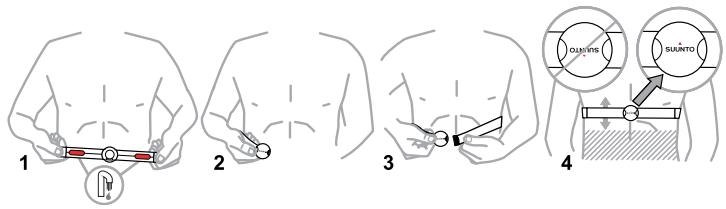
WARNING: If you have a pacemaker, defibrillator, or other implanted electronic device, you use the transmitter belt at your own risk. Before using it, we recommend an exercise test with your Suunto heat rate monitor and belt under a doctor's supervision. Exercise may include some risk, especially for those who have been inactive. We strongly advise you to consult your doctor prior to beginning a regular exercise program.
5.2 Using timers
Interval timer enables you to set and follow different timed intervals. This function is useful in timing intervals between periods of activity and rest.
Interval timer
Interval timer enables you to set and follow different timed intervals. This function is useful in timing intervals between your periods of activity and rest. In addition to alerting at selected time intervals, your Suunto t6d records lap information for each interval.
Warm-up timer
Warm-up is intended for distinguishing a separate warm-up period in the beginning of the training. Data measured during warm-up is stored in the memory of the device. With Suunto t6d you can start your training session with a warm-up and move on to normal training or interval training.
Countdown timer
Countdown timer functions as a start timer. It measures remaining time and upon reaching zero, it alerts you when the countdown has reached zero and automatically starts the timer/log. Use the countdown timer for example to exclude the warm-up session from the training log.

NOTE: The maximum countdown time is 59 mins 59 seconds.
| Setting | Value | Description |
| interval | 00.00 | Timer for interval training |
| warm up | 00.00 | Timer for a warm-up period |
| countd | 00.00 | Countdown to timer start |
To set the timers:
- In the settings menu, enter TRAINING.
- Scroll to TIMERS with [Lap +] and [Light -] and enter with [Mode].
- Scroll through the timers with [Lap +] and [Light -] and select a timer with [Mode].
- Set the timer on or off with [Lap +] and [Light -] and accept with [Mode].
- Change the values with [Lap +] and [Light -] and accept with [Mode].
- Press [Start Stop] to exit.
5.3 Using Training Effect
Training Effect (TE) is a unique feature of Suunto t6d that measures the real effect of a workout on your physical fitness. With Training Effect, you can be sure that your workouts have the intended result.
There is a significant difference between heart rate zone (temporary training intensity) and Training Effect (total load of a workout). In zone training, you try to keep your heart rate at a certain level throughout the whole workout. With Training Effect you just need to reach the desired target once during training.
| Training Effect | Result | Description |
| 1.0-1.9 | Minor | Improves recovery ability; in longer sessions (over one hour) also improves basic endurance. Does not significantly improve aerobic performance. |
| 2.0-2.9 | Maintaining | Maintains aerobic fitness. Builds base for harder training in the future. |
| 3.0-3.9 | Improving | Improves aerobic performance if repeated 2-4 times a week. No special recovery requirements. |
| 4.0-4.9 | Highly improving | Rapidly improves aerobic performance if repeated 1-2 times a week. Requires 2-3 recovery sessions (TE 1-2) per week. |
| 5.0 | Over-reaching | Extremely high effect on aerobic performance if adequate recovery allowed; should not be done often. |
NOTE: It is important to note that the numerical TE values do not mean that a workout with a lower numerical value is somehow worse or less significant than a workout with a high value. Both are needed in balanced training.
TIP: Training Effect is an advanced feature and can help you in many ways. More details about TE can be found in the Suunto Training Guide, available for download at suunto.com/training.
You can select the TE level to be shown in the TRAINING mode displays (see Section 4.4 Configuring TRAINING mode displays).
Training Effect is shown on the selected display and additionally with a scale from 1 - 5 on the right side of the screen.
Use the Training Effect calculator of the Suunto Training Manager software to define the time and average heart rate needed for the desired physiological training effect. For more information, see Suunto Training Manager online help.
5.4 Using EPOC
EPOC (Excess Post-exercise Oxygen Consumption) indicates the amount of extra oxygen that your body needs to recover after exercise. Your body consumes more oxygen after exercise than during rest. The higher the EPOC, the more strenuous the exercise. EPOC is most useful in measuring the exercise load in endurance sports such as running and cycling.
Suunto t6d allows you to predict EPOC already during exercise, which in turn makes it possible to monitor the exercise load and the Training Effect.
You can select EPOC to be shown in the TRAINING mode displays (see Section 4.4 Configuring TRAINING mode displays).
Use the Suunto Training Manager software to view your individual training sessions with their EPOC values correlated to the Training Effect level as graphs. For more information, see Suunto Training Manager Online help.
5.5 Starting a training session
When you enter TRAINING mode, your Suunto t6d automatically searches for signals from a transmitter belt. Once found, your heart rate is displayed on the screen. The
training session itself starts when you start the log recorder and ends when you stop it.
Using log recorder
By default, the log recorder (CHRONO) is displayed on the top row of the DISPLAY 1. You can personalize the TRAINING mode displays in the DISPLAYS settings.
To use the log recorder:
- In TRAINING mode, start the log recorder with [Start Stop]. While the log recorder is running, you can add training laps with [Lap +] .
- Stop the log recorder with [Start Stop].
- Continue with another timed session (lap) with [Start Stop].
- To reset the timer and view the last log summary, keep [Lap + ] pressed.

NOTE: The log recorder must be stopped before you can reset it.
5.6 During training
Your Suunto t6d has a number of visual and audio indicators to help guide you during training. This information can be both helpful and rewarding.
Here are some ideas on what to do while training:
-
Lock the buttons to avoid accidentally stopping your stopwatch.
-
Switch between the two TRAINING displays to view various data about your exercise.
- Set HR limits on or off by keeping [View Back] pressed in TRAINING mode.
5.7 After training
5.7.1 Viewing logbook
While the log recorder is running, your Suunto t6d collects various data about the session, such as EPOC and calories burned. This data is saved in your device's memory. The content of the log depends on the parameters you have selected (see Section 4.7 Selecting log parameters). You can view the training data in the logbook.
To view logbook:
- In settings menu, enter TRAINING.
- Use [Lap +] and [Light -] to scroll to LOGBOOK and enter with [Mode]. The available free space in memory is briefly displayed before the logs.
- Enter VIEW with [Mode].
- Scroll through the logs using [Lap +] and [Light -] and open a log with [Mode].
- Press [Lap +] or [Light -] to scroll through the log totals.
TIP: You can view the summary of the last training log by keeping [Lap +] pressed in TRAINING mode.
To erase logbook information:
- In LOGBOOK, scroll to ERASE with [Lap +] and [Light -] and enter with [Mode].
- Scroll to the log you want to erase with [Lap + ] and [Light -] and select the log with [Mode].
- Erase the log with [Ligh -] or cancel with [View Back].
To erase all logbook information, enter LOGBOOK and select ERASE ALL. Erase all logs with [Light -] or cancel with [View Back].
5.7.2 Using www.movescount.com
You can transfer your training logs from the Suunto t6d memory to
www.movescount.com and analyze them in more detail. At www.movescount.com
you can measure up to seven body parameters from your training session: heart rate, EPOC, Training effect, ventilation volume, respiratory rate, oxygen consumption, and energy consumption.
To transfer training data from Suunto t6d to www.movescount.com:
- Connect your Suunto t6d to the USB port of your computer using the supplied data cable.
- Log on to www.movescount.com.
- Transfer the log files to your www.movescount.com profile according to the instructions.
6 USING PODS
You can use various Peripheral Observation Devices (PODs) with your Suunto t6d. These include Foot POD, Bike POD, Cadence POD, GPS POD and generic Speed POD (see Section 6.1 Pairing a POD). After you have paired a POD with the device, Suunto t6d gives you additional information during your training.
6.1 Pairing a POD
To view speed and distance information, you first need to pair your Suunto t6d with a Suunto POD.
To pair a POD:
- Turn on the POD (or belt).
- In the settings menu, enter SPD/DST or GENERAL.
- Scroll to PAIR with [Lap +] and [Light -] and enter with [Mode].
- Scroll through the PODs and belts with [Lap + ] and [Light -].
- Activate pairing with [Mode].
6.2 Using autolap
With AUTOLAP, you can define laps in distance instead of time (interval training). When autolap is turned on (and your speed and distance POD is activated), your Suunto heart rate monitor shows total distance, average lap speed, and lap time for each lap.
| Setting | Value | Description |
| autolap | on / off | Autolap feature: on or off |
| dist | 00.00 | Lap distance: between 0.0 and 99.9 |
NOTE: When using the autolap feature, it is very important to calibrate your speed and distance POD accurately.
To set the autolap feature on:
- In the settings menu, enter SPD/DST.
- Scroll to AUTOLAP with [Lap +] and [Light -] and enter with [Mode].
- Set the autolap on or off with [Lap +] and [Light -] and accept with [Mode].
- Set the lap distance with [Lap +] and [Light -] and accept with [Mode].
- Press [Start Stop] to exit.
6.3 Using distance intervals
You can set distance intervals for interval training after you have paired your Suunto t6d with a speed and distance POD. When you start the stopwatch, your Suunto t6d alerts and records lap times and other data after every completed interval.
To set the distance intervals:
- In the settings menu, enter SPD/DST.
- Scroll to INTERVAL with [Lap +] and [Light -] and enter with [Mode].
- Set the intervals on or off with [Lap +] and [Light -] and accept with [Mode].
- Set the first interval with [Lap +] and [Light -].
- Accept the setting and move to the next interval with [Mode].
- Repeat steps 3 and 4 for remaining intervals.
- Press [Start Stop] to exit.
6.4 Using speed limits
You can turn on speed limits and define the upper and lower speed limits for yourself, after you have paired your Suunto t6d with a speed and distance POD. The speed limits will notify you if you go above or below the limits.
| Setting | Value | Description |
| limits | on / off | Limits feature: on or off |
| lower | 00:00 | Lower speed limit |
| upper | 00:00 | Upper speed limit |
To set the speed limits:
- In the settings menu, enter SPD/DST.
- Scroll to SPD LIM with [Lap +] and [Light -] and enter with [Mode].
- Set the limits on or off with [Lap +] and [Light -] and accept with [Mode].
- Change the high and low speed limits with [Lap +] and [Light -] and accept with [Mode].
- Press [Start Stop] to exit.
6.5 Using autopause
AUTOPAUSE is a feature that will automatically stop the log recorder during your training session when very slow speed is detected while using your Suunto speed and distance POD. The session is reactivated when you speed up again.
To activate autopause:
- In the settings menu, enter SPD/DST.
- Scroll to PAUSE with [Lap + ] and [Light -].
- Set autopause off, or activate it for one or all PODs with [Mode].
- Press [Start Stop] to exit.
6.6 Calibrating your POD
A Suunto POD that measures speed and distances needs to be calibrated to give you accurate readings. The calibration procedure differs for each POD type, and you will need to read the POD user guide to get detailed instructions.
A simple way to get a quick calibration is to run or cycle a known distance using the POD.
- Pair and activate your POD.
- Start the log recorder.
- Go a known distance.
- Stop the log recorder.
- In the settings menu, enter SPD/DST.
- Scroll to CALIBRATE with [Lap +] and [Light -] and enter with [Mode].
- Scroll through the PODs with [Lap +] and [Light -] and select a POD with [Mode].
- Replace the measured distance with the actual (known) distance.
7 TROUBLESHOOTING
Suunto t6d uses coded transmission to prevent reading disturbances. However, exercising near overhead power lines or powerful magnetic / electronic devices may cause interference with the signal.
If you lose the signal, try the following:
- Exit and then re-enter TRAINING mode.
- Check that you are wearing the belt correctly.
- Check that the electrode areas of the belt are moist.
- Move away from any potential sources of interference.
- Replace the battery of the belt or wristop if problems persist.
Pairing your transmitter belt
If you replace the belt battery or are having troubles with the signal reception, you need to re-pair your belt with your Suunto t6d.
To re-pair the belt:
- Remove the belt battery
- Push the (new) battery into the compartment positive side down.
- In your Suunto t6d, enter the settings menu and enter GENERAL.
- Scroll to PAIR with [Lap +] and [Light -] and enter with [Mode].
- Scroll to HR BELT with [Lap +] and [Light -].
- Activate pairing with [Mode].
- Put the battery in with the positive side up and close the cover.
The same procedure can be used if you experience problems with Suunto POD signal reception.
8 CARE AND MAINTENANCE
en
8.1 General guidance
For all Suunto Training devices:
- Only perform the procedures described in Suunto guides.
- Do not disassemble or service your device yourself.
- Protect your device from shocks, hard and sharp objects, extreme heat and prolonged exposure to direct sunlight.
- Store your device in a clean, dry environment at room temperature.
- Do not place the device where it could be scratched by hard objects.
Removing scratches
Use Polywatch to remove small scratches in the screen. It is available at authorized Suunto dealers, in most watch stores, and from Suunto Web Shop (shop.suunto.com). A protective plastic shield can also be placed over the screen to prevent scratches.
Cleaning and chemicals
Clean your device with a moist cloth. For stubborn marks, use a mild soap. Do not use gasoline, cleaning solvents, acetone, alcohol, insect repellents, paint, or other strong chemicals on your device.
8.2 Replacing wristop battery
Replace the battery as illustrated here:
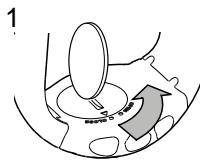
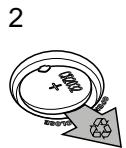
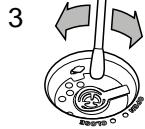
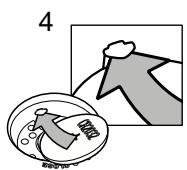
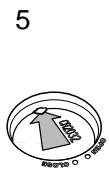
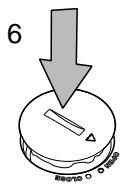
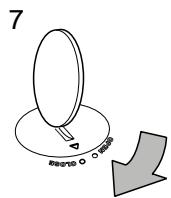
TIP: Use the Suunto battery compartment opening tool to avoid cover damage.

NOTE: Replace the battery with extreme care to ensure your Suunto heart rate monitor ains water resistant. Careless replacement may void the warranty.
en
8.3 Replacing belt battery
Replace the battery as illustrated here:
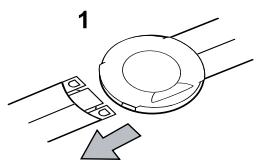
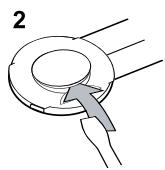
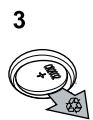
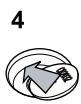
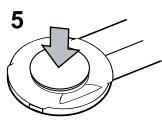

NOTE: We recommend that you replace the cover and O ring along with the battery to ensure the transmitter remains clean and water resistant. Replacement covers are available in replacement batteries.
9 SPECIFICATIONS
9.1 Technical data
General
- Operating temperature: -20^ to +60^ / -5^ to +140^
Storage temperature: -30^ to +60^ / -22^ to +140^
Weight (device): 55 g - Transmission frequency (belt): 2.465 GHz Suunto ANT compatible, 5.3 kHz gym equipment compatible
Transmission range: Up to 10m / 30 ft
Weight (belt): 39 g
Water resistance (device): 100m / 330 ft (ISO 2281)
Water resistance (belt): 20m / 66 ft (ISO 2281) - User-replaceable battery: (device / belt) 3V CR2032
- Battery life-time: approximately 1 year in normal use (3 hours of exercise with HR per week)
Log recorder
Maximum number of logs: 30
Maximum length of a log: 99 hours
Maximum lap time: 99 hours
- Lap/split times: 199 per session (log)
Resolution: 0.1 second
en
Heart rate
- Display: 30 to 240
- Limits: 30 to 230
Maximum for percentage display: 240
9.2 Trademark
Suunto and its product names, trade names, trademarks and service marks whether registered or unregistered are protected by Suunto or respective third party owners. All rights reserved.
Firstbeat & Analyzed by Firstbeat are registered or unregistered trademarks of Firstbeat Technologies Ltd. All rights reserved.
9.3 Copyright
Copyright © Suunto Oy 2007. All rights reserved. This document and its contents are proprietary to Suunto Oy and are intended solely for the use of its clients to obtain knowledge and information regarding the operation of Suunto products. Its contents shall not be used or distributed for any other purpose and/or otherwise communicated, disclosed or reproduced without the prior written consent of Suunto Oy.
This document content is subject to change at any time without notice. Suunto shall not give any warranties, whether express or implied, including without limitation that this documentation is accurate, comprehensive or error-free. The latest version of this documentation can be downloaded at www.suunto.com.
9.4 CE
The CE mark is used to mark conformity with the European Union EMC directives 89/336/EEC and 99/5/EEC.
9.5 ICES
This Class [B] digital apparatus complies with Canadian ICES-003.
9.6 FCC
This device complies with Part 15 of the FCC Rules. Operation is subject to the following two conditions: (1) this device may not cause harmful interference, and (2) this device must accept any interference received, including interference that may cause undesired operation. Repairs should be made by authorized Suunto service personnel.
Unauthorized repairs will void warranty. This product has been tested to comply with FCC standards and is intended for home or office use.
FCC WARNING: Changes or modifications not expressly approved by Suunto Oy could void your authority to operate this device under FCC regulations.
9.7 Patent notice
This product is protected by the following patents and patent applications and their corresponding national rights: US 11/432,380, US 11/169712,US 11/808,391, US 10/523,156, US 10/515,170. Additional patent applications have been filed.
9.8 Disposal of device

Please dispose of the device in an appropriate way, treating it as electronic waste. Do not throw it in the garbage. If you wish, you may return the device to your nearest Suunto representative.
10 DISCLAIMER
10.1 User's responsibility
This instrument is intended for recreational use only. Suunto heart rate monitors must not be used as a substitute for obtaining measurements that require professional or laboratory-quality precision.
10.2Warnings
If you have a pacemaker, defibrillator, or other implanted electronic device, you use the transmitter belt at your own risk. Before using it, we recommend an exercise test with your Suunto heat rate monitor and belt under a doctor's supervision. Exercise may include some risk, especially for those who have been inactive. We strongly advise you to consult your doctor prior to beginning a regular exercise program.
Index
A
alarm, 15
autolap, 41
autopause, 43
B
backlight, 22
C
calibratingPODs,44
D
distance intervals, 42
dual time, 14
E
EPOC, 36
F
fitness METs, 19
H
heart rate limits, 27
1
icons, 22
L
logbook, 38
logs
selecting parameters, 29
viewing, 38
M
maximum heart rate, 18
modes
TIME, 13
TRAINING, 31
P
pairing a POD, 40
PODs
autolap, 41
autopause, 43
calibrating, 44
distance intervals, 42
pairing, 40
R
reference altitude, 26
replacing
belt battery, 49
wristop battery, 48
s
setting
alarm, 15
backlight, 22
dual time, 14
heart rate limits, 27
icons, 22
reference altitude, 26
speed limits, 42
time, 14
tones, 21
settings
GENERAL, 21
PERSONAL, 17
UNITS, 19
settling
date, 15
speed limits, 42
T
TIME mode, 13
timer
countdown,32
interval, 32
warm up, 32
training
during training, 37
EPOC, 36
fitness METs, 19
Training Effect, 34
TRAINING mode
displays, 23
using, 31
transmitter belt
pairing, 45
putting on, 31
replacing battery, 49
V
views
TIME mode, 13
TRAINING mode, 23

SUUNTO HELP DESK
Global +358 2 284 1160
USA (toll free) 1-800-543-9124
Canada (toll free) 1-800-267-7506
www.suunto.com
SUUNTO
Copyright © Suunto Oy 4/2010.
Suunto is a registered trademark of Suunto Oy.
All Rights reserved.
- Training
- display 2*
- Using TRAINING mode 31
- Using PODs 40
- INTRODUCTION
- GETTING STARTED
- Basic settings
- Setting activity class
- Activity class 1
- Activity classes 2 and 3
- Activity classes 4-7
- Activity classes 7.5 - 10
- Menu navigation
- Modes and views
- Modes
- Views
- Button lock
- USING TIME MODE
- Setting time
- To set time:
- Setting dual time
- To set dual time:
- Possible real life situation: Knowing the time at home
- Setting date
- To set the date:
- Setting alarm
- To set the alarms:
- SETTINGS BEFORE TRAINING
- Personal settings
- Maximum heart rate
- Fitness METs level
- Units settings
- General settings
- Setting tones
- Setting icons
- To set the icons:
- Setting backlight
- To set the backlight:
- Configuring TRAINING mode displays
- Setting reference altitude
- Possible real life situation: Using altitude measurement during training
- Setting heart rate limits
- Selecting log parameters
- USING TRAINING MODE
- Putting on your transmitter belt
- Using timers
- Interval timer
- Warm-up timer
- Countdown timer
- To set the timers:
- Using Training Effect
- Using EPOC
- Starting a training session
- Using log recorder
- During training
- After training
- Viewing logbook
- To erase logbook information:
- Using www.movescount.com
- USING PODS
- Pairing a POD
- Using autolap
- Using distance intervals
- Using speed limits
- Using autopause
- Calibrating your POD
- TROUBLESHOOTING
- Pairing your transmitter belt
- CARE AND MAINTENANCE
- General guidance
- Removing scratches
- Cleaning and chemicals
- Replacing wristop battery
- Replacing belt battery
- SPECIFICATIONS
- Technical data
- General
- Log recorder
- Heart rate
- Trademark
- Copyright
- CE
- ICES
- FCC
- Patent notice
- Disposal of device
- DISCLAIMER
- User's responsibility
- 10.2Warnings
- Index
- A
- B
- C
- D
- E
- F
- H
- 1
- L
- M
- P
- R
- s
- T
- V
- SUUNTO HELP DESK
- SUUNTO
Brand : SUUNTO
Model : T6D
Category : Sports Watch