
COBRA 2 - Dive computer SUUNTO - Free user manual and instructions
Find the device manual for free COBRA 2 SUUNTO in PDF.


| Product Type | Dive Computer |
| Brand | SUUNTO |
| Model | COBRA 2 |
| Dimensions (L x W x H) | 73 mm x 165 mm x 35 mm |
| Weight (without hose) | 210 g |
| Power | Lithium battery 3 V CR 2450 |
| Battery life | Approximately 1.5 to 3 years depending on use |
| Maximum operating depth | 100 m (EN 13319 compliant) |
| Depth sensor accuracy | ±1% of full scale (0-80 m at 20 °C) |
| Temperature display | Range: -20 to +50 °C, resolution 1 °C |
| Decompression algorithms | Suunto RGBM with Deep Stop |
| Dive modes | Air, Nitrox (1 or 2 mixtures), Gauge |
| Main features | Digital compass, air integration (pressure and remaining air time), max depth, alarms (depth, time, pressure), safety and deep stops, dive planner, logbook memory (42 h at 20 s interval), simulator |
| Maintenance and cleaning | Rinse with fresh water after each dive, clean contacts with fresh water and soft brush. Do not use solvents or compressed air. |
| Periodic service | Every 2 years or 200 dives by an authorized SUUNTO representative |
| Battery change | Recommended by an authorized service center. Battery kit available (battery + O-ring). The procedure requires specific tools. |
| Spare parts | Battery kit (CR 2450 + O-ring), high-pressure hose, strap. Available from authorized dealers. |
| Warranty | 2 years (parts and labor), battery excluded |
| Standards | CE, EN 250, EN 13319 |
| After-sales service | Contact the local SUUNTO representative (www.suunto.com) |
Frequently Asked Questions - COBRA 2 SUUNTO
User questions about COBRA 2 SUUNTO
0 question about this device. Answer the ones you know or ask your own.
Ask a new question about this device
Download the instructions for your Dive computer in PDF format for free! Find your manual COBRA 2 - SUUNTO and take your electronic device back in hand. On this page are published all the documents necessary for the use of your device. COBRA 2 by SUUNTO.
USER MANUAL COBRA 2 SUUNTO
3.1.Navigating in the menus 9
3.2. Button symbols and functions 9
- GETTING STARTED WITH YOUR SUUNTO Cobra2 11
4.1. TIME mode settings 11
4.1.1.Setting the alarm 11
4.1.2.Setting the time 11
4.1.3.Setting the date 11
4.1.4.Setting the units 12
4.1.5. Setting the backlight 12
4.1.6.Setting the tones 12
4.2. AC water contacts 12
4.3.Learning how to use your compass 13
4.3.1. Compass display 13
4.3.2.Locking a bearing 14
4.3.3. Compass settings 14
- BEFORE DIVING 16
5.1. The Suunto RGBM/Deep Stop Algorithm 16
5.2. Emergency ascents 16
5.3.Dive computer limitations 16
5.4.Nitrox 17
5.5.Audible and visual alarms 17
5.6.Error conditions 18
5.7.Air integration 18
5.7.1. Connecting Suunto Cobra2 to a regulator 19
5.8.DIVE mode settings 19
5.8.1.Setting the depth alarm 19
5.8.2.Setting the dive-time alarm 19
5.8.3.Setting the nitrox values 20
5.8.4. Setting the personal/altitude adjustments 20
5.8.5. Setting the sample rate 21
5.8.6. Setting the Safety Stops/Deep Stops 21
5.8.7.Setting the RGBM values 21
5.9. Activation and pre-checks 21
5.9.1. Accessing DIVE mode 21
5.9.2.DIVE mode activation 22
5.9.3. Battery power indication 22
5.9.4.Diving at altitude 23
5.9.5. Personal adjustments 23
5.10. Safety Stops 24
5.10.1. Recommended Safety Stops 24
5.10.2.Mandatory Safety Stops 25
5.11. Deep stops 25
6.DIVING 26
6.1.Diving in AIR mode (DIVEair) 26
6.1.1. Basic dive data 26
6.1.2.Bookmark 27
6.1.3. Tank pressure data 27
6.1.4. Ascent rate indicator 28
6.1.5. Safety Stops 28
6.1.6. Decompression dives 28
6.2.Diving in NITROX mode (DIVEnitrox) 31
6.2.1.Before diving in NITROX mode 31
6.2.2.Oxygen displays 31
6.2.3.Oxygen limit fraction (OLF) 32
6.2.4. Gas change and multiple breathing gas mixes 32
6.3.Diving in GAUGE mode (DIVEgauge) 32
7.AFTER DIVING 34
7.1. Surface interval 34
7.2.Dive numbering 34
7.3.Repetitive dive planning 34
7.4.Flying after diving 35
7.5.PLANmode 35
7.5.1.Dive Planning mode (PLANnodec) 35
7.5.2. Simulation Mode (PLANsimulator) 36
7.6. MEMORY mode 37
7.6.1.Dive logbook (MEMlogbook) 37
7.6.2.Dive history (MEMhistory) 38
7.7.SuuntoDiveManager(SDM) 38
7.8. www.suuntosports.com and Suunto Diving World at www.suunto.com/diving 39
8.CARE AND MAINTENANCE 40
8.1.Water contacts and buttons 40
8.2.Care of your dive computer 40
8.3.Maintenance 40
8.4.Water resistance inspection 41
8.5. Battery replacement 41
8.5.1. Battery kit 41
8.5.2. Required tools 41
8.5.3. Battery replacement procedure 41
- TECHNICAL DATA 44
9.1. Technical specifications 44
9.2.RGBM 45
9.2.1.Suunto RGBM adaptive decompression 45
9.2.2.No-decompression limits 46
9.2.3. Altitude diving 47
9.3.Oxygen exposure 47
- INTELLECTUAL PROPERTY 48
10.1.Copyright 48
10.2. Trademark 48
10.3.Patent notice 48
11.DISCLAIMERS 49
11.1.User's responsibility 49
11.2. CE 49
11.3. Limits of liability and ISO 9001 compliance 49
11.4.After sales service 49
- WARRANTY 50
13.DISPOSAL OF THE DEVICE 51
GLOSSARY 52
1. WELCOME TO THE WORLD OF SUUNTO DIVING INSTRUMENTS
Suunto Cobra2 was designed to help you get the most out of your diving. By reading this manual and becoming familiar with the functions of your dive computer, you can begin a new era in your diving.
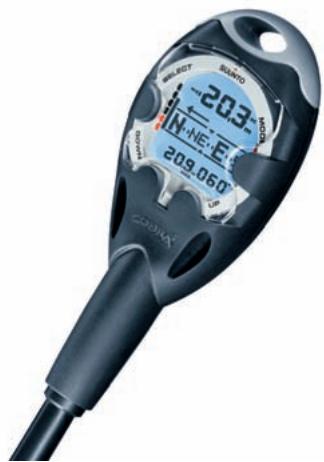
With integrated digital compass, air integration, and gas switching, Suunto Cobra2 simplifies your diving experience because all the information you need relating to depth, time, tank pressure, decompression status, and direction is available on one easy-to-read screen.
To get the most out of your Suunto Cobra2, please read this instruction manual carefully and make sure you understand the use, displays, and limitations of the instrument before using it. To make life easier, we've included a glossary of dive-specific terminology at the back of the manual.
2. WARNINGS, CAUTIONS, AND NOTES
Throughout this manual, important safety icons are displayed. Three classifications are used to separate these icons by their order of importance:
WARNING
is used in connection with a procedure or situation that could result in serious injury or death
CAUTION
is used in connection with a procedure or situation that could result in damage to the device
NOTE
is used to emphasize important information
Before you go on to read the manual itself, it is extremely important that you read the following warnings. These warnings are intended to maximize your safety while using Suunto Cobra2 and must not be ignored.
WARNING
READ THIS MANUAL! Carefully read this manual in its entirety, paying close attention to all the warnings listed below, including Section 5. BEFORE DIVING. Make sure that you fully understand the use, displays and limitations of the dive computer, because any confusion resulting from neglecting to follow this user's manual or from improper use of this device could cause you to commit errors that may lead to serious injury or death.
WARNING
NOT FOR PROFESSIONAL USE! Suunto dive computers are intended for recreational use only. The demands of commercial or professional diving may expose the diver to depths and conditions that tend to increase the risk of decompression illness (DCI). Therefore, Suunto strongly recommends that the device is not used for any commercial or professional diving activities.
WARNING
ONLY DIVERS TRAINED IN THE PROPER USE OF SCUBA DIVING EQUIPMENT SHOULD USE A DIVE COMPUTER! No dive computer can replace the need for proper dive training. Insufficient or improper training may cause you to commit errors that may lead to serious injury or death.
WARNING
THERE IS ALWAYS A RISK OF DECOMPRESSION ILLNESS (DCI) FOR ANY DIVE PROFILE, EVEN IF YOU FOLLOW THE DIVE PLAN PRESCRIBED BY DIVE TABLES OR A DIVE COMPUTER. NO PROCEDURE, DIVE COMPUTER, OR DIVE TABLE CAN PREVENT THE POSSIBILITY OF DCI OR OXYGEN TOXICITY! An individual's physiological make-up can vary from day to day. The dive computer cannot account for these variations. You are strongly advised to remain well within the exposure limits provided by the instrument to minimize the risk of DCI. As an added precaution, you should consult a physician regarding your fitness before diving.
WARNING
SUUNTO STRONGLY RECOMMENDSTHAT SPORT DIVERS LIMIT THEIR MAXIMUM DEPTH TO 40 M/130 FT OR TO THE DEPTH CALCULATED BY THE COMPUTER BASED ON THE SELECTED O_2% AND A MAXIMUM PO_2 OF 1.4 BAR!
WARNING
DIVES THAT REQUIRE DECOMPRESSION STOPS ARE NOT RECOMMENDED. YOU SHOULD ASCEND AND BEGIN DECOMPRESSION IMMEDIATELY WHEN THE DIVE COMPUTER SHOWS YOU THAT A DECOMPRESSION STOP IS REQUIRED! Note the blinking ASC TIME symbol and the upward pointing arrow.
WARNING
USE BACK-UP INSTRUMENTS! Make sure that you use back-up instrumentation, including a depth gauge, submersible pressure gauge, timer or watch, and have access to decompression tables whenever diving with the dive computer.
WARNING
PERFORM PRE-CHECKS! Always activate and check the device before diving in order to ensure that all Liquid Crystal Display (LCD) segments are completely displayed, that the device has not run out of battery power, and that the oxygen, altitude, personal, Safety/Deep Stop, and RGBM adjustments are correct.
WARNING
YOU ARE ADVISED TO AVOID FLYING ANY TIME THE COMPUTER COUNTS DOWN THE NO-FLY TIME. ALWAYS ACTIVATE THE COMPUTER TO CHECK THE REMAINING NO-FLY TIME PRIOR TO FLYING! Flying or traveling to a higher altitude within the no-fly time can greatly increase the risk of DCI. Review the recommendations given by Diver's Alert Network (DAN) in Section 7.4. Flying after diving.
WARNING
THE DIVE COMPUTER SHOULD NEVER BE TRADED OR SHARED BETWEEN USERS WHILE IT IS IN OPERATION! Its information will not apply to someone who has not been wearing it throughout a dive, or sequence of repetitive dives. Its dive profiles must match that of the user. If it is left on the surface during any dive, the dive computer will give inaccurate information for subsequent dives. No dive computer can take into account dives made without the computer. Thus, any diving activity up to four days prior to initial use of the computer may cause misleading information and must be avoided.
WARNING
DO NOT DIVE WITH A CYLINDER OF ENRICHED AIR IF YOU HAVE NOT PERSONALLY VERIFIED ITS CONTENTS AND ENTERED THE ANALYZED VALUE INTO YOUR DIVE COMPUTER! Failure to verify cylinder contents and enter the appropriate O_2% into your dive computer will result in incorrect dive planning information.
WARNING
THE DIVE COMPUTER WILL NOT ACCEPT FRACTIONAL PERCENTAGE VALUES OF OXYGEN CONCENTRATION. DO NOT ROUND UP FRACTIONAL PERCENTAGES! For example, 31.8% oxygen should be entered as 31% . Rounding up will cause nitrogen percentages to be understated and will affect decompression calculations. If you want to adjust the computer to provide more conservative calculations, use the personal adjustment feature to affect decompression calculations, or reduce the PO_2 setting to affect oxygen exposure.
WARNING
SELECT THE CORRECT ALTITUDE ADJUSTMENT SETTING! When diving at altitudes greater than 300m / 1,000 ft the Altitude Adjustment feature must be correctly selected in order for the computer to calculate the decompression status. The dive computer is not intended for use at altitudes greater than 3,000m / 10,000 ft. Failure to select the correct Altitude Adjustment setting, or diving above the maximum altitude limit will result in erroneous dive and planning data.
WARNING
SELECT THE CORRECT PERSONAL ADJUSTMENT SETTING! Whenever it is believed that factors that tend to increase the possibility of DCI exist, it is recommended that you use this option to make the calculations more conservative. Failure to select the correct Personal Adjustment setting will result in erroneous dive and planning data.
WARNING
This device contains a Lithium cell battery. To reduce the risk of fire or burns, do not disassemble, crush, puncture, short external contacts, or dispose of in fire or water. Replace only with manufacturer-specified batteries. Recycle or dispose of used batteries properly.
NOTE
It is not possible to change between AIR, NITROX and GAUGE modes before the instrument has counted down the no-fly time.
There is one exception to this: You can change from AIR to NITROX mode even during the no-fly time. When planning both air and nitrox dives during the same dive series, you should set the instrument in NITROX mode and modify the gas mix accordingly.
In GAUGE mode, the no-fly time is always 48 hours.
3. SUUNTO COBRA2 AT A GLANCE
3.1. Navigating in the menus
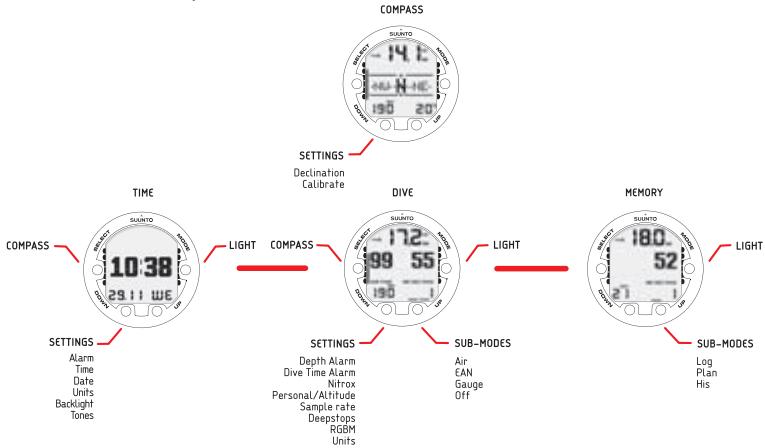
Suunto Cobra2 has four main operating modes - TIME mode (TIME), DIVE mode (DIVE), PLAN mode (PLAN), and MEMORY mode (MEMORY) - as well as the COMPASS submode, which can be activated from either TIME or DIVE modes. To toggle between the main modes, press the MODE button. To select a submode in DIVE, PLAN and MEMORY modes, press the UP/DOWN buttons.
3.2. Button symbols and functions
The table below explains the main functions of the dive computer's buttons. The buttons and their use will be explained in more detail in the relevant sections of the manual.
Table 3.1. Button symbols and functions
| Symbol | Button | Press | Main functions |
| MODE | Short | Switch between main modes Switch from submode to main mode Activate backlight in DIVE mode | |
| MODE | Long | Activate backlight in other modes | |
| SELECT | Short | Select a submode Select and accept settings | |
| SELECT | Long | Activate compass in TIME and DIVE modes | |
| UP | Short | Toggle between alternative displays Change submode Increase values | |
| WE | UP | Long | Enable gas switching in NITROX mode |
| 29.1 | DOWN | Short | Toggle between alternative displays Change submode Decrease values |
| 29.1 | DOWN | Long | Enter Setting mode Toggle between ceiling and remaining air time display |
4. GETTING STARTED WITH YOUR SUUNTO COBRA2
To get the most out of your Suunto Cobra2, take some time to personalize it and really make it YOUR computer. Set the correct time and date, as well as the alarms and tones, unit and backlight settings, then calibrate and test the compass function.
Suunto Cobra2 is a very user-friendly dive computer, and you will quickly become familiar with its functions. Make absolutely sure that you know your computer and have it set up as you want it BEFORE getting into the water.
4.1. TIME mode settings
The first thing you'll want to do with your Suunto Cobra2, is to set the TIME mode shortcuts: alarm, time, date, units, backlight, and tones. In this section, we look at how to do this.
NOTE
The display is illuminated by holding down the MODE button for more than 2 seconds.
Now that you know how to toggle between the shortcuts, you can start to set them. The following figure shows how to enter the TIME SETTINGS menu.
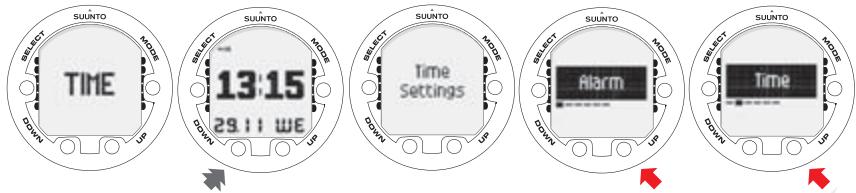
USE UP AND DOWN BUTTONS TO TOGGLE BETWEEN ALARM, TIME, DATE, UNITS, BACKLIGHT AND TONES.
4.1.1. Setting the alarm
The dive computer has a daily alarm function. When the daily alarm activates, the screen blinks and the alarm sounds for 24 seconds. Press any button to stop the alarm.
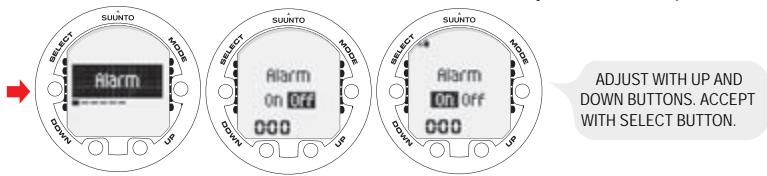
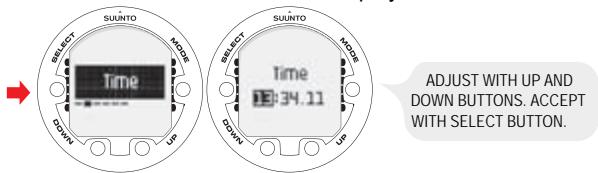
4.1.2. Setting the time
In the TIME SETTING mode, you are able to set the hour, minute, and second, as well as choose between 12 and 24 hour display.
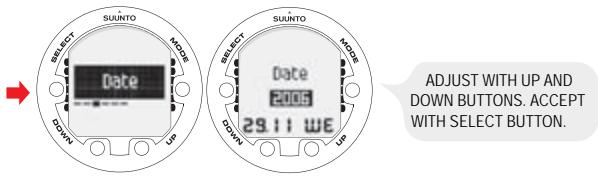
4.1.3. Setting the date
Use the DATE SETTING mode to set the year, month, and day. The day of the week is automatically calculated in accordance with the date.
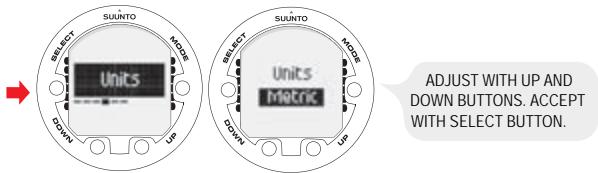
4.1.4. Setting the units
In the UNITS SETTING mode you can choose to have the units displayed in either the metric or imperial system - meters/feet, Celsius/Fahrenheit etc.
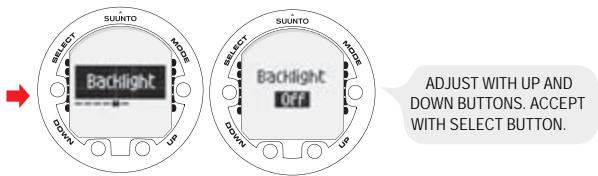
4.1.5. Setting the backlight
Use the BACKLIGHT SETTING mode to turn the backlight on or off and to define how long it stays on for (5, 10, 20, 30, or 60 seconds). When the backlight is turned off, it does not illuminate when an alarm sounds.
4.1.6. Setting the tones
The TONE SETTING mode allows you to activate or deactivate the tones.
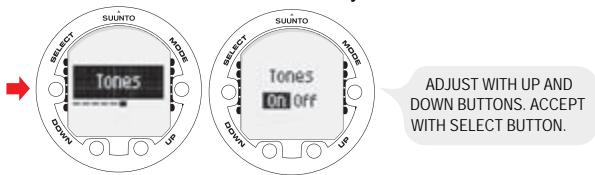
NOTE When the tones are off, there are no alarms.
4.2. AC water contacts
The water and data transfer contact is located on the rear of the case. When submerged, the water contact poles are connected by the conductivity of the water and the "AC" symbol appears on the display. The AC text is shown until the water contact deactivates.
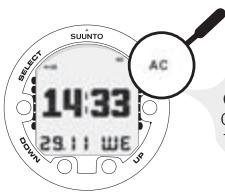
AC APPEARS IN THE TOP RIGHT CORNER OF THE DISPLAY, WHEN THE DIVE COMPUTER IS IN CONTACT WITH WATER. THIS ALSO ACTIVATES THE DIVE MODE.
Contamination or dirt on the water contact may prevent this automatic activation. It is therefore important that the water contact is kept clean. The contact can be cleaned with fresh water and a soft brush, for example a tooth brush.
4.3. Learning how to use your compass
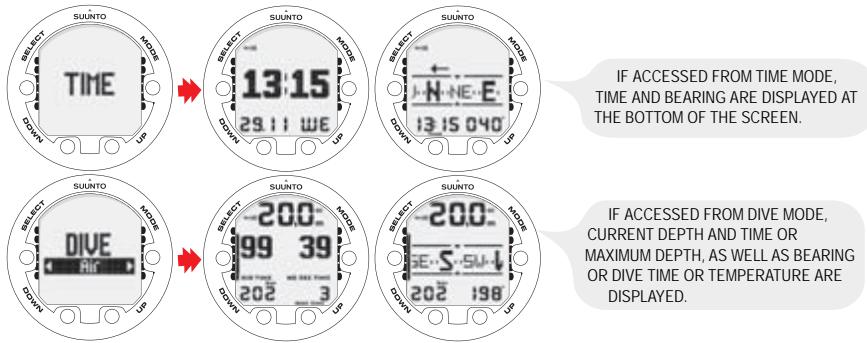
Suunto Cobra2 integrates a digital compass, which can be used both while diving and on dry land, and can be accessed from either the DIVE mode or TIME mode.
NOTE
When accessed from DIVE mode, toggle between the alternative displays by pressing the UP/DOWN buttons.
NOTE
In order to save battery power, the compass display will automatically return to the TIME or DIVE mode 60 seconds after the last button-press.
4.3.1. Compass display
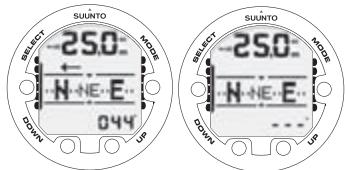
The Suunto Cobra2 displays the compass as a graphical representation of a compass rose. The rose displays the cardinal and half cardinal points, in addition to which, the current bearing is also displayed numerically.
Tilt sensor
The compass has a tilt sensor, so it doesn't have to be completely level in order to display the correct bearing. As long as the device is held at an angle of + / - 5^ to level, the compass will display the correct bearing. If the device is not held within this range, no bearing will be displayed.
4.3.2. Locking a bearing
A bearing can be locked to help you follow a selected course, and directional arrows point towards the locked bearing. Locked bearings are stored in the memory for later analysis and are available the next time the compass is activated.
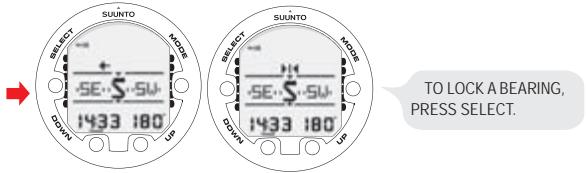
The Suunto Cobra2 also provides help for navigating square and triangular patterns, as well as navigating a return heading. This is made possible by following graphical symbols in the center of the compass display:
Table 4.1. Locked bearing symbols
| Symbol | Explanation |
| | | | | You are traveling towards the locked bearing |
| [ ] | You are 90 (or 270) degrees from the locked bearing |
| [ ] | You are 180 degrees from the locked bearing |
| [ ] | You are 120 (or 240) degrees from the locked bearing |
4.3.3. Compass settings
You can define the compass settings (declination and calibration) when in COMPASS mode:
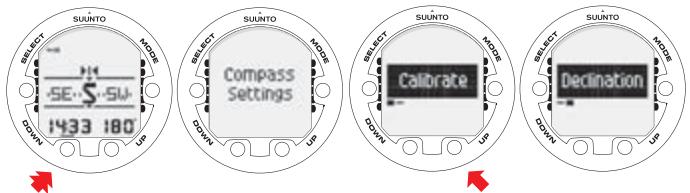
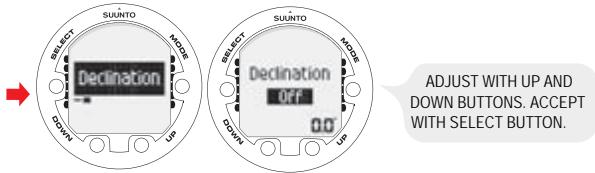
Declination
You can compensate for the difference between true north and magnetic north by adjusting the compass declination. The declination can be found, for example, from sea charts or topographic maps of the local area.
Calibration
Because of changes in the surrounding magnetic field, the Suunto Cobra2 electronic compass occasionally needs to be re-calibrated. During the calibration process, the compass adjusts itself to the surrounding magnetic field. As a basic rule, you should calibrate the compass whenever it doesn't seem to operate properly, or after replacing the dive computer's battery.
Strong electromagnetic fields, such as powerlines, stereo speakers, and magnets can affect the compass calibration. It is therefore advisable to calibrate the compass if your Suunto Cobra2 has been exposed to these fields.
NOTE
When traveling overseas, it is recommended that you recalibrate the compass at the new location before using it.
NOTE
Remember to hold the Suunto Cobra2 level during the calibration process.
To calibrate the compass:
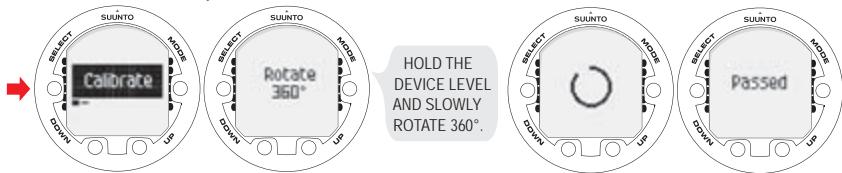
If the calibration fails several times in a row, it is possible that you are in an area with sources of magnetism, such as large metal objects, powerlines or electric appliances. Move to another location and try to calibrate the compass again. If the calibration continues to fail, contact an authorized Suunto service center.
5. BEFORE DIVING
Do not attempt to use the dive computer without reading this user's manual in its entirety, including all the warnings. Make sure that you fully understand the use, displays, and limitations of the instrument. If you have any questions about the manual or the Suunto Cobra2 please contact your Suunto representative before diving with the dive computer.
Always remember that YOU ARE RESPONSIBLE FOR YOUR OWN SAFETY!
When used properly, Suunto Cobra2 is an outstanding tool for assisting properly trained, certified divers in planning and executing sport dives. It is NOT A SUBSTITUTE FOR CERTIFIED SCUBA INSTRUCTION, including training in the principles of decompression.
WARNING
Diving with enriched air mixtures (nitrox) exposes you to risks that are different from those associated with diving with standard air. These risks are not obvious, and require training to understand and avoid. Risks include possible serious injury or death.
Do not attempt to dive with any gas mix other than standard air without first receiving certified training in this specialty.
5.1. The Suunto RGBM/Deep Stop Algorithm
Suunto's Reduced Gradient Bubble Model (RGBM), utilized in the Suunto Cobra2, predicts both dissolved and free gas in the blood and tissues of divers. It is a significant advance on the classic Haldane models, which do not predict free gas. The advantage of Suunto RGBM is additional safety through its ability to adapt to a variety of situations and dive profiles.
The Suunto Cobra2 uses traditional recommended safety stops as well as deep stops.
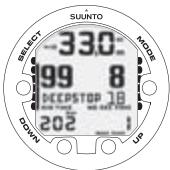
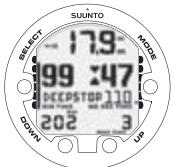
YOU ARE ADVISED TO MAKE A DEEPSTOP AT 18 M. THE SECOND INDICATOR SHOWS THAT YOU HAVE 110 SECONDS LEFT OF YOUR DEEPSTOP.
In order to optimize the response to different increased risk situations, an additional category of stop, referred to as a Mandatory Safety Stop, has been introduced. The combination of stop types depends on the user settings and the specific dive situation.
To get the most from the RGBM safety benefits, refer to Section 9.2. RGBM.
5.2. Emergency ascents
In the unlikely event that the dive computer malfunctions during a dive, follow the emergency procedures provided by your certified dive training agency or, alternatively, follow these steps:
- Assess the situation calmly and then move promptly to less than 18 m/60 ft.
- At 18m / 60 ft, slow down your ascent rate to 10m / 33 ft per minute and move to a depth between 3 and 6m / 10 and 20ft .
- Stay there for as long as your air supply will safely allow. After reaching the surface, do not dive for at least 24 hours.
5.3. Dive computer limitations
While the dive computer's calculations are based on current decompression research and technology, it is important to realize that the computer cannot monitor the actual physiological functions of an individual diver. All decompression schedules currently known to the authors, including the U.S. Navy Tables, are based on theoretical mathematical models, which are intended to serve as a guide to reduce the probability of decompression illness.
5.4. Nitrox
Diving with nitrox provides you with an opportunity to increase bottom times or reduce the risk of decompression illness by reducing the nitrogen content in the gas mix.
However, when the gas mix is altered, the oxygen content of the mix is generally increased. This increase exposes the diver to an oxygen toxicity risk not usually considered in recreational diving. In order to manage this risk, the dive computer tracks the time and intensity of the oxygen exposure and provides the diver with information to adjust the dive plan in order to maintain oxygen exposure within reasonably safe limits.
In addition to the physiological effects of enriched air on the body, there are operational considerations to be addressed when handling altered breathing mixes. Elevated concentrations of oxygen present a fire or explosion hazard. Consult the manufacturer of your equipment to check its compatibility with nitrox.
5.5. Audible and visual alarms
The dive computer features audible and visual alarms that advise when important limits are approached or that prompt you to acknowledge preset alarms. The table below describes the different alarms and their meanings.
Table 5.1. Audible and visual alarm types
| Alarm type | Alarm reason |
| Short single beep | Dive computer is activated.Dive computer automatically returns to the TIME mode. |
| Three beeps with a three second interval | Cylinder pressure reaches 50 bar/725 psi. The cylinder pressure display will start to blink.Cylinder pressure reaches the selected alarm pressure.Calculated remaining air time reaches zero. |
| Three beeps with a three second interval and activated backlight | No-decompression dive turns into a decompression stop dive. An arrow pointing upwards and the blinking ascent warning ASC TIME will appear. |
| Continuous beeps and activated backlight | Maximum allowed ascent rate, 10 m per min/33 ft per min, is exceeded. Ascent rate bar graph blinks and STOP warning appears.Decompression ceiling depth is exceeded. An error warning Er and a downward pointing arrow appear. You should immediately descend to, or below, the ceiling.The instrument will otherwise enter a permanent Error mode within three minutes, indicated by a permanent Er. |
You can set alarms for maximum depth, dive time and tank pressure. See also Section 5.8. DIVE mode settings and Section 4.1. TIME mode settings.
Table 5.2. Preset alarm types
| Alarm type | Alarm reason |
| Continuous beep series for 24 secondsMaximum depth blinks as long as the current depth valueexceeds the preset value. | Preset maximum depth isreached. |
| Continuous beep series for 24 seconds or until anybutton is pressed.Dive time blinks for one minute. | Preset dive time is reached. |
| Current time is shown | Preset alarm time is reached. |
| Continuous beep series for 24 seconds or until any button is pressed. | |
| Current time blinks for one minute |
Table 5.3. Oxygen alarms in NITROX mode
| Alarm type | Alarm reason |
| Continuous beeps for 3 minutes and activated backlight | Set oxygen partial pressure limit is exceeded. The alternative display is replaced with a current blinking \(\mathsf{PO}_2\) value. You should immediately ascend above the \(\mathsf{PO}_2\) depth limit. OLF value reaches 80%. The OLF value will start to blink. OLF value reaches 100%. The OLF value will blink. |
NOTE
When the backlight is turned OFF, it does not illuminate when an alarm is activated.
WARNING
WHEN THE OXYGEN LIMIT FRACTION INDICATES THAT THE MAXIMUM LIMIT IS REACHED, YOU MUST IMMEDIATELY ASCEND UNTIL THE OLF VALUE STOPS BLINKING. Failure to take action to reduce oxygen exposure after the warning is given can rapidly increase the risk of oxygen toxicity, injury, or death.
5.6. Error conditions
The dive computer has warning indicators that alert you to react to certain situations that would significantly increase the risk of DCI. If you do not respond to its warnings, the dive computer will enter an Error mode, indicating that the risk of DCI has greatly increased. If you understand the dive computer and operate it sensibly, it is very unlikely you will ever put the instrument into the Error mode.
Omitted decompression
The Error mode results from omitted decompression, i.e. when you stay above the ceiling for more than three minutes. During this three-minute period the Er warning is shown and the audible alarm beeps. After this, the dive computer will enter a permanent Error mode. The instrument will continue to function normally if you descend below the ceiling within this three-minute period.
Once in the permanent Error mode, only the Er warning is shown in the center window. The dive computer will not show times for ascent or stops. However, all the other displays will function as before to provide information for ascent. You should immediately ascend to a depth of 3 to 6 m/10 to 20 ft and remain at this depth until air supply limitations require you to surface.
After surfacing, you should not dive for a minimum of 48 hours. During the permanent Error mode, the Er text will be displayed in the center window and the planning mode will be disabled.
5.7. Air integration
The Cobra2 can be attached to the high-pressure port of the regulator, enabling you to receive cylinder pressure and remaining air time data.
5.7.1. Connecting Suunto Cobra2 to a regulator
When purchasing the Suunto Cobra2, we strongly recommend that you have your Suunto representative attach it to the first stage of your regulator.
However, if you decide to attach it yourself, follow the steps outlined below:
- Remove the high pressure (HP) port plug on the first stage of your regulator using an appropriate tool.
- Thread the high pressure hose of the Suunto Cobra2 into the HP port of your regulator with your fingers. Tighten the hose fitting with a 16 mm (5/8") wrench. DO NOT OVERTIGHTEN!
- Attach the regulator to the scuba cylinder and slowly open the valve. Check for leaks by submerging the regulator first stage in water. If leaks are detected, check the condition of the O-ring and sealing surfaces.
5.8. DIVE mode settings
Suunto Cobra2 has several user-definable functions, as well as depth and time-related alarms that you can set according to your personal preferences. The DIVE mode settings are dependent on the dive sub-mode chosen (AIR, NITROX, GAUGE), so that, for example, nitrox settings are only available in the DIVENitrox sub-mode.
The following figure shows how to enter the DIVE mode settings menu.
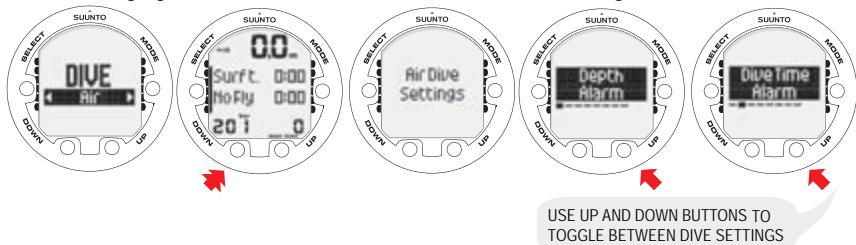
NOTE
The settings cannot be activated until 5 minutes has elapsed after the dive.
5.8.1. Setting the depth alarm
You can set a depth alarm in the dive computer.
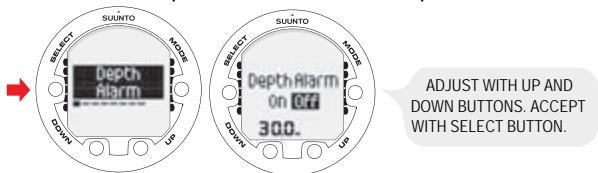
The depth alarm is factory-set to 30 m/131 ft, but you can adjust it according to your personal preference, or switch it off altogether. The depth range can be set from 3m to 100 m/9 ft to 328 ft.
5.8.2. Setting the dive-time alarm
The Suunto Cobra2 has a dive-time alarm setting which, when activated, can be used for several purposes to add to your diving safety.
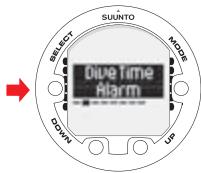
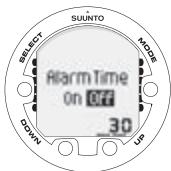
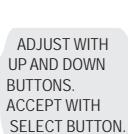
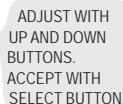
ADJUST WITH UP AND DOWN BUTTONS. ACCEPT WITH SELECT BUTTON.
NOTE
With a range of 1 - 999 minutes, the alarm can be set to your planned bottom time, for example.
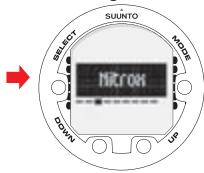
5.8.3. Setting the nitrox values
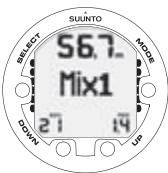
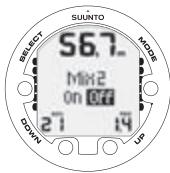
If set to the NITROX mode, the correct oxygen percentage of the gas in your cylinder (and additional gases) must always be entered into the computer to ensure correct nitrogen and oxygen calculations. In addition, the oxygen partial pressure limit must be set. When in the Nitrox setting mode, the equivalent allowed maximum depth, based on the chosen setting, will also be displayed. Settings for an additional mix (MIX2) are made similarly, but with the additional selection of "ON" or "OFF".
In order to minimize the risk of error during a dive, it is highly recommended that the mixes are set in the proper order. This means that as the mix number rises, so does oxygen content, and this is the order they are usually used during the dive. Before a dive, only set to "ON" the mixes you actually have available and remember to check the set values to make sure they are correct.
The default oxygen percentage (O_2%) setting is 21% (air) and oxygen partial pressure (PO_2) setting 1.4 bar. After entering values for MIX1, you can enable/disable and set an additional gas mix - MIX2.
NOTE
If the oxygen content of a mix is set to 22% or above, the setting will remain stored until changed; it does not automatically revert back to 21% .
5.8.4. Setting the personal/altitude adjustments
The current Altitude and Personal Adjustment settings are displayed in the startup screen when entering the DIVE mode. If the mode does not match the altitude or personal conditions (see Section 5.9.4. Diving at altitude and Section 5.9.5. Personal adjustments), it is imperative that you enter the correct selection before diving. Use Altitude Adjustment to select the correct altitude and use Personal Adjustment to add an extra level of conservatism.
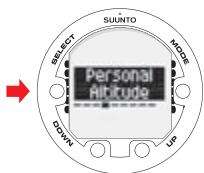
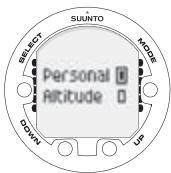
ADJUST WITH UP AND DOWN BUTTONS. ACCEPT WITH SELECT BUTTON.
5.8.5. Setting the sample rate
The sample rate controls how often the depth, time, tank pressure, and water temperature is stored in the memory. You can set the dive profile sample rate to 1, 10, 20, 30, or 60 seconds. The factory default setting is 20 seconds.
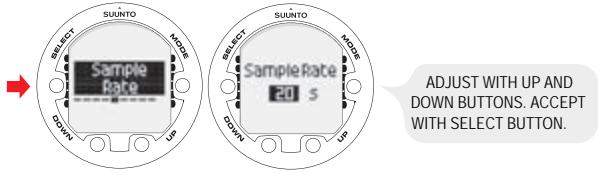
5.8.6. Setting the Safety Stops/Deep Stops
The Deep Stop setting allows you to choose between traditional Safety Stops or Deep Stops. If Deep Stops are set to OFF, only the traditional Safety Stop calculation is used. If set to ON, iterative Deep Stops will be prompted aswell. The length of the individual Deep Stops can be set to 1 or 2 minutes.
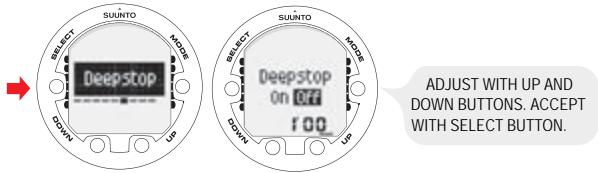
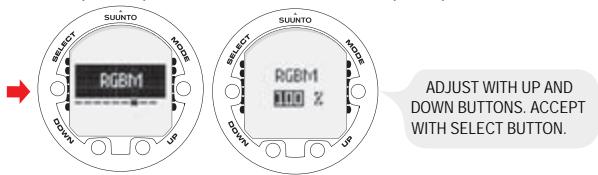
5.8.7. Setting the RGBM values
For certain divers and diving conditions, it may be desirable to set the attenuated RGBM mode. The selection is displayed during the DIVE mode startup. The options are full RGBM effects (100%), and attenuated RGBM (50%).
5.9. Activation and pre-checks
This section describes how to activate the DIVE mode and explains the pre-checks that it is highly recommended you perform before you get into the water.
5.9.1. Accessing DIVE mode
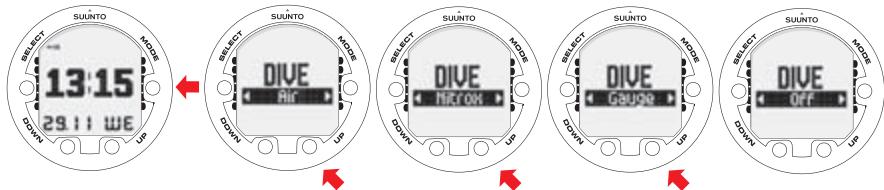
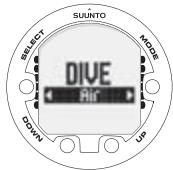
The Suunto Cobra2 has three diving modes: AIR mode for diving with standard air only, NITROX mode for diving with oxygen enriched mixtures, and GAUGE mode for use as a bottom timer. The OFF mode disables the DIVE mode, and allows the TIME mode to be used underwater. The chosen dive mode is displayed when the DIVE mode is accessed, and you can toggle between the submodes by pressing the UP/DOWN buttons.
5.9.2. DIVE mode activation
The dive computer activates automatically when submerged deeper than 0.5m / 1.5 ft. However, it is necessary to activate the DIVE mode BEFORE diving to check the altitude and personal adjustment settings, battery condition, oxygen settings etc.
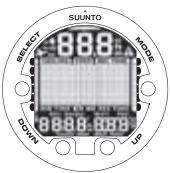
After activation, all display elements turn on showing mostly figure 8s and graphical elements, and the backlight and the beep are activated. After this, the selected altitude and personal settings are displayed, as well as the RGBM and Deep Stop status. A few seconds later the battery power indicator is shown.
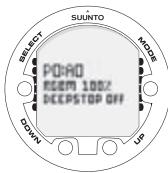
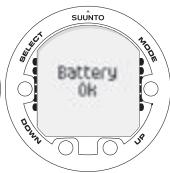
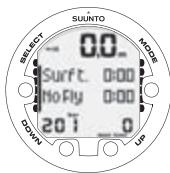
At this time, perform your pre-checks, making sure that:
- the instrument operates in the correct mode and provides a complete display (AIR/NITROX/GAUGE mode)
the battery level is ok - the altitude, personal adjustment, Safety/Deep stops, and RGBM settings are correct
- the instrument displays correct units of measurement (Metric/Imperial)
the instrument displays the correct temperature and depth (0.0 m/0 ft)
the alarm beeps
And, if set to NITROX mode, make sure that:
- the correct number of mixes is set and that the oxygen percentages are adjusted according to the measured nitrox blends in your cylinders
the oxygen partial pressure limits are set correctly
For more information on the NITROX mode, refer to Section 6.2. Diving in NITROX mode (DIVEnitrox).
The dive computer is now ready for diving.
5.9.3. Battery power indication
Temperature or internal oxidation of the battery affect the battery voltage. If the instrument is stored for a long period, or used in cold temperatures, the low battery warning may be displayed even though the battery has enough capacity. In these cases, re-enter DIVE mode to receive the battery power indication.
After the battery check, the Low Battery Warning is indicated by the battery symbol.
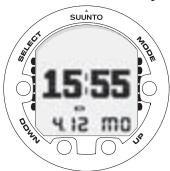
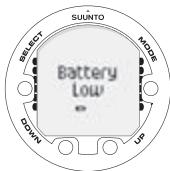
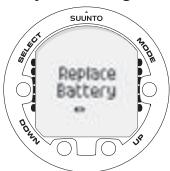
If the battery symbol is displayed in the Surface mode, or if the display is faded or weak, the battery may be too low to operate the dive computer, and battery replacement is recommended.
NOTE
For safety reasons, the backlight cannot be activated when the low battery warning is indicated by the battery symbol.
5.9.4. Diving at altitude
The dive computer can be adjusted both for diving at altitude and also to increase the conservatism of the mathematical nitrogen model.
When programming the instrument for the correct altitude, you need to select the correct Altitude Adjustment settings according to Table 5.4, Altitude Adjustment settings. The dive computer will adjust its mathematical model according to the entered altitude setting, giving shorter no-decompression times at higher altitudes (see Table 9.1, No-decompression time limits for various depths (m) and Table 9.2, No-decompression time limits for various depths (ft) in Section 9.2. RGBM).
Table 5.4. Altitude Adjustment settings
| Alt. adjustment value | Altitude range |
| A0 | 0 - 300 m / 0 - 1000 ft |
| A1 | 300 - 1500 m / 1000 - 5000 ft |
| A2 | 1500 - 3000 m / 5000 - 10 000 ft |
NOTE
Section 5.8.4. Setting the personal/altitude adjustments describes how the Altitude value is set.
WARNING
Traveling to a higher elevation can temporarily cause a change in the equilibrium of dissolved nitrogen in the body. It is recommended that you acclimatize to the new altitude by waiting at least three hours before diving.
5.9.5. Personal adjustments
There are personal factors that can affect your susceptibility to DCI, which you can predict in advance, and input into the decompression model. Such factors vary between divers and also for the same diver from one day to another. The three-step Personal Adjustment setting is available if a more conservative dive plan is desired and, for very experienced divers, a two step adjustment for RGBM effect on repetitive dives is available.
The personal factors which tend to increase the possibility of DCI include, but are not limited to:
- cold exposure - water temperature less than 20^ / 68^
below average physical fitness level
fatigue
dehydration
previous history of DCI - stress
obesity
This feature is used to adjust the computer to be more conservative, according to personal preference, by entering the suitable Personal Adjustment setting with the help of Table 5.5, Personal Adjustment settings. In ideal conditions, retain the default setting, P0. If conditions are more difficult, or any of the factors which tend to increase the possibility of DCI exist, select P1, or even the most conservative P2. The dive computer then adjusts its mathematical model according to the entered Personal Adjustment setting, giving shorter no-decompression times (see Section 9.2.2. No-decompression limits, Table 9.1, No-decompression time limits for various depths (m) and Table 9.2, No-decompression time limits for various depths (ft)).
Table 5.5. Personal Adjustment settings
| Personal adjustment value | Condition | Desired tables |
| P0 | Ideal conditions | Default |
| P1 | Some risk factors or conditions exist | Progressively more conservative |
| P2 | Several risk factors or conditions exist |
The Suunto Cobra2 also allows experienced divers who are willing to accept a greater level of risk to adjust the RGBM model. The default setting is 100% , which gives full RGBM effect. Suunto strongly advises you to use full RGBM effect. Statistically, very experienced divers have less incidents with DCI. The reason for this is unknown, but it is possible that some level of physiological and/or psychological accommodation can take place when you are very experienced as a diver. Thus, for certain divers and diving conditions, it may be desirable to set attenuated (50%) RGBM mode. See Table 5.6, RGBM model settings.
Table 5.6 RGBM model settings
| RGBM setting | Desired Tables | Effect |
| 100% | Standard Suunto RGBM model (Default) | Full RGBM effects |
| 50% | Attenuated RGBM model | Smaller RGBM effects, higher risk! |
5.10. Safety Stops
Safety Stops are widely considered good diving practice for recreational diving, and are an integral part of most dive tables. The reasons for performing a Safety Stop include: reducing sub-clinical DCI, microbubble reduction, ascent control, and orientation before surfacing.
The Suunto Cobra2 displays two different types of Safety Stops: Recommended Safety Stop and Mandatory Safety Stop.
5.10.1. Recommended Safety Stops
With every dive over 10 meters, there is a three minute countdown for the Recommended Safety Stop, to be taken in the 6 - 3m / 10 ft - 20 ft range. This is shown with the STOP sign and a three-minute countdown in the center window instead of the no-decompression time.
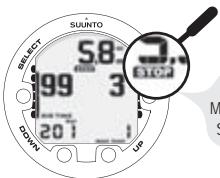
WHEN STOP IS DISPLAYED, MAKE A RECOMMENDED SAFETY STOP FOR 3 MINUTES.
NOTE
The Recommended Safety Stop, as the name implies, is recommended. If it is ignored, there is no penalty applied to the following surface intervals and dives.
5.10.2. Mandatory Safety Stops
When the ascent rate exceeds 10m / 33 ft per minute continuously for more than 5 seconds, the microbubble build-up is predicted to be more than is allowed for in the decompression model. The Suunto RGBM calculation model responds to this by adding a Mandatory Safety Stop to the dive. The time of this Mandatory Safety Stop depends on the severity of the ascent rate excess.
The STOP sign appears in the display and when you reach the depth zone between 6m and 3m / 20 ft and 10 ft, the CEILING label, ceiling depth, and the calculated Safety Stop time also appear in the display. You should wait until the Mandatory Safety Stop warning disappears. The total length of the Mandatory Safety Stop time depends on the seriousness of the ascent rate violation.
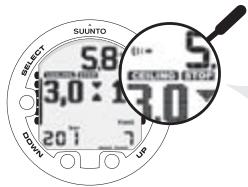
WHEN CEILING AND STOP ARE DISPLAYED, MAKE A ONE MINUTE MANDATORY SAFETY STOP IN THE DEPTH ZONE BETWEEN 6 M AND 3 M.
You must not ascend shallower than 3m / 10 ft with the Mandatory Safety Stop warning on. If you ascend above the Mandatory Safety Stop ceiling, a downward pointing arrow will appear and a continuous beeping starts. You should immediately descend to, or below, the Mandatory Safety Stop ceiling depth. If you correct this situation at any time during the dive, there are no effects on the decompression calculations for future dives.
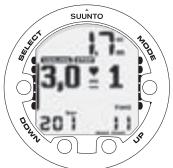
WHEN CEILING AND STOP ARE DISPLAYED, IMMEDIATELY (WITHIN 3 MINUTES) DESCEND TO OR BELOW CEILING.
If you continue to violate the Mandatory Safety Stop, the tissue calculation model is affected and the dive computer shortens the available no-decompression time for your next dive. In this situation, it is recommended that you prolong your surface interval time before your next dive.
5.11. Deep stops
Deep Stops are safety stops that occur deeper than traditional stops, with the purpose of minimizing microbubble formation and excitation.
The Suunto RGBM model calculates deep stops iteratively, placing the first stop about halfway between the maximum depth and the ceiling depth. After the first Deep Stop is completed, another Deep Stop will be prompted halfway to the ceiling, and so on until the ceiling depth is reached.
The Deep Stop length can be set to 1 or 2 minutes.
NOTE
With Deep Stops on, the Recommended Safety Stops will still be activated at the end of the dive.
6. DIVING
This section contains instructions on how to operate the dive computer and interpret its displays. You'll find that this dive computer is easy to use and read. Each display shows only the data relevant to that specific diving mode.
6.1. Diving in AIR mode (DIVEair)
In this section, we look at how to make the most of the dive computer when diving with standard air. To activate DIVEair mode, please see Section 5.9.1. Accessing DIVE mode.
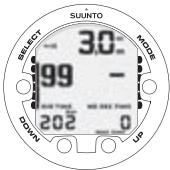
DIVE HAS JUST BEGUN AND AVAILABLE NO-DECOMPRESSION TIME IS OVER 99 MINUTES SO NO VALUE IS DISPLAYED.
NOTE
The dive computer will remain in the Surface mode at depths less than 1.2m / 4 ft. At depths greater than 1.2m / 4 ft the instrument will go into the DIVE mode automatically. However, it is recommended that you activate the DIVE Mode manually in order to perform the necessary dive pre-checks.
6.1.1. Basic dive data
During a No-decompression dive, the following information is displayed:
- your present depth in meters/feet
the available no-decompression time in minutes as NO DEC TIME - the ascent rate presented as a bar graph on the right side
- the Diver Attention Symbol if surface interval should be prolonged (see Table 7.1, Alarms)
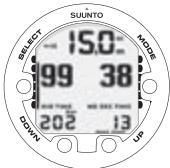
DIVE DISPLAY - PRESENT DEPTH IS 15 M, NO-DECOMPRESSION STOP TIME LIMIT IS 38 MIN. ELAPSED DIVE TIME IS 13 MIN. 99 MINUTES OF REMAINING AIR TIME AND 202 BAR TANK PRESSURE.
Alternative displays, by pressing the UP/DOWN buttons, show:
- the elapsed dive time in minutes, shown as DIVE TIME
- the water temperature in ^ C / ^
the maximum depth during this dive in meters/feet, indicated as MAX
the current time, shown as TIME
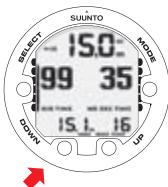
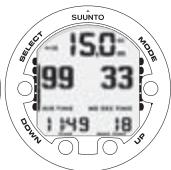
DOWN BUTTON TOGGLES BETWEEN MAXIMUM DEPTHAND CURRENT TIME.
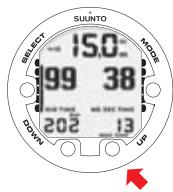
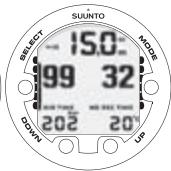
UP BUTTON TOGGLES BETWEEN DIVE TIME AND WATER TEMPERATURE.
6.1.2.Bookmark
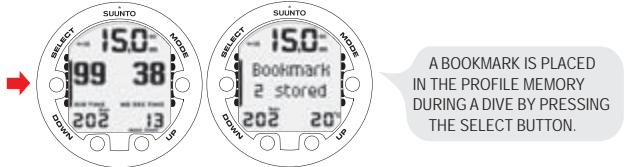
It is possible to record bookmarks in the profile memory during a dive. These bookmarks are displayed when scrolling the profile memory on the display. The bookmarks will also be shown as annotations in the downloadable Suunto Dove Manager PC software. The bookmark logs the depth, time, and water temperature, as well as compass heading (if the compass has been enabled). To make a bookmark in the profile memory during a dive, press the SELECT button. A brief confirmation will be given.
6.1.3. Tank pressure data
The pressure of your scuba cylinder in bars (or psi) is shown digitally in the lower left corner of the alternative display. Whenever you start a dive, the remaining air time calculation begins. After 30 - 60 seconds (sometimes more, depending on your air consumption), the first estimation of remaining air time will be shown in the left center window of the display. The calculation is always based on the actual pressure drop in your cylinder and will automatically adapt to your cylinder size and current air consumption.
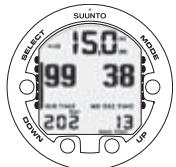
The change in your air consumption will be based on constant one second interval pressure measurements over 30 - 60 second periods. An increase in air consumption will influence the remaining air time rapidly, while a drop in air consumption will increase the air time slowly. In this way, an over optimistic air time estimation, caused by a temporary drop in air consumption, is avoided.
The remaining air time calculation includes a 35 bar/500 psi safety reserve. This means that when the instrument shows the air time to be zero, there is still about 35 bar/500 psi of pressure left in your cylinder, depending on your air consumption rate. With a high consumption rate, the limit will be closer to 50 bar/725 psi and with a low rate closer to 35 bar/500 psi.
NOTE
Filling your BC affects the air time calculation due to the temporary increase in air consumption.
NOTE
A change of temperature will affect the cylinder pressure and consequently the air time calculation.
Low Air PressureWarnings
The dive computer will warn you with three audible double beeps and a blinking pressure display when the cylinder pressure reaches 50 bar/725 psi.
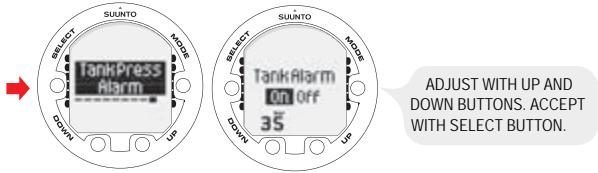
Three double beeps are also heard when the cylinder pressure goes down to the user-selected alarm pressure and when the remaining air time reaches zero.
6.1.4. Ascent rate indicator
The ascent rate is show graphically along the right hand side. When the maximum allowed ascent rate is exceeded, the lower segments start to blink with the top segment staying solid, indicating that the maximum ascent rate has been exceeded continuously or that the current ascent rate is significantly above the allowed rate.
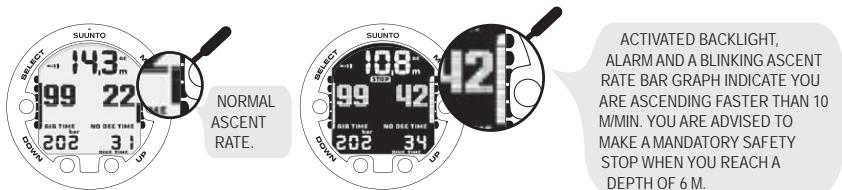
WARNING
DO NOT EXCEED THE MAXIMUM ASCENT RATE! Rapid ascents increase the risk of injury. You should always make the Mandatory and Recommended Safety Stops after you have exceeded the maximum recommended ascent rate. If this Mandatory Safety Stop is not completed, the decompression model will penalize your next dive(s). Continuous ascent rate violations will result in Mandatory Safety Stops. When Recommended Deep Stop is enabled, the length is indicated in seconds.
6.1.5. Safety Stops
A 3 minute Recommended Safety Stop is prompted after every dive to over 10m
6.1.6. Decompression dives
When your NO DEC TIME becomes zero, your dive becomes a decompression dive so you must perform one or more decompression stops on your way to the surface. The NO DEC TIME on your display will be replaced by an ASC TIME, and a CEILING notation will appear. An upward pointing arrow will also prompt you to start your ascent.
If you exceed the no-decompression limits on a dive, the dive computer will provide the decompression information required for ascent. After this, the instrument will continue to provide subsequent interval and repetitive dive information.
Rather than requiring you to make stops at fixed depths, the dive computer lets you decompress within a range of depths (continuous decompression).
The ascent time (ASC TIME) is the minimum amount of time needed to reach the surface in a decompression dive. It includes:
-
the time needed to ascend to the ceiling at an ascent rate of 10m per minute/33 ft per minute. The ceiling is the shallowest depth to which you should ascend
the time needed at the ceiling -
the time needed at the Mandatory Safety Stop (if any)
- the time needed to reach the surface after the ceiling and Safety Stops have been completed
WARNING
YOUR ACTUAL ASCENT TIME MAY BE LONGER THAN DISPLAYED BY THE INSTRUMENT! The ascent time will increase if you:
- remain at depth
- ascend slower than 10 m/33ft per minute
make your decompression stop deeper than at the ceiling
These factors will also increase the amount of air required to reach the surface.
Ceiling, ceiling zone, floor and decompression range
When in decompression, it is important that you understand the meaning of ceiling, floor, and decompression range.
- The ceiling is the shallowest depth to which you should ascend when in decompression. At this depth, or below, you must perform all stops
- The ceiling zone is the optimum decompression stop zone. It is the zone between the minimum ceiling and 1.8m / 6 ft below the minimum ceiling
- The floor is the deepest depth at which the decompression stop time will not increase. Decompression will start when you pass this depth during your ascent
- The decompression range is the depth range between the ceiling and floor. Within this range, decompression takes place. However, it is important to remember that the decompression will be very slow at, or close to, the floor
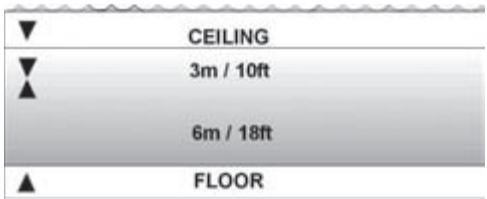
The depth of the ceiling and floor will depend on your dive profile. The ceiling depth will be fairly shallow when you enter the decompression mode, but if you remain at depth, it will move downward and the ascent time will increase. Likewise, the floor and ceiling may change upwards while you are decompressing.
When conditions are rough, it may be difficult to maintain a constant depth near the surface. In such cases, it is more manageable to maintain an additional distance below the ceiling, to make sure that the waves do not lift you above the ceiling. Suunto recommends that decompression takes place deeper than 4m / 13 ft, even if the indicated ceiling is shallower.
NOTE
It will take more time and more air to decompress below the ceiling than at the ceiling.
WARNING
NEVER ASCEND ABOVE THE CEILING! You must not ascend above the ceiling during your decompression. In order to avoid doing so by accident, you should stay somewhat below the ceiling.
Display below the floor
The blinking ASC TIME and an upward pointing arrow indicate that you are below the floor. You should start your ascent immediately. The ceiling depth is shown on the left side, and the minimum total ascent time on the right side, of the center window. Below is an example of a decompression dive without Deep Stops, below the floor.
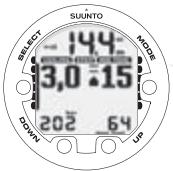
Display above the floor
When you ascend above the floor, the ASC TIME display stops blinking and the upward pointing arrow disappears. Below is an example of a decompression dive above the floor.
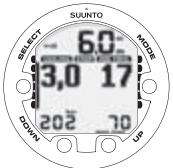
UPWARD POINTING ARROW HAS DISAPPEARED AND ASC TIME LABEL HAS STOPPED BLINKING, MEANING YOU ARE IN THE DECOMPRESSION RANGE.
Decompression will now begin, but is very slow. You should therefore continue your ascent.
Display at the ceiling zone
When you reach the ceiling zone, the display will show you two arrows pointing at each other (the "hour glass" icon). Below is an example of a decompression dive at the ceiling zone.
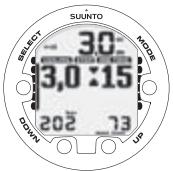
TWO ARROWS POINT AT EACH OTHER 'HOUR GLASS: YOU ARE IN THE OPTIMUM CEILING ZONE AT 3 M. AND YOUR MINIMUM ASCENT TIME IS 15 MINUTES.
During the decompression stop, ASC TIME will count down towards zero. When the ceiling moves upwards, you can ascend to the new ceiling. You may surface only after the ASC TIME and CEILING labels have disappeared, which means that the decompression stop and any Mandatory Safety Stop have been completed. You are advised, however, to stay until the STOP sign has also disappeared. This indicates that the three minute Recommended Safety Stop has also been completed.
Display above the ceiling
If you ascend above the ceiling during a decompression stop, a downward pointing arrow will appear and a continuous beeping starts.
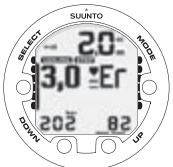
DECOMPRESSION DIVE, ABOVE CEILING. NOTE DOWNWARD POINTING ARROW, ER WARNING AND ALARM. YOU SHOULD IMMEDIATELY (WITHIN 3 MINUTES) DESC CEND TO OR BELOW CEILING.
In addition, an Error warning (Er) reminds you that you have only three minutes to correct the situation. You must immediately descend to, or below, the ceiling.
If you continue to violate the decompression, the dive computer will go into a permanent Error Mode. In this mode, the instrument can only be used as a depth gauge and timer. You must not dive again for at least 48 hours. (See Section 5.6. Error conditions).
6.2. Diving in NITROX mode (DIVEnitrox)
NITROX mode (DIVEnitrox) is the second dive mode available in Suunto Cobra2 and is used when using oxygen- enriched gas mixtures.
6.2.1. Before diving in NITROX mode
If set to the NITROX mode, the correct oxygen percentage of the gas in your cylinder must always be entered into the computer to ensure correct nitrogen and oxygen calculations. The dive computer adjusts its mathematical nitrogen and oxygen calculation models accordingly. The dive computer will not accept fractional percentage values of oxygen concentration. Do not round up fractional percentages. For example, 31.8% oxygen should be entered as 31% . Rounding up will cause nitrogen percentages to be understated and will affect decompression calculations. If you want to adjust the computer to provide more conservative calculations, use the personal adjustment feature to affect decompression calculations, or reduce the PO_2 setting to affect oxygen exposure according to the entered O_2% and PO_2 values. Calculations based on nitrox use result in longer no-decompression times and shallower maximum depths than diving with air.
As a safety precaution, the oxygen calculations in the computer are made with an oxygen percentage of 1% + set O_2% .
When the dive computer is set in NITROX mode, the Dive Planning mode calculates using the O_2% and PO_2 values that are currently in the computer.
To set the nitrox mixes, refer to Section 5.8.3. Setting the nitrox values.
Default nitrox settings
In NITROX mode, the Suunto Cobra2 allows you to set 1 or 2 nitrox mixes containing 21-99% oxygen.
In the NITROX mode, the default setting for MIX1 is standard air (21% O_2 ). It remains in this setting until the O_2% is adjusted to any other percentage of oxygen (22% - 99%). The default setting for maximum oxygen partial pressure is 1.4 bar, however you are able to set it in the range of 0.5 - 1.6 bar.
MIX2 is set to OFF by default. To set MIX2, refer to Section 6.2.4. Gas change and multiple breathing gas mixes. Oxygen percentages and maximum oxygen partial pressures for MIX2 are stored permanently.
6.2.2. Oxygen displays
When NITROX mode is activated, the display will show the information in the figure below. In NITROX mode, the maximum operational depth is calculated based on set O_2% and PO_2 values.
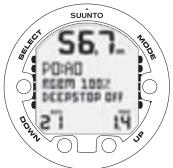
NITROX DIVE MODE ACTIVATION. MAXIMUM OPERATIONAL DEPTH BASED ON SET O_2% 21%) AND PO_2 (1.4 BAR) IS 56.7M
If set to NITROX mode, the Suunto Cobra2 will additionally show on the alternative display:
the oxygen percentage, labeled O_2%
the set oxygen partial pressure limit, labeled PO_2
the current oxygen toxicity exposure, labeled OLF
maximum depth
current time
water temperature
- dive time
tank pressure
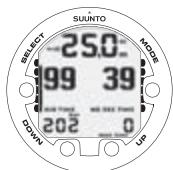
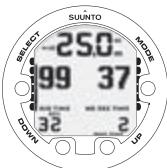
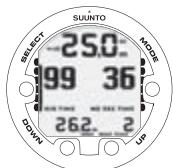
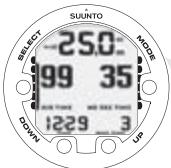
DOWN BUTTON
Toggles
BETWEEN O_2
MAXIMUM DEPTH
TANK PRESSURE
AND CURRENT TIME.
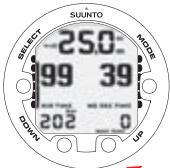
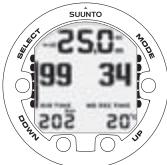
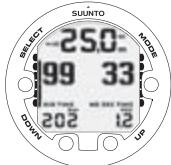
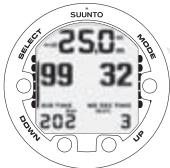
UP BUTTON TOGGLES
BETWEEN POY, OLF. DIVE TIME
AND WATER TEMPERATURE.
6.2.3. Oxygen limit fraction (OLF)
If set to NITROX mode, in addition to tracking the diver's exposure to nitrogen, the instrument tracks the exposure to oxygen. These calculations are treated as entirely separate functions.
The dive computer calculates separately for Central Nervous System oxygen toxicity (CNS) and Pulmonary Oxygen toxicity, the latter measured by the addition of Oxygen Toxicity Units (OTU). Both fractions are scaled so that the maximum tolerated exposure for each is expressed as 100% .
The Oxygen Limit Fraction (OLF) displays only the value of the higher of the two calculations. The oxygen toxicity calculations are based on the factors listed in Section 9.3 "Oxygen exposure".
6.2.4. Gas change and multiple breathing gas mixes
The Suunto Cobra2 allows gas changes to enabled gas mixes during the dive. Gas changes are made by following the procedure below:
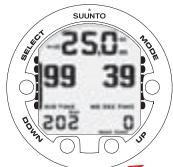
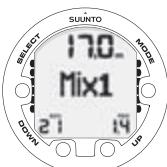
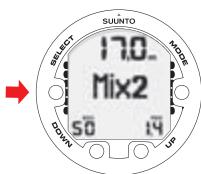
CHANGING GAS MIX. SCROLL
THROUGH ENABLED MIXES BY PRESSING THE UP OR DOWN
BUTTONS. SELECT NEW MIX BY
PRESSING THE SELECT BUTTON.
NOTE
Mix number, O_2% , and PO_2 for the mixes are shown when scrolling. If the set PO_2 limit is exceeded, it will be shown with the PO_2 value blinking. The dive computer does not allow you to change to a gas whose set PO_2 is exceeded. In such a case, the mix is shown but cannot be selected.
NOTE
If no button is pressed in 15 seconds, the dive computer will go back to the dive display without changing the gas mix. Upon ascent, the computer prompts you to change gas when the PO_2 level you have set for the next mix allows a gas change. The prompt is an audible 3 beeps and the current O_2 mix starts to blink.
6.3. Diving in GAUGE mode (DIVEgauge)
If set to GAUGE mode, the dive computer can be used as a bottom timer.
In the GAUGE mode, the total dive time is always displayed in minutes in the lower right corner. In addition, a Dive Timer in the center window displays time in minutes and seconds. The center window Dive Timer is activated at the start of the dive and it can be reset during the dive and used as a stopwatch by pressing the SELECT button.
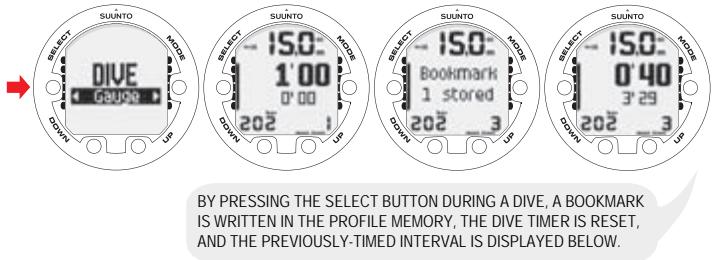
NOTE The GAUGE mode does not provide decompression information.
NOTE There is no ascent rate monitoring in the GAUGE mode.
NOTE If you dive with the GAUGE mode, it is not possible to change between the modes before the no fly time has counted down.
7. AFTER DIVING
Once back at the surface, Suunto Cobra2 continues to provide post-dive safety information and alarms. Calculations to enable repetitive dive planning also help to maximize diver safety.
Table 7.1. Alarms
| Symbol on display | Indication |
| Δ | Diver Attention Symbol - Extend Surface Interval |
| Er | Violated Decompression Ceiling |
| No | Do Not Fly Symbol |
7.1. Surface interval
An ascent to any depth shallower than 1.2m / 4 ft will cause the DIVING display to be replaced by the SURFACE display:
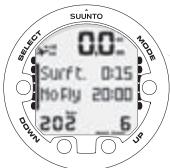
IT IS 15 MINUTES SINCE YOU SURFACED FROM A 6-MINUTE DIVE. THE PRESENT DEPTH IS 0.0 M. THE AIRPLANE SYMBOL AND NO-FLY VALUE INDICATE THAT YOU SHOULD NOT FLY FOR 20 HOURS.
Or, in the alternative displays, the following information will be shown:
maximum depth of last dive in meters/feet
- dive time of last dive in minutes, shown as DIVE TIME
the current time, shown as TIME
- the current temperature in ^ C / ^
If set to NITROX mode, the following information will also be shown:
the oxygen percentage labeled O_2%
the oxygen partial pressure labeled PO_2
- the current oxygen toxicity exposure labeled OLF
7.2.Dive numbering
Several repetitive dives are considered to belong to the same repetitive dive series when the dive computer has not counted the no-fly time to zero. Within each series, the dives are given individual numbers. The first dive of the series will be numbered as DIVE 1, the second as DIVE 2, the third as DIVE 3, etc.
If you start a new dive with less than 5 minutes of surface interval time, the dive computer interprets this as a continuation of the previous dive and the dives are considered to be the same. The diving display will return, the dive number will remain unchanged, and the dive time will begin where it left off. After 5 minutes on the surface, subsequent dives are, by definition, repetitive. The dive counter displayed in the Planning mode will increment to the next number if another dive is made.
7.3. Repetitive dive planning
The Suunto Cobra2 includes a dive planner that allows you to review the no-decompression limits on a subsequent dive, taking the residual nitrogen loading of previous dives into consideration. The Dive Planning mode is explained in Section 7.5.1. Dive Planning mode (PLANnodec).
7.4. Flying after diving
The no-fly time is shown in the center window next to the airplane image. Flying or traveling to a higher altitude should be avoided at any time when the computer is counting down the no-fly time.
The no-fly time is always at least 12 hours, or equivalent to the so-called desaturation time (if longer than 12 hours). For desaturation times lower than 70 minutes, no no-fly time is given.
In the Permanent Error mode and GAUGE mode the no-fly time is 48 hours.
The Divers Alert Network (DAN) recommends the following on no-fly times:
- A minimum surface interval of 12 hours would be required in order to be reasonably assured a diver will remain symptom free upon ascent to altitude in a commercial jetliner (altitude up to 2,400m / 8,000 ft)
- Divers who plan to make daily, multiple dives for several days, or make dives that require decompression stops, should take special precautions and wait for an extended interval beyond 12 hours before a flight. Further, the Undersea and Hyperbaric Medical Society (UHMS) suggests divers using standard air cylinders and exhibiting no symptoms of decompression illness wait 24 hours after their last dive to fly in an aircraft with cabin pressure up to 2,400 m/8,000 ft. The only two exceptions to this recommendation are:
If a diver has less than 2 hours total accumulated dive time in the last 48 hours, a 12 hour surface interval before flying is recommended
- Following any dive that required a decompression stop, flying should be delayed for at least 24 hours, and if possible, for 48 hours
- Suunto recommends that flying is avoided until all the DAN and UHMS guidelines, as well as the dive computer's no-fly conditions, are satisfied
7.5. PLAN mode
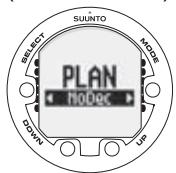
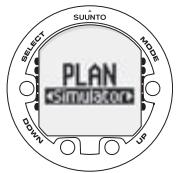
The PLAN mode includes a dive planner (PLANnodec) and simulation mode (PLANsimulator).
7.5.1. Dive Planning mode (PLANnodec)
The Dive Planning mode displays no-decompression times for a new dive, taking into account the effects of previous dives.
When entering the PLANnodec mode, the display first briefly shows the remaining desaturation time before going into plan mode.
By pressing the UP/DOWN buttons, you can scroll the no-decompression limits in 3m / 10 ft increments ending at 45m / 150 ft. No-decompression limits longer than 99min are displayed as “—”.
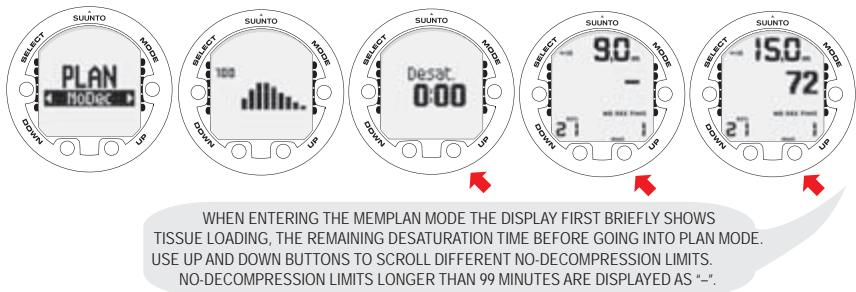
The Planning mode takes into account the following information from previous dives:
- any calculated residual nitrogen
all dive history for the past four days
The no-decompression times given for different depths will therefore be shorter than before your first "fresh" dive.
You can exit the planning mode by pressing the MODE button.
NOTE
The Planning mode is disabled in GAUGE mode and in Error mode (see Section 5.6. Error conditions). The planning mode calculates nodecompression times for MIX1 only. If an additional mix is enabled in the NITROX mode, it does not affect the calculations in PLANNoDec mode.
Higher Altitude and conservative Personal Adjustment settings will shorten the nodecompression time limits. These limits at different Altitude and Personal Adjustment setting selections are explained in Section 5.9.4. Diving at altitude and in Section 5.9.5. Personal adjustments
Dive numbering shown during dive planning
Dives belong to the same repetitive dive series if the instrument was still counting down the no-fly time at the beginning of the dive.
The surface interval must be at least 5 minutes for a dive to be considered a repetitive dive. Otherwise, it is considered a continuation of the same dive. The dive number will not change and the dive time will continue where it left off. (See also Section 7.2. Dive numbering).
7.5.2. Simulation Mode (PLANsimulator)
The Simulation mode can be used to become familiar with the features and displays of the device before diving, to plan dives in advance, for demonstrational or educational purposes, or just for fun.
In the Simulation mode, time runs faster than real time, so after 15 seconds using a simulator, the dive time will be one minute.
Dive Simulator
The Dove Simulator is an excellent tool for familiarizing yourself with your dive computer and for planning your dives. The Dove Simulator allows you to "perform" dive profiles of your choice and to see what the display would look like during an actual dive - including basic dive information as well as audible and visual warnings.
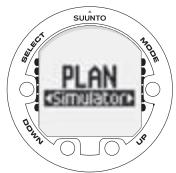
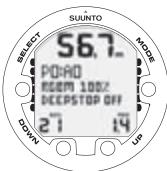
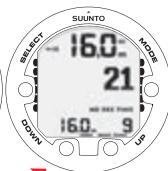
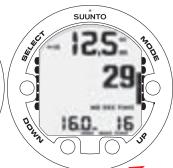
PRESS UP OR DOWN BUTTONS TO DESCEND OR ASCEND.

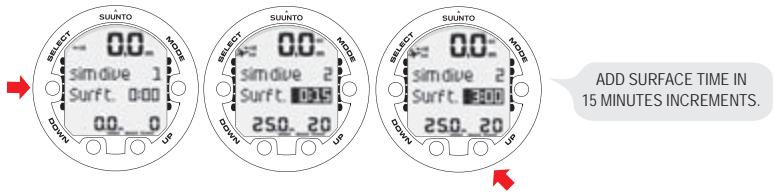
The mode can also be used to add the desired surface intervals for dive simulations. Add the desired surface interval increments to the present surface interval by pressing the UP and DOWN buttons.
7.6. MEMORY mode
The memory options include a dive logbook (MEMlogbook) and dive history (MEMhistory).
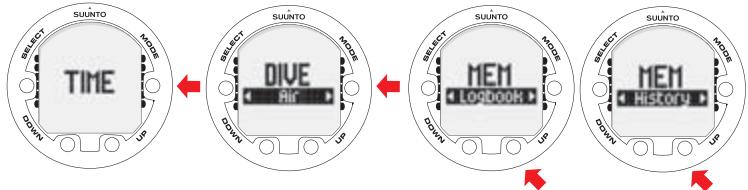
The dive time and date are registered in the Logbook memory. Always check before diving that the time and date are correctly set, especially after traveling between different time zones.
7.6.1. Dive logbook (MEMlogbook)
The Suunto Cobra2 has a very sophisticated, high capacity Logbook and Profile Memory. The data is recorded in the profile memory based on the selected sample rate.
The END OF LOGS text is displayed between the oldest and most recent dive. The following information will be shown on three pages:
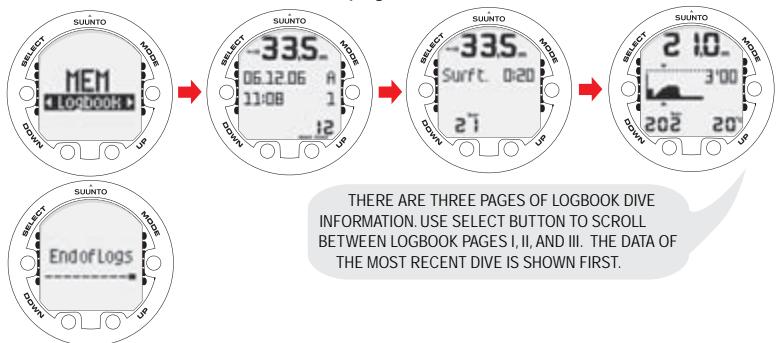
Page I, main display
Maximum depth
- date of dive
type of dive (Air, Nitrox, Gauge) - dive start time
- dive number
- oxygen percentage for Mix1
- total dive time
Page II
maximum depth
- surface time before previous dive
- warnings
consumed tank pressure
Page III
depth/time profile of the dive
real-time water temperature
tank pressure
The memory will retain approximately the last 42 hours of dive time. After that, when new dives are added, the oldest dives are deleted. The contents of the memory will remain when the battery is changed (providing that the battery has been replaced according to the instructions).
NOTE
Several repetitive dives are considered to belong to the same repetitive dive series if the no-fly time has not ended. See Section 7.2. Dive numbering for further information.
7.6.2. Dive history (MEMhistory)
The Dove History is a summary of all the dives recorded by the dive computer. The following information will be shown on the display:
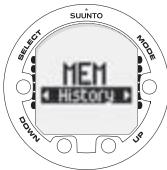
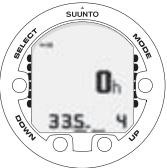
DIVE HISTORY DISPLAY TOTAL NUMBER OF DIVES, DIVE HOURS AND MAXIMUM DEPTH.
The Dove History Memory can hold a maximum of 999 dives and 999 diving hours. When these maximum values are reached, the counters will start again from zero.
NOTE
The maximum depth can be reset to 0.0m / 0 ft using the PC-Interface unit and the downloadable Suunto Dive Manager software.
7.7. Suunto Dove Manager (SDM)
Suunto Dive Manager (SDM) is optional PC software that greatly enhances the functionality of your Suunto Cobra2. With the SDM software, you can download dive data from your dive computer to your PC. You can then view and organize all the data recorded with your Suunto Cobra2. You can also plan dives, print copies of your dive profiles and upload your dive logs to share with your friends at SuuntoSports.com.
You can always download the latest version of Suunto Dive Manager from www.suunto.com. Please check for updates regularly as new features are constantly being developed.
The following data is transferred to your PC:
depth profile of the dive
- dive time
- preceding surface interval time
divenumber
- dive start time (year, month, day and time)
- dive computer settings
- oxygen percentage settings and maximum OLF (in NITROX mode)
- tissue calculation data
real-time water temperature - additional dive information (e.g. SLOW and Mandatory Safety Stop violations, Diver Attention Symbol, Bookmark, Surfaced Mark, Decompression Stop Mark, Ceiling Error Mark, Gas Change)
- dive computer serial number
personal information (30 characters)
Using SDM, you are able to enter setup options such as:
input a personal, 30-character field into the Suunto Cobra2
- reset the Dive History's maximum depth to zero
It is also possible to manually add comments, multimedia and other personal information to the PC-based dive data files.
7.8. www.suuntosports.com and Suunto Diving World at www.suunto.com/diving
When you have dived and transferred your dive data to your Suunto Dive Manager, you can share your best experiences with other diving enthusiasts at SuuntoSports.com. It's a free and open Internet community where you can compare your underwater experiences with other Suunto users and learn from each other.
SuuntoSports.com includes three sections.
In My Suunto you can register your dive computer and manage your membership profile. The section also contains a personal event calendar.
The Communities section is meeting a place for smaller groups of SuuntoSports.com members. Here you can create and manage your own communities and search for others. All communities have a home page that lists the latest group activities. Community members can also use group-specific bulletin boards and calendars, create their own link lists and group activities. All registered SuuntoSports.com users automatically become members of the 'World of Suunto Sports' community.
The Sport forums include sport-specific news, bulletin boards, event calendars, ranking lists and discussions. You can also exchange experiences and read travel reports written by other members.
To learn more about SuuntoSports.com's functions and activities, visit the site, try them and, if necessary, use the site Help. The Help is available on the right side of the bar that divides the screen.
8. CARE AND MAINTENANCE
The Suunto Cobra2 dive computer is a sophisticated precision instrument. Though designed to withstand the rigors of scuba diving, you must handle your Suunto Cobra2 with care, and follow the advice below on how to maximize its service life.
8.1. Water contacts and buttons
Contamination or dirt on the water contacts/connector or buttons may prevent the automatic activation of the DIVE mode and cause problems during data transfer. Therefore, it is important that the water contacts and push buttons are kept clean. If the water contacts of the instrument are active (AC-text remains on the display) or the DIVE mode activates on its own, the reason is probably contamination or invisible marine growth that may create an unwanted electric current between the contacts. It is important that the dive computer is carefully washed in fresh water after the day's diving is completed. The contacts can be cleaned with fresh water and, if necessary, a mild detergent and a soft brush.
8.2. Care of your dive computer
NEVER try to open the case of the dive computer
- Have your dive computer serviced every two years or after 200 dives (whichever comes first) by an authorized Suunto representative. This service will include a general operational check, replacement of the battery, and a water resistance check. The service requires special tools and training, so do not attempt to carry out any service that you are not competent to perform
- If moisture appears inside the case, have the instrument checked immediately by your Suunto representative
- If you detect scratches, cracks or other such flaws on the display that may impair its durability, have it replaced immediately by your Suunto representative
- Check the strap and the buckle for flaws. If needed, have them replaced by your Suunto representative
- Wash and rinse the unit in fresh water after every use
- Protect the unit from shock, extreme heat, direct sunlight, and chemical corrosion. The dive computer cannot withstand the impact of heavy objects like scuba cylinders, nor chemicals like gasoline, cleaning solvents, aerosol sprays, adhesive agents, paint, acetone, alcohol etc. Chemical reactions with such agents will damage seals, the case, and the finish
- Store your dive computer in a dry place when you are not using it
- The dive computer displays a battery symbol as a warning when the power gets too low. When this happens, the instrument should not be used until the battery has been replaced. Also refer to Section 5.9. Activation and pre-checks
- Do not fasten the strap of your dive computer too tightly. You should be able to insert your finger between the strap and your wrist
8.3. Maintenance
If left without care for an extended period, a thin film, often invisible to the naked eye, will cover the unit. Much like the build-up on the glass of an aquarium, this film is the result of organic contaminants found in both salt and fresh water. Suntan oil, silicone spray and grease will speed up this process. As a result of this build-up, moisture will be trapped next to the water contacts and will prevent your Suunto Cobra2 from operating properly. The water contacts can be cleaned with a small brush (e.g. toothbrush).
IMPORTANT: Your Suunto Cobra2 should be soaked, then thoroughly rinsed with fresh water and dried with a soft towel after each dive. Make sure that all salt crystals and sand particles have been flushed out. Check the display for possible moisture or water, and do not use the Suunto Cobra2 if you detect any moisture or water inside.
CAUTION
- Do not use compressed air to blow water off the unit.
- Do not use solvents or other cleaning fluids that might cause damage.
- Do not test or use the dive computer in pressurized air.
8.4. Water resistance inspection
The water resistance of the unit must be checked after replacing the battery or after other service operations. The check requires special equipment and training.
You must frequently check the display for any sign of leaks. If you find moisture inside your dive computer, there is a leak. A leak must be corrected without delay, as moisture will seriously damage the unit, even beyond repair. Suunto does not take any responsibility for damage caused by moisture in the dive computer, if the instructions of this manual have not been carefully followed.
In the event of a leak, immediately take the dive computer to an authorized Suunto representative.
8.5. Battery replacement
NOTE
It is advisable to contact an authorized Suunto representative for battery replacement. It is imperative that the change is made in a proper manner to avoid any leakage of water into the battery compartment or computer.
CAUTION
Defects caused by improper battery installation are not covered by the warranty.
CAUTION
When the battery is changed, all nitrogen and oxygen uptake data is lost. Therefore, the no-fly time shown by the computer should have reached zero or you must wait for 48 hours, or preferably up to 100 hours, before you dive again.
All history and profile data, as well as the altitude, personal, and alarm settings, will remain in the dive computer memory after the battery change. However, the clock time and time alarm settings are lost. In the NITROX Mode, the nitrox settings also revert back to default settings (MIX1 21% O_2 , 1.4 bar PO_2 , MIX2 OFF).
When working with the battery compartment, cleanliness is extremely important. Even the smallest dirt particles may cause a leakage when you dive.
8.5.1. Battery kit
The battery kit includes a 3.0V coin type lithium cell battery and a lubricated Oring. When handling the battery do not make contact with both of the poles at the same time. Do not touch the surfaces of the battery with your bare fingers.
8.5.2. Required tools
A Philips-head screwdriver.
- Soft cloth for cleaning.
- Needlenose pliers or small screwdriver for turning securing ring.
8.5.3. Battery replacement procedure
The battery and the buzzer are located in the back of the instrument in a separate compartment. To change the battery, follow the procedure below:
- Unscrew the four screws at the back of the elastomer console and remove the back cover of the console.
-
Thoroughly rinse and dry the computer.
-
Open the securing ring of the battery compartment lid by pushing it down and rotating it clockwise. You may use a pointed nose pliers or a small screwdriver as an aid in the rotating. Put the pliers ends into the holes of the securing ring or the screwdriver onto the side of the right tooth on the ring and turn the ring clockwise. Be careful not to damage any of the parts.
- Remove the ring.
- Carefully remove the lid with the beeper attached to it. You can remove the lid by pressing with your finger on the outermost edge of the lid while simultaneously pulling with your nail at the opposite side. Don't use sharp metal objects as they might damage the O-ring or the sealing surfaces.
- Remove the O-ring and the battery retainer.
- Carefully remove the battery. Do not damage the electrical contacts or the sealing surface.
- Check for any traces of flooding, particularly between the beeper and the lid, or for any other damage. In case of a leak or any other damage, bring the dive computer to an authorized SUUNTO dealer or distributor for check and repair.
- Check the condition of the O-ring; a defective O-ring may indicate sealing or other problems. Dispose the old O-ring, even if it seems to be in good condition.
- Check that the battery compartment, battery holder and lid are clean. Clean with soft cloth if necessary.
- Reinstall the battery retainer in its correct position.
- Check that the new lubricated O-ring is in good condition. Put it in the right position on the battery compartment lid. Be very careful not to get any dirt on the o-ring or its sealing surfaces.
- Carefully press the lid onto the battery compartment with your thumb, while making sure that the O-ring is not at any point protruding out on the edge.
- Put your other thumb through the locking ring. Press this thumb firmly against the lid and release the other one. Make sure that the lid is pressed completely down!
- Turn the locking ring counterclockwise with your free thumb and fingers until it snaps into its locked position.
- The dive computer should now active its timekeeping mode and show time 18:00 [6:00 PM] and date SA 01,01. Activate the instrument. Check that
all display segments work.
the low battery warning is off.
the buzzer beeps and backlight works.
- all the settings are correct. Reset if necessary.
- Reassemble computer into the console. The instrument is now ready for use.
CAUTION
Check after the first dives for possible moisture under the transparent battery compartment lid, indicating a leak.
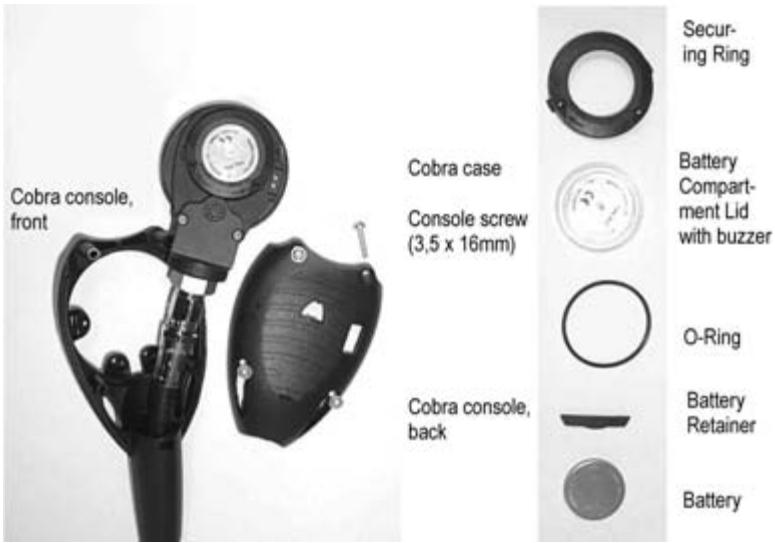
9. TECHNICAL DATA
9.1. Technical specifications
Dimensions and weight:
- Diameter: width 73 mm/2.85 in, length 165 mm/6.50 in
Thickness: 35mm / 1.40 in
Weight: 210 g/7.4 oz (without hose)
Depth gauge:
- Temperature compensated pressure sensor
Salt water calibrated, in fresh water the readings are about 3% smaller (calibrated in compliance with EN 13319)
Maximum depth of operation: 100m / 328 ft (complying with EN 13319)
Accuracy: ± 1% of full scale or better from 0 to 80~m / 262 ft at 20^ / 68^ (complying with EN 13319) - Depth display range: 0 to 150 m/492 ft
Resolution: 0.1m from 0 to 100m / 1 ft from 0 to 328 ft
Temperature display:
Resolution: 1^ / 1^
Display range: -20 to +50^ / -9 to +122^
Accuracy: ± 2^ / ± 3.6^ within 20 minutes of temperature change
Calendar clock:
Accuracy: ± 25 s/month (at 20^ / 68^
12/24 h display
Displays only in NITROX mode:
Oxygen % : 21 - 99
- Oxygen partial pressure display: 0.2 - 3.0 bar, depending on the limit setting
- Oxygen Limit Fraction: 1 - 200% with 1% resolution
Logbook/dive profile memory:
- Recording interval: 20 seconds adjustable (1,10,20,30,60s).
Memory capacity: approximately 42 hours of diving with 20 second recording interval - Depth accuracy: 0.3 m/1ft
Operating conditions:
Normal altitude range: 0 to 3,000 m/10,000 ft above sea level
- Operating temperature: 0^ to 40^ / 32^ to 104^
Storage temperature: -20^ to +50^ / -4^ to +122^
It is recommended that the instrument be stored in a dry place at room temperature.
NOTE
Do not leave the dive computer in direct sunlight!
Tissue calculation model:
- Suunto Deep Stop RGBM algorithm (developed by Suunto and Bruce R. Wienke, BSc, MSc, PhD)
9 tissue compartments - Tissue compartment halftimes: 2.5, 5, 10, 20, 40, 80, 120, 240 and 480 minutes (on gassing). The off gassing halftimes are slowed down
- Reduced gradient (variable) "M" values based on diving habit and dive violations. The "M" values are tracked up to 100 hours after a dive
- The EAN and oxygen exposure calculations are based on recommendations by R.W. Hamilton, PhD and currently accepted exposure time limit tables and principles
Battery:
One 3 V lithium battery: CR 2450
- Battery storage time (shelf life): Up to three years
- Replacement: Every three years, or more often depending on dive activity
Life expectancy at 20^ / 68^
0 dives/y - 3 years
100 dives/year - 2 years
300 dives/year - 1.5 years
The following conditions have an effect on the expected battery lifetime:
The length of the dives
- The conditions in which the unit is operated and stored (e.g. temperature/cold conditions). Below 10^ / 50^ the expected battery lifetime is about 50 - 75% of that at 20^ / 68^
The use of the backlight and audible alarms
The use of the compass
- The quality of the battery. (Some lithium batteries may exhaust unexpectedly, which cannot be tested in advance)
- The time the dive computer has been stored until it gets to the customer. (The battery is installed in the unit at the factory)
NOTE
Low temperature or an internal oxidation of the battery may activate the battery warning even though the battery has enough capacity. In this case, the warning usually disappears when the DIVE mode is activated again.
9.2.RGBM
The Suunto Reduced Gradient Bubble Model (RGBM) is a modern algorithm for predicting both dissolved and free gas in the tissues and blood of divers. It was developed in cooperation between Suunto and Bruce R. Wienke BSc, MSc, PhD. It is based on both laboratory experiments and diving data, including data from DAN.
It is a significant advance on the classical Haldane models, which do not predict free gas (microbubbles). The advantage of Suunto RGBM is additional safety through its ability to adapt to a wide variety of situations. Suunto RGBM addresses a number of diving circumstances outside the range of dissolved-gas-only models by:
Monitoring continuous multiday diving
Computing closely spaced repetitive diving
- Reacting to a dive deeper than the previous dive
Adapting to rapid ascents which produce high microbubble (silent-bubble) build-up
- Incorporating consistency with real physical laws for gas kinetics
9.2.1. Suunto RGBM adaptive decompression
The Suunto RGBM algorithm adapts its predictions of both the effects of microbubble build-up and adverse dive profiles in the current dive series. It also changes these calculations according to the personal adjustment you select.
The pattern and speed of decompression at the surface is adjusted according to microbubble influence.
On repetitive dives, adjustment may also be applied to the maximum allowable nitrogen overpressure in each theoretical tissue group.
Depending on the circumstances, Suunto RGBM will adapt the decompression obligations by doing any or all of the following:
- Reducing No-decompression Stop dive times
- Adding Mandatory Safety Stops
- Increasing Decompression Stop times
- Advising an extended surface interval (Diver Attention symbol)
Diver Attention Symbol - Advice to Extend Surface Interval
Some patterns of diving cumulatively add a higher risk of DCI; for example, dives with short surface intervals, repetitive dives deeper than earlier ones, multiple ascents, and substantial multiday diving. When this is detected, in addition to adapting the decompression algorithm, the Suunto RGBM model will in some circumstances also advise, with the Diver Attention Symbol, that you extend your surface interval.
9.2.2. No-decompression limits
The no-decompression limits displayed by the dive computer for the first dive to a single depth (see Table 9.1, No-decompression time limits for various depths (m) and Table 9.2, No-decompression time limits for various depths (ft)). are slightly more conservative than those permitted by the U.S. Navy tables.
Table 9.1. No-decompression time limits for various depths (m)
| No-decompression time limits (mins) for various depths (m) for the first dive of a series | |||||||||
| Depth (m) | Personal Mode / Altitude Mode | ||||||||
| P0/A0 | P0/A1 | P0/A2 | P1/A0 | P1/A1 | P1/A2 | P2/A0 | P2/A1 | P2/A2 | |
| 9 | -- | 163 | 130 | 163 | 130 | 96 | 130 | 96 | 75 |
| 12 | 124 | 89 | 67 | 89 | 67 | 54 | 67 | 54 | 45 |
| 15 | 72 | 57 | 43 | 57 | 43 | 35 | 43 | 35 | 29 |
| 18 | 52 | 39 | 30 | 39 | 30 | 5 | 30 | 25 | 21 |
| 21 | 37 | 29 | 23 | 29 | 23 | 20 | 23 | 20 | 15 |
| 24 | 29 | 24 | 19 | 24 | 19 | 16 | 19 | 16 | 12 |
| 27 | 23 | 18 | 15 | 18 | 15 | 12 | 15 | 12 | 9 |
| 30 | 18 | 14 | 12 | 14 | 12 | 9 | 12 | 9 | 7 |
| 33 | 13 | 11 | 9 | 11 | 9 | 8 | 9 | 8 | 6 |
| 36 | 11 | 9 | 8 | 9 | 8 | 6 | 8 | 6 | 5 |
| 39 | 9 | 7 | 6 | 7 | 6 | 5 | 6 | 5 | 4 |
| 42 | 7 | 6 | 5 | 6 | 5 | 4 | 5 | 4 | 4 |
| 45 | 6 | 5 | 5 | 5 | 5 | 4 | 5 | 4 | 3 |
Table 9.2. No-decompression time limits for various depths (ft)
| No-decompression time limits (mins) for various depths (ft) for the first dive of a series | |||||||||
| Depth (ft) | Personal Mode / Altitude Mode | ||||||||
| P0/A0 | P0/A1 | P0/A2 | P1/A0 | P1/A1 | P1/A2 | P2/A0 | P2/A1 | P2/A2 | |
| 30 | -- | 160 | 127 | 160 | 127 | 92 | 127 | 92 | 73 |
| 40 | 120 | 86 | 65 | 86 | 65 | 52 | 65 | 52 | 43 |
| 50 | 69 | 56 | 41 | 56 | 41 | 34 | 41 | 34 | 28 |
| 60 | 50 | 38 | 29 | 38 | 29 | 25 | 29 | 25 | 20 |
| 70 | 36 | 29 | 22 | 29 | 22 | 20 | 22 | 20 | 15 |
| 80 | 28 | 23 | 19 | 23 | 19 | 15 | 19 | 15 | 11 |
| 90 | 22 | 18 | 15 | 18 | 15 | 11 | 15 | 11 | 9 |
| 100 | 17 | 14 | 11 | 14 | 11 | 9 | 11 | 9 | 7 |
| 110 | 13 | 11 | 9 | 11 | 9 | 7 | 9 | 7 | 6 |
| 120 | 10 | 9 | 8 | 9 | 8 | 6 | 8 | 6 | 5 |
| 130 | 9 | 7 | 6 | 7 | 6 | 5 | 6 | 5 | 4 |
| 140 | 7 | 6 | 5 | 6 | 5 | 4 | 5 | 4 | 4 |
| 150 | 6 | 5 | 4 | 5 | 4 | 4 | 4 | 4 | 3 |
9.2.3. Altitude diving
The atmospheric pressure is lower at high altitudes than at sea level. After traveling to a higher altitude, you will have additional nitrogen in your body, compared to the equilibrium situation at the original altitude. This "additional" nitrogen is released gradually over time and equilibrium is restored. It is recommended that you acclimatize to a new altitude by waiting at least three hours before making a dive.
Before high-altitude diving, the instrument must be set to the Altitude Adjustment mode to adjust the calculations for the new altitude. The maximum partial pressures of nitrogen allowed by the mathematical model of the dive computer are reduced according to the lower ambient pressure.
As a result, the allowed no-decompression-stop limits are considerably reduced.
9.3. Oxygen exposure
The oxygen exposure calculations are based on currently accepted exposure time limit tables and principles. In addition to this, the dive computer uses several methods to conservatively estimate the oxygen exposure. For example:
- the displayed oxygen exposure calculations are raised to the next higher percentage value
- for recreational scuba diving, the recommended upper limit of 1.4 bar PO_2 is used as a default
- the CNS % limits up to 1.6 bar are based on 1991 NOAA Diving Manual limits
- the OTU monitoring is based on the long-term daily tolerance level and the recovery rate is reduced
Oxygen related information displayed by the dive computer is also designed to ensure that all warnings and displays occur at the appropriate phases of a dive. For example, the following information will be shown before and during a dive when the computer is set in NITROX mode:
the selected O_2% on the alternative display
- OLF% alternative display for either CNS% or OTU% (whichever is larger)
audible alarms are given and the OLF value starts to blink when the 80% and 100% limits are exceeded
audible alarms are given and the actual PO_2 value blinks when it exceeds the preset limit
- in dive planning, the maximum depth according to the O_2% and maximum PO_2 selected
10. INTELLECTUAL PROPERTY
10.1. Copyright
This user's manual is copyrighted and all rights are reserved. It may not, in whole or in part, be copied, photocopied, reproduced, or translated to any media without prior written consent from Suunto.
10.2. Trademark
Suunto, Cobra2, Consumed Bottom Time (CBT), Oxygen Limit Fraction (OLF), Suunto Reduced Gradient Bubble Model (RGBM), and Continuous Decompression and their logos are all registered or unregistered trademarks of Suunto. All rights are reserved.
10.3. Patent notice
This product is protected by the following patents and patent applications: US 5,845,235 and US11/152,075. Other patents have been applied for.
11. DISCLAIMER
11.1. User's responsibility
This instrument is intended for recreational use only. Suunto Cobra2 must not be used for obtaining measurements that require professional or industrial precision.
11.2. CE
The CE mark is used to mark conformity with the European Union EMC directive 89/336/EEC
FIOH, Laajaniitytie 1, FIN-01620 Vantaa, Finland, notified body no.0430, has EC type-examined this type of personal protective equipment.
EN 250 Respiratory equipment - Open circuit self-contained compressed air diving apparatus - Requirements, testing, marking.
The cylinder pressure gauge, and the parts of this product used in measuring the cylinder pressure, meet the requirements set in the section of the European Standard EN 250 that concern cylinder pressure measurements. The instruments must be serviced by an authorized Suunto representative every second year or after 200 dives (whichever comes first).
EN 13319 "Diving accessories - Depth gauges and combined depth and time measuring devices - Functional and safety requirements, test methods" is a European diving depth gauge standard. The Suunto Cobra2 is designed to comply with this standard.
11.3. Limits of liability and ISO 9001 compliance
Suunto Oy does not assume any responsibility for losses or claims by third parties, which may arise through the use of this device.
Due to continuous product development, the Suunto Cobra2 is subject to change without notice.
ISO 9001
Suunto Oy's Quality Assurance System is certified by Det Norske Veritas to be in accordance with ISO 9001 in all Suunto Oy's operations (Quality Certificate No. 96-HEL-AQ-220).
11.4. After sales service
If a claim under warranty appears to be necessary, return the product, freight prepaid, to your Suunto representative, who is responsible for having your product repaired or replaced. Depending on the requirements in your country, include your name, address, proof of purchase and/or Warranty card, which can be found at the back of this manual. The claim will be honored and the product repaired or replaced at no charge and returned in what your Suunto representative determines a reasonable amount of time, provided that all necessary parts are in stock. All repairs that are not covered under the terms of this warranty will be made at the owner's expense. This warranty is non-transferrable from the original owner.
You can locate your local Suunto representative at www.suunto.com.
12. WARRANTY
NOTE
Warranty arrangements vary from country to country. The dive computer packaging contains information regarding the warranty benefits and requirements applicable to your purchase.
This Suunto dive computer is warranted against defects in workmanship and materials for a period of two years after purchase to the original owner subject to and in accordance with the terms and conditions set forth below:
The dive computer should be serviced and repaired only by an authorized Suunto representative.
This warranty does not cover damage to the product resulting from improper usage, improper maintenance, neglect of care, alteration or unauthorized repair. This warranty will automatically become void if proper preventive maintenance procedures have not been followed as outlined in the use and care instructions for this product.
All implied warranties, including but not limited to the implied warranties of merchantability and fitness for a particular purpose, are limited from the date of purchase and in scope to the warranties expressed herein. Suunto shall not be liable for loss of use of the product or other incidental or consequential costs, expenses or damage incurred by the purchase. All warranties not stated herein are expressly disclaimed.
Some states do not allow the exclusion or limitation of implied warranties of consequential damages, so the above exclusions or limitations may not apply to you. This warranty gives you specific legal rights, and you may also have other rights that vary from state to state.
This warranty does not cover any representation or warranty made by representatives beyond the provisions of this warranty. No Suunto representative is authorized to make any modifications to this warranty or to make any additional warranty.
Battery replacement is not covered by this warranty.
This User's Guide should be kept with your dive computer.
Suunto's dive computers and wristop computers can be registered online at www.suunto.com. Registering your unit makes it quicker and easier for us to help you if you ever need to send your product for servicing, or if you need information about using your unit from our Global Help Desk.
13. DISPOSAL OF THE DEVICE
Please dispose of the device in an appropriate way, treating it as electronic waste. Do not throw it in the garbage. If you wish, you may return the device to your nearest Suunto representative.

GLOSSARY
Air time
The amount of dive time remaining, based on a calculation of cylinder pressure and ambient pressure and present air consumption.
Altitude dive
A dive made at an elevation greater than 300m / 1000 ft above sea level.
Ascent rate
The speed at which the diver ascends toward the surface.
ASC RATE
Abbreviation for ascent rate.
Ascent time
The minimum amount of time needed to reach the surface on a decompression stop dive.
ASC TIME
Abbreviation for ascent time.
Ceiling
On a decompression stop dive, the shallowest depth to which a diver may ascend based on computed nitrogen load.
Ceiling zone
On a decompression stop dive, the zone between the ceiling and the ceiling plus 1.8m / 6 ft. This depth range is displayed with two arrows pointing toward each other (the "hour glass" icon).
Central nervous system toxicity
Toxicity caused by oxygen. Can cause a variety of neurological symptoms. The most important of which is an epileptic-like convulsion which can cause a diver to drown.
CNS
Abbreviation for central nervous system toxicity.
CNS%
Central nervous system toxicity limit fraction. Also note Oxygen Limit Fraction See "Tissue group".
Compartment
Abbreviation for Divers Alert Network.
DAN
Abbreviation for decompression illness.
DCI
Time spent at a decompression stop, or range, before surfacing, to allow absorbed nitrogen to escape naturally from tissues
Decompression
On a decompression stop dive, the depth range between the floor and the ceiling within which a diver must stop for some time during ascent.
Decompression range
Any of a variety of maladies resulting either directly or indirectly from the formation of nitrogen bubbles in tissues or body fluids, as a result of inadequately controlled decompression. Commonly called "the bends" or "DCI".
Decompression illness
A group of repetitive dives between which the dive computer indicates some nitrogen loading is present. When nitrogen loading reaches zero the dive computer deactivates.
Dive series
Elapsed time between leaving the surface to descend, and returning to the surface at the end of a dive.
Dive time
Delta P, describing the Cylinder Pressure drop during the dive; the difference in cylinder pressure between the beginning and end of a dive.
P
Abbreviation for equivalent air depth.
EAD
Abbreviation for enriched air nitrox.
EAN
Also called nitrox or Enriched Air = EANx. Air that has some oxygen added. Standard mixes are EAN32 (NOAA Nitrox I = NN I) and EAN36 (NOAA Nitrox II = NN II).
Enriched air nitrox
Nitrogen partial pressure equivalent table.
Equivalent air depth
The deepest depth during a decompression stop dive at which decompression takes place.
Floor
After a change in ambient pressure, the amount of time required for the partial pressure of nitrogen in a theoretical compartment to go half way from its previous value to saturation at the new ambient pressure.
Half time
Abbreviation for high pressure (= cylinder pressure).
HP
Multi level dive
Nitrox
NOAA
No decompression time
No decompression dive
NO DEC TIME
OEA = EAN = EANx
OLF
OTU
Oxygen tolerance unit
Oxygen limit fraction
O_2%
Oxygen partial pressure
PO2
RGBM
Reduced Gradient Bubble Model
Repetitive dive
Residual nitrogen
SURF TIME
Surface interval time
Tissue group
Whole-body toxicity
A single or repetitive dive that includes time spent at various depths and whose no decompression limits are therefore not determined solely by the maximum depth attained.
In sports diving, refers to any mix with a higher fraction of oxygen than standard air.
United States National Oceanic and Atmospheric Administration.
The maximum amount of time a diver may remain at a particular depth without having to make decompression stops during the subsequent ascent.
Any dive which permits a direct, uninterrupted ascent to the surface at any time.
Abbreviation for no decompression time limit.
Abbreviations for oxygen enriched air nitrox.
Abbreviation for oxygen limit fraction.
Abbreviation for oxygen tolerance unit.
Used to measure the whole-body-toxicity.
A term used by Suunto for the values displayed in the oxygen toxicity bar graph. The value is either the CNS% or the OTU%.
Oxygen percentage or oxygen fraction in the breathing gas. Standard air has 21% oxygen.
Limits the maximum depth to which the nitrox mixture can be safely used. The maximum partial pressure limit for enriched air diving is 1.4 bar. The contingency partial pressure limit is 1.6 bar. Dives beyond this limit risk immediate oxygen toxicity.
Abbreviation for oxygen partial pressure.
Abbreviation for Reduced Gradient Bubble Model.
Modern algorithm for tracking both dissolved and free gas in divers.
Any dive whose decompression time limits are affected by residual nitrogen absorbed during previous dives.
The amount of excess nitrogen remaining in a diver after one or more dives.
Abbreviation for surface interval time.
Elapsed time between surfacing from a dive and beginning a descent for the subsequent repetitive dive.
Theoretical concept used to model bodily tissues for the construction of decompression tables or calculations.
Another form of oxygen toxicity, which is caused by prolonged exposure to high oxygen partial pressures. The most common symptoms are irritation in the lungs, a burning sensation in the chest, coughing and reduction of the vital capacity. Also called Pulmonary Oxygen Toxicity. See also OTU.
CUSTOMER SERVICE CONTACTS
Global Help Desk +358 2 284 11 60
Suunto USA Phone +1 (800) 543-9124
Canada Phone +1 (800) 776-7770
This publication and its contents are proprietary to Suunto Oy.
Suunto, Dove Computer, Suunto Cobra2 and their logos are registered or unregistered trademarks of Suunto Oy. All rights reserved.
While we have taken great care to ensure that information contained in this documentation is both comprehensive and accurate, no warranty of accuracy is expressed or implied. Its content is subject to change at any time without notice.
SUUNTO
TWO YEAR WARRANTY
This product is warranted to be free of
defects in material and/or workmanship to the original owner for the above noted period
(does not include battery life). Keep a copy of
the original purchase receipt and make sure
place of purchase. The warranty originates
from the date of purchase.
All warranties are limited and are subject
to the restrictions given in the instruction
manual. This warranty does not cover
the damage to the product resulting from
improper usage, improper maintenance,
neglect of care, alteration, improper battery
replacement or unauthorized repair.
Suunto's dive computers and wristop
computers can be registered online at
www.suntao.com.
Model of
Dive Computer
Serial number:
1 1 1 1 1 1 1
1 1 1 1 1 1
1
e
y
Signature
- WELCOME TO THE WORLD OF SUUNTO DIVING INSTRUMENTS
- WARNINGS, CAUTIONS, AND NOTES
- WARNING
- CAUTION
- NOTE
- SUUNTO COBRA2 AT A GLANCE
- Navigating in the menus
- Button symbols and functions
- GETTING STARTED WITH YOUR SUUNTO COBRA2
- TIME mode settings
- Setting the alarm
- Setting the time
- Setting the date
- Setting the units
- Setting the backlight
- Setting the tones
- AC water contacts
- Learning how to use your compass
- Compass display
- Tilt sensor
- Locking a bearing
- Compass settings
- Declination
- Calibration
- To calibrate the compass:
- BEFORE DIVING
- The Suunto RGBM/Deep Stop Algorithm
- Emergency ascents
- Dive computer limitations
- Nitrox
- Audible and visual alarms
- Error conditions
- Omitted decompression
- Air integration
- Connecting Suunto Cobra2 to a regulator
- DIVE mode settings
- Setting the depth alarm
- Setting the dive-time alarm
- Setting the nitrox values
- Setting the personal/altitude adjustments
- Setting the sample rate
- Setting the Safety Stops/Deep Stops
- Setting the RGBM values
- Activation and pre-checks
- Accessing DIVE mode
- DIVE mode activation
- Battery power indication
- Diving at altitude
- Personal adjustments
- Safety Stops
- Recommended Safety Stops
- Mandatory Safety Stops
- Deep stops
- DIVING
- Diving in AIR mode (DIVEair)
- Basic dive data
- 6.1.2.Bookmark
- Tank pressure data
- Low Air PressureWarnings
- Ascent rate indicator
- Safety Stops
- Decompression dives
- Ceiling, ceiling zone, floor and decompression range
- Display below the floor
- Display above the floor
- Display at the ceiling zone
- Display above the ceiling
- Diving in NITROX mode (DIVEnitrox)
- Before diving in NITROX mode
- Default nitrox settings
- Oxygen displays
- Oxygen limit fraction (OLF)
- Gas change and multiple breathing gas mixes
- Diving in GAUGE mode (DIVEgauge)
- AFTER DIVING
- Surface interval
- 7.2.Dive numbering
- Repetitive dive planning
- Flying after diving
- PLAN mode
- Dive Planning mode (PLANnodec)
- Dive numbering shown during dive planning
- Simulation Mode (PLANsimulator)
- Dive Simulator
- MEMORY mode
- Dive logbook (MEMlogbook)
- Page II
- Page III
- Dive history (MEMhistory)
- Suunto Dove Manager (SDM)
- www.suuntosports.com and Suunto Diving World at www.suunto.com/diving
- CARE AND MAINTENANCE
- Water contacts and buttons
- Care of your dive computer
- Maintenance
- Water resistance inspection
- Battery replacement
- Battery kit
- Required tools
- Battery replacement procedure
- TECHNICAL DATA
- Technical specifications
- Dimensions and weight:
- Depth gauge:
- Temperature display:
- Calendar clock:
- Displays only in NITROX mode:
- Logbook/dive profile memory:
- Operating conditions:
- Tissue calculation model:
- Battery:
- 9.2.RGBM
- Suunto RGBM adaptive decompression
- Diver Attention Symbol - Advice to Extend Surface Interval
- No-decompression limits
- Altitude diving
- Oxygen exposure
- INTELLECTUAL PROPERTY
- Copyright
- Trademark
- Patent notice
- DISCLAIMER
- User's responsibility
- CE
- Limits of liability and ISO 9001 compliance
- ISO 9001
- After sales service
- WARRANTY
- DISPOSAL OF THE DEVICE
- GLOSSARY
- CUSTOMER SERVICE CONTACTS
- SUUNTO
- TWO YEAR WARRANTY
Brand : SUUNTO
Model : COBRA 2
Category : Dive computer