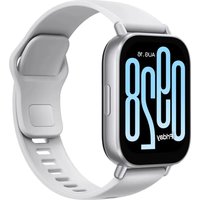
Mi Smart Band 8 Active - Smartwatch Xiaomi - Free user manual and instructions
Find the device manual for free Mi Smart Band 8 Active Xiaomi in PDF.


Pick your language and provide your email: we'll send you a specifically translated version.
| Product Type | Smartwatch / Activity Tracker |
| Brand | Xiaomi |
| Model | Mi Smart Band 8 Active |
| Screen | 1.47-inch TFT Screen |
| Resolution | 172 x 320 pixels |
| Screen Size | 1.47 inches |
| Connectivity | Bluetooth 5.3 BLE |
| Sensors | Accelerometer, gyroscope, heart rate sensor, SpO2 sensor |
| Battery | 210 mAh lithium-ion |
| Battery Life | Up to 14 days of normal use |
| Water Resistance | 5 ATM (50 meters) |
| Compatibility | Android 6.0+ / iOS 12.0+ |
| Weight | 27 g (without strap) |
| Dimensions | 43.3 x 18.4 x 11.9 mm |
| Main Features | Activity tracking, heart rate, SpO2, sleep, stress, 100+ sports modes, notifications, weather, music, etc. |
| Care and Cleaning | Clean with a soft dry cloth. Avoid chemicals. Remove the strap to clean the watch. |
| Safety | Do not expose to extreme temperatures. Avoid strong impacts. Use the original charger. |
| Spare Parts and Repairability | Standard interchangeable straps. Battery not user-replaceable. No official spare parts available separately. |
| General Information | Manufactured by Xiaomi. 2-year warranty. Comes with magnetic charging cable and user manual. |
Frequently Asked Questions - Mi Smart Band 8 Active Xiaomi
How do I reset my Xiaomi Mi Smart Band 8 Active?
To reset the device, go to Settings > System > Reset. Confirm the action. This will erase all data.
Is the watch waterproof?
Yes, it is certified 5 ATM, so it resists water up to 50 meters depth. Suitable for surface swimming, but not for diving.
How to connect the watch to the phone?
Download the Mi Fitness app (or Xiaomi Wear). Open the app, create an account or log in, then tap Add Device and follow the instructions.
What is the battery life?
Battery life can be up to 14 days with normal use and about 6 days with heavy use and GPS enabled.
How to change the strap?
The watch uses a removable strap. Push the latch under the strap to release it, then remove it. Attach the new strap by snapping it in until it clicks.
Does the watch support WhatsApp notifications?
Yes, it displays notifications from WhatsApp, messages, calls, and other apps. Make sure notifications are enabled in the Mi Fitness app.
How to measure blood oxygen level?
From the main screen, swipe to access the menu and select SpO2. Place your finger on the sensor and stay still during the measurement.
What to do if the watch does not charge?
Clean the charging contacts on the charger and watch. Ensure the charger is properly aligned. Try another cable or USB power adapter. If the problem persists, contact support.
How to update the firmware?
Updates are done via the Mi Fitness app. Open the app, go to Profile > Firmware Update and follow the instructions. Make sure the battery is sufficient.
Is sleep tracking automatic?
Yes, sleep tracking is automatic. The watch detects your light, deep, and REM sleep phases. For more accuracy, wear it on your wrist during the night.
User questions about Mi Smart Band 8 Active Xiaomi
0 question about this device. Answer the ones you know or ask your own.
Ask a new question about this device
No questions yet. Be the first to ask one.
Download the instructions for your Smartwatch in PDF format for free! Find your manual Mi Smart Band 8 Active - Xiaomi and take your electronic device back in hand. On this page are published all the documents necessary for the use of your device. Mi Smart Band 8 Active by Xiaomi.
USER MANUAL Mi Smart Band 8 Active Xiaomi

Manual assistant
Powered by Anthropic
Waiting for your message
Product information
Brand : Xiaomi
Model : Mi Smart Band 8 Active
Category : Smartwatch