DeckLink Quad HDMI Recorder - Graphic card Blackmagic Design - Free user manual and instructions
Find the device manual for free DeckLink Quad HDMI Recorder Blackmagic Design in PDF.


| Product Type | PCIe Video Capture Card |
| Brand | Blackmagic Design |
| Model | DeckLink Quad HDMI Recorder |
| Interface | PCI Express 2.0 x4 |
| Video Inputs | 4 x HDMI (female Type A connectors) |
| Input Formats | SD, HD up to 1080p60 |
| Maximum Resolution | 1920 x 1080 @ 60 fps |
| Outputs | None (recording only) |
| Supported Codecs | Uncompressed, ProRes, DNxHD, H.264 (via software) |
| Power | Via PCI Express bus (75 W max) |
| Dimensions (card) | 16.7 x 10.6 cm (half-height) |
| Weight | Approximately 200 g |
| Operating Systems | Windows, macOS, Linux (with drivers) |
| Included Software | Blackmagic Desktop Video, Media Express |
| Operating Temperature | 0 to 40 °C |
| Maintenance and Cleaning | Dust with compressed air, avoid moisture |
| Safety | Turn off computer before installation, protect against electrostatic discharge |
| Spare Parts and Repairability | No user-replaceable parts; contact customer support |
| Warranty | 2 years (depending on retailer) |
| General Information | Professional capture card for recording 4 HDMI sources simultaneously |
Frequently Asked Questions - DeckLink Quad HDMI Recorder Blackmagic Design
User questions about DeckLink Quad HDMI Recorder Blackmagic Design
0 question about this device. Answer the ones you know or ask your own.
Ask a new question about this device
Download the instructions for your Graphic card in PDF format for free! Find your manual DeckLink Quad HDMI Recorder - Blackmagic Design and take your electronic device back in hand. On this page are published all the documents necessary for the use of your device. DeckLink Quad HDMI Recorder by Blackmagic Design.
USER MANUAL DeckLink Quad HDMI Recorder Blackmagic Design
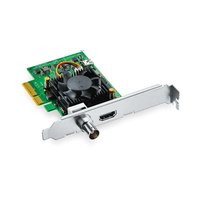


Brand : Blackmagic Design
Model : DeckLink Quad HDMI Recorder
Category : Graphic card