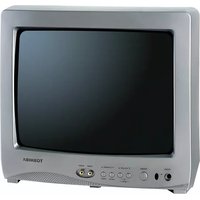
13A26 - Television TOSHIBA - Free user manual and instructions
Find the device manual for free 13A26 TOSHIBA in PDF.


Pick your language and provide your email: we'll send you a specifically translated version.
| Product Type | CRT Television |
| Brand | Toshiba |
| Model | 13A26 |
| Screen Size | 13 inches (33 cm) diagonal |
| Dimensions (W x H x D) | Approx. 15.7 x 14.2 x 13.8 inches (400 x 360 x 350 mm) |
| Weight | Approx. 22 lbs (10 kg) |
| Power Consumption | 65 W (typical) |
| Power Supply | AC 120V, 60 Hz |
| Tuner | Analog NTSC |
| Input Connectors | RF antenna input, Composite AV input (RCA) |
| Audio Output | Built-in mono speaker, 3W |
| Remote Control | Infrared remote (model CT-90221 or similar) |
| On-Screen Display | Yes, for menu and settings |
| Sleep Timer | Yes, adjustable |
| Closed Captioning | Supported |
| Cabinet Color | Black |
| Cleaning Instructions | Unplug TV, wipe with dry soft cloth. Do not use liquid cleaners. |
| Safety | Use grounded outlet; avoid moisture; do not block ventilation slots. |
| Reparability | Repairs should be performed by qualified service personnel. |
| Spare Parts | Remote control, power cord, fuse (available from Toshiba or third parties) |
Frequently Asked Questions - 13A26 TOSHIBA
What type of remote control does the Toshiba 13A26 use?
The Toshiba 13A26 uses an infrared remote control, typically model CT-90221 or a universal replacement. It requires two AAA batteries.
How do I connect external devices like a DVD player?
Use the composite AV input (yellow video, red/white audio) on the back of the TV. Connect the device and select the AV input using the remote or TV buttons.
Why is there no picture but sound works?
Check if the brightness/contrast settings are too low. Ensure the antenna or input source is properly connected. If the screen is dark but has a faint glow, the TV may need servicing.
How do I clean the screen?
Unplug the TV. Use a soft, dry microfiber cloth to gently wipe the screen. Do not use water, alcohol, or glass cleaners as they may damage the anti-glare coating.
Can I use a universal remote with this TV?
Yes, the Toshiba 13A26 is compatible with many universal remotes. Common codes for Toshiba TVs include 10178, 10885, or 11326 (for GE, RCA, etc.). Refer to your universal remote's manual.
What is the power consumption of this TV?
The Toshiba 13A26 consumes approximately 65 watts under normal operation. Standby power consumption is less than 1 watt.
How do I set the sleep timer?
Press the 'SLEEP' button on the remote repeatedly to cycle through time options (e.g., 30, 60, 90 minutes). The TV will turn off automatically after the set time.
The picture is distorted or rolling. What should I do?
Ensure the antenna connection is secure. If using an external source, check the cables. Adjust the vertical hold or V-Hold knob (if available) on the back panel. If the issue persists, the TV may require internal adjustment.
Is this TV compatible with digital converter boxes?
Yes, you can connect a digital converter box to the AV input. The TV will display the signal in standard definition. Tune the TV to channel 3 or 4 if using an RF modulator.
The remote control does not work. What can I do?
First, replace the batteries. Ensure nothing is blocking the IR sensor on the TV. Try pressing buttons on the TV panel. If the remote still fails, it may need replacement.
User questions about 13A26 TOSHIBA
0 question about this device. Answer the ones you know or ask your own.
Ask a new question about this device
No questions yet. Be the first to ask one.
Download the instructions for your Television in PDF format for free! Find your manual 13A26 - TOSHIBA and take your electronic device back in hand. On this page are published all the documents necessary for the use of your device. 13A26 by TOSHIBA.
USER MANUAL 13A26 TOSHIBA
Manual assistant
Powered by Anthropic
Waiting for your message
Product information
Brand : TOSHIBA
Model : 13A26
Category : Television