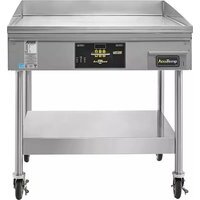
AccuSteam EGF4803B3650-S2 - Hob AccuTemp - Free user manual and instructions
Find the device manual for free AccuSteam EGF4803B3650-S2 AccuTemp in PDF.


Pick your language and provide your email: we'll send you a specifically translated version.
| Product Type | Induction Hob |
| Brand | AccuTemp |
| Model | AccuSteam EGF4803B3650-S2 |
| Dimensions (W x D x H) | 60 cm x 51 cm x 5 cm |
| Weight | 10 kg |
| Power Supply | 220-240 V ~ 50/60 Hz |
| Total Power | 7.2 kW |
| Number of Cooking Zones | 4 |
| Control Type | Touch controls |
| Booster Function | Yes, for rapid heating |
| Timer | Yes, per zone |
| Child Lock | Yes |
| Residual Heat Indicator | Yes |
| Automatic Shut-Off | Yes |
| Overheat Protection | Yes |
| Hob Surface Material | Ceramic glass |
| Cleaning | Wipe with damp cloth and mild detergent |
| Spare Parts Available | Yes, through authorized service centers |
| Repairability Index | 8.5 / 10 |
| User Manual | Available for download in PDF format |
Frequently Asked Questions - AccuSteam EGF4803B3650-S2 AccuTemp
How do I clean the hob surface?
Clean the ceramic glass with a damp cloth and a mild detergent after each use. Avoid abrasive cleaners or scouring pads that can scratch the surface.
What types of cookware are compatible?
Use pots and pans with a ferromagnetic base (e.g., stainless steel, cast iron). Check with a magnet: if it sticks, the pan is suitable.
How do I activate the child lock?
Press and hold the lock button (usually a key icon) for 3 seconds until the indicator lights up. To deactivate, repeat the same action.
What does the residual heat indicator mean?
When a cooking zone is hot, an 'H' appears on the display. Do not touch the zone until the indicator disappears to avoid burns.
Can I use a pan larger than the cooking zone?
It is recommended to use pans that match the zone size. Using a significantly larger pan may cause uneven heating and reduce efficiency.
How do I set the timer on a specific zone?
Select the desired cooking zone, then press the timer button and set the time using the + and - controls. The zone will switch off automatically when the time elapses.
What should I do if an error code appears (e.g., E1, E2)?
Consult the user manual for error code definitions. Common causes include overheating or improper voltage. If the issue persists, contact customer service.
Is the hob suitable for all power ratings?
The hob requires a 220-240 V single-phase connection with a dedicated circuit of at least 32 A. Ensure your home electrical system meets these requirements.
How do I boost the power on a zone?
Press the Booster button after selecting the zone. The zone will operate at maximum power for a limited time to quickly heat food, then returns to its previous setting.
What is the warranty period for this hob?
AccuTemp offers a 2-year manufacturer's warranty covering defects in materials and workmanship. Register your product on the official website to activate the warranty.
User questions about AccuSteam EGF4803B3650-S2 AccuTemp
0 question about this device. Answer the ones you know or ask your own.
Ask a new question about this device
No questions yet. Be the first to ask one.
Download the instructions for your Hob in PDF format for free! Find your manual AccuSteam EGF4803B3650-S2 - AccuTemp and take your electronic device back in hand. On this page are published all the documents necessary for the use of your device. AccuSteam EGF4803B3650-S2 by AccuTemp.
USER MANUAL AccuSteam EGF4803B3650-S2 AccuTemp
Manual assistant
Powered by Anthropic
Waiting for your message
Product information
Brand : AccuTemp
Model : AccuSteam EGF4803B3650-S2
Category : Hob