
TEW-659BRV - Wireless Router TRENDNET - Free user manual and instructions
Find the device manual for free TEW-659BRV TRENDNET in PDF.


| Product Type | Wireless VPN Router 300 Mbps |
| Brand | TRENDNET |
| Model | TEW-659BRV |
| Dimensions (approx.) | 200 x 150 x 30 mm |
| Weight (approx.) | 300 g |
| Power Supply | 12V DC, 1A power adapter |
| Main Functions | Wireless N 300 Mbps router, VPN, firewall, setup wizard, WPA2-PSK/WEP encryption |
| Ports | 4 LAN ports 10/100 Mbps, 1 WAN port 10/100 Mbps |
| Radio Frequency | 2.4 GHz |
| Wireless Standard | IEEE 802.11b/g/n |
| Maximum Speed | 300 Mbps |
| Wireless Security | WEP 64/128-bit, WPA-PSK, WPA2-PSK, MAC filtering |
| VPN | VPN pass-through (IPSec, PPTP, L2TP) |
| Firewall | NAT, SPI, IP/port filtering |
| Management | Web interface (http://192.168.10.1), default password: admin |
| Package Contents | TEW-659BRV router, quick installation guide, CD-ROM with user guide, RJ45 network cable (1.5 m), power adapter |
| Care and Cleaning | Unplug the device, clean with a soft dry cloth. Do not use chemicals. |
| Spare Parts and Repairability | Contact the reseller or TRENDnet. Power adapter and network cable available as spare parts. |
| Compatibility | Windows, Mac, Linux, Internet Explorer 6+, Firefox 2+, Opera, Chrome, Safari browsers |
| Environment | Operating temperature: 0°C to 40°C, humidity: 10% to 90% non-condensing |
| General Information | Manufactured by TRENDnet, Inc., 20675 Manhattan Place, Torrance, CA 90501, USA. Complies with European directives 1999/5/EC and 2009/125/EC. |
Frequently Asked Questions - TEW-659BRV TRENDNET
User questions about TEW-659BRV TRENDNET
0 question about this device. Answer the ones you know or ask your own.
Ask a new question about this device
Download the instructions for your Wireless Router in PDF format for free! Find your manual TEW-659BRV - TRENDNET and take your electronic device back in hand. On this page are published all the documents necessary for the use of your device. TEW-659BRV by TRENDNET.
USER MANUAL TEW-659BRV TRENDNET
-
I typed http://192.168.10.1 in my Internet Browser's Address Bar, but an error message says "The page cannot be displayed." How can I get into the TEW-659BRV's web configuration page?
-
Check your hardware settings again by following the instructions in Section 2.
- Make sure the Network Port and Wireless lights are lit.
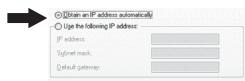
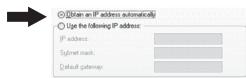
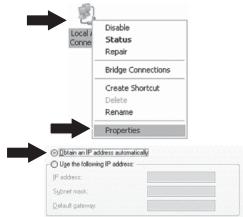
- Make sure your TCP/IP settings are set to Obtain an IP address automatically (see the steps below).
- Reset the TEW-659BRV. Press the button on the front of the TEW-659BRV for 20 seconds and then let go.
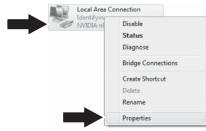
Windows 7
- Go into the Control Panel, click Network and Internet, click Network and Sharing Center, click Change Adapter Settings and then right-click the Local Area Connection icon and then click Properties.
- Click Internet Protocol Version 4(TCP/IPv4) and then click Properties. Then click on Obtain an IP address automatically.
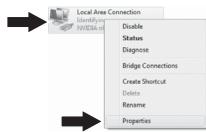
Windows Vista
- Go into the Control Panel, click Network and Internet, click Network and Sharing Center, click Manage Network Connections and then right-click the Local Area Connection icon and then click Properties.
- Click Internet Protocol Version 4(TCP/IPv4) and then click Properties. Then click on Obtain an IP address automatically.
Windows XP/2000
- Go into the Control Panel, double-click the Network Connections icon and then right-click the Local Area Connection icon and then click Properties.
- Click Internet Protocol (TCP/IP) and then click Properties. Then click on Obtain an IP address automatically.
- I am not sure what type of Internet Account Type I have for my cable/DSL connection. How do I find out?
Contact your Internet Service Provider's (ISP) support service for the correct information.
-
I went through the Wizard, but I cannot get onto the Internet. What should I do?
-
Verify that you can get onto the Internet with a direct connection into your modem.
- Contact your ISP and verify all the information that you have in regards to your Internet connection settings is correct.
-
Power cycle your modem and router. Unplug the power to the modem. Turn the power switch on the TEW-659BRV to the off position. Wait 30 seconds and then reconnect the power to the modem. Wait for the modem to fully boot up and then turn the power switch on the TEW-659BRV to the on position.
-
I cannot make a wireless connection to the router. What should I do?
-
Double check that the wireless light on the router is lit.
- Login to your router. Enter http://192.168.10.1 into the address bar of your router. The default system password is admin. Click Configuration, Basic Setting and then Wireless. Make sure Enabled is selected and then click Save.
- Power cycle the TEW-659BRV. Turn the power switch to the off position. Wait 30 seconds and then turn the power switch on the TEW-659BRV to the on position.
-
Contact the manufacturer of your wireless network adapter and make sure the wireless network adapter is configured with the proper SSID. The default SSID is TRENDnet659. If you have enabled any encryption on the TEW-659BRV, make sure to configure the wireless network adapter with the same Preshared key.
-
Please give me an explanation of all the LEDs and Buttons.
| LED/Button | Color | Sequence | Definition |
| Wireless/WPS LED | Green | Blinking | · Wireless LAN is on or enabled/Wireless data transmission · WPS is activated (Blinking rapidly for 2 minutes) |
| N/A | Off | Wireless LAN is off or disabled | |
| WAN Link/Act LED | Green | Solid | WAN port is connected at 10/20Mbps or 100/200Mbps (Half/Full Duplex) |
| Blinking | WAN port data transmitting/receiving at 10/20Mbps or 100/200Mbps (Half/Full Duplex) | ||
| N/A | Off | WAN port is disconnected/No Ethernet Link | |
| 1 2 3 4 WAN Link/Act LED (Ports 1-4) | Green | Solid | LAN port connected at 10/20 Mbps or 100/200Mbps (Half/Full Duplex) |
| Blinking | LAN port data transmitting/receiving 10/20Mbps or 100/200Mbps (Half/Full Duplex) | ||
| N/A | Off | LAN port disconnected/No Ethernet Link | |
| Status LED | Green | Blinking | Device is ready |
| Green | Solid/Off | Device is not ready | |
| Reset/WPS Button | N/A | N/A | Reset: Hold 20 seconds to reset device to factory defaults. WPS: Hold 3 seconds to activate WPS. |
If you still encounter problems or have any questions regarding the TEW-659BRV, please contact TRENDnet's Technical Support Department.
Detalls standard applicable:
EN 300 328 V1.7.1: 10-2006
EN 301 489-1 V1.8.1: 04-2008
EN301489-17V2.1.1:05-2009
EN 50385:2002
EN 60950-1:2006+A11:2009
Déclaration:
Director of Technology
Position / Title

Signature
GPL/LGPL General Information
This TRENDnet product includes free software written by third party developers. These codes are subject to the GNU General Public License ("GPL") or GNU Lesser General Public License ("LGPL"). These codes are distributed WITHOUT WARRANTY and are subject to the copyrights of the developers. TRENDnet does not provide technical support for these codes. The details of the GNU GPL and LGPL are included in the product CD-ROM.
Please also go to (http://www.gnu.org/licenses/gpl.txt) or (http://www.gnu.org/licenses/gpl.txt) for specific terms of each license.
The source codes are available for download from TRENDnet's web site (http://trendnet.com/downloads/list.gpl.asp) for at least three years from the product shipping date.
You could also request the source codes by contacting TRENDnet.
20675 Manhattan Place, Torrance, CA 90501, USA. Tel: +1-310-961-5500 Fax: +1-310-961-5511
Informations generales GPL/LGPL
Product Warranty Registration
Please take a moment to register your product online. Go to TRENDnet's website at http://www.trendnet.com/register
Certifications
This equipment has been tested and found to comply with FCC and CE Rules.
Operation is subject to the following two conditions:
(1) This device may not cause harmful interference.
(2) This device must accept any interference received. Including interference that may cause undesired operation.


Waste electrical and electronic products must not be disposed of with household waste. Please recycle where facilities exist. Check with you Local Authority or Retailer for recycling advice.

NOTE: THE MANUFACTURER IS NOT RESPONSIBLE FOR ANY RADIO OR TV INTERFERENCE CAUSED BY UNAUTHORIZED MODIFICATIONS TO THIS EQUIPMENT. SUCH MODIFICATIONS COULD VOID THE USER'S AUTHORITY TO OPERATE THE EQUIPMENT.
ADVERTENCIA
Brand : TRENDNET
Model : TEW-659BRV
Category : Wireless Router