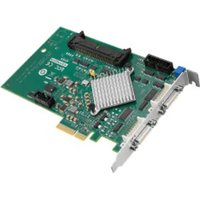
PCIE-1122B-AE - Camera Advantech - Free user manual and instructions
Find the device manual for free PCIE-1122B-AE Advantech in PDF.


Pick your language and provide your email: we'll send you a specifically translated version.
| Product Type | PCI Express Serial Interface Card |
| Brand | Advantech |
| Model | PCIE-1122B-AE |
| Form Factor | Low Profile PCI Express x1 |
| Dimensions | 120 mm x 80 mm |
| Weight | 120 g |
| Power Supply | Via PCIe bus (3.3V, 12V) |
| Operating Temperature | 0°C to 60°C |
| Storage Temperature | -20°C to 80°C |
| Number of Ports | 2 |
| Interface Standard | RS-232/422/485 |
| Maximum Baud Rate | 921.6 kbps |
| Isolation Protection | 2.5 kV isolation on each port |
| OS Compatibility | Windows, Linux, and other major operating systems |
| Maintenance and Cleaning | Dry cloth; avoid liquids and electrostatic discharge |
| Safety Precautions | Install in a well-ventilated slot; handle with care to avoid ESD |
| Spare Parts & Repairability | No user-serviceable parts; contact support for repair |
| General Information | Uncategorized industrial communication card |
Frequently Asked Questions - PCIE-1122B-AE Advantech
What operating systems are supported by the Advantech PCIE-1122B-AE?
The Advantech PCIE-1122B-AE supports Windows (7, 8, 10, Server), Linux (kernel 2.6 and later), and other major operating systems. Drivers can be downloaded from the Advantech website.
How do I install the PCIE-1122B-AE card?
Turn off the computer, insert the card into a free PCI Express slot, secure it with the bracket screw, then power on. Install the appropriate driver from the included CD or the Advantech support page.
What is the maximum baud rate for serial communication?
The card supports baud rates up to 921.6 kbps for RS-232/422/485 modes.
Does the card provide isolation protection?
Yes, each serial port offers 2.5 kV isolation to protect against voltage surges and ground loops.
Can I use this card with a low-profile bracket?
Yes, the card comes with a low-profile bracket and includes a full-height bracket for standard cases.
What is the power consumption of the PCIE-1122B-AE?
The card consumes approximately 7W from the PCIe bus, with no external power required.
How do I clean and maintain the card?
Use a dry, soft cloth to remove dust. Avoid liquid cleaners. Handle the card by its edges to prevent electrostatic discharge.
What should I do if the card is not recognized?
Ensure the card is fully seated in the PCIe slot. Check BIOS settings for PCIe device enumeration. Try a different slot. Reinstall the latest driver from Advantech.
Is this card compatible with RS-422/485 multi-drop networks?
Yes, each port can be configured for RS-422 or RS-485 with software-selectable termination and echo cancellation for multi-drop applications.
Where can I find the user manual and drivers?
Download the manual and drivers from the Advantech support website using the model number PCIE-1122B-AE. The manual is available in PDF format.
User questions about PCIE-1122B-AE Advantech
0 question about this device. Answer the ones you know or ask your own.
Ask a new question about this device
No questions yet. Be the first to ask one.
Download the instructions for your Camera in PDF format for free! Find your manual PCIE-1122B-AE - Advantech and take your electronic device back in hand. On this page are published all the documents necessary for the use of your device. PCIE-1122B-AE by Advantech.
USER MANUAL PCIE-1122B-AE Advantech
Manual assistant
Powered by Anthropic
Waiting for your message
Product information
Brand : Advantech
Model : PCIE-1122B-AE
Category : Camera