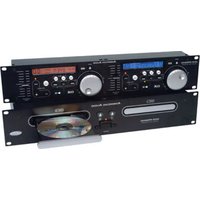
DCD-PRO240 - CD Player American Audio - Free user manual and instructions
Find the device manual for free DCD-PRO240 American Audio in PDF.


Pick your language and provide your email: we'll send you a specifically translated version.
| Product Type | Dual CD Player for DJs |
| Model | DCD-PRO240 |
| Brand | American Audio |
| Dimensions (WxHxD) | 19 x 3.5 x 10 inches (approx.) |
| Weight | 15 lbs (approx.) |
| Power Supply | AC 120V / 60Hz |
| Power Consumption | 30W |
| Playback Formats | CD, CD-R, CD-RW, MP3 |
| Jog Wheel | Touch-sensitive, pitch bend |
| Pitch Control Range | ±4%, ±8%, ±16%, ±100% (Master Tempo) |
| Connectivity | RCA outputs (L/R), headphone output, S/PDIF digital out |
| Anti-Shock Buffer | Yes, 10 seconds |
| Display | LCD screen showing track info, time, pitch |
| Main Functions | Play, pause, cue, loop, seamless loop, reverse play, reloop |
| Fader Start | Compatible with compatible mixers via trigger cable |
| Cueing | Instant start and cue points |
| Maintenance | Clean lens with CD lens cleaner; avoid dust; store in dry place |
| Safety | Do not disassemble; use only with specified power; avoid moisture |
| Repairability | Spare parts available from authorized service centers |
| Included Accessories | Power cord, audio cables, manual |
Frequently Asked Questions - DCD-PRO240 American Audio
How do I set the pitch range on the DCD-PRO240?
Press the PITCH RANGE button to cycle through ±4%, ±8%, ±16%, and ±100% (Master Tempo). The selected range will appear on the display.
Can I play MP3 files on this player?
Yes, the DCD-PRO240 supports MP3 CDs in addition to standard audio CDs, CD-R, and CD-RW discs.
How do I create a seamless loop?
Press the IN and OUT buttons to set loop points. The unit will loop seamlessly between them. Press RELOOP to recall the last loop.
Why is the disc not reading?
Ensure the disc is clean and not scratched. Try a different disc. If the issue persists, clean the lens with a CD lens cleaner. Avoid using damaged discs.
How do I connect the CD player to a mixer?
Use RCA cables to connect the OUTPUT jacks (L and R) to the mixer's line inputs. For digital output, use an S/PDIF cable if available.
What is the fader start function?
Fader start automatically starts or pauses playback when a mixer channel fader is moved. Connect the trigger cable between the CD player and a compatible mixer.
How do I adjust the pitch without changing tempo?
Enable MASTER TEMPO by pressing the MASTER TEMPO button. Then adjust the pitch slider; the tempo will remain unchanged.
Can I use headphones for cueing?
Yes, connect headphones to the PHONES jack on the front panel. Use the CUE button to preview audio before playing.
How do I clean the DCD-PRO240?
Use a soft, dry cloth for the exterior. For the lens, use a CD lens cleaner disc. Avoid liquids or abrasive cleaners.
What does the anti-shock buffer do?
The ANTI-SHOCK buffer stores 10 seconds of audio to prevent skipping from vibrations or bumps. Ensure the feature is enabled (default).
User questions about DCD-PRO240 American Audio
0 question about this device. Answer the ones you know or ask your own.
Ask a new question about this device
No questions yet. Be the first to ask one.
Download the instructions for your CD Player in PDF format for free! Find your manual DCD-PRO240 - American Audio and take your electronic device back in hand. On this page are published all the documents necessary for the use of your device. DCD-PRO240 by American Audio.
USER MANUAL DCD-PRO240 American Audio



Manual assistant
Powered by Anthropic
Waiting for your message
Product information
Brand : American Audio
Model : DCD-PRO240
Category : CD Player