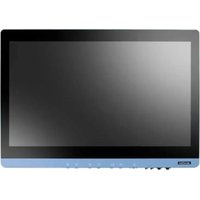
POC-621 - Computer Advantech - Free user manual and instructions
Find the device manual for free POC-621 Advantech in PDF.


Pick your language and provide your email: we'll send you a specifically translated version.
| Product Type | Industrial Panel PC |
| Brand | Advantech |
| Model | POC-621 |
| Dimensions (W × H × D) | 530 × 320 × 60 mm |
| Weight | 5.2 kg |
| Screen Type | 21.5" TFT LCD LED-backlit |
| Screen Resolution | 1920 × 1080 pixels |
| Touchscreen | Yes, multi-touch capacitive |
| Processor | Intel Core i5-1135G7 |
| Memory (RAM) | 8 GB DDR4 |
| Storage | 256 GB SSD |
| Operating System | Windows 10 IoT Enterprise |
| Power Supply | Power adapter 12 V DC, 5 A |
| Power Consumption | 60 W max |
| Network Connectivity | 2 × Gigabit Ethernet |
| USB Ports | 4 × USB 3.0, 2 × USB 2.0 |
| Serial Ports | 2 × RS-232/422/485 |
| Video Output | 1 × HDMI, 1 × DisplayPort |
| Audio | Headphone jack, built-in microphone |
| Operating Temperature | 0 °C to 50 °C |
| Protection Rating | IP65 (front panel) |
| Maintenance and Cleaning | Clean with a soft, dry cloth. Do not use solvents. |
| Security | Kensington lock, surge protection |
| Spare Parts and Repairability | RAM and SSD accessible. Repair by authorized Advantech center. |
| Warranty | 2 years |
Frequently Asked Questions - POC-621 Advantech
How to turn on the Advantech POC-621?
Press the power button located on the side or front. Ensure the power adapter is plugged in.
What to do if the screen stays black?
Check the power connection and that the LED indicator is on. If the issue persists, contact Advantech support.
How to connect an external device?
Use the available USB, HDMI, or DisplayPort ports. Drivers install automatically under Windows.
Touch screen not responding, what to do?
Clean the screen with a soft cloth. Restart the device. If the issue persists, recalibrate the touch screen in settings.
Which operating systems are compatible?
The POC-621 comes with Windows 10 IoT Enterprise but can also support Windows 11 and Linux (Ubuntu).
How to reset the device?
Go to Settings > Update & Security > Recovery. Choose 'Reset this PC' or use a recovery USB drive.
Can I replace the RAM?
Yes, the RAM is accessible. Refer to the manual for specifications and replacement procedure.
Is it normal for the device to get hot?
Moderate heat is normal. If excessive, check the fans and ventilation. Clean the air vents.
How to update drivers?
Download the latest drivers from the Advantech website. Use Device Manager or a USB drive for installation.
Where to find the serial number?
The serial number is on the label at the back of the unit. Keep it for any support requests.
User questions about POC-621 Advantech
0 question about this device. Answer the ones you know or ask your own.
Ask a new question about this device
No questions yet. Be the first to ask one.
Download the instructions for your Computer in PDF format for free! Find your manual POC-621 - Advantech and take your electronic device back in hand. On this page are published all the documents necessary for the use of your device. POC-621 by Advantech.
USER MANUAL POC-621 Advantech


Manual assistant
Powered by Anthropic
Waiting for your message
Product information
Brand : Advantech
Model : POC-621
Category : Computer