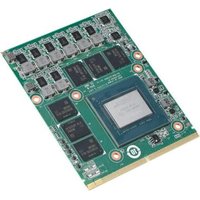
SKY-MXM-RTX3000 - Graphic card Advantech - Free user manual and instructions
Find the device manual for free SKY-MXM-RTX3000 Advantech in PDF.


Pick your language and provide your email: we'll send you a specifically translated version.
| Product Type | MXM GPU Module |
| GPU Model | NVIDIA RTX 3000 Series (Quadro RTX 3000) |
| Form Factor | MXM 3.0 Type A/B |
| Dimensions | 82 mm x 105 mm x 15 mm (approx.) |
| Weight | Approximately 150 g |
| Power Consumption | Up to 80 W (TGP) |
| Power Connector | Via MXM slot (requires dedicated power delivery from carrier board) |
| Memory | 6 GB GDDR6 |
| Memory Bandwidth | Up to 288 GB/s |
| CUDA Cores | 1920 |
| Supported APIs | DirectX 12, OpenGL 4.6, Vulkan, CUDA, OpenCL |
| Display Outputs | Depends on carrier board (e.g., 4x DisplayPort or 2x HDMI) |
| Max Digital Resolution | 7680 x 4320 (8K) at 60 Hz (via DisplayPort 1.4) |
| Cooling | Passive heatsink (requires system airflow) |
| Operating Temperature | 0°C to 55°C |
| Primary Functions | Professional GPU computing, AI inference, rendering, video encoding |
| Maintenance | Clean contacts with compressed air; avoid liquid cleaners |
| Safety Precautions | ESD sensitive: handle with anti-static wrist strap, avoid touching gold contacts |
| Spare Parts / Repairability | Module is not field-repairable; replace entire unit if faulty |
Frequently Asked Questions - SKY-MXM-RTX3000 Advantech
What is the Advantech SKY-MXM-RTX3000?
The SKY-MXM-RTX3000 is an MXM GPU module by Advantech, based on the NVIDIA Quadro RTX 3000. It is designed for embedded and industrial systems requiring high-performance GPU computing.
What type of MXM slot does it use?
It uses an MXM 3.0 Type A or Type B connector. Ensure your carrier board supports the appropriate keying (e.g., 230-pin or 280-pin).
What are the power requirements?
The module has a typical graphics power (TGP) of 80W. Power is supplied through the MXM slot; the carrier board must provide adequate voltage and current. A minimum 12V rail capable of 8A is recommended.
Does it support multiple displays?
Yes, depending on the carrier board. It typically supports up to 4 displays via DisplayPort 1.4 or HDMI 2.0b outputs.
Which operating systems are compatible?
It supports Windows 10/11 64-bit, Linux (Ubuntu, CentOS), and other embedded OS with NVIDIA drivers. See the official driver page for the latest support.
How do I install the drivers?
Download the latest NVIDIA Quadro RTX 3000 drivers from the NVIDIA website. For Linux, use the .run installer or package manager. For Windows, run the executable and follow on-screen instructions.
What cooling is required?
The module has a passive heatsink. It relies on system airflow for cooling. Ensure your chassis has adequate ventilation and, if needed, a fan blowing over the module.
Can I upgrade or replace the GPU module?
Yes, the MXM form factor allows for field replacement. However, always power down the system and follow ESD precautions. Ensure the carrier board supports the MXM type and power delivery.
What is the maximum resolution supported?
It supports up to 7680 x 4320 (8K) at 60Hz over DisplayPort 1.4, or 4096 x 2160 at 60Hz over HDMI 2.0b.
Does it support virtualization (GPU passthrough)?
Yes, it supports GPU passthrough for virtual machines (e.g., VMware, KVM) with NVIDIA vGPU or standard passthrough. Confirm compatibility with your hypervisor.
User questions about SKY-MXM-RTX3000 Advantech
0 question about this device. Answer the ones you know or ask your own.
Ask a new question about this device
No questions yet. Be the first to ask one.
Download the instructions for your Graphic card in PDF format for free! Find your manual SKY-MXM-RTX3000 - Advantech and take your electronic device back in hand. On this page are published all the documents necessary for the use of your device. SKY-MXM-RTX3000 by Advantech.
USER MANUAL SKY-MXM-RTX3000 Advantech
Manual assistant
Powered by Anthropic
Waiting for your message
Product information
Brand : Advantech
Model : SKY-MXM-RTX3000
Category : Graphic card