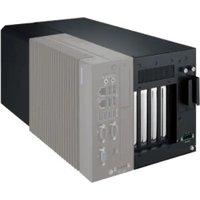
MIC-75G20 - Graphic card Advantech - Free user manual and instructions
Find the device manual for free MIC-75G20 Advantech in PDF.


Pick your language and provide your email: we'll send you a specifically translated version.
| Type | Embedded Computer |
| Model | MIC-75G20 |
| Brand | Advantech |
| Dimensions (W x D x H) | 200 x 150 x 50 mm |
| Weight | 1.5 kg |
| Power Input | 12V DC, 60W |
| Processor | Intel Core i7-9700TE (up to 3.8 GHz) |
| Memory | Up to 32 GB DDR4 |
| Storage | 1x M.2 NVMe SSD (supports up to 1 TB) |
| Operating System | Windows 10 IoT Enterprise / Linux |
| Expansion Slots | 2x Mini-PCIe, 1x M.2 Key E |
| I/O Ports | 2x Gigabit LAN, 4x USB 3.0, 2x COM, 1x HDMI, 1x DP |
| Operating Temperature | -20°C to 70°C |
| Cooling | Fanless design with heatsink |
| Protection Rating | IP40 (front panel) |
| Mounting | Wall mount, desk mount, or VESA |
| Main Functions | Edge computing, industrial automation, surveillance |
| Maintenance | Clean with a dry soft cloth; avoid liquids |
| Safety Precautions | Operate in dry environment; use provided power adapter |
| Spare Parts / Repairability | Contact Advantech support for replacement parts |
| Included Accessories | Power adapter, mounting brackets, manual |
Frequently Asked Questions - MIC-75G20 Advantech
What is the Advantech MIC-75G20?
The Advantech MIC-75G20 is an embedded industrial computer designed for edge computing and automation tasks.
How do I install additional RAM?
Open the bottom cover, locate the SODIMM slot, and insert the RAM module at a 45-degree angle, then press down until it locks.
What operating systems are supported?
It supports Windows 10 IoT Enterprise and Linux distributions like Ubuntu and Yocto.
Can I use a standard power adapter?
No, use only the included 12V DC adapter (60W) to avoid damage.
How do I connect to a network?
Use the two Gigabit Ethernet ports (RJ45) for wired connections; Wi-Fi via optional Mini-PCIe card.
Is the MIC-75G20 fanless?
Yes, it uses a fanless heatsink design for silent operation and reliability.
What is the operating temperature range?
It operates from -20°C to 70°C, suitable for harsh environments.
How do I mount the device?
It can be mounted on a wall, desk, or VESA bracket using the included mounting kit.
Can I boot from USB?
Yes, enter the BIOS (press F2 during boot) and change the boot order to USB.
How to reset to factory settings?
Enter the BIOS and select 'Load Optimized Defaults', then save and exit.
User questions about MIC-75G20 Advantech
0 question about this device. Answer the ones you know or ask your own.
Ask a new question about this device
No questions yet. Be the first to ask one.
Download the instructions for your Graphic card in PDF format for free! Find your manual MIC-75G20 - Advantech and take your electronic device back in hand. On this page are published all the documents necessary for the use of your device. MIC-75G20 by Advantech.
USER MANUAL MIC-75G20 Advantech
Manual assistant
Powered by Anthropic
Waiting for your message
Product information
Brand : Advantech
Model : MIC-75G20
Category : Graphic card