
SL500M - External hard drive LEXAR - Free user manual and instructions
Find the device manual for free SL500M LEXAR in PDF.


| Product Type | External Hard Drive |
| Brand | Lexar |
| Model | SL500M |
| Interface | USB 3.0 |
| Storage Capacity | 500 GB (typical model) |
| Form Factor | 2.5-inch portable |
| Dimensions (L x W x H) | Approximately 110 x 75 x 12 mm |
| Weight | Approximately 200 g |
| Power Supply | Bus-powered via USB |
| Data Transfer Speed | Up to 5 Gbps (USB 3.0) |
| Compatibility | Windows, macOS, Linux |
| File System | exFAT (pre-formatted) |
| Main Functions | Data storage, backup, file transfer |
| Care and Cleaning | Wipe with dry cloth; avoid liquids and drops |
| Safety | No user-serviceable parts; keep away from magnets and extreme temperatures |
| Spare Parts and Repairability | Not user-repairable; contact Lexar support |
| General Information | LED activity indicator; plug-and-play |
Frequently Asked Questions - SL500M LEXAR
User questions about SL500M LEXAR
0 question about this device. Answer the ones you know or ask your own.
Ask a new question about this device
Download the instructions for your External hard drive in PDF format for free! Find your manual SL500M - LEXAR and take your electronic device back in hand. On this page are published all the documents necessary for the use of your device. SL500M by LEXAR.
USER MANUAL SL500M LEXAR
Launch Communication
Lexar™
This document is for the purpose of information sharing only. It may be modified from time to time at the sole discretion of Lexar. This document shall not be treated as commitment, uncertaking and/or promise from any aspects, and should not be relied upon in making any decisions. This document in any form or printed matter, contains proprietary information that is the exclusive property of Lexar. This document and information contained herein may not be disclosed, copied, reproduced, or distributed to any third party without prior written consent of Lexar.
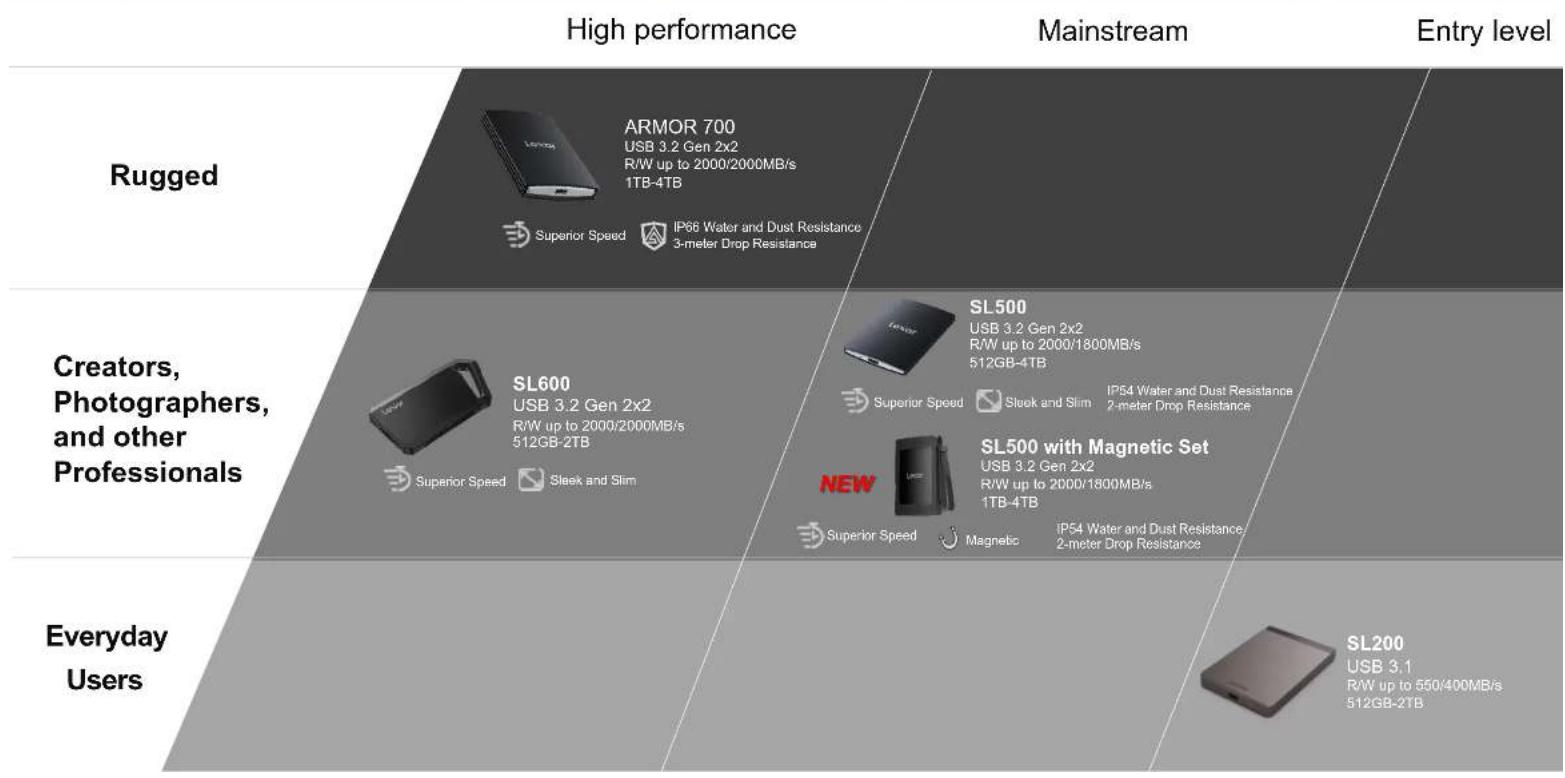
Positioning
SL500 Portable SSD with Magnetic Set
Lexar
Target Market
SL500 Portable SSD with Magnetic Set
Lexar
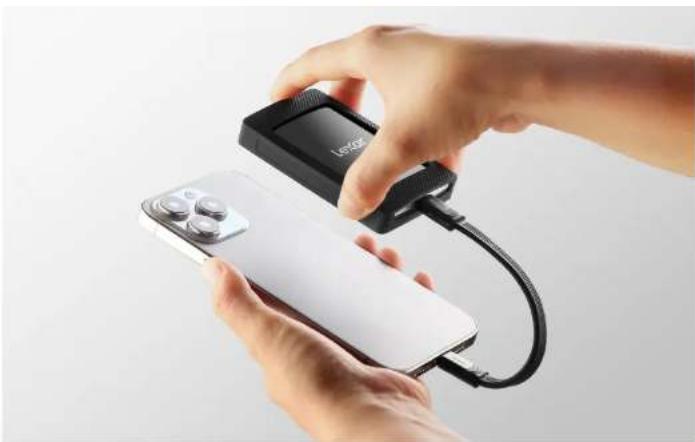
Designed for on-the-go users, the drive is portable and can be magnetically attached to your device. It is specifically designed for those who want to shoot directly to the drive in up to 4K 60FPS with iPhone 15 Pro and iPhone 15 Pro Max.
Product Overview
SL500 Portable SSD with Magnetic Set Lexar
Easily Attach, Capture, and Transfer
- Use the included magnetic set to attach to your laptop case or to your iPhone to capture ProRes video 3
- Incredible USB 3.2 Gen 2x2 performance of up to 2000MB/s read and 1800MB/s write 1 to transfer files fast for more efficient work (Performance on Mac and other systems not supporting USB 3.2 Gen 2x2 may be lower)
- Supports Apple ProRes recording – shoot directly to the drive in up to 4K 60FPS with iPhone 15 Pro and iPhone 15 Pro Max
- Thin, stylish, and durable metal design is rated IP54 for its dust and water resistance and is drop-resistant up to 2M4
- Wide compatibility with mobile devices, iPhone 15 series, laptops, cameras, as well as Xbox X|S, PS4, PS5, and more
- Unique Thermal Control Design ensures optimal temperatures even at top speeds, so high performance is always retained.
- Includes Lexar * DataShield TM 256-bit AES encryption software to protect files 2

4TB
2TB
1TB
up to 2000MB/s read up to 1800MB/s write 1
USB 3.2 Gen 2x2
Magnetic Set: 3-year limited Portable SSD: 5-year limited

The Lexar® SL500 Portable SSD with Magnetic Set delivers exceptional 2000MB/s read and 1800MB/s write 1 to store and transfer large files fast. It features a super-slim, solid aluminum unibody construction that easily fits in the palm of your hand and can magnetically attach to your device. It also comes with Lexar DataShield™ 256-bit AES encryption software to keep your files secure 2 and is compatible with most computers, cameras, and gaming devices
Up to 2000MB/s read and 1800MB/s write speeds, Speeds based on internal testing on device that supports USB 3.2 Gen 2x2; performance may be lower depending on host device, interface, usage conditions, and other factors, 1MB = 1,000,000 bytes. Security safeguards, by their nature, are capable of circumvention. Lexar does not guarantee data will be 100% secure from unauthorized access, alteration, or destruction.
Attach and Go!
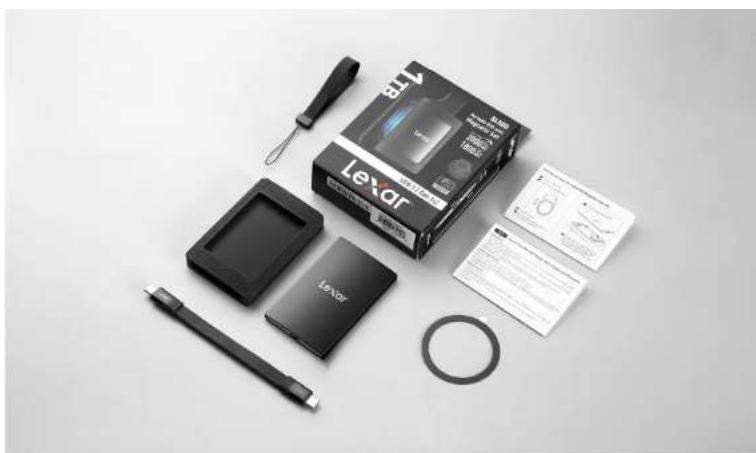
The Lexar® SL500 Portable SSD with Magnetic Set includes a magnetized, protective sleeve, an additional magnetic ring to use with a laptop cover or other device, and a wrist strap. This convenient magnetic set lets you easily and neatly attach the drive to your device.

Exceptional USB 3.2 Gen 2x2 Performance
Blazing-fast speeds of up to 2000MB/s read and 1800MB/s write 1 accelerate data transfers for more efficient work (Performance on Mac and other systems not supporting USB 3.2 Gen 2x2 may be lower).
Up to 2000MB/s read and 1800MB/s write speeds. Speeds based on internal testing on device that supports USB 3.2 Gen 2x2; performance may be lower depending on host device, interface, usage conditions, and other factors. 1MB = 1,000,000 bytes.
iPhone Friendly
The Lexar® SL500 Portable SSD supports Apple ProRes recording. Shoot directly to the drive in up to 4K 60FPS with iPhone 15 Pro and iPhone 15 Pro Max.
Compact and Lightweight
The Lexar® SL500 Portable SSD roughly the size of a credit card at 4.8mm thick, the slim, solid aluminum unibody construction fits comfortably in the palm of your hand or pocket.

Plays Nicely with all Your Devices
The Lexar® SL500 Portable SSD with Magnetic Set is compatible with PC, Mac, Android devices, iPhone 15 series, gaming consoles, cameras, and more.


Keep Your Files Secure
Includes Lexar DataShield™, with 256-bit AES encryption, to help keep your sensitive files secure³
3 Security safeguards, by their nature, are capable of circumvention. Lexar does not guarantee data will be 100% secure from unauthorized access, alteration, or destruction.
Specifications
SL500 Portable SSD with Magnetic Set Lexar
| Product | Lexar® SL500 Portable SSD with Magnetic Set |
| Capacity | 1TB, 2TB, 4TB |
| Interface | USB 3.2 Gen 2x2 |
| Speed | Up to 2000MB/s read, up to 1800MB/s write 1 |
| Systems Supported | Mac® OSX 10.6+, Windows® 11/10/7/8, Android 4.4, standard USB Type-C connector, iPhone 15 series or above |
| Operating Temperature | 0°C to 50°C (32°F to 122°F) |
| Storage Temperature | -40°C to 85°C (-40°F to 185°F) |
| Dimension (L x W x H) | Magnetic Set: 89.5mm x 59mm x 13.6mm/3.5" X 2.3" X 0.5"Portable SSD: 85mm x 54mm x 7.8mm (The thinnest part is 4.8mm)3.3" X 2.1" X 0.3" (The thinnest part is 0.19 inches) |
| Weight | Magnetic Set: 95gPortable SSD: 43g |
1 Up to 2000MB/s read and 1800MB/s write speeds. Speeds based on internal testing on device that supports USB 3.2 Gen 2x2; performance may be lower depending on host device, interface, usage conditions, and other factors. 1MB = 1,000,000 bytes.

Global Version
Benchmark Info
SL500 Portable SSD with Magnetic Set Lexar
CPU: 24-Core AMD Ryzen Threadripper 3960X, 4350 MHz (43.5 x 100)
BIOS: AMI UEFI
Motherboard: MSI TRX40 Pro WiFi (MS-7C60)
OS: Microsoft Windows 10 Pro
Interface: USB3.2 Gen2*2
RAM: 16GB
Mode: AHCI
![CrystalDiskMark 7.0.0 x64 [ADMIN] 文件(F) 设置(S) Profile 主题(T) 帮助(H) 语言(L)(Language) All 5 1GiB G: 0% (0/954GiB) MB/s SEQ1M Read [MB/s] Write [MB/s] QRT4 2093.92 2017.66 SEQ1M 1906.53 1735.41 QTT1 RND4K 177.45 210.97 Q32T16 RND4K 37.38 75.19](/content/2026/07/1455188/images/1899e2ed201360f091f9974a44a8781134ace47de61c88ca30b281ca5936846a.jpg)
1TB
![CrystalDiskMark 7.0.0 x64 [ADMIN] 文件(F) 设置(S) Profile 主题(T) 帮助(H) 语言(L)(Language) All 5 1GiB F: 0% (0/1908GiB) MB/s Read [MB/s] Write [MB/s] SEQ1M 2014.23 2007.48 QBT4 SEQ1M 1827.68 1721.25 Q1T1 RND4K 191.41 217.18 Q32T16 RND4K 29.91 82.21 Q1T1](/content/2026/07/1455188/images/66730a4ee6da9c85852ff00fb2b593b70e1aa85203f11b308535c27575b0f742.jpg)
2TB
Set-Up Information SKU/UPC
SL500 Portable SSD with Magnetic Set
Lexar
| Region | Oracle Item Number | Lexar Retail Sku Material Description Capacity | Lexar Single UPC/EAN Code | Master Carton UPC/EAN Code | Master Carton Qty | |
| Global | ZJPL023C0278 | LSL500M001T-RNBNG | Lexar SL500 Portable SSD 1TB with Magnetic Set, GL | 1TB 843367134595 10843367134592 | 10 | |
| Global | ZJPL023C0279 | LSL500M002T-RNBNG | Lexar SL500 Portable SSD 2TB with Magnetic Set, GL | 2TB 843367134632 10843367134639 | 10 | |
| Globa | ZJPL023C0280 | LSL500M004T-RNBNG | Lexar SL500 Portable SSD 4TB with Magnetic Set, GL | 4TB 843367134663 10843367134660 | 10 | |
SL500 Portable SSD


SL500 Portable SSD with Magnetic Set

Lexar™
THANK YOU

- LAUNCH COMMUNICATION
- POSITIONING
- SL500 PORTABLE SSD WITH MAGNETIC SET
- LEXAR
- TARGET MARKET
- PRODUCT OVERVIEW
- SL500 PORTABLE SSD WITH MAGNETIC SET LEXAR
- EASILY ATTACH, CAPTURE, AND TRANSFER
- ATTACH AND GO
- EXCEPTIONAL USB 3.2 GEN 2X2 PERFORMANCE
- IPHONE FRIENDLY
- COMPACT AND LIGHTWEIGHT
- PLAYS NICELY WITH ALL YOUR DEVICES
- KEEP YOUR FILES SECURE
- SPECIFICATIONS
- BENCHMARK INFO
- LEXAR™
Brand : LEXAR
Model : SL500M
Category : External hard drive