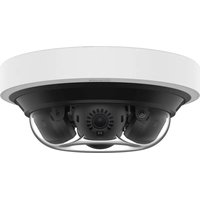
PNM-C16013RVQ - Surveillance Camera Hanwha - Free user manual and instructions
Find the device manual for free PNM-C16013RVQ Hanwha in PDF.


Pick your language and provide your email: we'll send you a specifically translated version.
| Product Type | 2-Channel Multi-Directional Surveillance Camera |
| Brand | Hanwha |
| Model | PNM-C16013RVQ |
| Category | Outdoor Surveillance Camera |
| Resolution | 16MP (dual 8MP sensors) |
| Lens | 2.8mm fixed |
| Field of View | 180° horizontal per sensor, 360° total |
| Night Vision | Up to 30m IR range |
| Weather Rating | IP66, IK10 |
| Power Supply | PoE+ (IEEE 802.3at) or DC 12V |
| Dimensions (W x H x D) | 200 x 150 x 100 mm |
| Weight | 1.5 kg |
| Operating Temperature | -40°C to 55°C |
| Storage | MicroSD slot up to 256GB |
| Video Compression | H.265, H.264, MJPEG |
| Frame Rate | 60fps at maximum resolution |
| Intelligent Analytics | Motion detection, tampering, line crossing, area entrance/exit |
| Connectivity | Ethernet RJ45 10/100/1000 Mbps |
| Warranty | 3 years |
| Maintenance | Clean lens with dry cloth; check cables periodically |
| Safety | Surge protection, CE, FCC compliant |
| Spare Parts | Replacement lenses, IR boards, main boards available |
| Reparability | Modular design; authorized service centers recommended |
Frequently Asked Questions - PNM-C16013RVQ Hanwha
How do I connect the PNM-C16013RVQ to my network?
Connect via Ethernet cable to a PoE+ switch. Ensure the switch provides sufficient power. Use Hanwha's IP Installer tool to discover the camera on the network.
Can I adjust the field of view on this camera?
No, the field of view is fixed at 180° per sensor due to the fixed lens. The dual sensor design covers 360° total.
What is the maximum storage capacity for local recording?
Supports MicroSD cards up to 256GB. For longer recording, consider using an NVR with HDD.
How do I enable night vision?
Night vision is activated automatically by the built-in IR cut filter and IR LEDs. Manual control is available via camera menu.
Is the camera compatible with Hanwha Wisenet software?
Yes, it fully supports Wisenet video management software and all compatible third-party VMS via ONVIF Profile G/T.
What is the recommended mounting height?
Mount at a height of 2.5m to 4m for optimal coverage. The multi-directional design covers wide areas.
How do reset to factory defaults?
Press and hold the reset button on the camera for 10 seconds using a pin. Or use the web interface factory reset option.
Can the camera be used indoors?
Yes, it has IP66 rating, suitable for both indoor and outdoor use. The operating temperature range is -40°C to 55°C.
What analytics are available?
Built-in intelligent analytics: motion detection, tampering alarm, line crossing, area entrance/exit. These can be configured in the camera menu.
How do I update the firmware?
Download the latest firmware from Hanwha's support site. Upload via the camera's web interface under System -> Firmware Upgrade.
User questions about PNM-C16013RVQ Hanwha
0 question about this device. Answer the ones you know or ask your own.
Ask a new question about this device
No questions yet. Be the first to ask one.
Download the instructions for your Surveillance Camera in PDF format for free! Find your manual PNM-C16013RVQ - Hanwha and take your electronic device back in hand. On this page are published all the documents necessary for the use of your device. PNM-C16013RVQ by Hanwha.
USER MANUAL PNM-C16013RVQ Hanwha

Manual assistant
Powered by Anthropic
Waiting for your message
Product information
Brand : Hanwha
Model : PNM-C16013RVQ
Category : Surveillance Camera