
Pac-Man Pixel Bash Neon - Toys Namco Bandai Games - Free user manual and instructions
Find the device manual for free Pac-Man Pixel Bash Neon Namco Bandai Games in PDF.


| Product Type | Electronic Arcade Game Toy |
| Brand | Namco Bandai Games |
| Model | Pac-Man Pixel Bash Neon |
| Game Theme | Pac-Man with Neon LED Effects |
| Dimensions (Approx.) | 15 x 10 x 5 cm (5.9 x 3.9 x 2.0 in) |
| Weight (Approx.) | 0.3 kg (0.66 lb) |
| Power Supply | 3 x AA batteries (not included) |
| Display | Pixel-style LED matrix with neon glow |
| Sound | Built-in speaker with classic Pac-Man sound effects |
| Controls | Directional joystick and action button |
| Main Functions | Play Pac-Man game, high score tracking, neon lighting effects |
| Age Recommendation | 5 years and up |
| Safety Certification | CE, FCC compliant |
| Materials | ABS plastic, electronic components |
| Cleaning Instructions | Wipe with a dry, soft cloth. Avoid liquids and solvents. |
| Battery Replacement | Open battery compartment with screwdriver. Use fresh alkaline batteries. |
| Spare Parts Availability | Contact Namco Bandai customer support for replacement joystick or buttons. |
| Repairability | Not user-serviceable beyond battery replacement. Seek professional repair for other issues. |
Frequently Asked Questions - Pac-Man Pixel Bash Neon Namco Bandai Games
User questions about Pac-Man Pixel Bash Neon Namco Bandai Games
0 question about this device. Answer the ones you know or ask your own.
Ask a new question about this device
Download the instructions for your Toys in PDF format for free! Find your manual Pac-Man Pixel Bash Neon - Namco Bandai Games and take your electronic device back in hand. On this page are published all the documents necessary for the use of your device. Pac-Man Pixel Bash Neon by Namco Bandai Games.
USER MANUAL Pac-Man Pixel Bash Neon Namco Bandai Games

OWNER'S MANUAL
The actual product you have received may differ slightly from the illustration.

DANGER
- To ensure safe operation of the product, be sure to read this Operation Manual before use.
- Keep this Operation Manual in a safe place for easy reference when needed.
Bandai Namco Amusement America Inc.
IMPORTANT
Read PRECAUTIONS and INSTALLATION Sections before operating game
RF Notice
FCC REGULATORY AND SAFETY INFORMATION (USA ONLY)
WARNING: This equipment has been tested and found to comply with the limits for a Class B digital device, pursuant to part 15 of the FCC Rules. These limits are designed to provide reasonable protection against harmful interference in a residential installation. This equipment generates, uses, and can radiate radio frequency energy and, if not installed and used in accordance with the instructions, may cause harmful interference to radio communications. However there is no guarantee that interference will not occur in a particular installation. If this equipment does cause harmful interference to radio or television reception, the user is encouraged to correct the interference by one or more or the following measures:
- Reorient or relocate the receiving antenna.
- Increase the separation between the equipment and the receiver
- Connect the equipment into an outlet that is on a circuit different from the receiver
- Consult the dealer or an experienced radio / TV technician for help.
No part of this publication may be reproduced by any mechanical photographic, or electronic process, or in the form of a photographic recording, nor may it be stored in a retrieval system, transmitted, or otherwise copied for public or private use, without permission from Bandai Namco Amusement America Inc..
SAFETY PRECAUTIONS
The following symbols are used in labels on the game to draw attention to potentially hazardous situations:

WARNING : Failure to avoid the risk may result in serious injury or death.

Electrical Shock Hazard. Disconnect power before removing cover. Should only be done by a qualified technician.
1.0 SPECIFICATIONS
Input Power:
120 VAC, 60 Hz, 1.5 Amp
180 Watts Maximum 33"
Installed Dimensions:
W 21 7/8" L 60" H
WARNING
REMOVAL OF SERIAL NUMBERS AND/OR BAR-CODES FROM PRODUCT OR COMPONENTS WILL VOID THE WARRANTY
THIS GAME CONTAINS NO SERVICEABLE PARTS INSIDE AND ANY ATTEMPT TO ACCESS INTERNAL PARTS MAY RESULT IN ELECTRIC SHOCK DUE TO THE PRESENCE OF HIGH VOLTAGE.
2.0 IMPORTANT SAFETY INSTRUCTIONS
2.1 INSTRUCTIONS
- Read these instructions.
- Keep these instructions
- Heed all warnings.
- Follow all instructions
- Do not use apparatus near water.
- Clean only with a dry cloth.
- Do not block any ventilation openings, install in accordance with the manufacturers instructions.
- Do not install near any heat sources such as radiators, heat registers, stoves or other apparatus (including amplifiers) that produce heat.
-
Do not defeat the safety purpose of the polarized or grounding type plug. A polarized plug has two blades with one wider than the other. A grounding type plug has two blades and a third grounding prong. The wide blade or the third prong are provided for your safety. If the provided plug does not fit into your outlet, consult an electrician for replacement of the obsolete outlet.
-
Protect the power cord from being walked on or pinched, particularly at plugs, convenience receptacles, and the point it exits from the product.
- Only use the attachments/accessories specified by the manufacturer.
- Unplug this apparatus during lightning storms or when unused for long periods of time.
- Refer all servicing to qualified service personnel. Servicing is required when the apparatus has been damaged in any way, such as power-supply cord or plug is damaged, liquid has been spilled or objects have fallen into the apparatus, the apparatus has been exposed to rain or moisture, does not operate normally, or has been dropped.
- When replacing fuses heed the following warning: CAUTION: For continued protection against risk of fire, replace only with the same type of fuse having the same electrical ratings.
2.2 INSTALLATION
This game is designed for indoor use only. It must not be installed outdoors. The following conditions must be avoided.
- Direct exposure to sunlight, high humidity, direct water contact, dust, high heat, or extreme cold.
- The game must be installed on a level surface. Do not install in an area such that the game would present an obstacle in case of an emergency (i.e., near fire equipment or emergency exits).
2.3 HANDLING
- Before operating the game, make sure that the main AC power hookup includes a safety ground. This will ensure safe operation as well as compliance with FCC and UL regulations. Measure the AC power line voltage. Verify that the voltage source is between 110 and 125 VAC.
- Before replacing any parts, turn the AC power OFF and unplug the game.
- When unplugging the game from an electrical outlet, always grasp the plug, not the line cord.
- The game power supply includes areas of high voltage. Take care at all times to avoid electrical shock whenever inspecting or adjusting the game.
3.0 INSPECTION & INSTALLATION
To ensure a successful startup following shipment, the PAC-MAN'S™ PIXEL BASH game cabinet should be inspected before initial power-up.
- Carefully remove the game cabinet from its shipping platform and inspect it for visible signs of damage. When installing, please ensure there is at least 3 inches clearance around the cabinet for adequate ventilation.
If your game exhibits signs of damage be sure to document it and contact your distributor and transportation carrier immediately.
- Examine the contents of the package. It should contain the following:
One PAC-MAN'S™ PIXEL BASH game.
One line cord.
One owners warranty registration Card.
One owners manual (this manual).
One FCC Regulatory and Safety Information Sheet.
If any of these items are missing, please contact your distributor immediately.
- Turn on the game.
Plug in the game and turn on the power switch, (the switch is located on the back left corner of the cabinet when facing the machine.)
- The cabaret game consists of the following video games in one package:
| Bosconian | Mappy | DigDug II | New Rally-X |
| DigDug | PAC-MAN | Tower of Druaga | Pac & Pal |
| Dragon Spirit | Pac-Mania | Gaplus | PAC-MAN Plus |
| Galaga | Rally-X | Grobda | Rompers |
| Galaga 88 | Rolling Thunder | Hopping Mappy | Skykid |
| Galaxian | Xevious | King & Balloon | Skykid Deluxe |
| Mappy | Baraduke | Metro-Cross | Splatterhouse |
| MS.PAC-MAN | Dragon Buster | Motos | Super PAC-MAN |
| Super Xevious |
From the main screen (Attract Mode) press any button on the Player control panel to enter the Select Game Mode. While in this mode, move the joystick to the left or right to view the game titles listed above. When the desired game title is selected (ie. Galaga) press the B button (the right hand player button) to select that game. To begin playing operate the 1 or 2 Player Start button to initiate the appropriate game. To back out of this selection, hit any other button before pressing either of the Player start buttons and the screen will return to game select mode. At this point you can move the joystick to start the choice for another selection. If no selection is made by the time countdown timer reaches zero, the game reverts back to attract mode.
4.0 TEST MODE
Located on the back of the cabinet on the upper left corner when facing the machine are access controls to the test mode. There are 3 switches and a volume control provided to tweak the settings to the owners specifications.

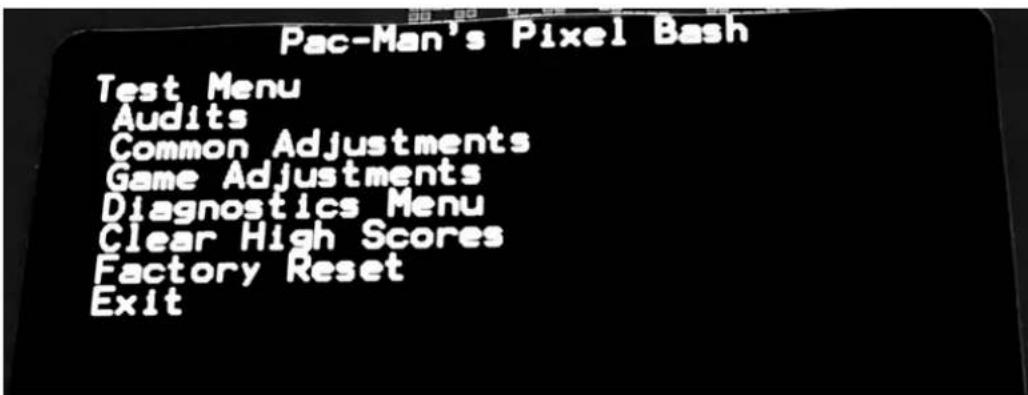
The Test toggle switch causes the game to enter test mode, showing the available catagories from which the tests can be selected. When the test toggle is returned to its previous position, the game returns to attract mode. Any changes performed by the owner are saved into memory. The Select toggle switch is used to move up and down through the menus or catagories, and the Enter pushbutton is used to make the selection. After making any changes to a setting, use the EXIT function to step out of that section. When complete, return the test toggle switch to its normal position before turning the game off.
When the test switch is operated, the following menu is displayed:
Choosing Game Options gives you the following menu :
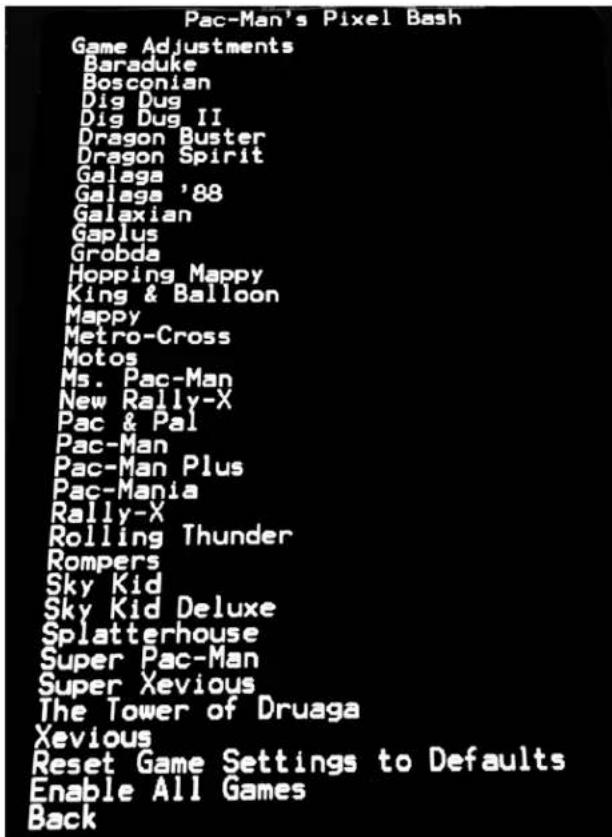
This will allow you to tailor each of the games characteristics individually by adjusting things like the game difficulty, the speed, the number of lives, and the number of points required for a bonus. It also allows you to return each game to default factory settings.
Choosing Common Adjustments gives you the following menu :

DIP SWITCH SETTINGS
DIP switches 1-3 select the resolution. In most applications all three should be off (VGA).
| 1 | 2 | 3 | resolution |
| OFF | OFF | OFF | VGA (640x480) |
| ON | OFF | OFF | Standard definition (288x224) |
| OFF | ON | OFF | reserved |
| ON | ON | OFF | XGA (1024x768) |
| OFF | OFF | ON | WXGA (1280x800) |
| ON | OFF | ON | 1368x768 |
| OFF | ON | ON | reserved |
| ON | ON | ON | reserved |
DIP 4, if on, stretches horizontal games vertically to fill the monitor. Has no effect when set to standard definition (288x224).
DIP 5-7 are unused.
DIP 8, if on, inverts the composite sync signal. This is useful only for standard resolution CRTs and only affects monitors attached via JAMMA. Typically this should be off.
JAMMA PINOUT
| BOTTOM | TOP | ||
| GND | A | 1 | GND |
| GND | B | 2 | GND |
| 5VDC | C | 3 | 5VDC |
| 5VDC | D | 4 | 5VDC |
| E | 5 | ||
| 12VDC | F | 6 | 12VDC |
| KEY | KEY | ||
| Count 2 | J | 8 | Count 1 |
| Lockout 2 | K | 9 | Lockout 1 |
| Speaker - | L | 10 | Speaker + |
| Volume Down | M | 11 | Volume Up |
| Analog Green | N | 12 | Analog Red |
| Composite Sync | P | 13 | Analog Blue |
| Service Credit | R | 14 | GND |
| S | 15 | Test | |
| Coin 2 | T | 16 | Coin 1 |
| Start 2 | U | 17 | Start 1 |
| Player 2 Up | V | 18 | Player 1 Up |
| Player 2 Down | W | 19 | Player 1 Down |
| Player 2 Left | X | 20 | Player 1 Left |
| Player 2 Right | Y | 21 | Player 1 Right |
| Player 2 Push 1 (A) | Z | 22 | Player 1 Push 1 (A) |
| Player 2 Push 2 (B) | a | 23 | Player 1 Push 2 (B) |
| b | 24 | ||
| c | 25 | ||
| d | 26 | ||
| GND | e | 27 | GND |
| GND | f | 28 | GND |
WARRANTY
Seller warrants that its printed circuit boards and parts thereon are free from defects in materials and workmanship under normal use and service for a period of ninety (90) days from the date of shipment. Seller warrants that its video displays (in games supplied with video displays) are free from defects in material and workmanship under normal use and service for a period of thirty (30) days from the date of shipment. None of the Seller's other products or parts thereof are warranted. Seller's sole liability shall be, at its option, to repair, replace, or credit Buyer's account for such products which are returned to Seller during said warranty period, provided:
a) Seller is promptly notified in writing upon discovery by Buyer that said products are defective.
b) Such products are returned prepaid to Seller's plant; and
c) Seller's examination of said products discloses to Seller's satisfaction that such alleged defects existed and were not caused by accident, misuse, neglect, alteration, improper repair, improper installation, or improper testing.
In no event shall Seller be liable for loss of profits. loss of use, incidental or consequential damages.
Except for any express warranty set forth in a written contract between Seller and Buyer which contract supersedes the terms herein, this warranty is in lieu of all other warranties expressed or implied, including the implied warranties of merchantability and fitness for a particular purpose, and all other obligations or liabilities on the Seller's part, and it neither assumes nor authorizes any other person to assume for the Seller any other liabilities in connection with the sale of products by Seller.
BNAA distributors are independent, being privately owned and operated. In their judgment they may sell parts or accessories other than BNAA parts or accessories. BNAA cannot be responsible for the quality, suitability or safety of any non-Bandai Namco Amusement America Inc. part or any modification including labor which is performed by such distributor.
SERVICE
If you have questions regarding any Bandai Namco Amusement America Inc.
product or require technical support:
Contact Bandai Namco Amusement America Inc. Customer Service at:
1 (847) 264-5614 or FAX 1 (847) 264-5613
Hours: 8:30 am - 5:00 pm CST
Parts and repair services for Bandai Namco Amusement America Inc.
products are available through your distributor.
Notes
Bandai Namco Amusement America Inc.
Technical Support
(847) 264-5614
Bandai Namco Amusement America Inc.
Parts Sales
(847) 264-5612
www.namcoparts.com
Your online destination for genuine replacement parts for NAMCO games
Part No: PY45-19862-00
Bandai Namco Amusement America Inc.
1550 Glenlake Ave
Itasca, IL 60143
(847) 264-5610
FAX: (847) 264-5613


- OWNER'S MANUAL
- DANGER
- BANDAI NAMCO AMUSEMENT AMERICA INC
- IMPORTANT
- READ PRECAUTIONS AND INSTALLATION SECTIONS BEFORE OPERATING GAME
- RF NOTICE
- FCC REGULATORY AND SAFETY INFORMATION (USA ONLY)
- SAFETY PRECAUTIONS
- 1.0 SPECIFICATIONS
- WARNING
- 2.0 IMPORTANT SAFETY INSTRUCTIONS
- 2.1 INSTRUCTIONS
- 2.2 INSTALLATION
- 2.3 HANDLING
- 3.0 INSPECTION & INSTALLATION
- IF YOUR GAME EXHIBITS SIGNS OF DAMAGE BE SURE TO DOCUMENT IT AND CONTACT YOUR DISTRIBUTOR AND TRANSPORTATION CARRIER IMMEDIATELY
- 4.0 TEST MODE
- DIP SWITCH SETTINGS
- WARRANTY
- SERVICE
- NOTES
- TECHNICAL SUPPORT
- PARTS SALES
- WWW.NAMCOPARTS.COM
- YOUR ONLINE DESTINATION FOR GENUINE REPLACEMENT PARTS FOR NAMCO GAMES
- 1550 GLENLAKE AVE
- ITASCA, IL 60143
Brand : Namco Bandai Games
Model : Pac-Man Pixel Bash Neon
Category : Toys