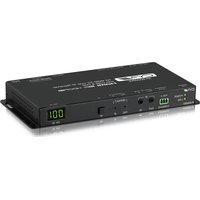
IP-9000RX - AV receiver CYP - Free user manual and instructions
Find the device manual for free IP-9000RX CYP in PDF.


Pick your language and provide your email: we'll send you a specifically translated version.
| Brand | CYP |
| Model | IP-9000RX |
| Product Type | HDMI over IP Receiver |
| Video Resolution | Up to 4K@60Hz 4:4:4 |
| HDMI Version | HDMI 2.0 |
| HDCP Version | HDCP 2.2 |
| Audio Support | LPCM 2.0/5.1/7.1, Dolby Digital, DTS |
| Video Latency | < 1 frame (typical) |
| Ethernet Port | 1x RJ-45 10/100/1000 Mbps |
| Control Interface | RS-232, IR, Web GUI, Telnet |
| Power Supply | 5V/2A DC |
| Power Consumption | 5W |
| Dimensions (W x D x H) | 140 x 80 x 25 mm |
| Weight | 200 g |
| Operating Temperature | 0°C to 50°C |
| Enclosure Material | Metal |
| Mounting | Desktop or rack mount with optional bracket |
| Warranty | 2 years |
| Included Accessories | Power adapter, IR blaster, manual |
| Compliance | CE, FCC, RoHS |
Frequently Asked Questions - IP-9000RX CYP
What is the maximum video resolution supported by the IP-9000RX?
The IP-9000RX supports video resolutions up to 4K@60Hz 4:4:4 over a Gigabit network.
How do I connect the IP-9000RX to my network?
Connect an Ethernet cable from your switch/router to the RJ-45 port on the unit. For best performance, use a Gigabit switch and ensure the network is dedicated to video traffic.
Can I use the IP-9000RX with a transmitter from another brand?
The IP-9000RX is designed to work exclusively with CYP transmitters (e.g., IP-9000TX). Using third-party transmitters may not guarantee compatibility or performance.
Does the IP-9000RX support HDCP 2.2?
Yes, it supports HDCP 2.2 and is backward compatible with HDCP 1.4 for protected content such as 4K Blu-ray or streaming services.
What is the typical latency of the video transmission?
The video latency is typically less than 1 frame (around 16ms at 60Hz), making it suitable for real-time applications.
How can I control the IP-9000RX remotely?
You can control it via RS-232 commands, IR remote (using the included blaster), Telnet, or the built-in web GUI.
What is the power requirement for the IP-9000RX?
It requires a 5V/2A DC power supply, which is included. The typical power consumption is about 5W.
Can I mount the IP-9000RX on a rack?
Yes, it can be mounted on a rack using an optional rack mount bracket. It is also suitable for desktop placement.
What audio formats are supported?
It supports LPCM 2.0/5.1/7.1, Dolby Digital, Dolby Digital Plus, and DTS up to 5.1 channels.
How do I reset the IP-9000RX to factory defaults?
Press and hold the Reset button on the rear panel for about 10 seconds until the status LEDs blink. The unit will reboot with factory settings.
User questions about IP-9000RX CYP
0 question about this device. Answer the ones you know or ask your own.
Ask a new question about this device
No questions yet. Be the first to ask one.
Download the instructions for your AV receiver in PDF format for free! Find your manual IP-9000RX - CYP and take your electronic device back in hand. On this page are published all the documents necessary for the use of your device. IP-9000RX by CYP.
USER MANUAL IP-9000RX CYP

Manual assistant
Powered by Anthropic
Waiting for your message
Product information
Brand : CYP
Model : IP-9000RX
Category : AV receiver