
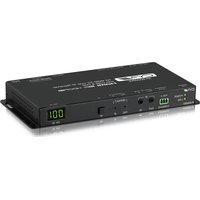
SDV-C2-RX - AV receiver CYP - Free user manual and instructions
Find the device manual for free SDV-C2-RX CYP in PDF.


Pick your language and provide your email: we'll send you a specifically translated version.
| Product Type | SDI Video Receiver |
| Model | SDV-C2-RX |
| Brand | CYP |
| Dimensions (W x D x H) | 170 mm x 100 mm x 30 mm |
| Weight | 0.5 kg |
| Power Supply | 5V DC, 1A |
| Supported Video Formats | 1080p, 3G-SDI |
| Input Connector | 1x BNC (SDI) |
| Output Connectors | 1x BNC (SDI loop-through), 1x HDMI |
| Maximum Cable Distance | 100 m (coaxial cable) |
| Operating Temperature | 0°C to 40°C |
| Housing Material | Metal |
| LED Indicators | Power, Signal Lock |
| Compliance | CE, FCC |
| Maintenance | Clean with dry cloth |
| Safety Precautions | Use only supplied power adapter |
| Spare Parts Availability | Contact manufacturer |
| Repairability | Service by qualified personnel |
| Warranty | 1 year |
| Applications | Broadcast, Pro AV |
Frequently Asked Questions - SDV-C2-RX CYP
What is the CYP SDV-C2-RX?
The CYP SDV-C2-RX is a 3G-SDI video receiver that converts SDI signals to HDMI, supporting up to 1080p resolution.
How do I connect the SDV-C2-RX?
Connect an SDI source to the BNC input, then connect the HDMI output to a display. The unit can also loop out SDI via the second BNC connector.
What power supply is needed?
The device requires a 5V DC, 1A power adapter. Only use the supplied adapter to avoid damage.
Does the SDV-C2-RX support 4K?
No, this model supports up to 1080p @ 60Hz (3G-SDI). For 4K, consider CYP's 12G-SDI series.
What is the maximum cable length?
Using Belden 1694A or equivalent coaxial cable, the maximum transmission distance is 100 meters.
Can I use this device for long-distance transmission?
Yes, it's designed for distances up to 100m over coaxial cable, ideal for broadcast and AV installations.
What do the LED indicators mean?
The Power LED lights when powered. The Signal Lock LED illuminates when a valid SDI signal is detected.
Is the SDV-C2-RX wall-mountable?
The metal enclosure has mounting holes on the sides for optional wall brackets (not included).
How do I clean the device?
Disconnect power and wipe the case with a soft, dry cloth. Do not use liquids or chemicals.
Where can I find the user manual?
The manual is available for download on the notice-facile.com website for the CYP SDV-C2-RX.
User questions about SDV-C2-RX CYP
0 question about this device. Answer the ones you know or ask your own.
Ask a new question about this device
No questions yet. Be the first to ask one.
Download the instructions for your AV receiver in PDF format for free! Find your manual SDV-C2-RX - CYP and take your electronic device back in hand. On this page are published all the documents necessary for the use of your device. SDV-C2-RX by CYP.
USER MANUAL SDV-C2-RX CYP
Manual assistant
Powered by Anthropic
Waiting for your message
Product information
Brand : CYP
Model : SDV-C2-RX
Category : AV receiver