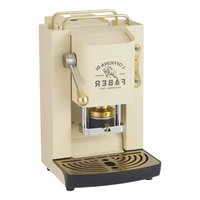
PRO Deluxe SABBASOTT - Coffee machine FABER - Free user manual and instructions
Find the device manual for free PRO Deluxe SABBASOTT FABER in PDF.


Pick your language and provide your email: we'll send you a specifically translated version.
| Product type | Automatic coffee machine with grinder |
| Brand | Faber |
| Model | PRO Deluxe SABBASOTT |
| Dimensions (W x D x H) | 30 x 25 x 35 cm |
| Weight | 8 kg |
| Power supply | 220-240 V, 50-60 Hz, 1450 W |
| Water tank capacity | 1.8 L |
| Bean hopper capacity | 250 g |
| Pump pressure | 15 bars |
| Main functions | Whole bean coffee, ground coffee, espresso, latte macchiato, cappuccino, hot water |
| Frothing system | Adjustable steam wand for milk |
| Maintenance and cleaning | Automatic descaling program, removable dishwasher-safe parts |
| Safety | Auto shut-off, overheat protection, steam wand locking |
| Spare parts and repairability | Water filter, door seal, removable brew unit, spout |
| General information | 2-year warranty, Italian manufacturing, LCD screen |
Frequently Asked Questions - PRO Deluxe SABBASOTT FABER
How to prepare an espresso with the Faber PRO Deluxe SABBASOTT?
Place a cup under the coffee spout, select the number of cups and press the espresso button. You can adjust the grind and water quantity via the menu.
What to do if the machine does not turn on?
Check that the plug is connected and the power switch is ON. If the problem persists, see the troubleshooting section of the manual.
How to clean the steam wand?
After each use, wipe the wand with a damp cloth. For deep cleaning, disassemble the tip and soak it in warm soapy water.
How often should you descale the machine?
It is recommended to descale every 2 to 3 months depending on water hardness. Use the integrated descaling program with compatible descaling agent.
Why is the coffee too weak?
Increase the grind (finer) or the coffee dose in the settings. Also check that the bean hopper is full and the spout is not clogged.
Can I use pre-ground coffee?
Yes, open the pre-ground coffee compartment (located at the front) and add a scoop of ground coffee. Then select the ground coffee mode on the screen.
How to change the water filter?
Remove the used filter from the water tank, insert the new filter pushing it firmly, then perform a manual rinse via the maintenance menu.
What to do if the drain indicator lights up?
The drip tray is full. Open the tray, empty the coffee grounds and liquid, then put it back. The indicator will turn off automatically.
How to adjust water hardness?
Go to the Settings menu, select 'Water hardness' and adjust according to levels (soft, medium, hard). Use a test strip if necessary.
The machine makes an abnormal noise, what to do?
Check that the drip tray and water tank are properly inserted. If the noise persists, stop the machine and contact after-sales service.
User questions about PRO Deluxe SABBASOTT FABER
0 question about this device. Answer the ones you know or ask your own.
Ask a new question about this device
No questions yet. Be the first to ask one.
Download the instructions for your Coffee machine in PDF format for free! Find your manual PRO Deluxe SABBASOTT - FABER and take your electronic device back in hand. On this page are published all the documents necessary for the use of your device. PRO Deluxe SABBASOTT by FABER.
USER MANUAL PRO Deluxe SABBASOTT FABER


Manual assistant
Powered by Anthropic
Waiting for your message
Product information
Brand : FABER
Model : PRO Deluxe SABBASOTT
Category : Coffee machine