
HMD 280 PRO - Professional headphones SENNHEISER - Free user manual and instructions
Find the device manual for free HMD 280 PRO SENNHEISER in PDF.


| Product type | Professional headset |
| Brand | Sennheiser |
| Model | HMD 280 PRO |
| Operating principle | Dynamic (headphone and microphone) |
| Headphone impedance | 64 Ω |
| Microphone impedance | 200 Ω |
| Headphone sensitivity | 113 dB SPL / 1 V rms |
| Microphone sensitivity | -63 dBV/Pa (0.7 mV/Pa) |
| Microphone frequency response | 50-13500 Hz |
| Noise attenuation | Up to 32 dB |
| Harmonic distortion | < 0.1% (at 1 kHz, 100 dB SPL) |
| Weight | Approximately 310 g |
| Cable length | Coiled cable, 1 to 3 m |
| Ear coupling | Circumaural (closed) |
| Magnets | Neodymium |
| Microphone directivity | Supercardioid |
| Supplied accessories | Windscreen, instruction manual |
| Main functions | Detailed and balanced sound reproduction, clear communication in noisy environments |
| Care and cleaning | Soft dry cloth, soapy water; do not use solvents |
| Safety | Respect listening levels (< 85 dB SPL for prolonged exposure) |
| Spare parts available | Ear pads, headband padding, windscreen, connection cable |
| Repairability | Replacement of wear parts possible; microphone to be replaced by Sennheiser service |
| Recommended use | Broadcast, TV, film, theatre, studio, intercom systems, intercoms |
| Folding | Foldable and reversible ear cups for compact transport |
Frequently Asked Questions - HMD 280 PRO SENNHEISER
User questions about HMD 280 PRO SENNHEISER
0 question about this device. Answer the ones you know or ask your own.
Ask a new question about this device
Download the instructions for your Professional headphones in PDF format for free! Find your manual HMD 280 PRO - SENNHEISER and take your electronic device back in hand. On this page are published all the documents necessary for the use of your device. HMD 280 PRO by SENNHEISER.
USER MANUAL HMD 280 PRO SENNHEISER
Instructions for use
Notice d'emploi
Instructions for use 15
Notice d'emploi 27
Instructions for use
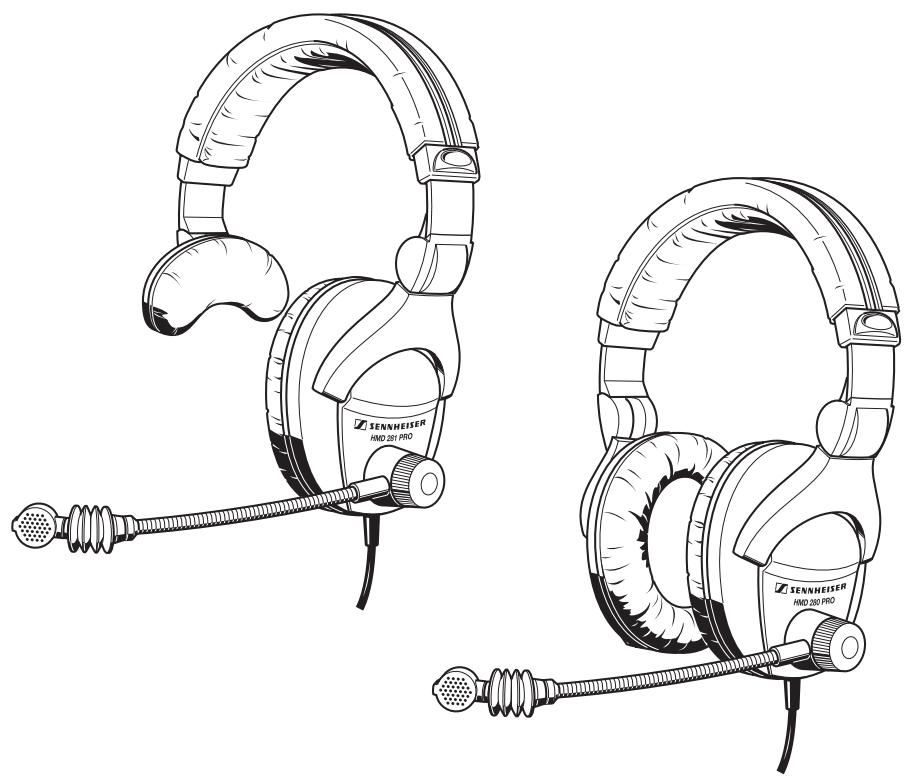
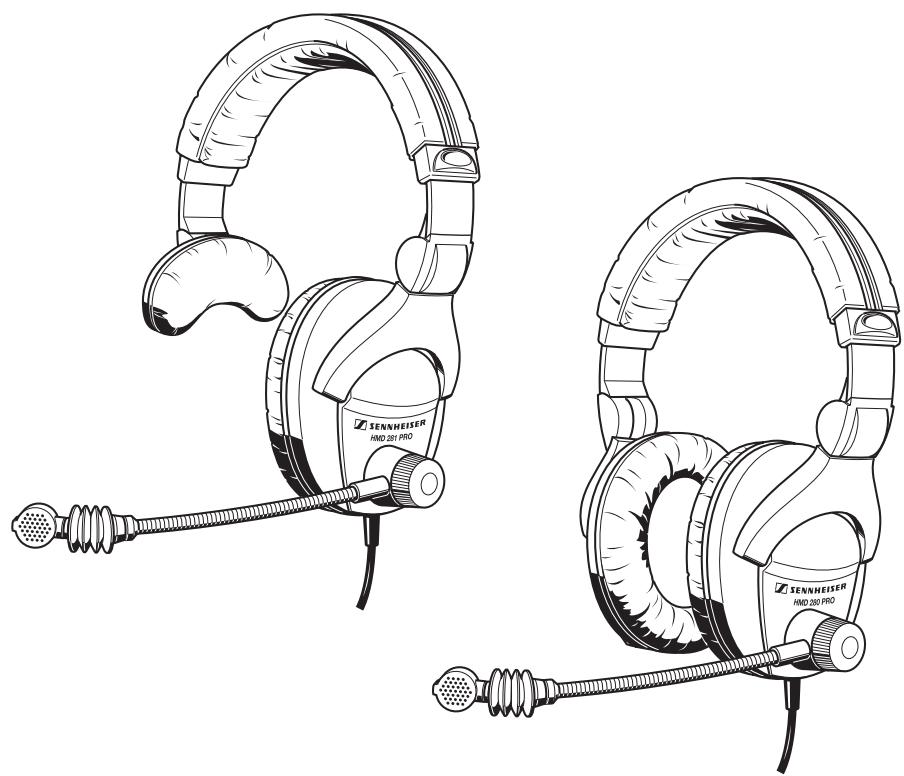
HMD 280 PRO / HMD 280-13
HMD 281 PRO / HMD 281-13
Thank you for choosing Sennheiser!
Over half a century of accumulated expertise in the design and manufacture of high-quality electro-acoustic equipment have made Sennheiser a world-leading company in this field. We have designed this product to give you reliable operation over many years.
Please take a few moments to read these instructions carefully, as we want you to enjoy your new Sennheiser product quickly and to the full.
Contents
Headset features 17
HMD 280 PRO headset 17
HMD 280-13 headset 17
HMD 281 PRO headset 17
HMD 281-13 headset 17
Areas of application 18
Delivery includes 18
Preparing the headset for use 20
Adjusting the headband 20
Relocating the microphone boom 20
Sliding over the wind screen 20
Position the microphone towards the corner of the mouth 20
Mounting a connector 20
Folding up the headset 21
Cleaning the headset 21
Replacing spare parts 22
Available accessories and spare parts 22
Replacing the ear cushions 22
Replacing the headband padding 22
Replacing the wind screen 22
Replacing the connecting cable 23
Replacing the microphone 23
Specifications 24
Frequency response curves and polar diagram 25
Connection diagrams 26
Connection diagram HMD 280 26
Connection diagram HMD 281 26
Headset features
HMD 280 PRO headset
- Accurate, linear sound reproduction for critical monitoring applications
- Low impedance headset (64 Ω impedance)
- Space-saving design features collapsible, rotating earcups
- Up to 32 dB of ambient noise attenuation
- Neodymium magnets for high maximum SPL (113 dB / 1 Vrms)
- Very comfortable, even if used for long periods due to
- very light weight
- soft, circum-aural ear cushions
- padded, adjustable headband
- Single-coiled cable
- Noise-cancelling, super-cardioid boom microphone, with excellent rejection of handling noise
- Very rugged with user-replaceable parts
HMD 280-13 headset
As HMD 280 PRO, but high impedance variant (300 impedance).
HMD 281 PRO headset
As HMD 280 PRO, but single-sided variant.
HMD 281-13 headset
As HMD 281 PRO, but high impedance variant (300 Ω impedance).
Areas of application
The noise-cancelling microphone provides clear communications even in a noisy environment. The headphones not only effectively attenuate external noise but also minimise spillage from the headphones to the outside world.
The headsets are designed for applications in the professional audio field, such as broadcast, TV, film, theater and recording applications. The headsets can be used
for live presentations
for news reporting
with talkback systems
with intercom systems, etc.
The single-sided headset is mainly used to provide camera teams with programme signals.
Delivery includes
- Headset
Wind and pop screen - Instructions for use
Attention! High volume!
This is a professional headset. Commercial use is subject to the rules and regulations of the trade association responsible. Sennheiser, as the manufacturer, is therefore obliged to expressly point out possible health risks arising from use.
This system is capable of producing sound pressure exceeding 85dB(A) . 85dB(A) is the sound pressure corresponding to the maximum permissible volume which is by law (in some countries) allowed to affect your hearing for the duration of a working day. It is used as a basis according to the specifications of industrial medicine. Higher volumes or longer durations can damage your hearing. At higher volumes, the duration must be shortened in order to prevent damage.
The following are sure signs that you have been subjected to excessive noise for too long a time:
You can hear ringing or whistling noise in your ears!
You have the impression (even for a short time only) that you can no longer hear high frequencies!
Preparing the headset for use
Adjusting the headband
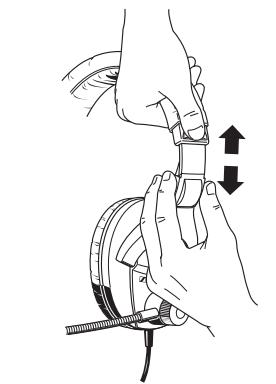
For good transmission quality and best possible comfort, the headband has to be adjusted to properly fit your head. To do so, adjust the headband via its snap-in locking mechanism.
Relocating the microphone boom
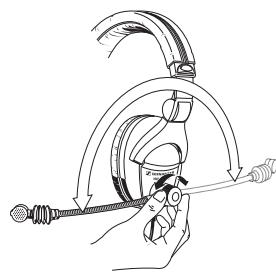
The microphone boom can be worn on either side of the mouth.
Loosen the quick-fixing device.
Turn the microphone boom towards the mouth.
Tighten the quick-fixing device.
Sliding over the wind screen
Before using the headset, slide the wind screen over the microphone. The wind screen must totally enclose the microphone.

Important:
Position the microphone towards the corner of the mouth
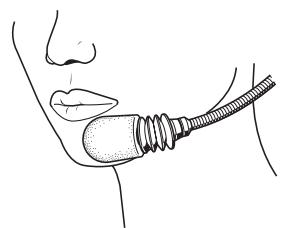
The headsets feature a flexible microphone boom. Bend the microphone boom so that the microphone is placed at the corner of the mouth. Maintain a distance of approx. 2cm between microphone and mouth. In this position, the risk of pop noise is reduced to a minimum.
Mounting a connector
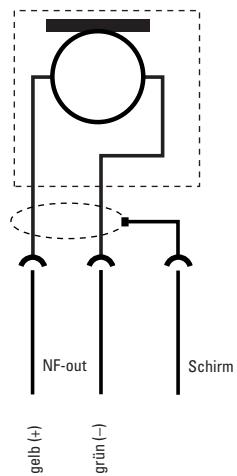
To mate with any signal jack the headset's connecting cable can be fitted with a connector of your choice
“Connection diagrams”).
Folding up the headset
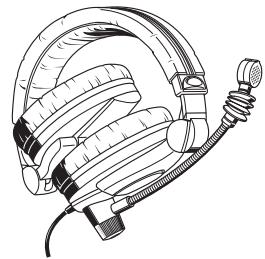
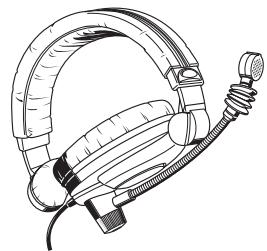
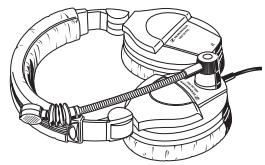
For space-saving transportation, the headset can be folded up in two different ways:
-
To fold up the headset as compact as possible, tuck the earcup without microphone boom inside the headband. Then fold the earcup with the microphone boom against the headband.
-
To fold up the headset as flat as possible, the earcups can be rotated by 90^ . Press the microphone with the flexible microphone boom as far as possible against the earcups.
Cleaning the headset
To clean the headset, use a soft, damp cloth. If necessary, the headset can be cleaned with soapy water (use a mild cleanser such as washing-up liquid).
Note:
Never use solvent-containing cleansers.
Replacing spare parts
Available accessories and spare parts
- Ear cushions
- Headband padding
- Wind screen for microphone
- Connecting cable
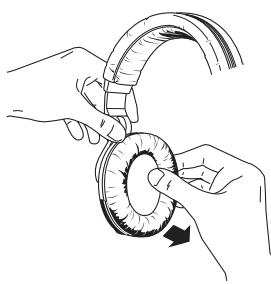
Replacing the ear cushions
Grasp behind the ear cushions and pull them up and away from the earcups. Slide the new ear cushions onto the earcups.
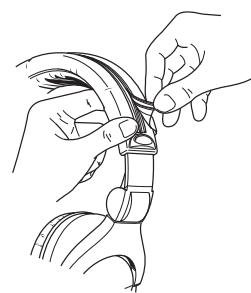
Replacing the headband padding
Pull the Ziploc type fastening strips of the headband padding apart, as shown in the diagram on the left, and remove the worn headband padding.
Put the new headband padding around the headband.
Pull the two edges of the headband padding together so that the fastening strips slightly overlap.
Join the fastening strips.
Replacing the wind screen
If the wind screen for the microphone shows signs of wear such as tears or holes, replace the wind screen.
Replacing the connecting cable
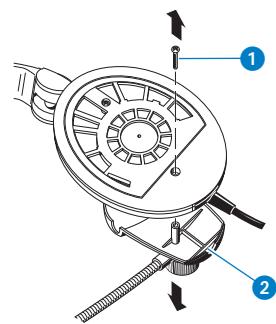
Replace the connecting cable if it is damaged. To do so, please proceed as follows:
Remove the ear cushion. Grasp behind the ear cushion and pull it up and away from the earcup.
Loosen the screw 1 and remove it.
Remove the cover with the microphone boom from the earcup 2.
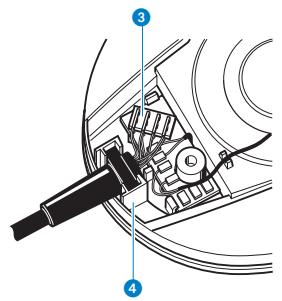
Pull the connector 3 out of the socket.
Remove the antikink protection of the connecting cable from the holding device 4.
Insert the antikink protection of the new connecting cable into the holding device.
Plug the connector 3 of the new connecting cable into the socket as shown in the diagram on the left.
Put the cover with the microphone boom back onto the earcup ②.
Replace the screw 1 and tighten it.
▶ Slide the ear cushion onto the earcup.
Replacing the microphone
If the microphone of your headset should be defective, it must be replaced by your Sennheiser service partner.
Specifications
HMD 280 PRO / HMD 281 PRO | HMD 280-13 / HMD 281-13
Headphones
Classification (as per IEC 268-7)
Transducer principle
Impedance
Long-term max. input power
Ear coupling
Frequency response (-10dB referred to 1kHz)
Sound pressure level
Ambient noise attenuation
THD
Weight
Contact pressure
Length of coiled cable
268-7-IEC-DCSC-64R0-2/-1 268-7-IEC-DCSC-03R2-2/-1
dynamic dynamic
64Ω (as per IEC 268-7) 300 as per IEC 268-7
0.5 W (as per IEC 268-7) | 0.5 W (as per IEC 268-7)
circum-aural | circum-aural
8 Hz-25 kHz 8 Hz-25 kHz
102 dB (as per IEC 268-7) | 102 dB (as per IEC 268-7)
113 dB / 1 V rms | 107 dB / 1 V rms
max.32dB max.32dB
<0.1% (at 1 kHz, 100 dB SPL) | <0.1% (at 1 kHz, 100 dB SPL)
approx. 310g / 245g approx. 310g / 245g
approx. 4N approx. 4N
min. 1 min. 1
max. 3m max. 3m
Microphone
Transducer principle
Type of microphone
Pick-up pattern
Nominal impedance
Close-talking sensitivity
Near field frequency response
dynamic dynamic
pressure-gradient pressure-gradient
super-cardioid (see polar diagram) | super-cardioid (see polar diagram)
200Ω 200Ω
-63 dBV/Pa (at 1 kHz) -63 dBV/Pa (at 1 kHz)
0.7 mV/Pa (at 1 kHz) 0.7 mV/Pa (at 1 kHz)
50-13,500 Hz 50-13,500 Hz
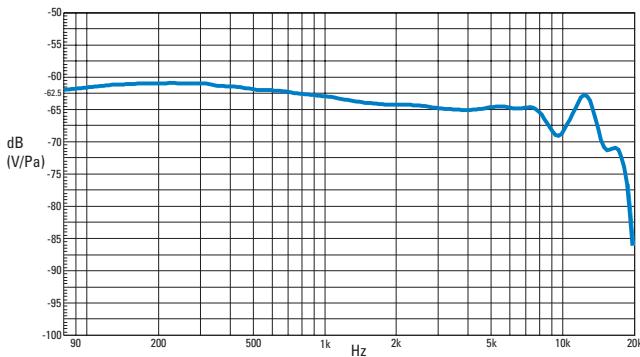
Frequency response curves and polar diagram
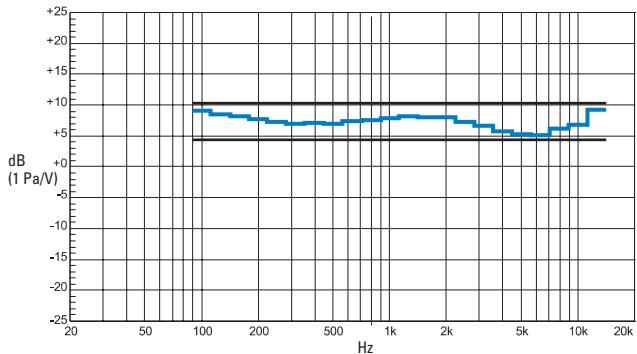
Diffuse field frequency response - Headphones
Frequency response curve - Microphone
(measured in the near field with artificial mouth B&K 4219)
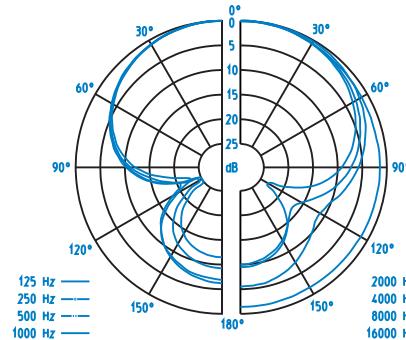
Polar diagram - Microphone
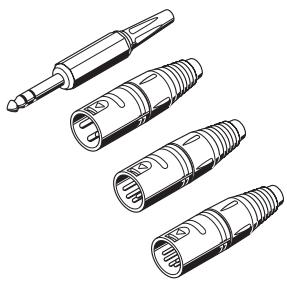
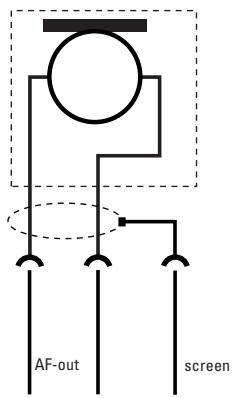
Connectors for HMD 280 and HMD 281
Connection diagrams
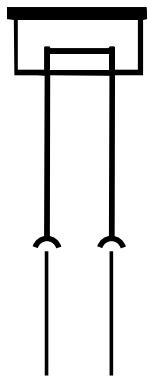
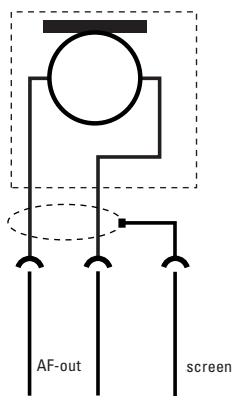
The HMD 280 and HMD 281 headsets can be fitted with a connector of your choice. For correct pin assignment, please refer to the connection diagrams below.
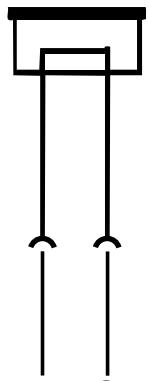
Connection diagram HMD 280
(white)
(+)
一
- -
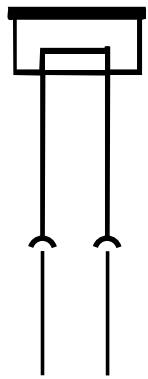
Connection diagram HMD 281
whte +


red(+)
righ
Notice d'emploi
yewey
-
HMD 280 PRO / HMD 280-13
HMD 281 PRO / HMD 281-13
circumcural | circumcural
8 Hz-25 kHz 8 Hz-25 kHz
102 dB (selon IEC 268-7) | 102 dB (selon IEC 268-7)
113 dB/1Vrms 107dB/1Vrms
maxi. 32 dB maxi. 32 dB
-63 dBV/Pa (a 1 kHz) -63 dBV/Pa (a 1 kHz)
0,7mV / Pa (a 1kHz) 0,7 mV/Pa (a 1 kHz)
50hasta 13500Hz 50hasta 13500Hz
For up-to-date information on Sennheimer products, you can also visit the Sennheimer Web site at "http://www.sennheimer.com".