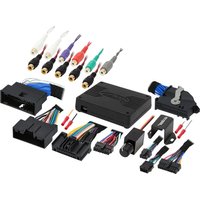
AXDSPX-FD2 - Car audio interface Axxess - Free user manual and instructions
Find the device manual for free AXDSPX-FD2 Axxess in PDF.


Pick your language and provide your email: we'll send you a specifically translated version.
| Product Type | Digital Signal Processor (DSP) |
| Brand | Axxess |
| Model | AXDSPX-FD2 |
| Input Voltage | 12V DC (10-16V) |
| Current Draw | < 2A |
| Dimensions (W x H x D) | 7.0 x 1.7 x 4.7 in (178 x 43 x 119 mm) |
| Weight | 0.6 lbs (272 g) |
| Input Impedance | 10 kΩ |
| Output Impedance | 100 Ω |
| Frequency Response | 20 Hz – 20 kHz |
| Signal-to-Noise Ratio | > 100 dB |
| Total Harmonic Distortion | < 0.01% |
| Number of Inputs | 6 (high-level or low-level) |
| Number of Outputs | 6 RCA pairs |
| Equalizer Bands | 31-band graphic EQ |
| Time Alignment | Yes, per channel |
| Crossover Filters | High-pass, low-pass, band-pass |
| Remote Control | Yes (included or optional) |
| PC Software | Axxess DSP Tuning Suite (USB) |
| Mounting | DIN or custom bracket |
| Operating Temperature | -20°C to 60°C |
| Protection | Reverse polarity, short circuit, thermal |
| Certifications | CE, RoHS |
Frequently Asked Questions - AXDSPX-FD2 Axxess
How do I connect the AXDSPX-FD2 to my factory radio?
Use the included high-level input harness to connect to factory speaker outputs, or use the low-level RCA inputs if your radio has preamp outputs. Ensure proper wiring of power, ground, and remote turn-on.
Can I use this DSP with an aftermarket amplifier?
Yes, the AXDSPX-FD2 outputs can be connected to any aftermarket amplifier via RCA cables. Configure the output voltage in the software to match the amplifier's input sensitivity.
How do I adjust the time alignment?
Using the Axxess DSP PC software, measure speaker distances in inches and enter them per channel, or use the auto time alignment feature with a microphone (sold separately).
What software is required to tune this DSP?
The Axxess DSP Tuning Suite is available as a free download from the Axxess website. Install on a Windows PC and connect via USB.
Does the AXDSPX-FD2 support Bluetooth audio streaming?
No, this model does not include Bluetooth. Audio must be input via wired connections. For Bluetooth, consider an external receiver.
Can I save multiple tuning presets?
Yes, you can store up to 6 presets and switch between them using the remote control or via software.
What is the warranty period for this product?
The Axxess AXDSPX-FD2 comes with a 1-year limited warranty covering defects in materials and workmanship.
How do I update the firmware?
Connect to the PC software and check for updates under the 'Settings' menu. Follow the on-screen instructions; do not disconnect power during update.
Can I use this DSP with a 24V system?
No, the AXDSPX-FD2 is designed for 12V automotive systems only. Use a DC-DC converter if operating from 24V.
What is the correct wiring for the remote turn-on?
Connect the blue remote wire to the amplifier's remote turn-on output or a switched 12V source. If not used, the unit can be powered by the signal sense feature (selectable in software).
User questions about AXDSPX-FD2 Axxess
0 question about this device. Answer the ones you know or ask your own.
Ask a new question about this device
No questions yet. Be the first to ask one.
Download the instructions for your Car audio interface in PDF format for free! Find your manual AXDSPX-FD2 - Axxess and take your electronic device back in hand. On this page are published all the documents necessary for the use of your device. AXDSPX-FD2 by Axxess.
USER MANUAL AXDSPX-FD2 Axxess


Manual assistant
Powered by Anthropic
Waiting for your message
Product information
Brand : Axxess
Model : AXDSPX-FD2
Category : Car audio interface