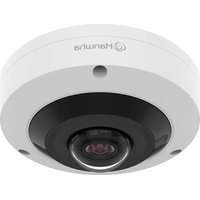
HCF-8011RV - Surveillance Camera Hanwha - Free user manual and instructions
Find the device manual for free HCF-8011RV Hanwha in PDF.


Pick your language and provide your email: we'll send you a specifically translated version.
| Product Type | Surveillance Camera |
| Brand | Hanwha |
| Model | HCF-8011RV |
| Resolution | 2 Megapixels (1920x1080) |
| Lens | 3.6mm Fixed Lens |
| Night Vision | IR LED, up to 30m range |
| Power Supply | 12V DC or PoE (Power over Ethernet) |
| Dimensions | 180 x 70 x 70 mm (approx.) |
| Weight | 0.8 kg |
| Main Functions | Motion detection, remote viewing, two-way audio, SD card storage |
| Protection Rating | IP66 (weatherproof) |
| Compression | H.265, H.264 |
| Field of View | 90° horizontal |
| Cleaning Instructions | Wipe with dry cloth; avoid solvents |
| Security | Password protection, encryption, secure connection (HTTPS) |
| Spare Parts & Repairability | Available through authorized service centers; user-replaceable parts include lens and IR LEDs |
| General Information | Indoor/outdoor use; compatible with Hanwha DVRs and NVRs |
Frequently Asked Questions - HCF-8011RV Hanwha
How do I reset the Hanwha HCF-8011RV to factory defaults?
Press and hold the reset button on the camera for 10 seconds using a paperclip. The camera will reboot with factory settings.
What is the maximum resolution of the HCF-8011RV?
The camera supports up to 2 Megapixels (1920x1080) resolution.
Can the camera be used outdoors?
Yes, it has an IP66 rating, making it weatherproof for outdoor use.
How do I connect the camera to a network?
You can connect via Ethernet cable (PoE) or use a 12V DC power adapter. Use the Hanwha configuration tool to assign an IP address.
What storage options are available?
The camera supports local storage via a microSD card (up to 128GB) and can also record to a network video recorder (NVR) or DVR.
How do I enable motion detection?
Access the camera's web interface, go to Event Settings, and configure motion detection zones and sensitivity.
What is the night vision range?
The IR LEDs provide night vision up to 30 meters (98 feet) in complete darkness.
How do I view the camera feed remotely?
Install the Hanwha Wave app on your smartphone, add the camera by its IP address or QR code, and log in with your credentials.
What type of lens does the camera have?
It has a fixed 3.6mm lens with a 90° horizontal field of view.
How do I clean the camera lens?
Use a soft, dry cloth to gently wipe the lens. Avoid abrasive materials or chemical cleaners.
User questions about HCF-8011RV Hanwha
0 question about this device. Answer the ones you know or ask your own.
Ask a new question about this device
No questions yet. Be the first to ask one.
Download the instructions for your Surveillance Camera in PDF format for free! Find your manual HCF-8011RV - Hanwha and take your electronic device back in hand. On this page are published all the documents necessary for the use of your device. HCF-8011RV by Hanwha.
USER MANUAL HCF-8011RV Hanwha

Manual assistant
Powered by Anthropic
Waiting for your message
Product information
Brand : Hanwha
Model : HCF-8011RV
Category : Surveillance Camera