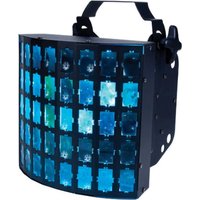
Dekker LED - Professional lighting American Audio - Free user manual and instructions
Find the device manual for free Dekker LED American Audio in PDF.


Pick your language and provide your email: we'll send you a specifically translated version.
| Product Type | LED Effect Light |
| Brand | American Audio |
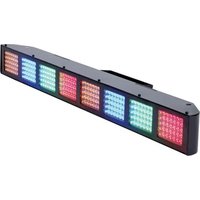
| Model | Dekker LED |
| Light Source | 6x 10W RGBW LEDs |
| Beam Angle | 25° |
| DMX Channels | 4, 6, 8, or 10 |
| Control Modes | DMX512, Sound Active, Master/Slave, Auto |
| Power Consumption | 60W |
| Power Input | AC 100-240V, 50/60Hz |
| Dimensions (L x W x H) | 10.6 x 8.5 x 4.3 inches (270 x 216 x 110 mm) |
| Weight | 4.4 lbs (2.0 kg) |
| Housing Material | Aluminum and Plastic |
| Cooling | Passive convection |
| IP Rating | IP20 (indoor use only) |
| Mounting Options | Floor stand, truss clamp |
| Safety Features | Safety cable attachment point, thermal protection |
| Maintenance | Clean lens with soft cloth; avoid liquids |
| Included Accessories | Power cord, DMX cable, mounting bracket |
Frequently Asked Questions - Dekker LED American Audio
How do I set the DMX address on the Dekker LED?
Press the Menu button until the display shows 'DMX Address'. Use the Up/Down buttons to set the desired address, then press Enter to confirm.
What are the different DMX channel modes?
The Dekker LED supports 4, 6, 8, or 10 channel modes. Select the mode via the menu: go to 'Channel Mode' and choose the number of channels. See the manual for channel assignments.
Can I control the light without a DMX controller?
Yes, you can use Sound Active mode (built-in microphone) or Auto mode (pre-programmed shows). The Master/Slave mode allows multiple units to sync.
How do I clean the Dekker LED?
Disconnect power before cleaning. Use a soft, dry cloth to gently wipe the lens and housing. Do not use liquids or abrasive cleaners as they may damage the surface.
What is the power requirement for this fixture?
The Dekker LED operates on AC 100-240V, 50/60Hz, and consumes 60W. Use only the provided power cord or a certified equivalent.
How do I link multiple Dekker LEDs together?
Connect DMX cables from the DMX Out of one unit to the DMX In of the next. Set the first unit as Master (Auto or Sound mode) and the others as Slave. All slaves will follow the master.
What should I do if the light does not respond?
Check power connections, DMX cable connections, and verify the DMX address is set correctly. Ensure the controller is sending data. If using Sound Active, adjust the sensitivity or check the microphone.
Is the Dekker LED suitable for outdoor use?
No, this fixture is rated IP20 and is intended for indoor use only. Exposure to moisture or dust can cause damage and safety hazards.
How do I mount the Dekker LED?
Use the included mounting bracket to attach to a truss or stand. Always use a safety cable as a secondary support. Do not mount on unstable surfaces.
Can I replace the LEDs inside?
The LEDs are not user-serviceable. If the light fails, contact a qualified technician or American Audio service center for repair.
User questions about Dekker LED American Audio
0 question about this device. Answer the ones you know or ask your own.
Ask a new question about this device
No questions yet. Be the first to ask one.
Download the instructions for your Professional lighting in PDF format for free! Find your manual Dekker LED - American Audio and take your electronic device back in hand. On this page are published all the documents necessary for the use of your device. Dekker LED by American Audio.
USER MANUAL Dekker LED American Audio

Manual assistant
Powered by Anthropic
Waiting for your message
Product information
Brand : American Audio
Model : Dekker LED
Category : Professional lighting