
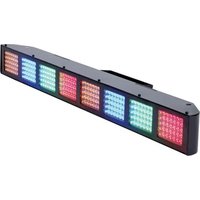
Fusion FX Bar 5 - Professional lighting American Audio - Free user manual and instructions
Find the device manual for free Fusion FX Bar 5 American Audio in PDF.


Pick your language and provide your email: we'll send you a specifically translated version.
| Product Type | LED Effect Light Bar |
| Dimensions (L x W x H) | 1000 x 100 x 200 mm |
| Weight | 5 kg (11 lbs) |
| Power Consumption | 100W |
| Power Supply | AC 100-240V, 50/60Hz |
| Light Source | 5 x 5W RGBW LEDs |
| Control Modes | DMX512, Sound Active, Master/Slave, Auto |
| DMX Channels | 4, 6, or 10 channels |
| Beam Angle | 25° |
| Housing Material | Aluminum and steel |
| Cooling | Passive convection |
| Mounting Options | Floor stand, truss clamp, or wall mount |
| IP Rating | IP20 (indoor use only) |
| Operating Temperature | 0°C to 40°C |
| Included Accessories | Power cord, mounting bracket, user manual |
| Optional Accessories | DMX controller, cables, gels |
| Maintenance | Clean lens with soft cloth; avoid solvents |
| Safety | Use grounded outlet; disconnect power before cleaning |
| Spare Parts Availability | Contact authorized dealer or American Audio support |
| Warranty | 1 year limited warranty |
Frequently Asked Questions - Fusion FX Bar 5 American Audio
How do I set up the Fusion FX Bar 5?
Plug into a grounded AC outlet, connect via DMX if using controller, set DIP switches for DMX address, select mode via menu or remote.
What DMX channels are available?
The fixture supports 4, 6, or 10 channel modes. Use the DMX address DIP switches to select mode and starting address.
How do I clean the light lenses?
Unplug the fixture, use a soft lint-free cloth slightly dampened with water. Do not use alcohol or harsh chemicals.
Can I use this outdoors?
No, the Fusion FX Bar 5 is IP20 rated for indoor use only. Avoid moisture and dust.
How do I set sound active mode?
Press MODE until 'Snd' appears on display. Use UP/DOWN to adjust sensitivity. The bar will react to music via built-in microphone.
What power cable is required?
Use the included IEC power cable rated for 10A. Connect to a grounded AC outlet with proper voltage (100-240V).
Why are some LEDs not working?
Check if fixture is in a mode that uses only certain colors. If persistent, contact support for possible LED replacement.
How do I link multiple units together?
Use DMX cables to daisy-chain. Set first unit as Master (or DMX controlled), others as Slave via DIP switches or menu.
Can I mount it on a wall?
Yes, use the included bracket and suitable hardware. Ensure fixture is securely fastened and not near heat sources.
What does the 'Auto' mode do?
Auto mode runs built-in color chase programs without external control. Speed and fade can be adjusted via menu.
User questions about Fusion FX Bar 5 American Audio
0 question about this device. Answer the ones you know or ask your own.
Ask a new question about this device
No questions yet. Be the first to ask one.
Download the instructions for your Professional lighting in PDF format for free! Find your manual Fusion FX Bar 5 - American Audio and take your electronic device back in hand. On this page are published all the documents necessary for the use of your device. Fusion FX Bar 5 by American Audio.
USER MANUAL Fusion FX Bar 5 American Audio
Manual assistant
Powered by Anthropic
Waiting for your message
Product information
Brand : American Audio
Model : Fusion FX Bar 5
Category : Professional lighting