
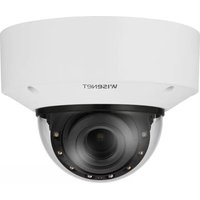
XNV-6123R - Surveillance Camera Hanwha - Free user manual and instructions
Find the device manual for free XNV-6123R Hanwha in PDF.


Pick your language and provide your email: we'll send you a specifically translated version.
| Product Type | Network IR Dome Camera |
| Model | XNV-6123R |
| Brand | Hanwha |
| Image Sensor | 1/2.8" 2MP CMOS |
| Resolution | 1920 x 1080 |
| Lens | 3.2x Motorized Varifocal, 2.8~8.5mm (F1.2~F2.75) |
| Field of View | Horizontal: 114.2°(Wide) ~ 32.2°(Tele) |
| IR Distance | Up to 30m (98ft) |
| Day/Night | ICR IR Cut Filter, Auto/Schedule |
| Wide Dynamic Range | True WDR 150dB |
| Power Supply | IEEE802.3af PoE, Max 12.95W |
| Dimensions (Dia. x H) | Φ160.0 x 124.0mm (Φ6.30 x 4.88in) |
| Weight | 1.1kg (2.43lb) |
| Protection Rating | IP66, IK10 |
| Operating Temperature | -30°C ~ +55°C (-22°F ~ +131°F) |
| Storage Temperature | -30°C ~ +60°C (-22°F ~ +140°F) |
| Main Functions | Motion Detection, Tampering, Line Crossing, Enter/Exit, Audio Detection, Scene Change |
| Cleaning | Use a soft, dry cloth. Avoid abrasive cleaners or solvents. |
| Safety | Do not disassemble; connect only to certified PoE switches; observe local electrical codes. |
| Spare Parts & Repairability | No user-serviceable parts inside. Contact authorized service center for repairs. |
| Certifications | FCC, CE, KC, UL listed |
Frequently Asked Questions - XNV-6123R Hanwha
How do I connect the camera to the network?
Use an Ethernet cable to connect the camera's PoE port to a PoE switch or injector. The camera supports IEEE 802.3af PoE for both power and data. Ensure the network and IP settings are configured via the web browser or Hanwha's device manager software.
Can I use the camera without PoE?
The XNV-6123R is designed for PoE (Power over Ethernet) only. A PoE switch or injector is required for operation. There is no alternative DC power input.
How do I access the camera remotely?
After obtaining the camera's IP address (e.g., using a device discovery tool), open a web browser and enter the IP. Login with default credentials (often admin/admin). For remote access, set up port forwarding on your router or use the Hanwha cloud service.
What is the IR range and does it work in total darkness?
The camera has built-in IR LEDs with a range of up to 30 meters (98 feet). It provides black-and-white images in zero lux conditions, automatically switching to IR mode when ambient light drops.
How do I reset the camera to factory defaults?
Press and hold the reset button on the camera for about 5 seconds while powered. The button is located under the dome cover. Alternatively, use the web interface's factory reset option under System Management.
What is the lens type and can I adjust the field of view?
The camera features a motorized varifocal lens (2.8~8.5mm) that can be adjusted remotely via the web interface. It offers a horizontal field of view from 114° (wide) to 32° (tele).
Does the camera support audio?
Yes, the XNV-6123R has a built-in microphone and a speaker connection (via terminal block). It supports two-way audio when an external speaker is connected and the network allows sufficient bandwidth.
What are the recommended cleaning methods?
Use a soft, dry microtube cloth to clean the dome and housing. For stubborn dirt, slightly dampen the cloth with water. Do not use alcohol, ammonia, or abrasive cleaners as they may damage the IR coating or lens.
Is the camera vandal-resistant?
Yes, the camera is rated IK10 for impact resistance, meaning it can withstand 20 joules of impact (equivalent to 5kg weight dropped from 40cm). It also has an IP66 weather rating for outdoor use.
How do I install the camera on a ceiling or wall?
The camera comes with a mounting bracket. For ceiling mount: secure the bracket to the ceiling with appropriate screws and anchors, then attach the camera base and adjust the pan/tilt/rotation. For wall mount, use the provided adapter plate. Refer to the installation guide for specific torque and cable routing.
User questions about XNV-6123R Hanwha
0 question about this device. Answer the ones you know or ask your own.
Ask a new question about this device
No questions yet. Be the first to ask one.
Download the instructions for your Surveillance Camera in PDF format for free! Find your manual XNV-6123R - Hanwha and take your electronic device back in hand. On this page are published all the documents necessary for the use of your device. XNV-6123R by Hanwha.
USER MANUAL XNV-6123R Hanwha

Manual assistant
Powered by Anthropic
Waiting for your message
Product information
Brand : Hanwha
Model : XNV-6123R
Category : Surveillance Camera