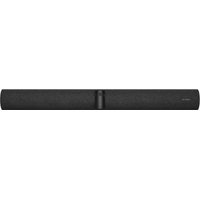
Panacast 50 VBS - Video Conferencing System JABRA - Free user manual and instructions
Find the device manual for free Panacast 50 VBS JABRA in PDF.


Pick your language and provide your email: we'll send you a specifically translated version.
| Product Type | Video Conferencing System |
| Brand | Jabra |
| Model | Panacast 50 VBS |
| Dimensions (L x W x H) | 650 x 80 x 100 mm |
| Weight | 1.5 kg |
| Power Supply | AC/DC adapter, 100-240V, 50/60Hz |
| Power Consumption | 15W typical, 30W max |
| Camera Resolution | 4K (3840 x 2160) at 30fps |
| Field of View | 180° (diagonal) |
| Microphones | 4 beamforming microphones, pickup range up to 6m |
| Speakers | Full-range speaker, 50Hz-20kHz |
| Connectivity | USB-C (UVC/UAC), Bluetooth 5.0, Wi-Fi 802.11ac |
| Supported Platforms | Microsoft Teams, Zoom, Google Meet, Cisco Webex, etc. |
| Mounting Options | Tabletop, wall mount (VESA compatible) |
| Cleaning Instructions | Wipe with a soft, dry cloth; avoid liquids and abrasives |
| Security | Tamper-resistant; firmware signed; HTTPS management |
| Spare Parts Availability | Power adapter, USB cable, remote control (optional) |
| Repairability | Modular design; user-replaceable camera module and main board |
| Operating Temperature | 0°C to 40°C (32°F to 104°F) |
| Warranty | 2 years limited warranty |
Frequently Asked Questions - Panacast 50 VBS JABRA
How do I connect the Jabra Panacast 50 VBS to my computer?
Connect the provided USB-C cable from the device to your computer. The system will be recognized as a video and audio device. For optimal performance, use a USB 3.0 port.
Does the Panacast 50 VBS support Microsoft Teams?
Yes, the Panacast 50 VBS is certified for Microsoft Teams and works seamlessly with Teams meetings, including buttons for mute and camera on/off.
Can I mount the Panacast 50 VBS on a wall?
Yes, the device supports VESA mounting (100x100mm). A wall mount kit is available separately from Jabra.
What is the maximum room size for the Panacast 50 VBS?
The system is designed for small to medium meeting rooms up to 4.5 x 4.5 meters (15 x 15 feet) with optimal audio pickup.
How do I clean the camera lens and microphones?
Use a soft, lint-free microfiber cloth to gently wipe the lens. For the microphone ports, use a dry cotton swab. Do not use any liquids or cleaning agents.
Does the Panacast 50 VBS have a privacy shutter?
No, but it has a dedicated camera mute button on the device that turns off the video feed. The LED indicator turns red when muted.
Can I use the Panacast 50 VBS with Bluetooth devices?
Yes, it supports Bluetooth 5.0 for wireless connectivity, but for video calls, a USB connection is recommended for low latency.
What are the power requirements?
The device uses an external power adapter (included) that accepts 100-240V AC. It consumes up to 30W during peak operation.
How do I update the firmware?
Connect the device to your computer and use the Jabra Direct software to check for and install firmware updates. Ensure the device is plugged into power.
Is the Panacast 50 VBS compatible with Zoom Rooms?
Yes, the Panacast 50 VBS is certified for Zoom Rooms and supports its native controller functionality for in-room controls.
User questions about Panacast 50 VBS JABRA
0 question about this device. Answer the ones you know or ask your own.
Ask a new question about this device
No questions yet. Be the first to ask one.
Download the instructions for your Video Conferencing System in PDF format for free! Find your manual Panacast 50 VBS - JABRA and take your electronic device back in hand. On this page are published all the documents necessary for the use of your device. Panacast 50 VBS by JABRA.
USER MANUAL Panacast 50 VBS JABRA
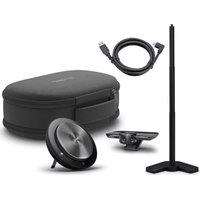

Manual assistant
Powered by Anthropic
Waiting for your message
Product information
Brand : JABRA
Model : Panacast 50 VBS
Category : Video Conferencing System