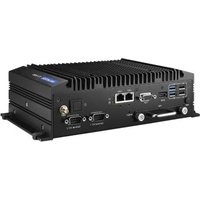
TS-206 - Embedded computer Advantech - Free user manual and instructions
Find the device manual for free TS-206 Advantech in PDF.


Pick your language and provide your email: we'll send you a specifically translated version.
| Product Type | Industrial Touch Panel PC |
| Display Size | 10.4 inches TFT LCD |
| Dimensions (W x H x D) | 290 x 220 x 60 mm |
| Weight | 3.2 kg |
| Power Supply | 12 V DC, 3 A |
| Power Consumption | 36 W typical |
| Operating Temperature | 0°C to 50°C |
| Storage Temperature | -20°C to 60°C |
| Humidity | 10% to 90% non-condensing |
| Processor | Intel Atom E3845 Quad Core 1.91 GHz |
| Memory | 4 GB DDR3L |
| Storage | 64 GB mSATA SSD |
| Touch Screen | 5-wire resistive touch |
| I/O Ports | 2 x COM, 2 x LAN, 4 x USB 2.0, 1 x VGA |
| Main Functions | Data acquisition, HMI, industrial automation control |
| Maintenance | Clean with soft dry cloth; avoid solvents |
| Safety Features | Overvoltage protection, fanless design |
| Spare Parts & Repairability | Replaceable SSD, fan module; service by authorized technicians |
| General Information | Fanless, IP65 front panel, wall/panel mountable |
Frequently Asked Questions - TS-206 Advantech
How to install the TS-206 in a panel?
Use the provided mounting clips. Cut a panel opening of 280x210 mm, insert the unit, and tighten the clips from the rear. Ensure proper sealing for IP65.
What is the default IP address?
The default IP is 192.168.0.10. You can change it via the BIOS or network settings in the operating system.
Can I use a different power adapter?
Use only the supplied 12V DC adapter. Using a different adapter may damage the device or cause malfunction.
How to clean the touch screen?
Turn off the device. Wipe the screen gently with a soft, lint-free cloth slightly dampened with water. Do not use abrasive cleaners.
What operating systems are supported?
The TS-206 supports Windows 10 IoT Enterprise and Linux (Ubuntu 18.04 or later). Check Advantech's website for specific builds.
How to reset the BIOS password?
Open the unit, locate jumper J2 on the motherboard, move it from pins 1-2 to 2-3 for 10 seconds, then restore. This clears the password.
Why does the system overheat?
Ensure the fan filter is clean and the ambient temperature is below 50°C. The device has thermal throttling; if it persists, contact support.
How to connect to a network?
Connect an Ethernet cable to either LAN port. The device supports 10/100/1000 Mbps. Configure IP settings in the OS network adapter.
Can I replace the SSD myself?
Yes. Remove the rear cover, unscrew the SSD bracket, and replace with a standard mSATA SSD. Ensure it is compatible (SATA III). Reinstall cover.
What does the LED indicator mean?
Green solid = power on. Amber blinking = standby. Red = fault. Check the manual for detailed fault codes.
User questions about TS-206 Advantech
0 question about this device. Answer the ones you know or ask your own.
Ask a new question about this device
No questions yet. Be the first to ask one.
Download the instructions for your Embedded computer in PDF format for free! Find your manual TS-206 - Advantech and take your electronic device back in hand. On this page are published all the documents necessary for the use of your device. TS-206 by Advantech.
USER MANUAL TS-206 Advantech
Manual assistant
Powered by Anthropic
Waiting for your message
Product information
Brand : Advantech
Model : TS-206
Category : Embedded computer