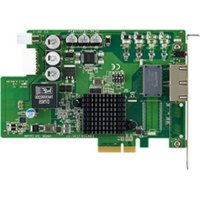
PCIE-1672E - Network card Advantech - Free user manual and instructions
Find the device manual for free PCIE-1672E Advantech in PDF.


Pick your language and provide your email: we'll send you a specifically translated version.
| Product Type | PCI Express CAN Bus Interface Card |
| Brand | Advantech |
| Model | PCIE-1672E |
| Interface | PCI Express x1 |
| Number of Channels | 2 CAN ports |
| CAN Protocol | CAN 2.0A and 2.0B |
| Data Rate | Up to 1 Mbps |
| Galvanic Isolation | 3000 VDC |
| Dimensions (L x W) | 167.6 mm x 111.2 mm |
| Weight | Approximately 100 g |
| Power Consumption | 3.3W (typical) |
| Operating Temperature | 0 to 60 °C |
| Storage Temperature | -20 to 85 °C |
| Connector Type | DB9 male (2 ports) |
| OS Support | Windows 7/8/10, Linux |
| Maintenance | Keep free of dust and moisture; avoid physical shock |
| Safety Precautions | Use ESD protection when handling; install in a grounded chassis |
| Spare Parts / Repairability | No user-serviceable parts; contact Advantech for support |
Frequently Asked Questions - PCIE-1672E Advantech
How do I install the PCIE-1672E in my computer?
Power off your computer, open the case, insert the PCIE-1672E into an available PCI Express slot, secure it with the bracket, close the case, then power on. Install the appropriate drivers from the included CD or Advantech's website.
Which operating systems are supported?
The PCIE-1672E is supported on Windows 7, 8, 10, and most Linux distributions. Refer to the manual for driver versions.
What is the maximum CAN bus speed?
The card supports CAN 2.0A and 2.0B with data rates up to 1 Mbps.
Does the card provide galvanic isolation?
Yes, the PCIE-1672E features 3000 VDC galvanic isolation on the CAN ports to protect your system from voltage spikes.
How many CAN channels does it have?
It has two independent CAN channels, each with a DB9 male connector.
Do I need external power for the PCIE-1672E?
No, the card is powered directly from the PCI Express slot. Its typical power consumption is 3.3W.
What is the physical size of the card?
The dimensions are 167.6 mm x 111.2 mm (standard low-profile PCIe form factor).
Can I use the PCIE-1672E with both 11-bit and 29-bit identifiers?
Yes, it supports both standard (11-bit) and extended (29-bit) CAN identifiers.
What should I do if the card is not detected by my system?
Check that the card is fully seated in the PCIe slot, try a different slot, and ensure the BIOS settings allow PCIe devices. Also verify that you have installed the correct drivers.
Is the PCIE-1672E hot-swappable?
No, the PCIE-1672E is not hot-swappable. Always power off the computer before installing or removing the card.
User questions about PCIE-1672E Advantech
0 question about this device. Answer the ones you know or ask your own.
Ask a new question about this device
No questions yet. Be the first to ask one.
Download the instructions for your Network card in PDF format for free! Find your manual PCIE-1672E - Advantech and take your electronic device back in hand. On this page are published all the documents necessary for the use of your device. PCIE-1672E by Advantech.
USER MANUAL PCIE-1672E Advantech
Manual assistant
Powered by Anthropic
Waiting for your message
Product information
Brand : Advantech
Model : PCIE-1672E
Category : Network card