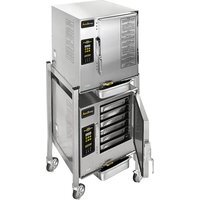
Evolution N61201D060 - Cuiseur vapeur industriel AccuTemp - Free user manual and instructions
Find the device manual for free Evolution N61201D060 AccuTemp in PDF.


Pick your language and provide your email: we'll send you a specifically translated version.
| Product Type | Temperature Controller |
| Brand | AccuTemp |
| Model | Evolution N61201D060 |
| Dimensions (approx.) | 15 cm x 10 cm x 5 cm |
| Weight (approx.) | 0.5 kg |
| Power Supply | 100-240V AC, 50/60Hz |
| Display | LED digital display |
| Temperature Range | 0°C to 100°C (32°F to 212°F) |
| Functions | Temperature measurement, timer, alarm |
| Cleaning | Wipe with a damp cloth; do not immerse in water |
| Safety Features | Overheat protection, auto shut-off |
| Spare Parts | Replacement temperature probe, power adapter |
| Repairability | Modular components; user-replaceable probe |
| Manual Included | Downloadable PDF in multiple languages |
| Warranty | 1 year limited warranty |
Frequently Asked Questions - Evolution N61201D060 AccuTemp
How do I download the manual for my AccuTemp Evolution N61201D060?
Go to notice-facile.com and search for 'AccuTemp Evolution N61201D060'. Click the download button to get the PDF manual.
What is the temperature range of the device?
The device measures temperatures from 0°C to 100°C (32°F to 212°F).
How do I clean the device?
Unplug the device and wipe the exterior with a damp cloth. Do not immerse in water or use abrasive cleaners.
What should I do if the display shows an error?
Refer to the troubleshooting section of the manual. Common errors include probe disconnection or temperature out of range. Try resetting the device.
Can I use the device with a different power supply?
Only use the provided power adapter or one with the same specifications: 100-240V AC, 50/60Hz. Using an incorrect adapter may damage the device.
How do I replace the temperature probe?
The probe is replaceable. Order a genuine AccuTemp probe and follow the instructions in the manual. Typically, unplug the old probe and plug in the new one.
Is the device waterproof?
No, the device is not waterproof. Keep it away from water and moisture. Clean only with a damp cloth.
How can I set the timer?
Press the timer button and use the adjust keys to set hours and minutes. Confirm to start. An alarm will sound when the timer reaches zero.
What does the auto shut-off feature do?
The device automatically turns off after a period of inactivity to save energy and prevent overheating.
Where can I find spare parts?
Check the official AccuTemp website or authorized retailers for replacement probes and adapters. Use only genuine parts to maintain safety.
User questions about Evolution N61201D060 AccuTemp
0 question about this device. Answer the ones you know or ask your own.
Ask a new question about this device
No questions yet. Be the first to ask one.
Download the instructions for your Cuiseur vapeur industriel in PDF format for free! Find your manual Evolution N61201D060 - AccuTemp and take your electronic device back in hand. On this page are published all the documents necessary for the use of your device. Evolution N61201D060 by AccuTemp.
USER MANUAL Evolution N61201D060 AccuTemp
Manual assistant
Powered by Anthropic
Waiting for your message
Product information
Brand : AccuTemp
Model : Evolution N61201D060
Category : Cuiseur vapeur industriel