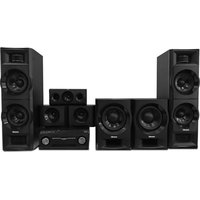
Yizumi V77 - Home Theater System Moonki - Free user manual and instructions
Find the device manual for free Yizumi V77 Moonki in PDF.


Pick your language and provide your email: we'll send you a specifically translated version.
| Product Type | Home Theater System |
| Model | Yizumi V77 |
| Brand | Moonki |
| Audio Channels | 5.1 Surround Sound |
| Total Power Output | 500 W RMS |
| Speaker Configuration | 5 Satellite Speakers + 1 Subwoofer |
| Connectivity | HDMI (ARC), Optical, Bluetooth, USB, AUX |
| Bluetooth Version | 5.0 |
| Dimensions (Main Unit) | 430 x 65 x 300 mm (WxHxD) |
| Dimensions (Satellite) | 100 x 200 x 100 mm each |
| Dimensions (Subwoofer) | 200 x 400 x 300 mm |
| Weight (Total System) | Approximately 12 kg |
| Power Supply | AC 100-240V, 50/60 Hz |
| Remote Control | Included (Battery CR2025) |
| Audio Formats Supported | DTS, Dolby Digital, MP3, WMA, AAC |
| Video Pass-through | 4K HDR via HDMI |
| Wall Mountable | Yes (Satellite speakers) |
| Warranty | 1 Year Limited |
Frequently Asked Questions - Yizumi V77 Moonki
How do I set up the Moonki Yizumi V77 home theater system?
Connect the speakers to the main unit using the color-coded cables. Plug in the power, connect your TV via HDMI ARC or optical cable, select the correct input, and follow on-screen instructions if available.
Can I connect my smartphone via Bluetooth?
Yes, press the Bluetooth button on the remote or main unit, enable Bluetooth on your device, and select Yizumi V77 from the available devices.
Why is there no sound from the subwoofer?
Check that the subwoofer is powered on, the volume is turned up, and the audio source is set to 5.1. Also verify the subwoofer cable is securely connected to the main unit.
How do I mount the satellite speakers on the wall?
Use the provided wall brackets. Drill holes at the correct spacing, insert wall plugs, screw the brackets, then attach the speakers. Ensure they are securely fastened.
What is the maximum power consumption of the system?
The system consumes up to 600W under maximum power output. Standby power consumption is less than 0.5W.
Can I control the system with my TV remote?
Yes, if your TV supports HDMI-CEC. Enable the feature on both TV and the Yizumi V77 (Settings -> HDMI Control). Then TV remote can adjust volume.
Does it support 4K video pass-through?
Yes, the HDMI ports support 4K HDR pass-through. Connect your 4K device to the HDMI IN and connect the HDMI OUT (ARC) to your TV.
How do I reset the system to factory settings?
Press and hold the Power button on the main unit for about 10 seconds until the display shows RESET. Release the button. The system will restart.
What should I do if the remote control stops working?
Replace the battery with a new CR2025 coin cell. Check for obstructions between remote and sensor. If still not working, try pairing again (press and hold Bluetooth button while pointing at unit).
Is it compatible with voice assistants?
The Yizumi V77 does not have built-in voice assistant support. However, you can use an external smart speaker connected via AUX or Bluetooth.
User questions about Yizumi V77 Moonki
0 question about this device. Answer the ones you know or ask your own.
Ask a new question about this device
No questions yet. Be the first to ask one.
Download the instructions for your Home Theater System in PDF format for free! Find your manual Yizumi V77 - Moonki and take your electronic device back in hand. On this page are published all the documents necessary for the use of your device. Yizumi V77 by Moonki.
USER MANUAL Yizumi V77 Moonki
Manual assistant
Powered by Anthropic
Waiting for your message
Product information
Brand : Moonki
Model : Yizumi V77
Category : Home Theater System