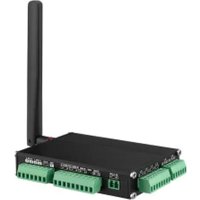
LEO-S550-DA - Industrial controller Advantech - Free user manual and instructions
Find the device manual for free LEO-S550-DA Advantech in PDF.


Pick your language and provide your email: we'll send you a specifically translated version.
| Product Type | Industrial Embedded System |
| Brand | Advantech |
| Model | LEO-S550-DA |
| Dimensions (W x D x H) | Approx. 200 x 150 x 50 mm |
| Weight | Approx. 2.0 kg |
| Power Supply | DC 12V, 5A (60W) |
| Processor | Intel Core i5/i7 (6th Gen or later) |
| Memory | 8GB DDR4 (expandable to 32GB) |
| Storage | 128GB SSD (mSATA) |
| Operating System | Windows 10 IoT / Linux (compatible) |
| Connectivity | 2x GbE LAN, 4x USB 3.0, 2x RS-232/422/485, 1x HDMI, 1x VGA |
| Expansion Slots | 1x Mini-PCIe (full-size), 1x SIM card slot |
| Operating Temperature | 0°C to 50°C (32°F to 122°F) |
| Storage Temperature | -20°C to 70°C (-4°F to 158°F) |
| Humidity Range | 10% to 90% (non-condensing) |
| Maintenance | Keep vents clean; use compressed air for dust removal |
| Safety | Proper grounding required; use surge protector |
| Spare Parts | Contact Advantech support or authorized distributors |
| Repairability | Modular design; user-accessible components (RAM, SSD) |
| Warranty | Standard 2-year limited warranty |
| Certifications | CE, FCC, UL (typical) |
Frequently Asked Questions - LEO-S550-DA Advantech
How do I install the operating system on the LEO-S550-DA?
Insert the installation media (USB or DVD) and boot from it. Press F2 during startup to enter BIOS, change boot order, then follow on-screen instructions. The system supports Windows 10 IoT and Linux distributions.
What is the default password for the BIOS?
The default BIOS password is typically empty (no password). If a password is set, it may be 'admin' or 'Advantech'. Check your device label or manual for specifics.
Can I upgrade the RAM or SSD?
Yes, the LEO-S550-DA has accessible SODIMM slots for RAM and an mSATA slot for SSD. Ensure you use compatible modules: DDR4 2133/2400 MHz RAM and mSATA SSD. Maximum RAM is 32GB.
How do I connect to the internet?
Use one of the two Gigabit Ethernet ports for wired connection. For wireless, insert a Wi-Fi module into the mini-PCIe slot and install drivers. Alternatively, use a USB Wi-Fi adapter.
What software or drivers are needed?
Drivers for chipset, LAN, graphics, and other peripherals can be downloaded from Advantech's support website. For Windows, use the driver CD included with the device or the online support portal.
How do I reset to factory settings?
There is no built-in factory reset. Restore your OS image using a backup or reinstall the OS. For BIOS reset, clear CMOS by moving the jumper on the motherboard (refer to manual).
Is the device fanless?
Yes, the LEO-S550-DA is designed as a fanless system for silent operation and reliability in dusty environments. It relies on passive cooling via heatsinks.
What is the maximum operating temperature?
The device can operate in temperatures from 0°C to 50°C (32°F to 122°F). Avoid placing it in direct sunlight or near heat sources.
Can I use the LEO-S550-DA in a vehicle?
It is not specifically rated for automotive use. For vehicle applications, consider using a DC-DC converter and vibration dampening. The device accepts 12V DC input with a range of 9-36V.
Where can I find the user manual?
The user manual is available for free download on notice-facile.com. Search for 'Advantech LEO-S550-DA' or use the direct link on the product page.
User questions about LEO-S550-DA Advantech
0 question about this device. Answer the ones you know or ask your own.
Ask a new question about this device
No questions yet. Be the first to ask one.
Download the instructions for your Industrial controller in PDF format for free! Find your manual LEO-S550-DA - Advantech and take your electronic device back in hand. On this page are published all the documents necessary for the use of your device. LEO-S550-DA by Advantech.
USER MANUAL LEO-S550-DA Advantech


Manual assistant
Powered by Anthropic
Waiting for your message
Product information
Brand : Advantech
Model : LEO-S550-DA
Category : Industrial controller